
By John Gruber
All your customer
data in that nice
California sunnn.
Early access now!
A Request Regarding ‘Magic Link’ Sign-Ins and Apple’s Passwords App
Friday, 19 December 2025
In Juli Clover’s aforelinked rundown of what’s new across the whole system in iOS 26.2, I misunderstood this item regarding the Passwords app:
In the Settings section of the Passwords app, there’s an option to manage websites where passwords are not saved when signing in.
This new setting is about managing sites that you have previously excluded from having a password entry saved. (In the Settings app, go to Apps → Passwords and then tap “Show Excluded Websites”.)
What I was hoping this was about is a feature Passwords doesn’t have, but that I want. There are many sites — and the trend seems to be accelerating — that do not use passwords (or passkeys) for signing in. Instead, they only support signing in via expiring “magic links” sent by email (or, sometimes, via text messages). To sign in with such a site, you enter your email address, hit a button, and the site emails you a fresh link that you need to follow to sign in.1 I despise this design pattern, because it’s inherently slower than signing in using an email/password combination that was saved to my passwords app and autofilled by my web browser. My password manager is Apple Passwords and my browser is Safari, but this is true for any good password manager and web browser. It’s not just a little slower but a lot slower to sign in with a “magic link”. It sometimes takes minutes for the email to arrive, and even in the best case, it takes at least 15 seconds or so. Saved-password autofill, on the other hand, happens instantly.2
To make matters worse, when you create a new account using a “magic link”, nothing gets saved to Apple Passwords. I don’t have many email addresses in active use, but I do have several. Sometimes I don’t remember which one I used for my account on a certain site. It doesn’t get autofilled by Apple Passwords because account entries in Apple Passwords require a password. I was hoping the above feature mentioned by Clover was a way to address this — that you could now enable a setting to get Passwords to save just your email address for websites and services that exclusively use “magic links” for signing in. No dice. Apple Passwords team, if you’re reading this, please give this some thought. I can’t be the only person irritated by this.
One workaround I’ve used for a few sites with which I keep running into this situation (Status, I’m looking in your direction) is to manually create an entry in Apple Passwords for the site with the email address I used to subscribe, and a made-up single-character password. Apple Passwords won’t let you save an entry without something in the password field, and a single-character password is a visual clue to my future self why I did this. When I do this, I also put a note to myself in the notes field for the entry. And by using just a single character for the made-up password, I can tell what I did even when the password is displayed using bullets to obscure its actual characters. (Screenshot.) If you feel like I do about “magic links”, the 🖕 emoji is a good “password” for such entries.
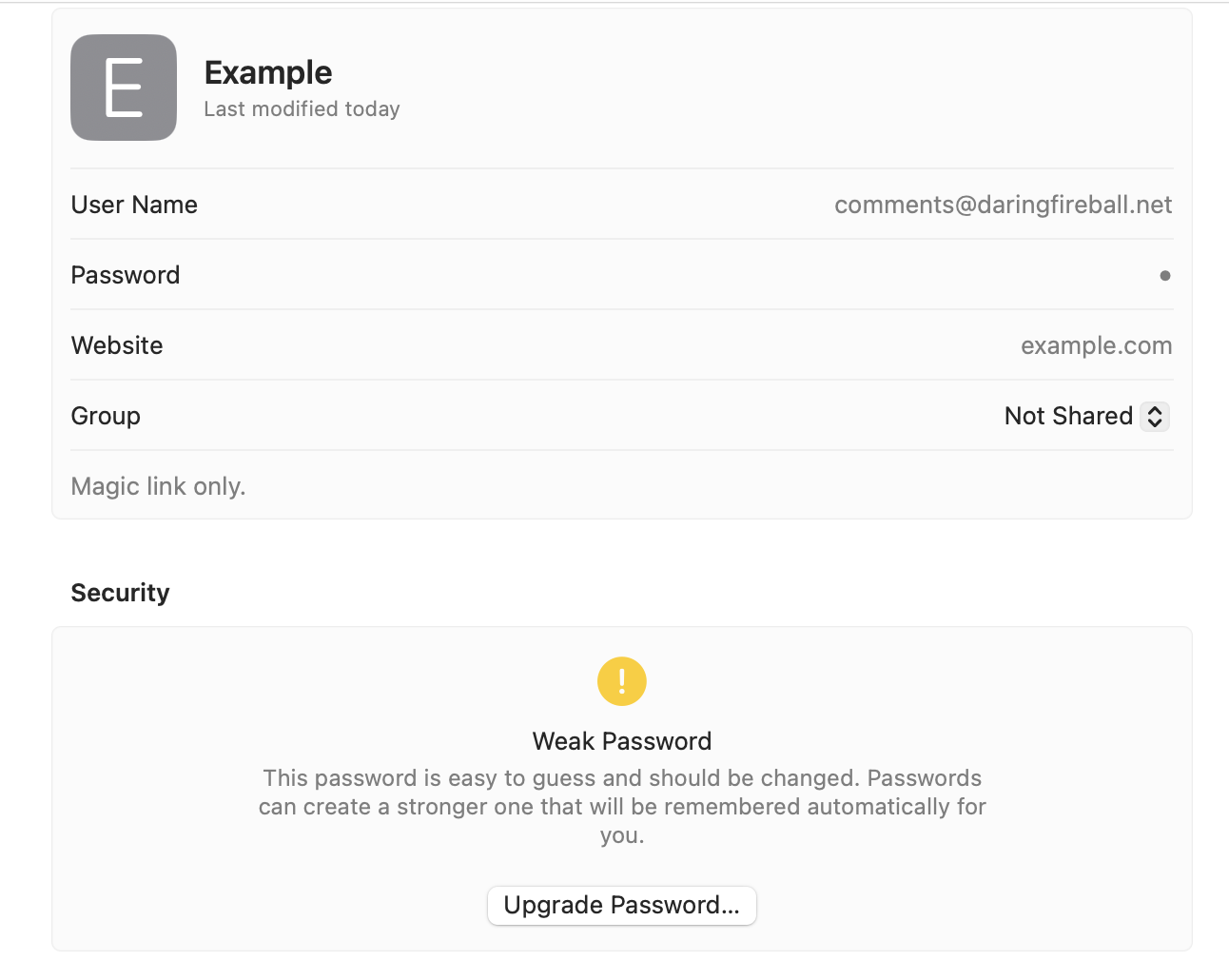
Once saved like this, my email address still doesn’t autofill on such sites in Safari, but the list of my saved email addresses in the suggestion list that appears when I click in the Email text field will have a “saved password” label next to the one for which I made this entry in Apple Passwords. This at least solves the problem when I can’t remember which address I used to create my account on a site.
Better would be a way for Passwords to ask if you want to save just your email address for sites with “magic link” sign-ins, and then for Safari to autocomplete that address just like it does for username/password combinations. I can see how this would be a tricky problem for Apple Passwords to solve in a way that makes clear to the user why certain entries do not have passwords, but it’s a problem worth solving.
-
This design pattern is common with paywalled subscription content sites, like email newsletters, to cut down on password sharing. Let’s say someone pays $10/month for a subscription-based newsletter. If they can sign in using an email/password combination, they might be willing to share their email/password combination for that particular site with a few friends or colleagues, to give them access to the same paywalled content without paying for their own subscriptions. Same goes for sharing email/password combinations for streaming services like Netflix. Well, you can’t share a password if there is no password to share. If the only way to log in to a subscription-based account is via a magic link that expires within minutes, it’s a lot harder for person A to share their account with person B (let alone with persons C, D, E, and F — nor can persons B through F share the account with others, because they don’t have access to the email). Person B has to tell person A that they’re signing in again, then person A has to wait for the email to arrive, and then person B needs to wait for person A to copy and paste the “magic” link, and hope it arrives before it expires. This pattern adds a significant convenience cost to account sharing — but it also makes signing in more annoying for honest users who aren’t sharing their accounts. ↩︎
-
Proponents of “magic links” argue that they’re beneficial for technically befuddled users who don’t use a password manager. That’s a good argument for offering “magic links” as an option, but it’s not a good argument for making them the exclusive way to sign in to a site or service. Good password managers are built into modern OSes and web browsers. Those of us who use them should not be punished with a significantly worse experience just because some users do not. When “magic links” are offered as an alternative to a saved password or passkey, there’s a path for all users. When “magic links” are the exclusive method for signing in, all users get the slowest experience.
(And yes, Passport, the subscription system behind Dithering and the rest of Ben Thompson’s Stratechery media empire, exclusively uses “magic links” for sign-in. I don’t like it, but, in Passports’s defense, once you’re signed in, Passport keeps you signed in for a very long time. Other CMSes tend to expire sign-ins far too quickly, which makes for a particularly frustrating experience with “magic links” because you need to keep using them every few weeks.) ↩︎︎