By John Gruber

All your customer
data in that nice
California sunnn.
Early access now!
Prestructured WYSIWYG
Tuesday, 27 October 2026
One of the many small pleasures of my job is when someone else writes a good take on a subject that I have been meaning to write myself. Occasionally this stings, because it was something I really wanted to write myself. But usually it’s just awesome, because it’s an article I wanted to exist, didn’t really want to do the work of writing myself, and now it exists and I can just link to it, perhaps with commentary. It’s like finding money on the ground or in the pocket of a jacket you haven’t worn in months.
That’s what happened yesterday with Glenn Fleishman’s “Why Notes Will Never Let Us Edit Markdown”, and my link to it. Found money!
But one of the reasons I’d been procrastinating on writing about Apple Notes and its growing support for Markdown import/export and copy/paste is that Notes is built around a text formatting idea that, to my knowledge, doesn’t really have a name. And without a name, it’s hard to write about. I’m going to suggest calling it prestructured WYSIWYG.
Apps like Apple’s Messages and especially Notes exemplify prestructured WYSIWYG, and I’m a huge fan of the idea. It’s low-key one of the best ideas and trends in software design of the last 15 years or so. Messages lets you apply WYSIWYG spans of character styles like bold and italics, but you can’t choose typefaces or define your own styles. Notes takes this further, adding inline hyperlinks and predefined block styles like title / heading / subheading, monostyled (e.g. for code), and ordered and unordered lists. But there is no Font menu or preference setting in Notes or Messages to change the default typeface. The “Aᴀ” formatting popover in Notes doesn’t have a control to change the typeface, only its preset styles, all of which are rendered in your notes using Apple’s San Francisco system font family.1 That would have seemed not just weird but downright wrong back in the early decades of the Mac (the era Fleishman calls the “Mac Is Not a Typewriter” era, referencing Robin Williams’s groundbreaking book). In those days, text was either plain text (a string of characters, no style at all, like a typewriter) or rich text, and if it was rich text, you expected to choose any font (and size) you wanted.
That era of anything-goes WYSIWYG presented unavoidable problems. On the technical side, the list of fonts installed on my computer isn’t the same as the list of fonts on your computer. Each operating system comes with its own set of included fonts. And the sort of people most interested in selecting their own typefaces are exactly the same people who are most likely to install third-party fonts. That’s a technical problem that can’t really be solved. There’s also an aesthetic problem. Most people, given the ability to choose their own fonts, make terrible typographic choices.
Prestructured WYSIWYG solves both problems. You get the expressiveness of abstract semantic styles like bold, italics, and monospace, and you get larger sizes for headings. But you avoid both the “missing font” technical problems and the “terrible font” design choices. If you use Apple Notes or Messages, you better like Apple’s San Francisco system font family, because that’s what you’re going to get. It’s great for accessibility, because all the type sizes are relative, not absolute. And these preset styles largely map well to Markdown, which itself has no concern with font choices or specific text sizes.
Even if you’re a decent designer (or believe yourself to be), it’s liberating not to have a say in the matter in certain contexts. Note-taking is exactly such a context. Email ought to be another, but alas, full-fledged WYSIWYG gained a foothold there long ago, and now it’s entrenched. Constraints are sometimes freeing.
-
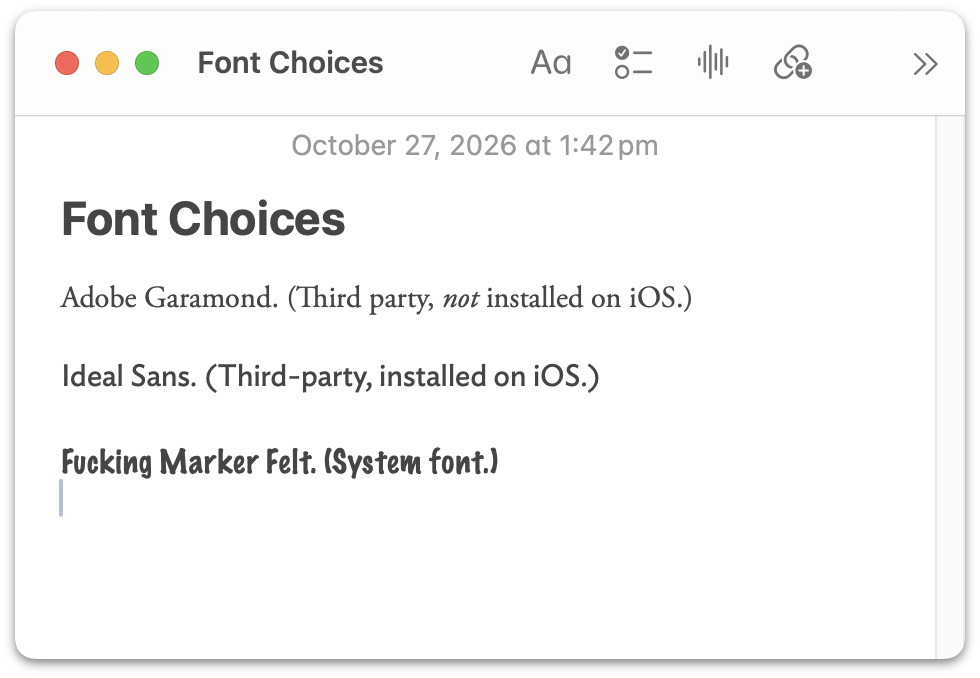
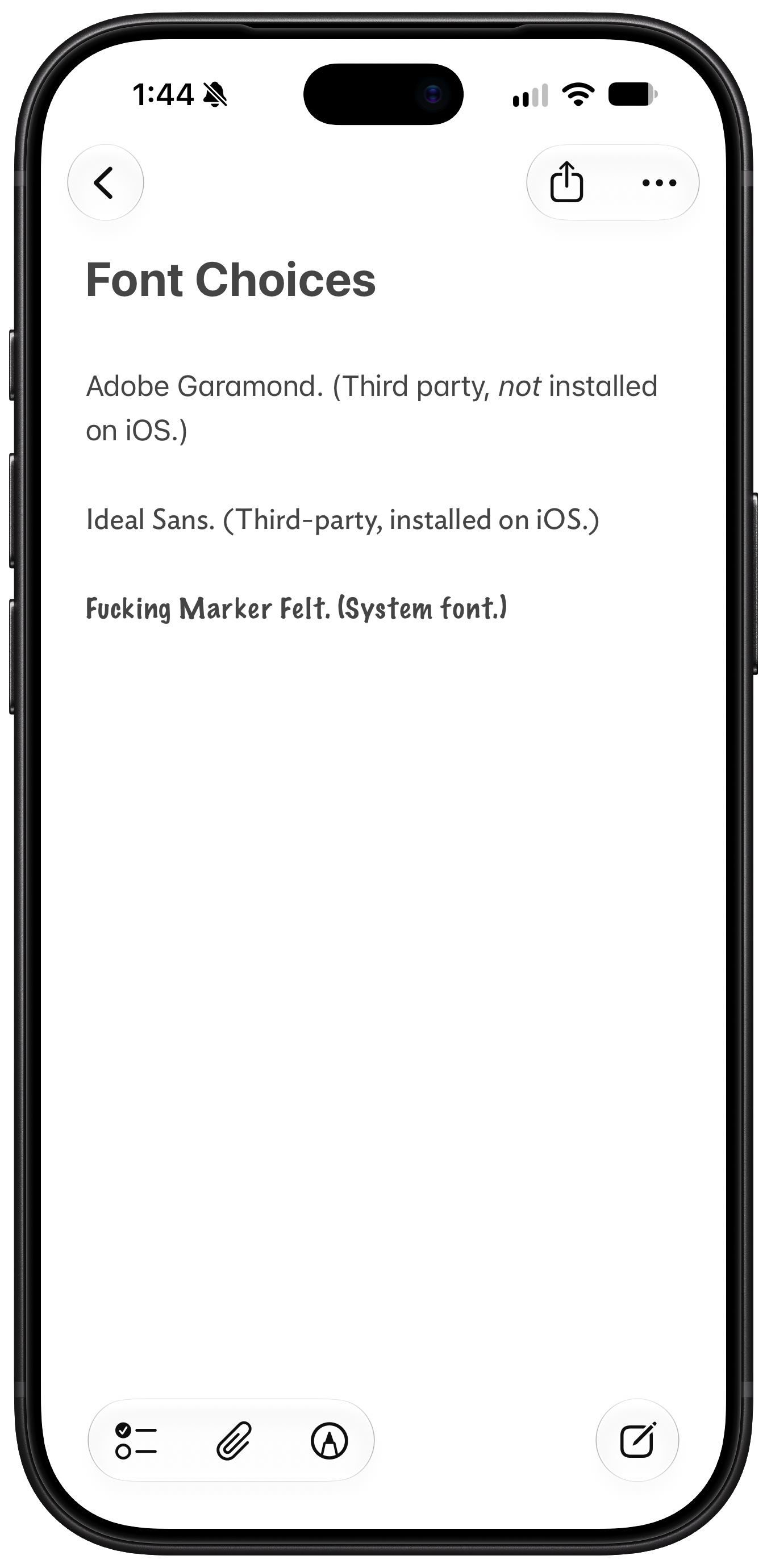
There is a huge but here. Notes, on the Mac and only on the Mac, does allow you to pick arbitrary fonts. Format → Font → Show Fonts (⌘T) shows the standard AppKit Fonts palette, and you can use that to change the font in a note to anything you want. I think this is historical baggage from earlier versions of the Notes app for Mac. Or maybe there are some Mac Notes users inside Apple who really do use this. Font choices made in Notes on the Mac are rendered on iOS and iPadOS, if the selected font is available. It even works for third-party fonts (which are quite complicated to install on iOS). Here’s a screenshot of a note with custom fonts that I made on my Mac, and the same note as it appears on iOS, where only some of those fonts are installed. But you cannot change custom fonts in Notes on iOS.
I can’t say Apple discourages you from dicking around with fonts in Notes on the Mac. It’s right there in the standard AppKit Fonts panel. But most casual Mac users don’t know about the standard AppKit Fonts panel. When they pick fonts in apps like Mail, TextEdit, and Pages, they do it from toolbars in the window. So Apple doesn’t encourage you to dick around with fonts in Notes on the Mac either. If they wanted to encourage it, there’d be a toolbar with a Font menu on the Mac, and it would be possible to change fonts on iOS too.
So I say it’s best to pretend that Apple Notes doesn’t support custom font choices. Let it go — even if, like me, it drives you crazy that Notes and only Notes uses that childish-looking alternative single-story “a” glyph in San Francisco. ↩︎