By John Gruber
We’re just out
here a-havin’ fun
In that warm
California sunnn…
Linked List: June 19, 2023
Monday, 19 June 2023
- On Scanning QR Codes With Your iPhone ★
-
Tim Hardwick, on a tweaked feature in iOS 17 beta 1:
Apple in iOS 13 decided to redesign QR code scanning so that the link appeared as a yellow button within the camera viewfinder itself. However, in doing so, it created a new problem: The button would rove around in the viewfinder if the camera lens was also in motion, which made tapping it even more tricky than before.
Thankfully, in iOS 17, Apple has made another small, and this time welcome, change that improves the situation immeasurably. Now when you scan a QR code, the link button automatically appears at the bottom of the Camera interface. So instead of chasing the dancing link around the viewfinder, you can simply tap its fixed location above the shutter button.
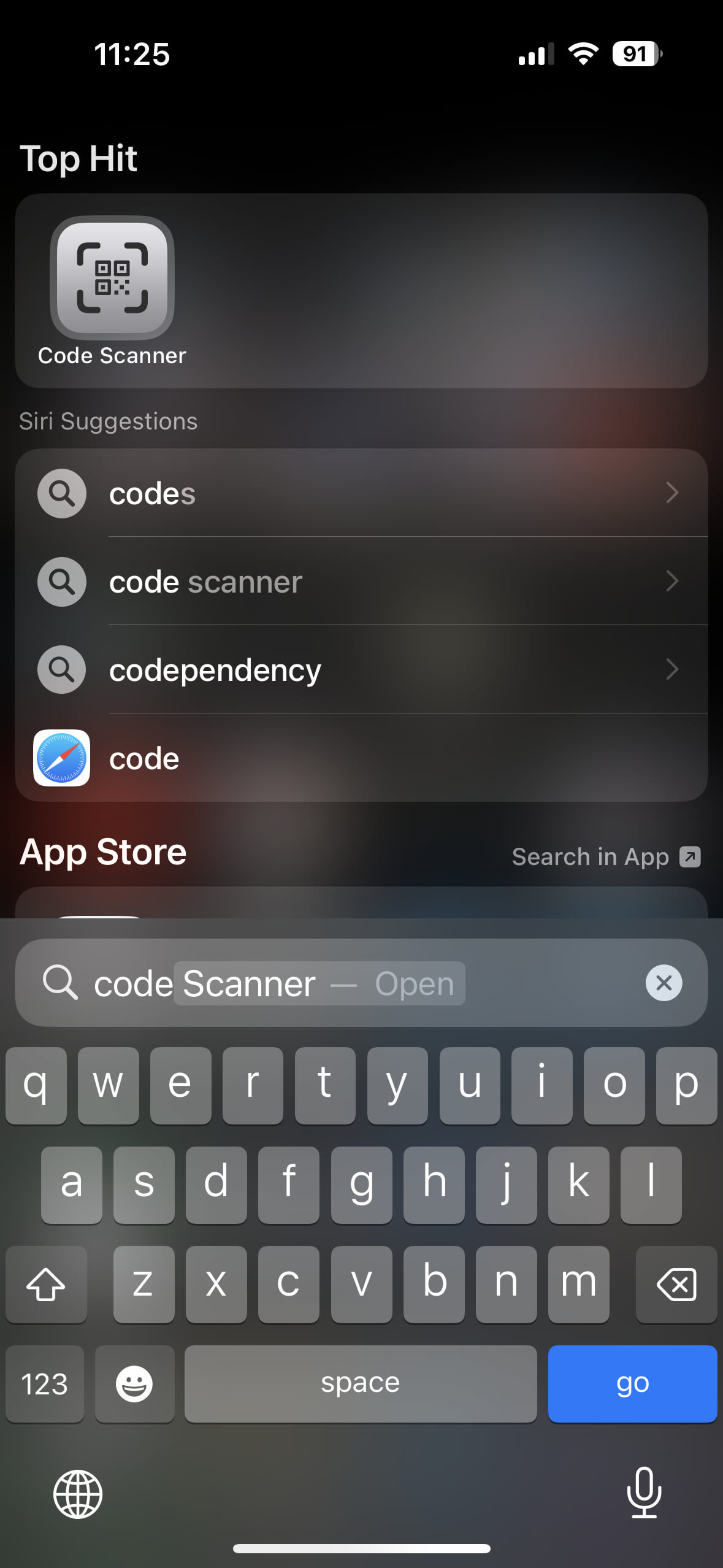
My tip for scanning QR codes is not to use the Camera app at all. Instead, enable iOS’s hidden built-in Code Scanner app in Contol Center. Go to Settings → Control Center, and under More Controls, enable Code Scanner. (This is also a good reminder that you can disable Control Center items you seldom use.) Now when you encounter a QR code, just pull down Control Center and use the Code Scanner app.
Worth keeping in mind, too, that when you use the regular Camera app to scan a QR code, if you open the link, it opens in Safari. With the Code Scanner app in Control Center, links open in a sandboxed in-app web view, which is more private. The only downside is that if you want to keep the opened page around, you’ll need to open it in Safari from within Code Scanner.
Code Scanner is a fantastic little “do one thing and do it well” app, but because you can only get to it via Control Center but it’s not shown in Control Center by default, most people don’t even know it exists. It’s truly a hidden gem.
Update: Turns out you can also launch the Code Scanner app by searching for it on the iOS home screen. Also, you can tell Siri “scan a QR code” or “open QR Code Scanner” and it’ll open. Nice!
- Not That Kind of ‘Open’ ★
-
The Anti-Meta Fedi Pact:
“i am an instance admin/mod on the fediverse. by signing this pact, i hereby agree to block any instances owned by meta should they pop up on the fediverse. project92 is a real and serious threat to the health and longevity of fedi and must be fought back against at every possible opportunity”
Yours truly, on Bluesky a month ago (which, ironically, is not yet open itself, so here’s an open preview):
Masto zealots: We’re open, federate with us!
Instagram: Great, we’re building a new thing to join you.
Masto zealots: Not that kind of open!
It should go without saying that I’m no fan of Meta/Facebook. But the idea that administrators of Mastodon/Fediverse instances should pledge to preemptively block Facebook’s imminent Twitter-like ActivityPub service (purportedly named Threads) strikes me as petty and deliberately insular. I don’t like Facebook, the company, and I’ve never seen the appeal of Facebook, the product (a.k.a. “the blue app”). But there are literally billions of good people who use their services. Why cut them off from the open ActivityPub social world? Large swaths of Mastodon seem to relish the fact that it’s confusing how to get started, and that this confusion is keeping Mastodon small.
The whole point of ActivityPub as an open protocol is to turn Twitter/Instagram-like social networking into something more akin to email: truly open. If Facebook were on the cusp of launching a Gmail-like email service, would you preemptively declare that your email server would block them? To me that’s what this “Anti-Meta Fedi Pact” is arguing for.
Maybe I’m wrong! I certainly don’t think the “let’s pledge to block Facebook before their Fediverse thing even starts” people are nuts. But to me this feels like convicting Facebook of a pre-crime. Is the goal of the Fediverse to be anti-corporate/anti-commercial, or to be pro-openness? I think openness is the answer. Others clearly disagree.