By John Gruber

All your customer
data in that nice
California sunnn.
Early access now!
Linked List: March 3, 2025
Monday, 3 March 2025
- Framous 1.0 ★
-
Chance Miller, writing last week at 9to5Mac:
Dark Noise developer Charlie Chapman is out with a new Mac utility called “Framous.” The app aims to be the best way to add device frames to screenshots. [...]
Here are the ways Framous aims to streamline this process:
- Auto-detect your device based on your screenshot to pick the right frame from a growing library of devices
- Combine multiple devices into a single image, or bulk export multiple separate images at once
- Quick customization options to change frame colors and more
- Automate your screenshot framing with Shortcuts support for even more efficient workflows
There are a bunch of ways you can add device frames to screenshots like this, but none as clever, fast, and easy as Framous. I love it. So many little details. You can just drop a screenshot in and copy a framed version out with zero fuss, but there are also all sorts of tweaks and adjustments you can make, right down to choosing which shade of titanium to color your specific iPhone Pro model. Chapman has a great 20-minute walkthrough video showing all of Framous’s features, and he posted a bunch of shorter videos showcasing specific features to Mastodon. I was sold after watching just one of these.
Framous is completely free to use with nice-looking generic device frames, and a $20 one-time purchase to unlock the exquisitely-detailed “real” frames covering all devices through the end of 2025. Or, a $10/year subscription to keep up to date with future device frames. Available at the Mac App Store.
- Another Tim Cook Product Announcement Teaser on X: ‘There’s Something in the Air’ ★
-
Basic Apple Guy (with screenshot):
The same tagline from Apple’s 2008 announcement for the original MacBook Air.
On the cusp of that announcement at Macworld Expo, AppleInsider photographed a bunch of banners with that slogan Apple had hung inside Moscone West. I swear I’m not making this up, but a bunch of people were speculating that the big announcement would be a deal with Adobe to bring Adobe Air (their still-in-progress next-gen Flash platform) to the iPhone (which was just over six months old).
Fond memories. Here are my initial thoughts and observations on the MacBook Air, post-keynote, and here’s the January 2008 archive of Linked List posts at DF. There were a lot of bad early takes on the Air.
- Apple Details Upcoming Changes and Improvements to Child Accounts, App Store Age Restrictions, and More ★
-
Dan Moren, writing at Six Colors:
In a whitepaper posted to Apple’s developer site entitled “Helping Protect Kids Online”, the company details several improvements it’s rolling out in upcoming software updates, including making it easier to set up child accounts, providing age ranges to developers, and filtering content on the App Store. [...]
It’s also worth noting that these announcements are happening against the backdrop of more stringent age-verification laws enacted in U.S. states like Texas and Oklahoma. Critics of those laws contend that they unfairly target LGBTQ+ communities. Apple, for its part, says that it holds to a standard of data minimization, not sharing any more information than is necessary. So, for example, offering developers access to the age range of a user — with the consent of a parent — rather than providing a birthdate.
From Apple’s whitepaper (PDF):
At Apple, we believe in data minimization — collecting and using only the minimum amount of data required to deliver what you need. This is especially important for the issue of “age assurance,” which covers a variety of methods that establish a user’s age with some level of confidence. Some apps may find it appropriate or even legally required to use age verification, which confirms user age with a high level of certainty — often through collecting a user’s sensitive personal information (like a government- issued ID) — to keep kids away from inappropriate content. But most apps don’t. That’s why the right place to address the dangers of age- restricted content online is the limited set of websites and apps that host that kind of content. After all, we ask merchants who sell alcohol in a mall to verify a buyer’s age by checking IDs — we don’t ask everyone to turn their date of birth over to the mall if they just want to go to the food court.
Meta has been vocally backing the various state initiatives that Moren referenced, that would require app stores to verify the exact age of children. To use Apple’s apt metaphor, Meta wants the mall owner to require checking ID for everyone who enters the mall, not just those who purchase alcohol. Meta also, of course, wants itself to then have access to those exact ages verified by the app store — it wants to know the exact age of every child using its platforms, and wants the App Store and Play Store to do the dirty work of verifying those ages and providing them via APIs to developers.
There are a lot of parents who supervise their kids’ online activities and simply don’t permit them to use platforms — like, oh, say, Meta’s — where age restrictions are necessary for some content. So why should those parents be required to provide privacy-intrusive verification of their kids’ birthdates just to let the kids play and use innocent G-rated games and apps?
Meta is clearly in the wrong here, and they’re using culture-war fear-mongering to try to get what they want through misdirection.
- Jeremy Keith on the Web on Mobile ★
-
Jeremy Keith, writing at Adactio:
Ask anyone about their experience of using websites on their mobile device. They’ll tell you plenty of stories of how badly it sucks.
It doesn’t matter that the web is the perfect medium for just-in-time delivery of information. It doesn’t matter that web browsers can now do just about everything that native apps can do.
In many ways, I wish this were a technical problem. At least then we could lobby for some technical advancement that would fix this situation.
But this is not a technical problem. This is a people problem. Specifically, the people who make websites.
There are mobile web proponents who are in denial about this state of affairs, who seek to place the blame at Apple’s feet for the fact that WebKit is the only rendering engine available on iOS. But WebKit’s limitations have nothing to do with the reasons so many websites suck when experienced on mobile devices. The mobile web sucks just as bad on Android. Apple’s WebKit-only rule on iOS is just a useful scapegoat for the fact that most websites, as experienced on phones, are designed and engineered to suck. It’s not whatever features WebKit lacks that Chrome-myopic web developers want. It’s all the crap that web developers add — tens of megabytes of JavaScript libraries and frameworks; pop-ups and pop-overs all over the screen; scrolljacking and other deliberate breakage of built-in UI behavior — that makes the experience suck. We should be so lucky if the biggest problems facing the web experience on iPhones were the technical limitations of WebKit.
And the app experiences from the same companies (whose websites suck on mobile) are much better. Not a little better, but a lot better — as I wrote in a piece in January. The truth hurts, just like the experience of using most websites on mobile.
- The Size of the US Federal Workforce Has Not Grown in the Last 50 Years ★
-
John Cassidy, writing for The New Yorker (requires a free account to read, annoyingly):
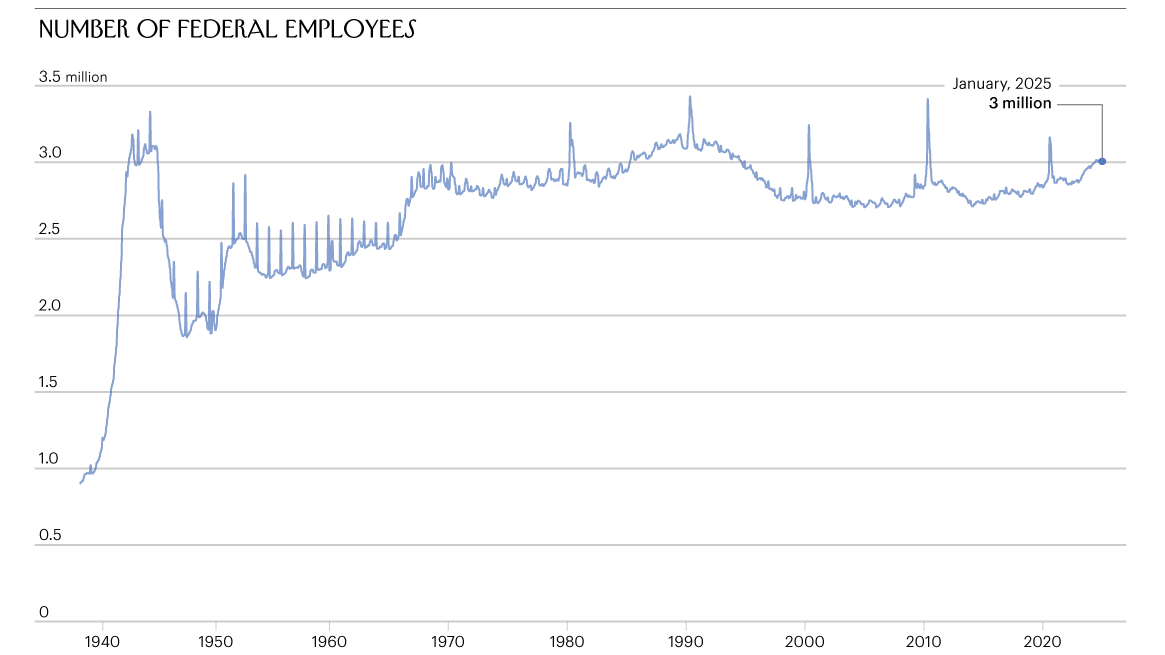
Of course, these calculations can’t be taken literally. Even Musk has said that he wants to protect essential workers. If the entire federal workforce were eliminated, there’d be no one to make sure that federal benefits got paid or that federal taxes were collected. The spending and revenue figures would crater; essential services like veterans’ hospitals, air-traffic-control systems, and border-crossing stations would be completely abandoned. But this thought experiment does illustrate the point that “bloated” payrolls aren’t what is driving federal spending and deficits. Since the nineteen-seventies, as the accompanying chart shows, the total number of federal employees has remained fairly steady.
Here’s a copy of the chart. Cassidy continues:
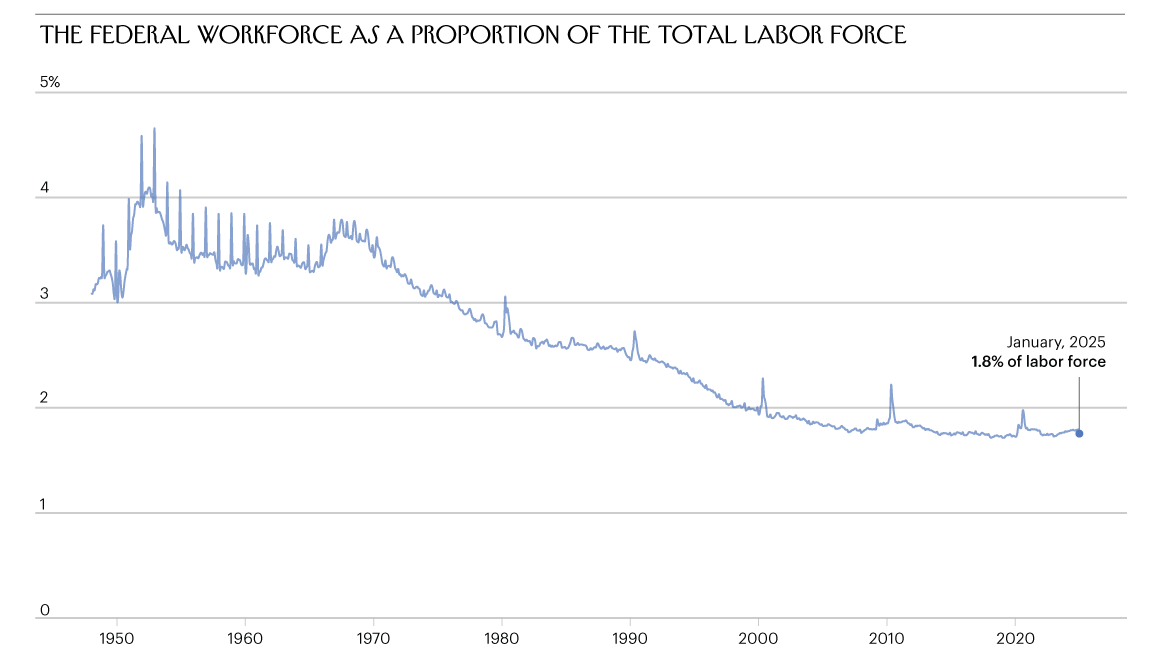
Unlike the figures from the U.S. Office of Personnel Management, the chart, which comes from the Federal Reserve Economic Database, counts members of the U.S. Postal Service as federal employees. It does show that the federal workforce has grown in recent years, but it’s still no larger than it was thirty or forty years ago. During the interim, total employment elsewhere in the economy has grown steadily alongside population growth. Consequently, the size of the federal workforce relative to the workforce at large has fallen considerably, as the following chart shows.
Here’s a copy of that second chart.
I knew the supposed justifications for the whole DOGE endeavor were a sham, but until this piece I was under the incorrect assumption that the federal government workforce has been growing steadily for decades, at least keeping pace with its percentage of the overall US workforce. The opposite is true — because the federal workforce size has remained steady while the population has continued to grow, its share of the overall workforce has in fact shrunk considerably.
- VisionOS 2.4, Now in Beta, Will Add New ‘Spatial Gallery’ App and Support for Apple Intelligence, Along With a ‘Vision Pro’ App for iPhones ★
-
Jason Snell, writing last week at Six Colors:
While a lot of us have gotten excited about the potential of Apple’s immersive video format, the truth is that the Vision Pro is also a great viewer of more traditional 3-D video content. And Apple has built a new visionOS app to highlight great spatial content: Spatial Gallery.
Think of Spatial Gallery as something sort of like the TV app, but for spatial videos, photos, and panoramas. The content comes from Apple as well as third-party content sources, and Apple is curating it all itself. The company says the content will be updated on a regular basis, and among the demo content I saw featured was some of 3-D (not immersive) behind-the-scenes content from various Apple TV+ productions such as “Severance” and “Shrinking.”
Just as the Apple Watch has its own app on iOS, so too will the Vision Pro. The new Vision Pro iOS app will be available with iOS 18.4, and will automatically appear on the iPhones of people who have Vision Pros. Of course the app will show off new content and offer tips, but it’s also functional: If you add highlighted media content via the app, it’ll be set to download on the Vision Pro. Similarly, you can use the Vision Pro app to remotely download apps to your Vision Pro, so they’re ready for you when you put the headset on.
VisionOS 2.4 is also making some big improvements to guest mode, making it much easier to let someone else use your Vision Pro. It remains to be seen if Vision is ever going to be a successful platform, but the potential is clearly there, and Apple is definitely rolling on it.
- Mike Myers’s Skewering Portrayal of Elon Musk on SNL ★
-
Like any great caricature, Myers’s Elon Musk conveys a better sense of Musk than watching Musk himself does. A cruel and infinitely self-satisfied know-it-all, whose utter self-confidence runs counter to the fact that he’s unfathomably awkward, as uncoordinated socially as he is physically. Just an utter and total spaz, who believes no one’s jokes are funnier than his own. The sort of person no one likes but who has nevertheless parlayed tremendous wealth into great power, forcing his influence upon the world.