By John Gruber

Finalist 4: Inspired by
Paper Day Planners
Linked List: October 18, 2019
Friday, 18 October 2019
- Joe Girardi to CC Sabathia: ‘I Love You, Man’ ★
-
Hard not to choke up watching Girardi talk about Sabathia.
- Facebook’s Origin, Then and Now ★
-
Sarah Frier:
Behold Mark Zuckerberg’s revised origin story for Facebook, as a way to give people voice during the Iraq war.
(And compare to the Harvard Crimson on Zuckerberg’s hot-or-not tool in 2003.)
“I understood that some parts were still a little sketchy” holds up as a description of Facebook, 16 years later.
- 16-Inch MacBook Pro Seemingly Pictured in MacOS 10.15.1 Beta ★
-
Nice find by French site MacGeneration. Looks very similar to the current 15-inch MacBook Pro, but with smaller bezels around the display. As rumors have suggested, it even looks like it has a nice big physical Esc key.
- Oregon Judge Ordered Woman to Type in Her iPhone Passcode So Police Could Search It for Evidence Against Her ★
-
Aimee Green, reporting for The Oregonian (via Dave Mark at The Loop):
Police wanted to search the contents of an iPhone they found in Catrice Pittman’s purse, but she never confirmed whether it was hers and wasn’t offering up a passcode. Her defense attorney argued forcing her to do so would violate her rights against self-incrimination under the Fifth Amendment of the U.S. Constitution and Article 1 Section 12 of the Oregon Constitution.
But a Marion County judge sided with police and prosecutors by ordering Pittman to enter her passcode. On Wednesday, the Oregon Court of Appeals agreed with that ruling — in a first-of-its-kind opinion for an appeals court in this state.
This is bullshit — being forced to produce a password is clearly a violation of the Fifth Amendment. If you’ve got the password written down on a sticky note and the police get a warrant to search your home and find it, that’s evidence. But being compelled to produce something in your mind is the definition of self-incrimination.
A password is different than biometric authentication. There are debates on whether law enforcement should be able to compel someone to provide their fingerprint or look at a facial recognition scanner to unlock a device. Are they allowed to just wave your phone in front of your face? (With a Pixel 4, closing your eyes won’t protect you.)
As a reminder, you can temporarily disable Touch ID and Face ID just by going to the power-down screen. On a X-class iPhone, that means pressing and hold the power button and either volume button for a second or two. Once your phone is at this screen, even if you tap “Cancel”, you must enter your passcode to unlock the phone. If you’re ever worried about anyone — law enforcement or otherwise — taking your phone from you and unlocking it with your face, just squeeze those two buttons. You don’t even need to take it out of your pocket or purse — you’ll feel haptic feedback once you’ve held the buttons long enough. And, if you keep holding the two buttons down for five seconds, your iPhone will call emergency services and contact your emergency contacts.
- Quick Video Always Records With a 4:3 Aspect Ratio ★
-
Joseph Keller, writing at iMore:
Something to keep in mind about quick video: it doesn’t record in 4K. No matter what resolution you’ve set for taking video on your iPhone, whether above or below 4K, quick videos on the iPhone 11 series of phones will always record at a resolution of 1920 × 1440.
“HD” video is usually 1920 × 1080, but Quick Video shoots 1920 × 1440 because it always records with a 4:3 aspect ratio. That’s not what I expected, but you don’t lose anything — the 1920 × 1080 image recorded by default in the “Video” mode is a 16:9 center crop of the 4:3 sensor. If you want a 16:9 aspect ratio from a clip shot using Quick Video, you can just crop it in post, right in the Camera or Photos app using the new video editing tools in iOS 13. (And not only can you crop to 16:9 in post, you can decide to raise or lower the centerline on the video when you do so.)
- Jason Snell on Baseball Telecast Graphics ★
-
Jason Snell, in a lovely piece at Six Colors that feels like it was written just for me:
And then there are the out dots.
This is one of the delightfully stupid controversies that comes up when you write about baseball graphics. In a nod to skeuomorphism and old ballpark scoreboards, many networks display the number of outs in an inning not as a numeral, but as dots. These dots generally appear as gray circles that are filled in with a bright color as the inning progresses.
The controversy is this: How many dots should there be? There are three outs in an inning, so you’d think the answer would be three. But some folks will point out that since getting the third out ends the inning, having a third dot would be superfluous. Once the third out is made, the inning is over and there are no outs at all.
I get the argument, but I firmly reject it. Outs come in threes, not twos. If you must represent it by a series of faux light bulbs, you should have three bulbs. Better, I think, to light up that third bulb momentarily, then turn it off and indicate the end of the inning. It improves the clarity of the graphic at the expense of a few pixels — and gives you the opportunity to make a fun animation at the end of the inning.
I strongly agree with Snell on this: if you’re going to use dots to represent outs, there should be three. When there are two outs, the batting team still has an out to give — the empty third dot represents that out. And when the third out is made, fill it in for the few seconds before the telecast cuts to the commercial break.
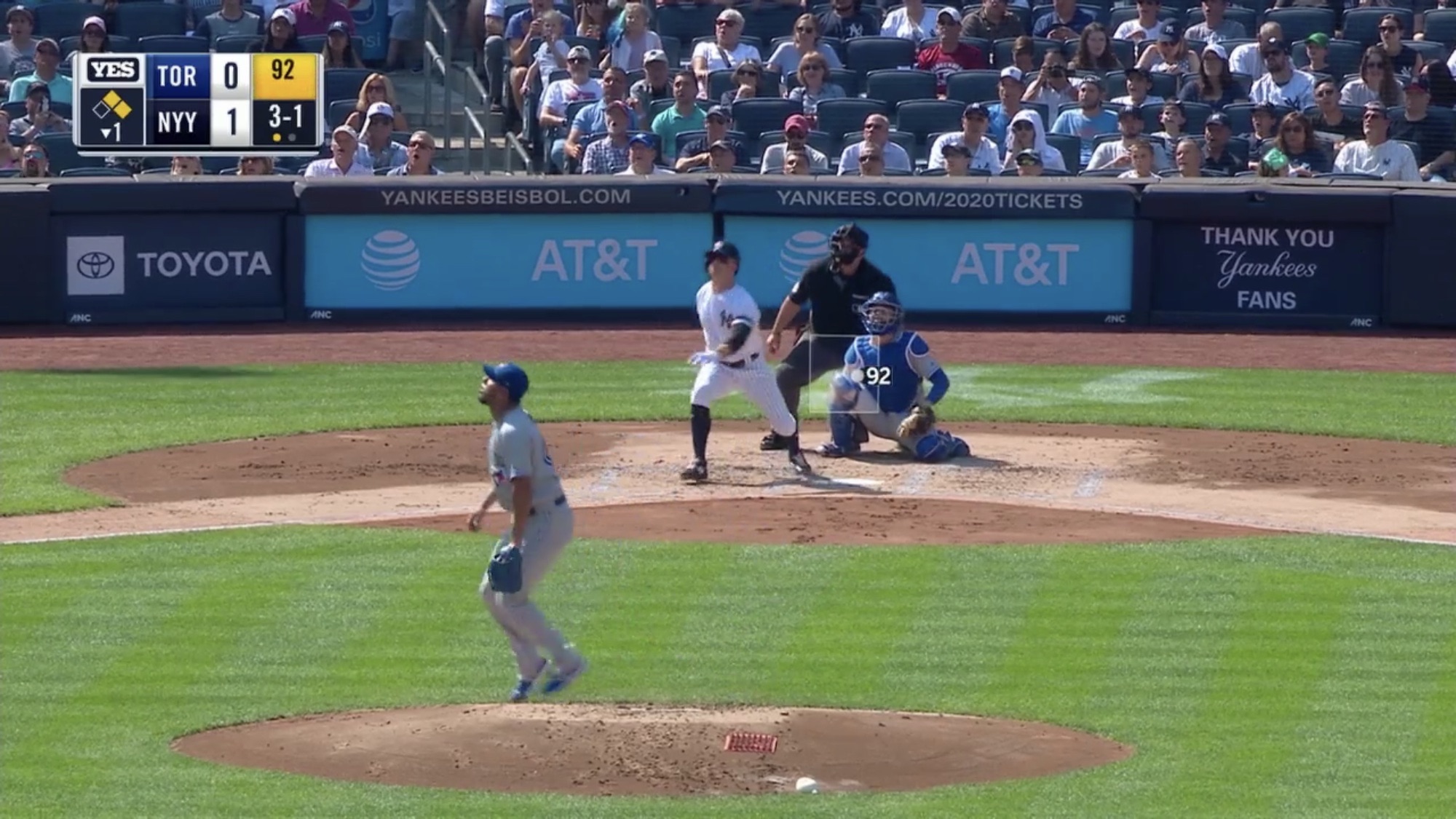
Another note: nearly all modern baseball telecasts show the strike zone live. This box, though, should be subtle. When you look at Snell’s screenshots, compare ESPN’s live strike zone (far too prominent) with Fox’s (perfectly subtle).
Here’s an example of the in-game graphics from YES, the Yankees’ regular season broadcaster. Good strike zone indicator (including the speed at the pitch location), good legibility, but boo hiss for the two-dot out display.