By John Gruber
WorkOS: How SSO works and the fastest way to add it.
Linked List: July 12, 2026
Sunday, 12 July 2026
- WorkOS Pipes ★
-
My thanks, once again, to WorkOS for sponsoring DF last week. Users expect apps and agents to reach the tools they already work in. Every integration that gets you there is a different OAuth flow, a different token lifecycle, and weeks of infrastructure before you write a line of product code.
WorkOS Pipes handles it with one API call. Pre-built connectors for GitHub, Slack, Salesforce, Google Drive, and more. Pipes handles OAuth, token refresh, and credential storage. You call the real provider API with a fresh token, every time.
- Paulo Andrade: ‘A WWDC 26 Update on Building a Mac-Assed App With SwiftUI’ ★
-
Paulo Andrade:
My last post on using SwiftUI to build a Mac-assed app got a bit more traction than I expected. It was mentioned on Mastodon several times, included in iOS Dev Weekly, inspired May’s edition of the Swift Blog Carnival, and was eventually mentioned by John Gruber, arguably the person most to blame for popularizing the term “Mac-assed”, on Daring Fireball.
All this attention also resulted in an engineer from Apple reaching out with some notes. We exchanged a few emails, I filed a few radars, and now that WWDC 27 is behind us, this post serves as a small update to the issues I wrote about before.
There’s real progress here, but I think my main point still stands: SwiftUI is now seven years old and it does not make it easy to create great Mac apps.
- How UIs Degrade Over Time ★
-
These examples are from Windows, but the same degradation is true for the standard look for MacOS alerts too. There was a time when system UI chrome was improving in clarity, everywhere. Today we live in an age when it’s degrading in clarity, everywhere. It’s rather inexplicable.
- ‘Every Frame Perfect’ ★
-
Nikita “Tonsky” Prokopov:
The rule of thumb is:
If I take a screenshot of your app at any moment, you should be able to explain what I see.
Why care about every frame? It builds trust. Users can’t see the code, so UI is the only way for them to judge the quality of the app. If UI looks good, that means developers had time to polish it, which means that they probably spent a comparable amount of time to iron out the code. It’s a heuristic, but a reasonable one.
Now, what does it mean in practice? I can think of a few things:
- No white flashes between screens.
- No partially loaded content.
- No relayout while content loads.
- Internally consistent. If one part of the UI says “1 update available”, another part should not say “Checking for updates...”
- Precise animations.
Animations often end up being forgotten. A UI might look great in both start and end states but very janky in between.
“Every frame perfect” is a great mantra for UI craftsmanship. If you care about every frame, that discipline will be palpable, even though almost no users will ever examine your animations and transitions frame-by-frame, and most will happen too quickly to see in real time. If you cut corners on interstitial states “because no one will notice”, you’ll start cutting corners elsewhere.
- TwoMillionKit: Use Private Cloud Compute in MacOS 27 Foundation Models Without an Entitlement ★
-
Guilherme Rambo:
Apple ships the
fmcommand-line tool in macOS 27, which can be used to run inference with the local system model or Private Cloud Compute from Terminal or scripts. You know what else can run command-line tools? Mac apps! 😃I decided to spend some of my Codex tokens and take GPT 5.6 Sol for a spin. I asked it to create this Swift package. All it does is provide a
LanguageModelimplementation that uses thefmcommand-line tool under the hood, meaning that any Mac app can use the Private Cloud Compute model without requiring a special entitlement from Apple.The main limitation is that this will not work for sandboxed Mac apps, so any Mac app distributed via the Mac App Store won’t be able to use it.
But for developers of Mac apps distributed outside the Mac App Store, this provides a simple and entitlement-free way to use Private Cloud Compute in their apps.
Use sparingly and at your own risk.
This is a workaround for Apple’s current limitation that only grants access to Private Cloud Compute to “developers in the App Store Small Business Program with fewer than two million first time App Store downloads”. Hence Rambo’s clever name for the framework.
- Sam Altman and Elon Musk Argue Over Who’s Running the Bigger Scam ★
-
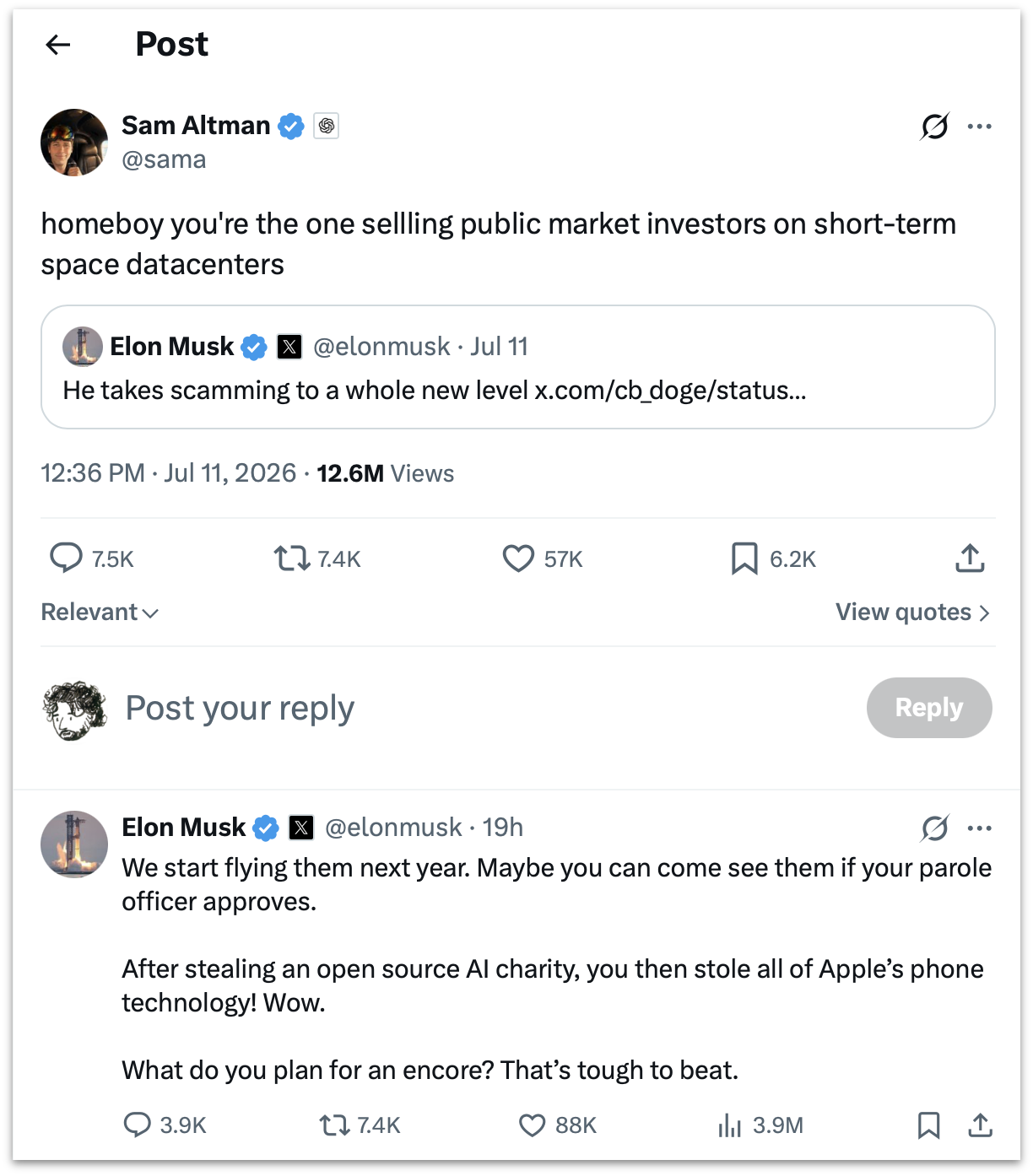
Elon Musk, linking to his own tweet from March that “Sam Altman is super good at scamming”:
He takes scamming to a whole new level
homeboy you’re the one sellling public market investors on short-term space datacenters
Musk:
We start flying them next year. Maybe you can come see them if your parole officer approves.
After stealing an open source AI charity, you then stole all of Apple’s phone technology! Wow.
What do you plan for an encore? That’s tough to beat.
(All spelling, capitalization, and punctuation sic.)
These are two of the CEOs of the most valuable companies on the planet. Say what you want about it, but Musk’s Twitter/X is like nothing else that’s ever existed. Screenshot of the thread for posterity, and an XCancel link for those icked by X itself.
- Lunacy – Jeff Halter’s Lunatic Fringe Player ★
-
After linking to Stacks, his remarkable new modern HyperCard player, I made the terrible mistake of clicking around the rest of Jeff Halter’s website, and fell upon Lunacy:
Created by Ben Haller and released in the early ’90s as part of the Macintosh More After Dark software package, Lunatic Fringe was unique among screensavers in that it was not just a passive animation to watch, but an interactive game! Toggling the Caps Lock key while the screensaver was running popped you into a space shooter where you could fly around, collect power-ups, and blast a variety of baddies all in pursuit of a high score. It was a blast.
Running Lunatic Fringe on a modern computer has been a challenge. Fringe Player by Greg Parker filled this need during Apple’s PPC and Intel era, but is not supported on modern Apple platforms. Lunacy brings Lunatic Fringe to the present: a native Swift app with a built-in emulation engine that runs the original module, unchanged, on modern Apple platforms.
Lunatic Fringe is one of my all-time favorite classic Mac games. Lunacy is a great modern player, including CRT simulation to make the game look a lot more like it did back in the day.
- Stacks — HyperCard Player for Modern MacOS ★
-
Well this is just delightful:
- Run HyperCard stacks directly on your modern Mac. No emulator required!
- Browse the Internet Archive’s HyperCard collection and run stacks with one-click.
- Period-accurate typography.
- Sound, instruments, and MacinTalk speech synthesis.
- Cross-stack navigation.
Stacks is a really beautiful native Mac app, and its presentation of classic HyperCard stacks is exquisitely faithful to the era. It’s simultaneously Mac-assed 2026-style and Mac-assed 1987-style. Crackerjack work from developer Jeff Halter.