
By John Gruber

All your customer
data in that nice
California sunnn.
Early access now!
Thoughts and Observations Regarding Apple Creator Studio
Saturday, 17 January 2026
Let’s Just Get It Out of the Way and Talk About the New Icons First, but Let’s Also Use the Icons as a Proxy for Talking About the Broader Software Design Problems at Apple
There’s a lot of hate for the new app icons of the entire Creator Studio suite, but while I think the icons are tragically simplistic, I think the hate is misplaced.
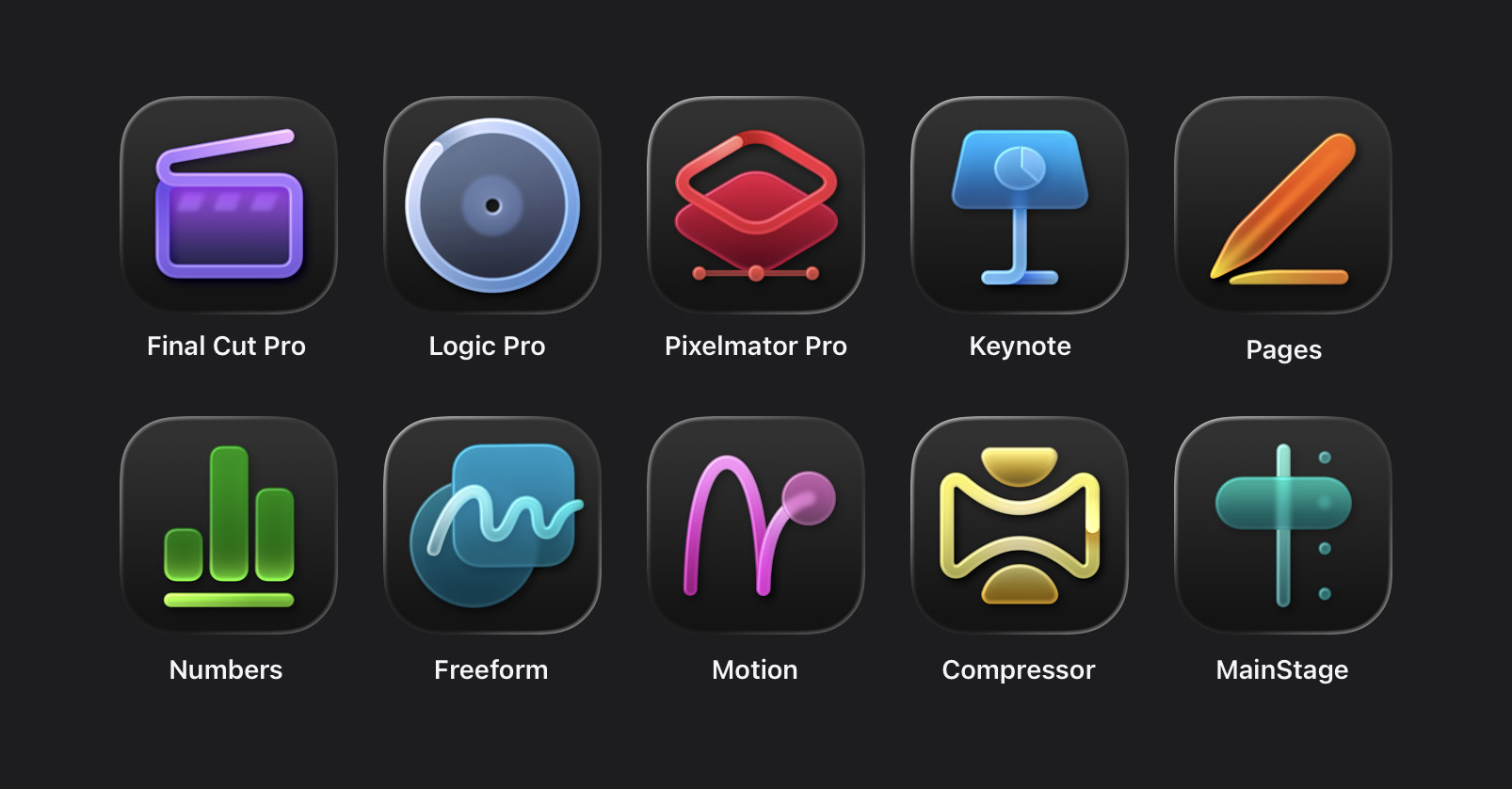
The problem isn’t with these icons in and of themselves. The problem is with the rules Apple has imposed for Liquid Glass app icons, along with their own style guidelines for how to comply with those rules. Given Apple’s own self-imposed constraints for how icons must look (with the mandatory squircle) and how Apple has decided its own app icons should look (a look which can best be described as crude), I actually think the icons in the Creator Studio are pretty good, relatively speaking. But that’s like saying one group of kids has pretty good haircuts, relatively speaking, at a summer camp where the rule is that the kids all cut each others’ hair using only fingernail clippers.
The best take on these icons is this zinger from Héliographe:
If you put the Apple icons in reverse it looks like the portfolio of someone getting really really good at icon design.
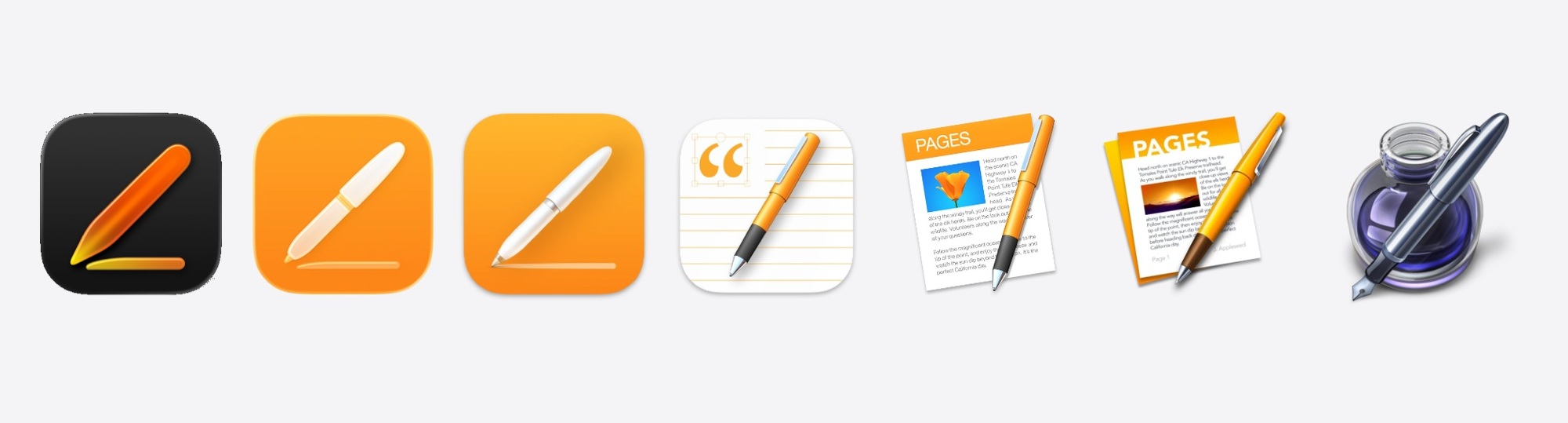
Devastating. Whatever you think of this new 2026 icon for Pages, you can’t seriously argue that it’s much worse — or really all that different — from the previous one. But go back in time and each previous Pages icon had more detail and looked cooler. And then you get back to the original Pages icon and that one clearly belongs in the App Icon Hall of Fame.
At some point in the previous decade, I had a product briefing with Jony Ive where we were discussing some just-announced new device that largely looked like the previous generation of the same device. I honestly don’t remember if it was an iPhone, an Apple Watch, or a MacBook. It doesn’t matter. What Ive told me is that Apple didn’t change things just for the sake of changing them. That Apple was insistent on only changing things if the change made things better. And that this was difficult, at times, because the urge to do something that looks new and different is strong, especially in tech. “New” shows that you’re doing something. “The same” is boring. What’s difficult is embracing the fact that boring can be good, especially if the alternative is different-but-worse, or even just different-but-not-better. You need confidence to ship something new that looks like the old version, because you know it’s still the best design. You need confidence to trust yourself to know the difference between familiarity (which is comforting) and complacency (which is how winners become losers).
Apple’s hardware designs remain incredibly confident. An M5 MacBook Pro looks like an M1 MacBook Pro, and really hasn’t changed much in the last decade other than getting thinner. An iPhone 17 Pro looks a lot like an iPhone 12 Pro and has only evolved in small ways since the iPhone X in 2017. A brand-new Series 11 Apple Watch is very hard to distinguish at a glance from a Series 0 Apple Watch from 2015. This is not a complaint, this is a compliment. These hardware designs do not need to change because they’re excellent. Iconic, dare I say.
This is why Apple’s software UI designs are the target of so much scorn and criticism right now, and Apple’s hardware designs are not.1 Yes, it’s human nature that people love to complain. But Apple’s current work isn’t receiving criticism in anything close to equal measures. Apple’s hardware is hardly the subject of any criticism at all. Not the way it looks, not the way it performs. Apple’s software design, on the other hand, is the subject of withering criticism. It’s not (just) about new features having bad designs. It’s about existing, decades-old features being made so obviously worse. I know a lot of talented UI designers and a lot of insightful UI critics. All of them agree that MacOS’s UI has gotten drastically worse over the last 10 years, in ways that seem so obviously worse that it boggles the mind how it happened.
Take a few minutes and go peruse Stephen Hackett’s extensive MacOS Screenshot Library at 512 Pixels, where he’s assembled copious screenshots from every version of MacOS going back to the Mac OS X Public Beta from October 2000.2 Take a look in particular at MacOS 10.11 El Capitan from 2015, exactly a decade ago. It doesn’t look old compared to MacOS 26 Tahoe. It just looks better, in every single way. I can’t think of one single thing about MacOS 26 that looks better than MacOS 10.11 from 2015, and I can quickly name dozens of things that are obviously worse. We would rejoice if MacOS 27 simply reverted to the UI of MacOS 10.11 from a decade ago, or had evolved as subtly as Mac hardware has over the same decade. The menu bar was better. The contrast between active and inactive windows was better. The standard UI controls looked better. The delineation between application chrome and content was clear, rather than deliberately obfuscated. And, to return to my point regarding Apple Creator Studio, all of the app icons — every goddamn one of them — was better. Many of the Mac app icons from MacOS 10.11 were downright exquisite. And the real heyday for Apple’s application icon design was the decade prior, the 2000s, under Steve Jobs. At the time, in 2015, we thought El Capitan shipped during an era of somewhat lazy icon design from Apple. If only we knew then how good we still had it.
Before you ask, there’s no point wondering why these new Creator Suite icons look like this if Alan Dye and his inner squircle of magazine-designer cowboys left to work at Meta a month ago. I genuinely believe that Dye’s departure and the promotion of longtime Apple UI designer Steve Lemay to replace him will restore some measure of sanity and grace to Apple’s UI direction and style. That can’t happen in one month (let alone a month taken up by major holidays). For now, Creator Studio needs to abide by the guidelines of the OS 26 Liquid Glass world.
Two more zingers. Benjamin Mayo on the new Pixelmator icon (the first new icon since Apple’s acquisition):
the ultimate icon downgrade
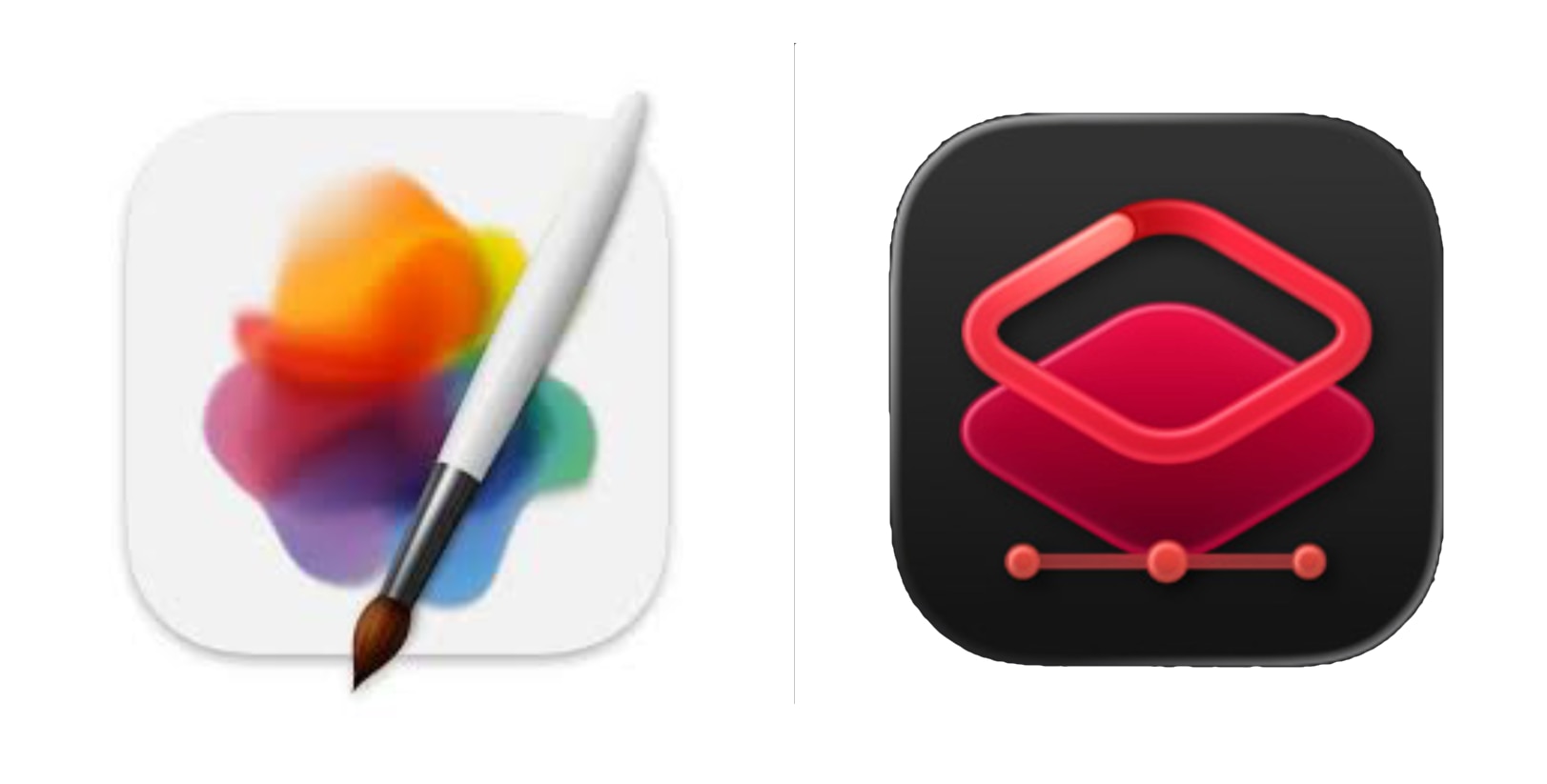
The new Pixelmator icon is the most jarring of the bunch because it hasn’t been on the drip-drip-drip yearslong slide of Apple’s in-house app icons. It just switched in one fell swoop from something that looks like art that one might print, frame, and hang on their wall, to, well, whatever the new one is.
The Boringification of Software
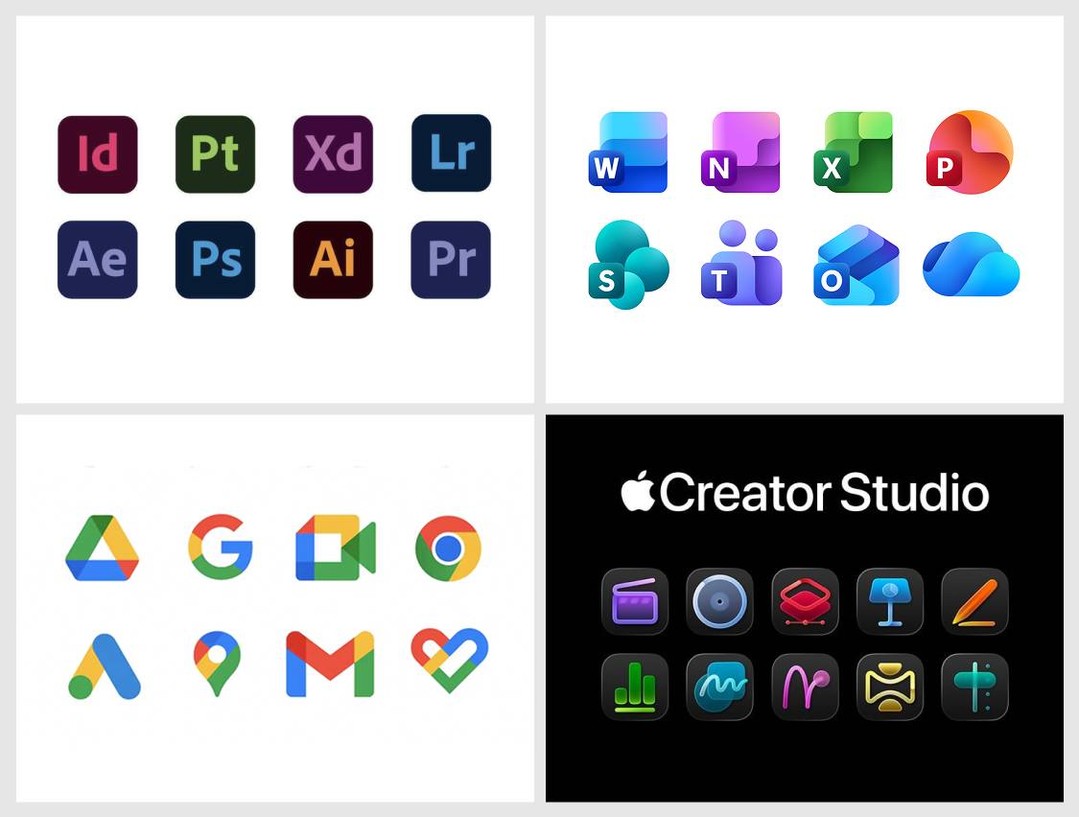
Liquid Glass
I could go on for thousands of words here, too. But let’s cut to the chase for a moment and acknowledge that “Liquid Glass”, as a catch-all term to describe the entirety of the UI changes in Apple’s version 26 OS releases, means a few different things. The most obvious thing it means is the lowercase liquid glass look. Transparency and fluidity. Let’s put that aside.
Liquid Glass also represents — per Apple’s own description when it was introduced by Alan Dye at WWDC — a “content-first” change to layout within an application. The content, in Liquid Glass, should take up as much of the screen, or window, as possible, and the UI of the application should be presented atop the content, not apart from the content. I’ll let Apple speak for itself and present Apple’s own video of the iOS Music app, from the Newsroom article announcing Liquid Glass back at WWDC:
This design ethos may or may not work on iOS. I think it often does. But let’s put that argument aside too. In the desktop context of MacOS, I don’t think this ethos works at all for most apps. It’s a downright disaster in the context of complex productivity apps. Apps should have distinctive chrome. The idea that they shouldn’t, that only “content” matters, and that apps themselves should try to be invisible and indistinctive, is contrary to the idea that apps themselves can be — should be — artistic works. The parts of a window that belong to the app and present the functionality of the app, and the parts of a window that represent content, should be distinct. Like separating the dashboard — sorry, instrument panel — from what you see through the windshield while driving a car. One or two items of primary importance (say, the speedometer and the next step in turn-by-turn directions) are OK to project on the windshield in a heads-up display atop the “content” of the road and world around the vehicle. But it would be disastrous to eliminate the instrument panel and project every control status indicator as HUD elements on the windshield. Either the driver’s view would be overwhelmed by too many HUD elements, making it hard to see the world and to read the dials, or the car designer would have to eliminate many useful controls and indicators entirely. (I know, some electric car makers are doing just that. It sucks.)
If you look through the screenshots Apple has provided of the new versions of the apps in the Creator Studio bundle, most of them haven’t been updated with Liquid Glass at all. They don’t have UI elements that look like liquid glass (transparent and fluid), and they don’t have layouts that seek to remove or obfuscate the application from its content. Final Cut Pro, Logic Pro, Motion: nope. Not a drop of Liquid Glass.
Pixelmator Pro does, however. It seems to embrace Liquid Glass in both senses. I haven’t tried it yet, and it doesn’t ship until January 28, but I strongly suspect I’d prefer if the new Pixelmator Pro looked like the new Final Cut Pro and Logic Pro, with solid, distinct user interface chrome. (Fingers crossed that there’s a setting for this.)
One possible explanation for Pixelmator Pro embracing Liquid Glass, but the other apps not, comes from the fineprint on the Apple Newsroom post announcing the whole Creator Studio suite:
Pixelmator Pro for iPad is compatible with iPad models with the A16, A17 Pro, or M1 chip or later running iPadOS 26 or later. The Apple Creator Studio version of Pixelmator Pro requires macOS 26.
The other apps require only MacOS 15.6 Sequoia and iOS 18.6:
The one-time-purchase versions of Final Cut Pro requires macOS 15.6 or later, Logic Pro requires macOS 15.6 or later, and Pixelmator Pro requires macOS 12.0 or later. MainStage is available for any Mac supported by macOS 15.6 or later. Motion requires macOS 15.6 or later. Compressor requires macOS 15.6 or later and some features require a Mac with Apple silicon.
MacOS 12 Monterey came out in 2021. So I think that means you can one-time purchase and download an older version of Pixelmator, if you’re running an older version of MacOS. But if you’re running MacOS 26 Tahoe, you’ll get the new Liquid-Glassified version of Pixelmator whether you get it as a one-time purchase or through a Creator Studio subscription. I think? Update: That was wrong. It’s a little simpler than that, in that Pixelmator Pro is an outlier from the other apps in Creator Studio. The new version of Pixelmator Pro — version 4.0 — is only available through the Creator Studio subscription, and requires MacOS 26 (and iPadOS 26). The one-time purchase version of Pixelmator Pro is version 3.7.1 — the existing version, last updated two months ago — and that’s the version you get from MacOS 12 through MacOS 26 if you get it via one-time purchase. Pixelmator Pro is the only app in Creator Studio where the new version is exclusively available through the Creator Studio subscription.
The iWork Apps
From the Newsroom announcement:
For more than 20 years, Apple’s visual productivity apps have empowered users to express themselves with beautiful presentations, documents, and spreadsheets using Keynote, Pages, and Numbers. And Freeform has brought endless possibilities for creative brainstorming and visual collaboration.
I’m not sure when Apple stopped referring to these apps, collectively, as iWork, but I guess it’s probably when they stopped selling them and made them free for all users in 2017. (Freeform was launched in 2022, so was never part of “iWork”. But it does feel like a fourth app in the suite.)
With Apple Creator Studio, productivity gets supercharged with all-new features that bring more intelligence and premium content to creators’ fingertips so they can take their projects to the next level. The Content Hub is a new space where users can find curated, high-quality photos, graphics, and illustrations. A subscription also unlocks new premium templates and themes in Keynote, Pages, and Numbers.
In addition to Image Playground, advanced image creation and editing tools let users create high-quality images from text, or transform existing images, using generative models from OpenAI. On-device AI models enable Super Resolution to upscale images while keeping them sharp and detailed, and Auto Crop provides intelligent crop suggestions, helping users find eye-catching compositions for photos.
To help users prepare presentations even more quickly in Keynote, Apple Creator Studio includes access to features in beta, such as the ability to generate a first draft of a presentation from a text outline, or create presenter notes from existing slides. Subscribers can also quickly clean up slides to fix layout and object placement. And in Numbers, subscribers can generate formulas and fill in tables based on pattern recognition with Magic Fill.
I’ll co-sign Jason Snell’s column on this aspect of Creator Studio. I feel like it’s just fine for new document templates and the Content Hub stock image library to be paid features. (See next section.) But I don’t think it makes sense to gate useful new features of these apps behind the Creator Studio subscription. Smarter autofill in Numbers, generating Keynote slides from a text outline, and Super Resolution image upscaling all sound like great features, but they sound like the sort of features all users should be getting in the iWork apps in 2026. Especially from on-device AI models. I could countenance an argument that AI-powered features that are processed on Apple’s Private Cloud Compute servers should require a subscription. But it feels like a rip-off if they’re running on-device.
It’s simpler for Apple to offer one single subscription bundle of “work” apps. But office productivity apps and creative design apps are very different. A word processor and spreadsheet go together. A video editor and audio editor go together. But it seems wrong for someone who just wants the new AI-powered features in Numbers and Keynote to need to pay for a subscription bundle whose value is primarily derived from Final Cut Pro, Logic Pro, Motion, and Pixelmator Pro — apps that many iWork users might never launch.
The Content Hub
Apple describes the Content Hub as “a new space where users can find curated, high-quality photos, graphics, and illustrations.” Stock imagery, basically. From Apple’s Creator Studio FAQ:
What happens to projects and content I created if my subscription ends?
All the projects and content you create with an active subscription to Apple Creator Studio — including any images you generate or add from the Content Hub — remain licensed in the context of your original creation.
What struck me about the Content Hub is its name. Despite only offering “photos, graphics, and illustrations” it is not called the Image Hub. It’s the Content Hub. I asked Apple if this meant it might eventually include other things, like music, video B-roll, and perhaps even fonts licensed from third-party type libraries. I was told — unsurprisingly3 — that they can’t comment on future products and features. But that was said with a smile, which smile at least acknowledged that the name Content Hub leaves the door open to other types of media.
Whither Photomator?
When Apple acquired Pixelmator a little over a year ago, they acquired two ambitious creative professional apps, not one. Pixelmator is an image editor, like Adobe Photoshop (or, from the indie world, Acorn). Photomator is like Adobe Lightroom (or, from the indie world, Darkroom.) We’ve been waiting to see what Apple’s plans were for both apps. With Pixelmator Pro, we now have an answer — a major new update for the Mac (with, as mentioned above, a Liquid Glass UI) and an all-new version now available for iPad.
This week’s announcement of the Creator Studio bundle included no news about the future of Photomator. However, my spidey-sense says this is a case where no news might be good news. At the bottom of Apple’s new product page for Pixelmator Pro is a brief Q&A, which includes these two items:
Where can I get Photomator?
Photomator remains available as a separate purchase from the App Store.
How does Pixelmator Pro compare to Pixelmator Classic for iPad?
Pixelmator Pro for iPad is available as part of an Apple Creator Studio subscription, alongside the Mac version and other pro apps like Final Cut Pro and Logic Pro. It brings all the features that Pixelmator Pro users love on Mac to iPad, including nondestructive editing, AI features, tools for freely transforming layers, and more — all optimized for touch.
Pixelmator Classic for iOS, released in 2014 as a companion app to the now-discontinued Pixelmator Classic for Mac, provides basic image editing features such as cropping, color adjustments, and effects. It remains a functional app but is no longer being updated.
These are very different answers, if you speak Cupertino-ese. Functional but no longer being updated means you should not hold your breath waiting for an updated version of Pixelmator that runs on an iPhone.
When Apple end-of-lifes an app — like they recently did with Clips — they’re clear about it. But when Apple has plans for something but isn’t ready to announce those plans, they’re obtuse about it. If Photomator did not have a future as part of Creator Studio, I think Apple would have used this moment to stop selling the existing version. They’d say that it too remains functional but is no longer being updated. But that’s not what they said.
Apple’s Aperture — a photo library manager and editor for professionals — debuted in October 2005. Adobe released the first public beta of what became Lightroom in January 2006. Lightroom today remains an actively-developed popular app. But Apple ceased development of Aperture in 2014. Times change. In 2014 Apple clearly did not anticipate that a decade later they’d want to take on Adobe’s Creative Suite. Here in 2026, Apple has just launched the first version of that rival to Adobe’s suite. Perhaps the biggest omission4 in this first release of Apple Creator Studio is the lack of a Lightroom rival, which is exactly what Photomator is — and Aperture was. My guess is that Apple and the acquired Pixelmator team are hard at work on a new Creator Studio version of Photomator, including a version for iPad, and it just isn’t finished yet. I’m more unsure whether they’ll keep the Photomator name (which I think is too easily conflated with the Pixelmator name) than whether they’re working on an ambitious update to the app to include in Creator Studio.
I have no little birdie insider information about that, just my own hunch. I just think that if Photomator didn’t have a future, Apple’s statement about it would say so, and they’d stop selling the current version. And the lack of a professional photo library app is a glaring omission in Creator Studio. Apple Photos is an outstanding app, and iCloud Photo Library has in my experience delivered fast dependable syncing across devices for several years now. But an app like Photos, that is necessarily anchored to the needs of very casual users, can’t possibly scale in complexity to meet the needs of professional photographers. And Photos is not fully satisfying for prosumer users like me.
Family Sharing and Student Pricing
The standard subscription for Creator Studio costs $13/month or $130/year, and subscriptions are eligible for sharing with up to five other people in a family sharing group. Apple is also offering Creator Studio education pricing for students and educators for $3/month or $30/year. That’s a nice discount. But, I confirmed with Apple, the education subscription is not eligible for family sharing.
I think Apple’s pricing for Creator Studio is very fair. It’s a decent value for $130/year, a great value with the education discount, and it’s nice that Apple is still offering one-time purchasing, per app, for those who object to software subscriptions (or those who simply know they only want to use one or two of these apps). But the fact that Creator Studio is only available as a separate subscription puts the lie to the “One” in the Apple One subscription bundle. Apple One is a good value, and Creator Studio is a good value, but Apple One is no longer one bundle that includes all of Apple’s subscription offerings. It’s more like Apple Most now.
-
This is also, I think, why John Ternus is so heavily rumored to be named Tim Cook’s successor as CEO, and everyone feels cautiously optimistic about that. In the entire 50-year history of the company, Apple has never been on a longer sustained streak of excellent hardware than they are today. No one feels the same way about Apple’s software, services, or marketing. ↩︎
-
If Hackett weren’t so lazy, he’d document the classic Mac system software era too. ↩︎︎
-
Now that I think about it, if Apple’s representative had answered my question by saying something like, “Yes, we’re definitely thinking about other types of media that we could add to the Content Hub in the future, and that’s why we gave it that name,” I would have plotzed. ↩︎︎
-
Another is that Adobe Creative Cloud includes access to Adobe’s entire library of fonts, the biggest type library in the world. But like I wrote above, Apple Creator Studio’s “Content Hub” is an open-ended name. I’d love to see Apple work out licensing deals with a broad assortment of typography houses. ↩︎︎