
By John Gruber

WorkOS: How SSO works and the fastest way to add it.
- Tom the Dancing Bug’s Inner Hive, and Harvey Richards, the Greatest Lawyer in the History of Fiction ★
-
Ruben Bolling’s long-running Tom the Dancing Bug is one of my favorite comic strips. I’ve been a huge fan since the early 1990s, when I started reading it in alternative newspapers. (Newspapers were sort of like websites, excepted they were printed daily or weekly. I swear.) Back in 2012 Bolling — noting that the comic was more widely read than ever yet generating less money than ever — started a subscription membership called The Inner Hive. I love it. Not just because I’m supporting work that I adore and value, but because the extras that members get are so fun. If you’re even half as big a fan of Tom the Dancing Bug as I am, you should join too. There are several options — Patreon, MailChimp, Substack — but in my opinion Patreon is the simplest and the best, and it gets you everything.
I was reminded to re-endorse The Inner Hive after I wrote a post last night referencing Harvey Richards, lawyer for children — one of the comic’s longest running recurring characters. Tom the Dancing Bug’s entire schtick is premised on a wide array of recurring characters and premises, but Richards is probably my favorite. Here’s an early one regarding the doctrine of “He Who Smelt It, Dealt It” that ran in National Lampoon in 1990. Here’s one from 2012 at Boing Boing (where Bolling is a contributor), and here’s one from 2018 where Richards joins the Trump 1.0 White House, and specifically invokes the “I’m Rubber, You’re Glue, Everything You Say Bounces Off Me and Sticks to You” doctrine that I mentioned as a Richards specialty in my post yesterday.
But the thing is, my earliest memory of Harvey Richards was regarding the “I’m Rubber, You’re Glue” doctrine. It’s the foundation of all of children’s law, obviously. In my memory, it’s the first thing I remember about Harvey Richards in the strip. But I searched the web, and couldn’t find any old strips with it. I asked the LLM robots to search, and they came up with nothing. So I wrote to Bolling, with whom I’ve exchanged occasional correspondence for many years. Bolling not only confirmed that my memory isn’t entirely shot, but he graciously granted me permission to reproduce it here. It’s from 1993, when I know I was already a weekly reader of the strip.

- WorkOS AuthKit ★
-
My thanks to WorkOS for sponsoring DF last week. Login looks simple until you’re building password resets, email verification, MFA, social providers, session management, and the enterprise SSO your first big customer asked for last week.
WorkOS AuthKit lets you:
- Offer SSO, MFA, passkeys, passwords, email codes, and social sign-in.
- Add and remove users automatically with SCIM provisioning.
- Track who did what with audit logs.
- Verizon Is Going to Charge $10/Month for iPhone Handoff ★
-
Verizon, in a post headlined “Switch to Verizon and Get the New iPhone Duo Now. No Trade-In Needed.”:
Verizon will support iPhone Handoff, giving customers the flexibility to use a single Verizon phone number seamlessly across two compatible iPhone models. Whether using the pocketable iPhone Duo on the go or iPhone 18 Pro for work, customers can switch active status between devices at any time while keeping full access to Verizon’s 5G network. iPhone Handoff will be available from Verizon for $10/month on compatible iPhones models running iOS 27.
First, the word “now” is doing a lot of work in that headline, given the current January 25 estimate for new Duo orders.
Second, we all know Verizon is the most expensive competent carrier in the U.S. (Maybe AT&T is just as expensive, but I said “competent”.) It feels like a rip that T-Mobile is charging $5/month. Verizon charging double is on-brand but irritating.
- Gurman on HomeView: ‘Finished Units Have Been Sitting Boxed Up in Warehouses for the Better Part of a Year’ ★
-
Mark Gurman, today, in his weekly Power On column for Bloomberg (gift link):
Without a serviceable version of the new assistant, Apple couldn’t deliver the experience it had envisioned. That left the hardware ready to go, but the software nowhere near finished.
So Apple postponed the HomeView repeatedly — first until spring 2025, then summer, then fall, and then again throughout 2026 before finally unveiling it this past week. And the hardware betrays its age. With thick bezels, an A18 processor and 8 gigabytes of memory, this is clearly a product conceived years ago. Finished units have been sitting boxed up in warehouses for the better part of a year, waiting for the software to catch up.
The A18 chip and 8 GB of RAM aren’t a sure sign of delay; this year’s MacBook Neo has the 18 Pro chip and only 8 GB RAM, and wasn’t delayed. And if a kick-ass MacBook can get by with A18-class chip and 8 GB RAM, surely a HomeView can too. HomeView only does a fraction of what a Mac can do, and the MacBook Neo is perhaps Apple’s best new product, full stop, in years.
But I have no reason to doubt Gurman that this hardware was finished and production started long ago. His reporting on this product has proven out going back two years. Parts of Apple clearly — and disastrously — believed that a credible version of Siri AI would ship in early 2025. You might recall my writing about that. HomeView clearly depends on having a credible version of Siri AI behind it. But Siri AI didn’t ship until last month.
One revealing sign of how long this thing has been in development: I spotted several posts on social media from former Apple employees proudly touting their work on the HomeView. These weren’t people who had just left the company, either. Some hadn’t worked at Apple in quite a while, yet were still able to point to the newly announced device as something they helped create. That tells you plenty about how long ago much of the work was completed.
That’s juicy, but it might have been good to include some links here?
- Claim Chowder: The Information on HomeView Having a ‘Robotic Swiveling Base’ ★
-
Wayne Ma and Qianer Liu, reporting, wrongly, for The Information in January this year (paywalled; here’s MacRumors’s summary)
Apple’s pin joins a growing portfolio of AI-powered products the tech giant has under development, including AirPods equipped with enhanced sensors, a security camera, smart glasses and augmented reality glasses, according to multiple people familiar with the projects. Apple is also working on a home product featuring a small display, speakers and a robotic swiveling base, designed with a heavy emphasis on AI features. That device could be released as soon as this spring, according to two of the people.
Wrong. So I’d say that the stupid-sounding “AI pin” that these same “people familiar with the matter” told Ma and Liu about is probably equally wrong. (That supposed “AI pin” was the main thrust of the article.)
I love to point out when Mark Gurman is wrong, which is not infrequently, but in the case of HomeView he’s seemingly been right about everything going back to 2025. He reported back in April 2025, with codenames, that the initial HomeView (J490) had no robotics but that a subsequent version (J595) would — or at least might. Two dinguses heard a rumor about J595 and told The Information it might ship six months ago, when in fact it’s something that won’t ship until 2027 or 2028 at the earliest. But The Information ran with it.
The phrase “familiar with the matter” often just means “who heard something about it from someone who goes to the same gym as a guy whose wife works at Apple”. Substitute that longer phrase whenever you see “people familiar with the matter”.
- Apple Issues Statement on Duo Demand Far Outstripping Supply ★
-
The Financial Times:
Apple had originally promised delivery of the Duo by October 23, but within hours of orders opening, delivery times through Apple’s website had slipped into late January. US mobile carriers also saw delivery times for new orders pushed back.
“The pre-order demand for iPhone Duo, our first foldable iPhone, has been nothing short of extraordinary,” Apple said in a statement. “We are working hard to get this revolutionary new product into customers’ hands as quickly as possible,” it added.
Of course Apple is going to play it this way. I would too. But no one other than Apple’s operations teams knows how low the initial supply is. Just judging from my friends and my social media feeds, I think demand is quite strong for a device that starts at $2000. But I think initial supply is incredibly low.
To that point, Hartley Charlton has a nice scoop for MacRumors:
Apple Store employees told MacRumors that they have been advised that there will likely be no iPhone Duo stock available for walk-in purchases on launch day. Staff have been instructed to discourage customers without pre-orders from coming in expecting to buy the device, warning that they will be disappointed. [...]
Warnings about a constrained launch began well before Apple announced the iPhone Duo. In early September, Nikkei Asia reported that production had reached only a few hundred devices per day in late August. Further production problems emerged in late September.
I suspect this means Apple is going to discourage, if not disperse, anyone attempting to camp out overnight on Thursday outside Apple stores.
That said, a few hours after pre-orders opened Friday morning, ship dates went to January 25. They’re still at January 25, as I write this Sunday afternoon. So it seems Apple expects to greatly increase production in the next two months. I bet a lot of those “January 25” pre-orders wind up delivering weeks before that. Apple has a strong history of under-promising and over-delivering when new products are backordered.
- Manton Reece’s Spitball Theory on Why the Wall-Mounted HomeView Costs the Same as the Version With the Subwoofer Base ★
-
Manton Reece:
All I can come up with is that Apple doesn’t want you to buy the wall-mounted version unless you’re really sure that’s what you need. If the wall-mounted version was cheaper, some people might buy it based on price, then be unhappy because it’s too much trouble to install.
Oh, that clicks for me.
- Michigan Democratic Senate Candidate Abdul El-Sayed on His Allegiances ★
-
I do see some political content in my feed on X. For example, this extraordinary video posted by Abdul El-Sayed, who seems poised to become the next junior senator from Michigan. You should watch it. It’s so good you might suspect the questioner was a plant, but in fact, he was not. This actually happened. El-Sayed actually handled this heckler this well, on the fly. And he posted it on X, where it’s garnered 9 million views. He posted it on Bluesky too, if you’d prefer that. El-Sayed hands this guy his (red) hat so soundly it’s like something out of an Aaron Sorkin script: “So I think it’s you who needs to understand the Constitution, not me.”
Update: This guy “Tommy” was in fact a plant — a plant from the Republicans. The best way to understand the political re-sorting that Trumpism has created isn’t left/right or conservative/liberal. It’s smart/stupid. There are and always have been stupid people everywhere — on the left, on the right, at the top, at the bottom. But Donald Trump turned the Republican Party into one that celebrates stupidity and ignorance. That this dope Thomas Teepell was a Republican operative whose stunt blew up in his face, Wile E. Coyote style, exemplifies that.

Saturday, 17 October 2026
- Whatever You Say Bounces Off Me and Sticks to You ★
-
Stephen Nellis and Deepa Seetharaman, reporting Wednesday for Reuters:
An OpenAI employee who left the ChatGPT maker for Apple sent more than 100 files about an unreleased product to a personal account and later made a presentation about the unreleased product to senior Apple leadership, a new filing in the lawsuit between OpenAI and Apple alleges.
In the filing in US federal court in San Jose, California, OpenAI alleged that the presentation happened months ago and that Apple is now making AI products of its own, citing the release of Apple’s HomeView product this week.
“OpenAI is very concerned that its trade secret and confidential information is now circulating inside Apple, where Apple engineers can shape Apple’s upcoming products based on OpenAI’s confidential and innovative work,” OpenAI said in its filing.
I see OpenAI has added Harvey Richards, the world renowned lawyer for children, to their legal team, to present the “I’m rubber, you’re glue” defense.
HomeView Thoughts and Observations
Saturday, 17 October 2026
I’ll start with a nomenclatural sidenote: Apple seems to be going with “Apple HomeView” as the product’s name. E.g., the URL slug for it on Apple.com is apple-homeview/, not just homeview/. Few people notice and no one who doesn’t work in Apple product marketing cares, but they actually do the same thing with Vision Pro — in Cupertino, it’s “Apple Vision Pro” (once again including the URL slug). Yet this week’s new HomePod Mini is just “HomePod mini 2” and the existing 2nd-generation HomePod is just “HomePod (2nd generation)” — not “HomePod 2” or “Apple HomePod”. I certainly intend to just call it “HomeView”.
Apple introduced HomeView with a three-minute introductory film simulating a suburban family’s hectic before-school/work kitchen rush hour, with versions hosted on Apple’s site and YouTube. The most ridiculous aspect of it is that anyone would possibly make their kid French toast in that scenario. I’d have told my son to make his own goddamn French toast with that attitude. Or I’d have made a single serving and eaten it myself right in front of him. Bro.
I do think the basic concept is an intriguing idea. But as an implementation of that concept, my initial impressions are threefold. First, I am unconvinced that anyone in a family would use this for anything other than playing music or podcasts, rather than just using their phones. And if that’s the case, why not just have a HomePod? Apple’s video shows family members taking turns to use the HomeView, rotating it on the kitchen island to face themselves. Why? Why does the mom check her calendar on this, rather than on her iPhone, while the dad is using it to follow a French toast recipe? There’s a real “Why do we need this?” question here and I don’t think Apple’s video answers it, at all. You need to think you want it if you’re going to buy it. And even if you already had a HomeView set up, I’m not sure how often you’d use it instead of your phone, or instead of just talking to it like a screenless HomePod.
Second, all the touching and rotating — in Apple’s own demonstration — makes it seem awkward that HomeView must be tethered to a USB power cable. If you look closely in the video, they do show the USB power cable in some shots, but not many. And if you look really closely, this hypothetical family has drilled a hole in the center of their kitchen island to snake the cable through.
The hero shot introducing the product, of course, does not show the power cable at all:
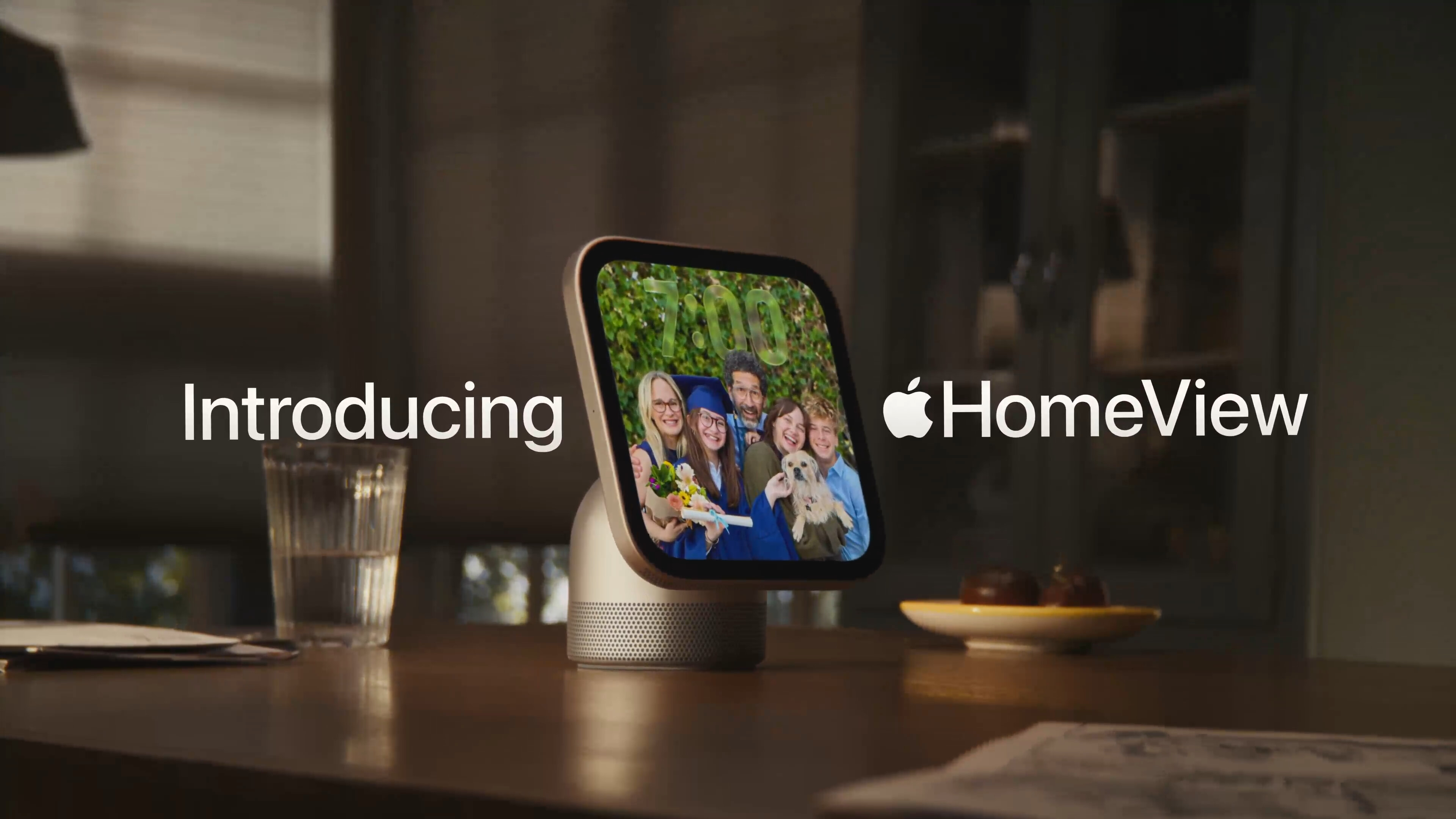
We see a wee bit of the cable when the dad reaches to touch the screen to start the French toast recipe:
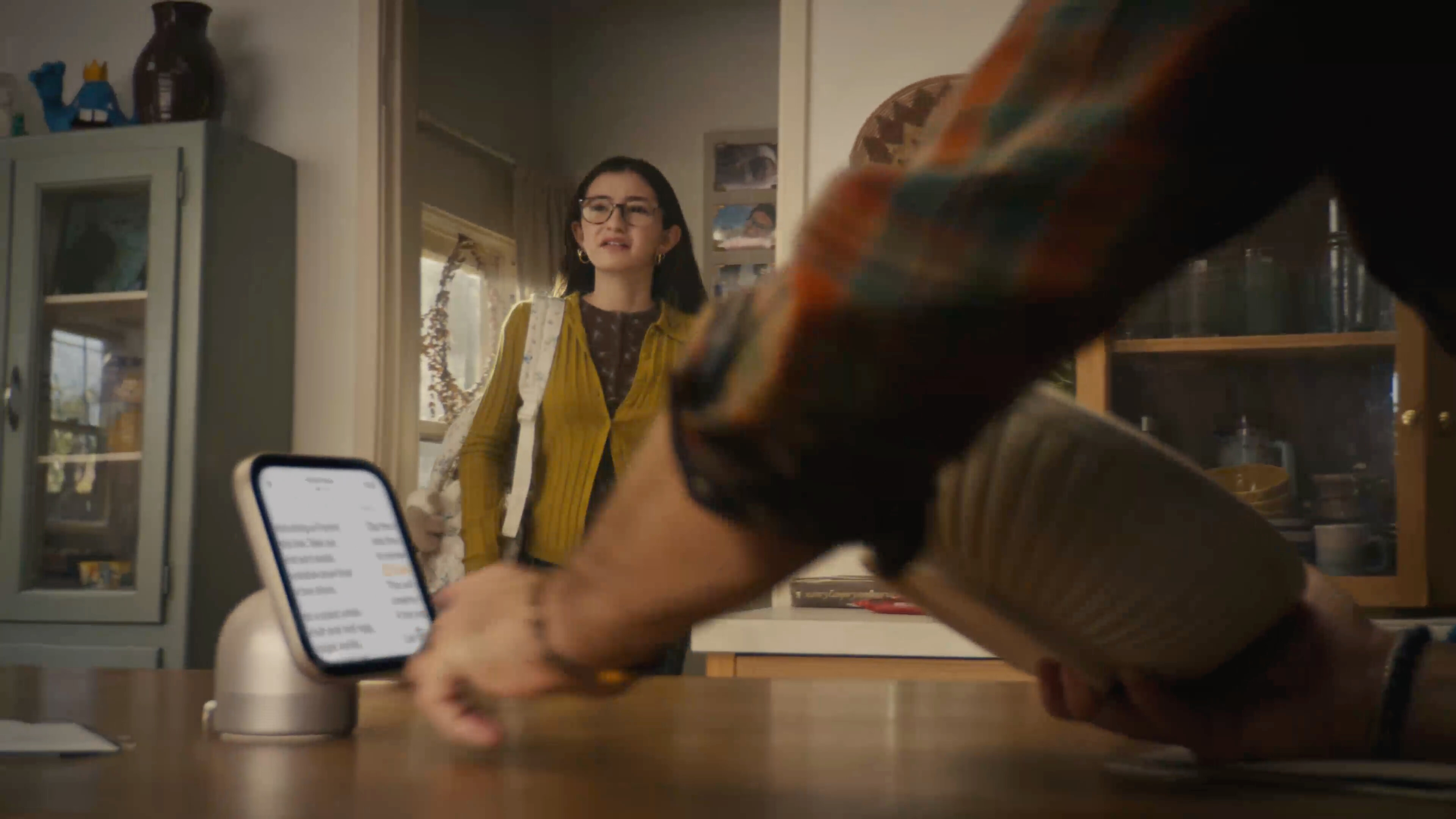
And then a few seconds later, after the mom rotates the HomeView to the side, so she can check her calendar (despite the fact that she knows the dad was using it to follow a recipe), we get our most honest shot of the cabling situation:
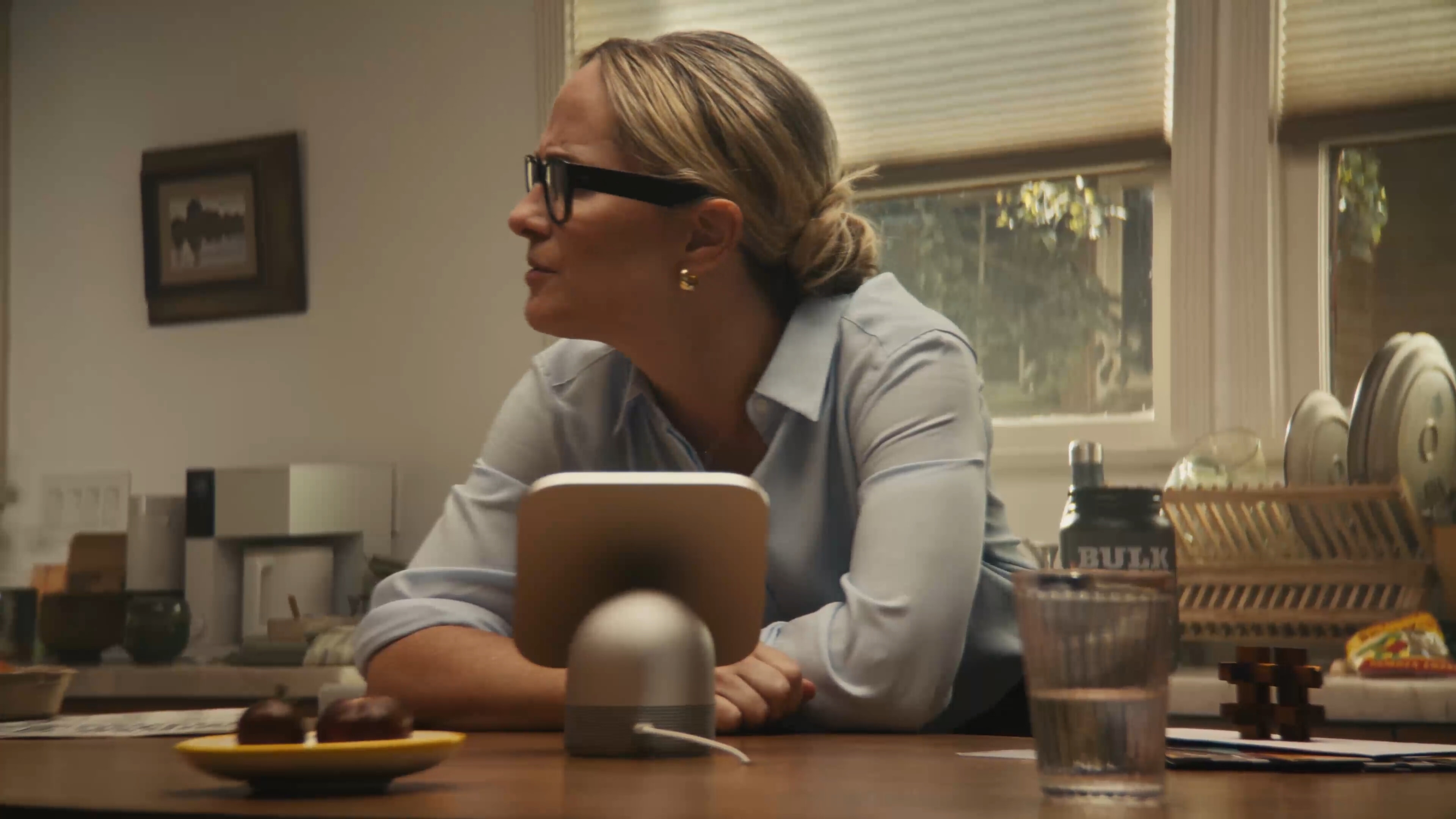
The above shot is at 0:49. It’s followed by two quick cuts to the dad and then the younger daughter, then at 0:52 we cut back to the mom (curious about her daughter’s new boyfriend situation), and, lo, the shot is now framed in such a way that we no longer see where the cable goes:
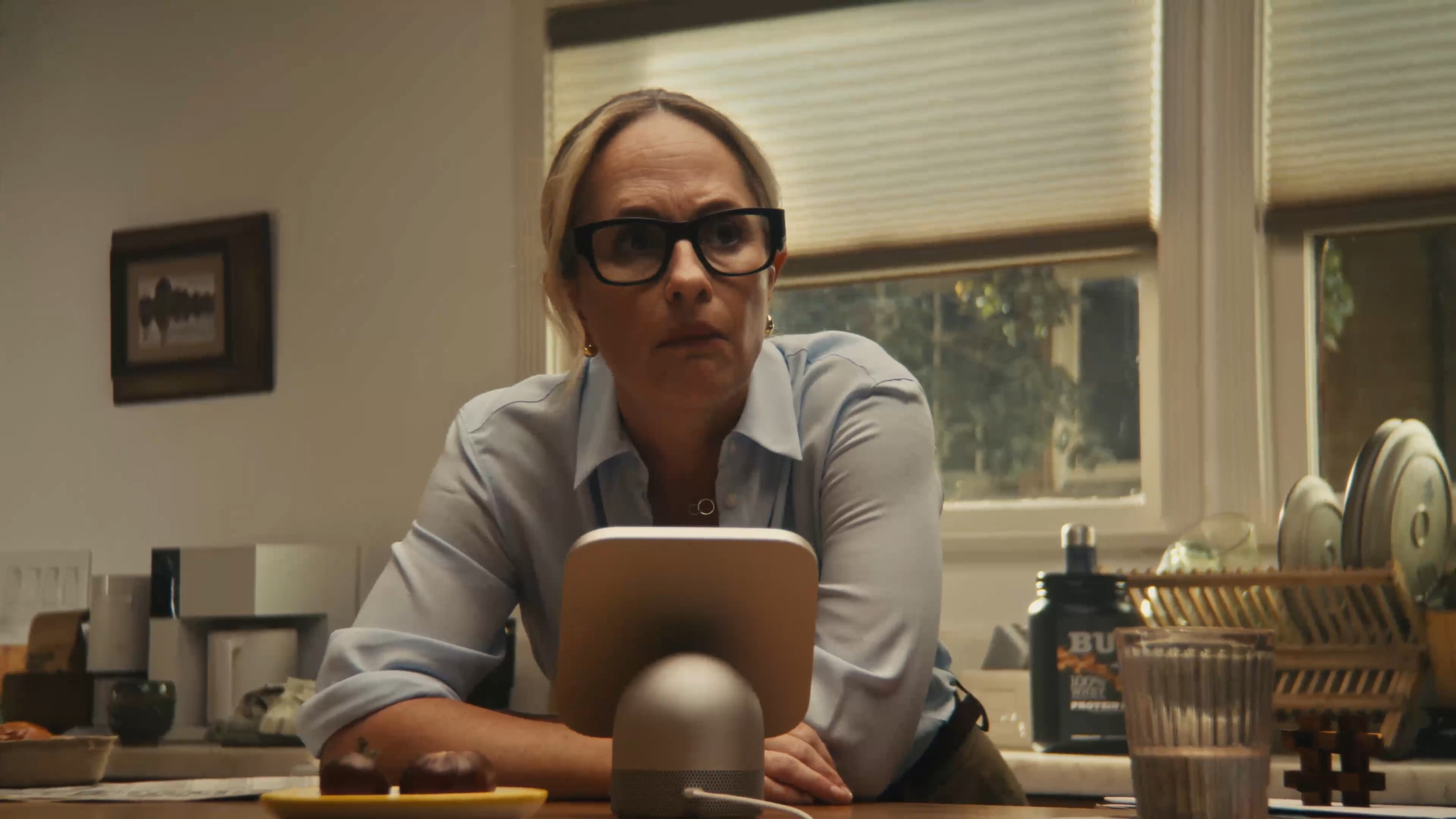
If you think that slight reframing is happenstance, you should stay away from poker tables. Most kitchen islands I’m familiar with — including my own — have power outlets on the sides of the island. I’m sure some people have power outlets on the top surface of the counter, but I can’t recall seeing one. These are kitchen counters, not office desks. But either way, there’d be a long USB-C cable cluttering the countertop. And if you do happen to have a power outlet on the top surface of your counter, there’d be an adapter sticking out of it, all the time, to duplicate this HomeView setup.
This family’s convenient hole in the center of their island countertop is a fantasy. Where does the cable go underneath? How exactly do they have a power adapter plugged in down there? What happens when something spills on the counter? When we custom ordered our kitchen, we weren’t asked if we wanted any holes drilled in our island countertop, and if we had been asked, it would have made me wonder if the guy asking the question had a hole or two drilled in his head.
I know, it’s a marketing video. Marketing videos present products in ideal settings. But the power cable is an essential aspect of the standalone HomeView. I’m not suggesting that it should be battery powered. You’d still need to plug it in every few days, which would mean most people would just leave it plugged in, which gets us back to needing to live with an always-visible cable and power adapter in one of our living spaces. The countertop hole this cable disappears into in this video is less ideal and more dishonest.
The wall-mounted option seems more appealing to me, but now you’re talking about a home improvement project and (for most of us) calling an electrician. And that raises the question of why the wall-mounted version costs the same $300 as the one with the connected base, even though the base provides the subwoofer. And it requires a mount, and the mounts cost $60 (USB-C), $80 (AC wired), or $130 (PoE — and this one is not available yet). So the wall-mounted version, when you include a mount, costs more but sounds worse? This doesn’t make sense.
Those points make me skeptical that there’s a place for HomeView in my home. We have a stereo pair of HomePods in our kitchen. Neither is on the center island, because that would be dumb. They’re on the counters along the outside of the kitchen, each near an outlet on the wall. In the four days since HomeView was announced, I’ve tried to imagine when I’d want to look at something on a screen on either of them. My count remains at zero.
My third early impression is that the display is surprisingly small. I saw HomeView in person in New York on Tuesday, and I think Apple’s video conveys its size very accurately. It’s small and cute. It’s much more like a HomePod Mini with a screen than a full-size HomePod with a screen. For some reason I was expecting the latter. This is not a complaint, simply an observation. I actually think that making it small and cute makes it about as unobtrusive as an ever-present screen could possibly be. That’s good. But because it’s small you need to be close to it to read anything more detailed than large glanceable widgets.
The major difference between a device with a screen and one without is that you can watch video on a device with a screen. But HomeView clearly isn’t intended for that. It can play video but isn’t primarily meant to play video. If it were it would have a widescreen aspect ratio. But instead it has a square aspect ratio,1 which is decidedly unsuited to video, unless, I suppose, you want a screen that is equally unsuited for both widescreen and tallscreen video.
So my skepticism boils down to the question of why anyone would want to add one (or more!) additional ever-present screens to our homes and lives. Phones can stay in our pockets until we need them. Watches remain on our wrists. HomePods can be tucked away unobtrusively in corners, and remain fully useful. HomeView needs to be in a prominent location for its display to serve any practical purpose. Apple’s initial pitch for it doesn’t earn that prominence for me. ★
-
In my thoughts and observations column after Apple’s iPhone event last month, I wrote the following regarding the iPhone Duo’s clever 1:1.4 aspect ratio:
Here’s the thing. If you take a 2 : 1 or even 2.2 : 1 aspect ratio phone display and turn that into a book-like foldable, the inner screen comes out square — or so close to square that we might as well just call it square. Nobody makes any device of any sort that just has a square display. Square is a terrible aspect ratio for a phone or a tablet or a laptop or a desktop display. The only square displays on the market are the inner displays for Android foldables from the last decade. Square being a shitty aspect ratio is half the reason almost no one has bought those things.
I will admit that I had the as-yet-unannounced HomeView in mind as I wrote that, given that its square aspect ratio had been rumored for months. HomeView is not a phone or tablet or laptop or desktop display. It’s not a TV either. So maybe square works for this nascent product category (status boards?). But if square does prove to be correct for this purpose, it’ll be the first category I can think of where that’s true. Apple Watch is the closest device I can think of whose screen serves primarily to display status, but even Apple Watch isn’t square. (It varies slightly by model, but Apple Watch displays are around 4 : 5.) ↩︎
Saturday, 17 October 2026
- Apple TV Price History, Charted ★
-
Glenn Fleishman:
I wondered what the entry-level, initial price of each Apple TV box at introduction was, from the March 2007 original to the Apple TV 4K (4th generation) announced October 13, 2026, adjusted for inflation. So I charted it.
I suppose this doesn’t mean Apple has given up on making Apple TV content accessible, but the price-accessible path is just using the Apple TV app on the crapware OS your “smart” TV runs.
Friday, 16 October 2026
- The Late Charlie Munger on Elon Musk and Tesla ★
-
Re: my post today on the still-vaporware Tesla Roadster and Benedict Evans’s maxim that “Elon Musk is a bullshitter who delivers”, a reader sent me this YouTube short of Charlie Munger’s answer to a question at Berkshire Hathaway’s 2020 shareholder meeting regarding Tesla’s volatility and Musk’s self-promotion. Munger said:
My thoughts are two. I would never buy it, and I would never sell it short.
[Audience laughs.]
I have a third comment. There was a man out in Los Angeles for years named Howard Ahmanson. He once said something that I’ve taken to my heart: “Never underestimate the man who overestimates himself.” I think Elon Musk is peculiar and he may overestimate himself, but he may not be wrong all the time.
- Apple: ‘Strengthening App Review Guidelines Against Nonconsensual Intimate Imagery and Bait-And-Switch Apps’ ★
-
Apple Developer News:
As outlined in our App Review Guidelines, pornographic material has long been prohibited on the App Store — this includes apps that generate nudity or sexually explicit imagery, such as “nudification” apps that create sexually explicit images of real individuals without their consent. Apps that host user-generated content are required to filter objectionable material, give users a way to report offensive content, and let users block abusive accounts. Apps containing hidden or undocumented features are also prohibited on the App Store, including apps that misrepresent their purpose during review and only reveal harmful capabilities — such as “nudification” — after approval, a tactic commonly known as bait-and-switch.
Their post includes the specific changes to the guidelines. Let’s hope the guideline changes are accompanied by better enforcement.
Of course, it’s worth noting that the best known perpetrator of AI-generated non-consensual nudification is X, which (checks notes) is where Apple executives do all their social media posting, and which, yes, I argue once again marks the spot in the zeitgeist. The zeitgeist is not clean.
- Apple TV Started at $69 in 2015 ★
-
Joe Rossignol, reporting for MacRumors back on 9 March 2015:
Apple CEO Tim Cook on Monday at the “Spring Forward” media event in San Francisco announced that Apple TV will now cost $69, discounted from its regular price of $99. The new price for the set-top box arrives on the heels of the announcement of HBO Now for Apple TV. The new price appears to apply to the third-generation Apple TV, as the company did not announce a new set-top box on stage at the Yerba Buena Center this afternoon.
Basic Apple Guy posted a short clip of Tim Cook, on stage, announcing the price reduction. Cook said:
And it’s got a very attractive entry level price of $99. But today, we would like to make it even more accessible for more people so they can take advantage of this great new content. So we are lowering the price today to $69.
The audience greeted this with whoops and cheers. (This, despite it being a smaller media event — Apple always packs the front of the house with employee ringers. Whoops and cheers are one of the things Apple is missing out on with their post-COVID pre-filmed keynotes.)
Apple continued selling the 3rd-gen Apple TV (not to be confused with “Apple TV 4K”, which restarted the generation counting in 2017 alongside the introduction of the iPhone X) for $69 until October 2016.
Inflation adjusted, a $69 Apple TV box today would cost a little under $99. Even if we only consider the $99 price in 2015 dollars, that’s about $137 in today’s dollars. Round that up to $150 and it would still be half the price of the only Apple TV hardware Apple now sells: this week’s new 4th-gen Apple TV 4K.
The new Siri Remote, with precision Find My support (and a speaker), is compatible with all prior generations of Apple TV 4K. So if you just want the new remote you can just buy the new remote. But it costs $59, which is almost as much as an entire Apple TV (with remote, of course) did in 2015.
- Strange Times Make for Strange Bedfellows ★
-
Mark Zuckerberg, on X:
Muse Spark Open — weights releasing today — runs great on new Mac Studios thanks to work with @johnternus and Apple.
Congrats to the team! Amazing to run a model of Muse Spark Open’s caliber and scale this efficiently, right from your desk. Mac Studio keeps pushing the boundaries of on-device AI!
You will recall that the M5 Ultra Mac Studio with 512 GB RAM is set to ship by “the end of October”, and we’re midway through the month. You will also recall, from that same announcement, that multiple Macs can be clustered together via Thunderbolt — four Mac Studios can be connected to each other.
For Ternus, I could do without the second exclamation mark. For Zuckerberg, it’s fascinating that he had to post this on X, despite owning Threads, because no one at Apple uses Threads.
Zuckerberg has been posting somewhat regularly to X for months now, particularly regarding AI. Alex Heath asked him about it on his Sources podcast a month ago. From that one-minute clip:
Threads is doing great. I think it’s actually ... either bigger than X at this point, or it’s like very soon about to be. But, I mean, look, there are different communities in the different places. There’s a lot of AI folks on X, and I think part of what you try to do with social media is just communicate where people are, right?
Lastly, there’s this “1984” spoof posted by Alexandr Wang, Meta’s chief of AI and mulletry, which I find both amusing and painful.
- How They Got Duo Support in NetNewsWire ★
-
From the NetNewsWire blog:
The latest version of NetNewsWire for iOS supports iPhone Duo, which is very much a novel iPhone with toolbars running up the side and all kinds of behavior.
How we did it: we didn’t do any work at all. We built the app using Xcode 27.1 and the default iOS SDK that comes with it, and that’s it.
Here’s the thing, though: we were already using standard controls — toolbars, navigation controllers, split views, etc. — and we were paying attention to size classes and such (as opposed to just looking at device type).
Develop your app the right way and, depending on the app, it might literally be no work at all to produce a great version for the Duo. Develop your app the wrong way and it might take months. NetNewsWire is one of my most-used apps. I keep it in my home screen dock, alongside Messages, Notes, and Safari. It would drive me nuts to use a Duo without a version of NetNewsWire that adapts to the Duo’s novel display sizes.
Real Artists Ship, Tesla Edition
Friday, 16 October 2026
Jonathan Gitlin, writing for Ars Technica:
Nine years after first trying to resurrect the Roadster, Tesla is apparently trying again. CEO Elon Musk might have relocated its HQ to Texas, but yet again he has returned to California’s showbiz industry to hawk his wares; last time it was a Hollywood back lot for the remote-controlled Cybercab demo, last night it was decades-old stunt technology to make a show car do tricks in the air. [...]
Musk claims that the Roadster will go into production by 2028. But the CEO has a long and glorious history of overpromising and underdelivering; in 2017 he told attendees at the previous launch that “We are making it now.” Using the company’s referral program, some people were in line to receive two free cars. But those free cars never showed up, and neither did the ones that people put down $50,000 deposits for; last year Sam Altman discovered how hard it can be to get that money back.
I like a good stunt show as much as the next guy, and this looked like a cool stunt show. But people are losing their minds if they think this stunt show makes it any more or less likely that Tesla will deliver a Roadster as promised. This Reuters story makes it sound like they think Tesla is going to sell cars that do this stuff. Last night’s stunt show has no more bearing on actual production cars Tesla may or may not ship than George Lucas’s Star Wars movie had on Ronald Reagan’s “Star Wars” missile defense system.
The Tesla Roadster is vaporware. But Elon Musk is very good at distracting from unshipped vaporware by delivering on stunts. Two years ago it was robots that were totally faked. Last night’s car stunt involved real things that actually happened but only in the way that David Copperfield made the Statue of Liberty “disappear”.
Over at Jalopnik, Amber DaSilva has another good take, which concludes:
Tesla has long made up specs for its cars, made wild claims that weren’t substantiated by users, and now it’s making more big impressive claims. The “cars” used for the demos were likely nothing more than shells outfitted with exactly enough equipment to make the tests work. The 0.81 second zero-to-60 number wasn’t even shown with an on-screen timer during the event, let alone independently verified. Tesla has yet to prove anything about the new Roadster works in the real world, or could even exist within the realm of physics that those of us not named Musk occupy.
Roadster preorders have reopened, with the company once again taking $50,000 checks to reserve a car that’ll theoretically be made two years from now. It hasn’t yet said what will happen to the people who placed a reservation for the car Tesla announced nine years ago, which looks and functions completely differently to the one that bears its name today. And — arguably most concerning — we don’t know, if Tesla rakes in more money off the Roadster name, just how much will go to some malicious end.
And on Threads, Benedict Evans reiterates his longstanding take on what makes Elon Musk so confounding to so many people:
A long time ago, I described Elon Musk as a bullshitter who delivers. This is the perfect expression of that. This car was first shown a decade ago, with another stunt, and it never shipped. Now there’s another stunt, and another huge wave of PR and admiration.
But meanwhile, there’s the scaled car company, and the self-landing rockets!
Henry Ford was a brilliant industrialist, a terrible manager and a racist piece of shit. Several things can be true at once.
If you think Musk is either completely legitimate and trustworthy or an utter fraud, you are wrong. He has led his companies to extraordinary accomplishments, and he has made promises based on complete bullshit. He is a shameless bullshitter who sometimes delivers. The sometimes is implicit in Evans’s take, because if he always delivered, there’d be no bullshit. But I think it’s worth including the sometimes to make the point. And some of the things he’s delivered are so amazing that they sure sounded like they might be bullshit when they were announced. “Space internet” sounded like total bullshit when Musk announced it in 2015, but it started rolling out in 2020, and today you can just buy it at Best Buy for $350.
Tesla makes some tremendous vehicles. Their self-driving technology is the best in the consumer market. (Not as good as Waymo’s, but you can’t buy a Waymo.) So maybe they will ship a great Roadster in 2028. I’ll pay attention if and when they do. But I wouldn’t bet a nickel that they will. And I wouldn’t bet that they won’t, either. ★
Friday, 16 October 2026
- Shyam Sankar, CTO of Palantir, Says AI Researchers Have Started Smoking Because They’re Convinced AI (Claude, Probably) Is Going to Cure Cancer ★
-
From the transcript of Sunday’s Face the Nation on CBS:
Shyam Sankar: You know, I take — I think there’s a profound truth to Pascal’s saying that every human has a god-shaped hole in their heart, and it’s important to understand that many of these folks in Silicon Valley who are building this technology have filled that hole with the machine God of AGI. And I mean, there’s so many interesting stories around this. Like, for example, so many AI researchers have started smoking as a way of signaling to other researchers how much they believe in AI. I believe so much — (CROSSTALK)
Margaret Brennan: What? That makes no sense. What do you think —
Shyam Sankar: I believe so much in AI that it’s going to cure cancer. So I will — I’m showing you my chips are all in. So there is kind of this mass psychosis, social delusion around it, and I think it’s getting in the way of actually what is happening with AI.
Sankar doesn’t name anyone, alas, but if there’s any truth to this (and good god do I hope there is) it’s got to be Anthropic researchers specifically. They’re the religious kooks who believe they’re creating an AI god and hold the psychotic belief that Claude is already conscious. Smoke ‘em if you got ‘em, you crazy fucks.
Via Ben Collins, CEO of The Onion, who notes that the nation’s finest news source was on this story 13 years ago.
- iPhone Duo Pre-Orders Launched, and Three Hours Later It’s Sold Out Through the End of January ★
-
Joe Rossignol, MacRumors:
If you were hoping to surprise someone with an iPhone Duo for Christmas, you might be out of luck, as Apple’s online store in the U.S. is already showing an estimated shipping date of January 25 for all configurations following the start of pre-orders today.
It is possible that some Apple Stores will have the iPhone Duo available for walk-in customers on Friday, October 23 launch day, but it seems likely that inventory will be very tight.
I suspect it’s a combination of high demand and low supply but I doubt we’ll get any insight on that from Apple itself. It’s in their interest to let people think demand is simply very high, and not draw attention to their production limits.
I feel for the folks on the West Coast who woke up for a 5:00am start and still got stuck with December or even January ship dates. This is one of those times where it’s frustrating that, per Apple’s consistent schedule, pre-orders always start before reviews appear. People are left to guess whether they’re going to like it without any word from people who’ve used it.
Initial Thoughts on This Week’s New Apple TV 4K (4th Generation) and HomePod Mini 2
Thursday, 15 October 2026
Apple Newsroom, Tuesday morning:
The new Apple TV 4K features three far-field microphones, letting users control what they’re watching and discover new shows completely hands-free. Advanced echo cancellation intelligently isolates a user’s voice from background sound to deliver crystal-clear “Hey Siri” or “Siri” recognition, even while audio is playing.
This is nice, but I don’t think it buys me anything, because my existing Apple TV 4K is paired with 2nd-gen HomePods, and the HomePods each have a “four-microphone design for far-field Siri”.
The A19 chip in the new Apple TV 4K delivers up to 50 percent faster CPU performance and up to 2× faster GPU performance than the previous generation, for greater responsiveness, faster navigation, and smoother animations. The A19 chip also includes a new, dedicated AV1 decoder, enabling more efficient, high-quality streaming while using less bandwidth.
The new AV1 decoder seems like it might be meaningful, but does anyone think UI navigation and animation smoothness is improved by going from the A15 to the A19 SoC? I mean navigation is going up/down/left/right. I’m sure the graphics and CPU improvements matter for gaming, but the only mention of gaming in Apple’s own Newsroom announcement is this sentence: “With Apple Fitness+, the living room becomes a workout studio, while Apple Arcade and the App Store’s library of games turn it into a home arcade.” I wish it were otherwise, but gaming is such an afterthought on Apple TV that it only garnered the second half of a sentence that started with Fitness+, a service that has only been in the news this year because Mark Gurman says Apple laid off part of the team.
The new Siri Remote keeps its familiar design while adding Find My support with Precision Finding and an option to play a sound on the remote — making it far easier to locate.
That’s my single favorite feature in the announcement. I hate to say it though, but the previous remote should have supported these features. The 3rd-gen Apple TV 4K came in 2022, but Apple launched AirTags with Precision Finding in 2021. Remote controls are right after keys on the list of things people misplace most frequently, and Apple’s remote controls, because they’re small and thin, are particularly susceptible to being snatched by couch-cushion gremlins. Speakers, so the remote can play a sound to help you find it, were invented even earlier than 2021.
Pairing HomePod with Apple TV 4K already offers users an immersive viewing experience that’s easy to set up, and the new Apple TV 4K takes it even further. For the first time, users can create a four-speaker surround sound experience with Apple TV 4K (4th generation) and HomePod mini 2. The four speakers work together with Apple TV 4K to intelligently recognize their position in the room so audio timing and levels are automatically calibrated to the space. HomePod (2nd generation) can also be used in this four-speaker setup for the ultimate audio experience, as long as the front and rear speaker pairs match.
This is tempting to try. In other words, in addition to the two 2nd-gen HomePods I already have paired in my living room, I can add two of the new HomePod Mini 2’s behind the sofa for surround sound.
The elephant in the room, though, is price. Before this week, Apple sold two models of the 3rd-generation Apple TV. On a percentage basis, they were hit the hardest of any products Apple sells by the company’s across-the-board price increases this summer:
| Before | June 25 | Change | |
|---|---|---|---|
| HomePod | $300 | $350 | 17% |
| (Old) HomePod Mini | $100 | $130 | 30% |
| (Old) Apple TV 64 GB | $130 | $200 | 54% |
| (Old) Apple TV 128 GB | $150 | $250 | 67% |
The new Apple TV 4K announced this week only comes in one model, and it costs $300. It’s great that there’s only one model for simplicity’s sake, but the number one complaint when the previous generation cost $130/150 was that it was too expensive compared to set-top boxes and sticks from Amazon and Roku. (Or the “free” option of using the “smart TV” software that comes with every TV set.) Now, with the new Apple TV, it’s twice as expensive — and Apple is not keeping the 3rd-gen models around as lower-priced options. I still think it’s worth it, personally, but the general consumer market thought the old prices were too high and I don’t see any of the new features making Joe or Jane Consumer think, “Sure, I was skeptical about the old one at $130, but this new model — which looks exactly the same — this seems worth $300.”
HomePod Mini 2 now costs $150. That’s not too much of an increase over the new-since-June-25 $130 price for the old HomePod Mini, but it’s a stiff 50 percent increase from the old HomePod Mini’s $100 price from November 2020 through June 24 this year. I generally round Apple’s prices up from their “99” values, but it’s worth noting that what I’m calling $100 was actually $99, and going to just two digits does have a psychological effect on buying behavior. Again, I think $150 is a reasonable price for the HomePod Mini 2, but it doesn’t feel as much like a lark as $99 did. $99 was a bit of a “Sure, let’s get another one” price; $150 is more of a “Do we really need another one of these?” price.
At the old pre-June prices, you could buy a 128 GB Apple TV and a pair of HomePod Minis for $350 ($150 + $100 + $100). Four short months later, with today’s new models, that combination would cost $600 ($300 + $150 + $150). That price difference is much more striking than any of the new and improved features in the products. ★
Thursday, 15 October 2026
- Secret Documents Reveal Donors Behind $330 Million for Trump’s Ballroom — Apple and Nvidia Top the List at $25 Million Each ★
-
Jonathan O’Connell, Sarah Blaskey, and Aaron Schaffer, reporting for The Washington Post (News+ link; Archive.today link):
A list obtained by The Washington Post reveals all the major donors to President Donald Trump’s White House ballroom project, including previously undisclosed contributors who have benefited from regulatory decisions, government contracts and, in one case, a pardon for a family member.
Tech giants Nvidia and Apple each committed $25 million, the top contribution amount, the list shows. The Adelson family, one of the GOP’s largest donor dynasties, committed that sum as well, as did billionaire Charles Ergen, co-founder and chairman of telecommunications company Dish Network.
Absent from the list is Trump himself, who has said that he is helping to pay for the project. “It’s being paid for a hundred percent by me and some friends of mine,” he said last year, days after demolition began on the old East Wing.
The White House publicly identified 37 people, companies and foundations as donors last October, without revealing the amount of their individual gifts.
The list obtained by The Post, an internal spreadsheet used to track contributions for the fundraising effort, contains the source, date and amount of all 67 donations above $10,000 recorded as of late last month. It shows a total of $333 million from private donors, aligning with the administration’s public statements. Additional records, also internal to the fundraising effort, provide more detail about the donations and indicate that at least $77 million came from donors who requested anonymity.
In addition to being a shameful display of abject corruption, it’s also a shameful act of support for horrendous architecture. This entire edifice ought to be destroyed — I won’t vote for any Democratic candidate in the 2028 primary who doesn’t pledge to knock all this Trump cack to the ground in January 2029. That’s table stakes.
Wednesday, 14 October 2026
- The FBI Arrested a Saudi National OpenAI Employee for Planting a Recording Device in the Company’s Executive Conference Room ★
-
The Department of Justice, yesterday:
An employee of OpenAI has been arrested for and charged with using or endeavoring to use an electronic, mechanical, or other device to intercept oral communications. Abdulrahman Alfozan, 35, a national of the Kingdom of Saudi Arabia, was arrested on Oct. 9, and made his initial appearance in federal court today.
“This serious situation underscores why winning the global super intelligence race is a national security prerogative — and why President Trump’s leadership in creating the Super Intelligence Force is so important,” said Director of National Intelligence Jay Clayton. “I thank Director Patel and our FBI partners for their diligence and swift action. The intelligence community remains committed to safeguarding America’s cutting-edge intellectual property from foreign threats.”
“According to the complaint unsealed today, Abdulrahman Alfozan allegedly concealed a covert recording device inside his employer’s executive conference room to secretly capture sensitive communications about the company’s super intelligence technology,” said FBI Director Kash Patel. “Protecting American SI innovation is essential to safeguarding our nation’s economic strength and national security, and the FBI views that mission as one of our highest counterintelligence priorities.
Four references to “super intelligence” in two paragraphs. Not weird at all.
Alfozan, unsurprisingly, was fired.
Tuesday, 13 October 2026
- Apple HomeView ★
-
Apple Newsroom:
Apple today introduced Apple HomeView, designed to be central to the home and personal to everyone in it. With a stunning 7-inch Liquid Retina display, HomeView brings entertainment, connection, and smart home management together in one place, from playing music and making FaceTime calls to home monitoring and hands-free automations with voice control — all designed with privacy and security at the core. HomeView recognizes users by their faces, adapting so they can access their personal content in Messages, FaceTime, Calendar, Reminders, and Find My. HomeView features Siri AI, an entirely new version of Siri that’s profoundly more capable and conversational, with broad world knowledge that powers richer music discovery and onscreen awareness. When paired with an Apple Intelligence-enabled device, it can also draw on a user’s personal context, such as their Calendar, Messages, and relevant information across their apps, to provide more helpful, personalized responses.
Your first question might be how this facial recognition to identify users works, using a Center Stage camera alone, when other products (like, notably, the iPhone Duo) don’t let you unlock using the camera alone. HomeView does not have Face ID. I asked about this and Apple reps said that first, your home is (reasonably!) presumed to be a safe space. But in order for users to be recognized — by voice or face — they must have a “registered personal device” that supports Apple Intelligence and Siri AI, that device must be present on the home’s Wi-Fi network, and it must have been recently unlocked. Per footnote 2 on the Newsroom post:
Personal context requests require a paired Apple Intelligence-enabled iPhone or iPad running the latest software version with Siri AI turned on and set to a supported language.
So, alas, an Apple Watch does not count as a personal device. Effectively, your iPhone or iPad serves as a second factor to securely identify you. FaceID serves as a single factor for authentication, so something like iPhone Duo cannot do what HomeView is doing here.
Monday, 12 October 2026
- Mark Stephens, a.k.a. Robert X. Cringely, Died at 73 ★
-
Mary Alyce Stephens (née Neader), posting on Cringely’s Facebook account:
Hello, this is Mary Alyce, Bob’s wife. I am coming to you with immense sadness to let you know that Bob passed away. His obituary follows. His family is not requesting anything, however, if you would like to make a donation in his honor, please consider The American Heart Association or The American SIDS Institute. [...]
Writing as Robert X. Cringely, Mark became a distinctive voice in technology journalism. He had an unusual ability to understand not only technology but also the human beings behind it — the dreamers, inventors, entrepreneurs, eccentrics, and risk-takers who were changing the world. He could take a complicated subject and make it understandable, entertaining, funny, and deeply human. He was skeptical when skepticism was warranted, irreverent when others were overly serious, and never particularly interested in following conventional wisdom. That independence was not simply part of his writing. It was Mark.
He followed the beat of his own drummer throughout his life. He was brilliant, funny, opinionated, curious, generous, exasperating, and unforgettable — sometimes all within the same conversation. He loved a good story and knew how to tell one. He could make you laugh, make you think, make you argue with him, and occasionally drive you crazy. Life with Mark was rarely dull.
Mark’s life also included heartbreaking loss. He was preceded in death by his beloved sons, Chase and Cole Stephens, as well as his parents, Ray and Lois Stephens and father-in-law Jim Neader. I could also add brother-in-law Jimmy Neader and niece Ericka Neader, but they were a thorn in our side.
That last dig, at her own dead brother and niece, offers a hint at why Cringely loved her. He wasn’t one to pull punches either.
Her full obituary for Cringely/Stephens is visible without being logged into Facebook (I’ve still never created one), but Steven Sinofsky kindly posted it to his account on X. Pick your poison. Update: Here’s a version hosted by the funeral home.
X Once Again Marks the Spot
Sunday, 11 October 2026
Upon taking the CEO helm last month, John Ternus began tweeting on X. He tweeted “hello”, posted an iPhone event eve teaser and then a promo video for the new products, celebrated Apple’s plethora of wins at the Emmys and launch day on Fifth Avenue, and commemorated the anniversary of Steve Jobs’s death.
X is the only place these posts go. Same for Greg Joswiak’s account. Lighthearted stuff too, like Cook “introducing” Ternus to Pikachu back in August. You may not like it that X has re-found its footing under Elon Musk’s ownership, but it has. I’m citing Apple executives here but they’re far from alone. There are hundreds of interesting people and accounts I follow that post on X very regularly and do not post anywhere else at all. As a word nerd I love Merriam-Webster’s account — fun, clever, smart posts every day. That’s just one example among hundreds. Here’s another. Fascinating new apps are being shown and discussed on X and nowhere else.
[Update: I stand corrected — Merriam-Webster does have an account on Bluesky. It contains a subset of the items they post to X. They’ve posted 34 original new tweets on X so far in October; only 10 on Bluesky. Plus on X they’ve chimed in with 11 clever and/or informative retweets from other accounts, including one from those notorious fascists at Sesame Street; there are zero of those on Bluesky. So while I regret the error of implying that Merriam-Webster posts exclusively on X, the 45-10 count for October to date proves my point just as well.]
I see more interesting posts on X than I do on Threads, Bluesky, and Mastodon combined. I wish that weren’t so but it is. Most people don’t want to think about politics so they don’t. Those people, when they want to participate in a Twitter-like social network, go to X.
And I can’t blame anyone. The only network that compares to X, size-wise, is Threads — but Threads’s algorithm is weirder than X’s now, and the content I see there is relatively boring. My Threads timeline is full of engagement bait without being engaging. And if you want to judge a platform by its owner, “I’m grossed out and/or appalled by Elon Musk so I’m going to Mark Zuckerberg’s joint” isn’t a way to avoid being grossed out and/or appalled by the owner. Bluesky and Mastodon are too small for most people to care about — and, worse, they are the networks where politics are, in my experience, unavoidable. You can have a discussion about cool new use cases and tools for AI on X and people just discuss the tools and use cases. On Bluesky and Mastodon it’s difficult to have such discussions without arguments from people who (a) believe all use of AI is unethical, and (b) will shove their viewpoints into your replies.
The culture on X today is remarkably friendly and inclusive. It is a cheerful place. That cheerfulness is another differentiator. If you believe the world is falling apart and doomed only to get worse, that our obvious and real problems cannot be surmounted, X is not the platform for you. If you think the world is full of fun and amazing people and things, that humanity’s defining feature is our collective ability to solve any problem, that the only time better to be alive than today is tomorrow, it might be.
If you have stayed away, or even just mostly away, from X for years and then come back, people just say things like “Hey, glad you’re back!” On the other networks, especially Mastodon, they tell you you’re “feeding Nazis” — by going to the platform where Tim Cook posts Pikachu videos. These people have either lost their minds or refuse to check their prior assumptions. (Most of the ones who chime in about it publicly are the lost-their-minds types.)
But the bigger problem is that there’s little action on Bluesky or, especially, Mastodon. There’s a lot of activity on Threads, but little action. There is action on X. I’ve said for years that Mastodon is my favorite of the bunch and in a way it still is, but really that’s because when I go there I don’t have to be diligent to avoid wasting time. I avoid wasting time on Mastodon because there’s so little of interest to see. That’s a feature — for me — but it certainly isn’t what most people are looking for in a Twitter-like posting platform. They want action. The action is on X.
Without any fanfare — perhaps to avoid his ire — X has de-Musked its algorithm. I stopped visiting at all when the algorithm there was putting Musk’s own tweets into my timeline, every time I checked, despite the fact that I never followed him. But they don’t do that anymore. I don’t see much politics of any kind in my timeline, and what I do see is from accounts I chose to follow. I see tech (including a lot of interesting breaking news), sports (including a lot of interesting videos and stats), and stupid stuff that’s actually funny. My only problem with X now is that I do have to pay attention to avoid wasting time when I visit.
Plus, in addition to the tweets, there are now many interesting people using X to post entire essays and blog posts. I wish that weren’t so, for multiple reasons (e.g., no RSS). But it is so.
If you returned from exile on a desert island and took a look at X today for the first time in a year, you might reasonably guess that Elon Musk got bored and sold it while you were away. I do think he got bored micromanaging it, but the rank muskiness that permeated the platform after he took over is — for now, at least — gone. ★
Sunday, 11 October 2026
- Apple Only Started Suggesting iOS 26 Users Upgrade to 27 Three Days Ago ★
-
Joe Rossignol, on Thursday:
Starting today, iPhone users still running iOS 26 will see iOS 27.0.1 as the prominent software update in the Settings app under General → Software Update, with iOS 26.7.1 now relegated to a smaller “Also Available” section at the bottom.
Just the other day I posted about how most users only get OS updates when Apple pushes them through automatic updates. But even for users who update manually, until Thursday, the default suggested update for users on iOS 26.x was to remain on the latest version of iOS 26. To get iOS 27 you had to scroll down “below the fold” and most users don’t do that.
iOS 27 adoption amongst normals is very slow, but that’s only because Apple wants it slow. That’s not because iOS 27 is buggy — it speaks to its Snow-Leopard-like focus on bug fixes and performance updates that it’s actually remarkably stable. The obvious explanation is that Apple is slow-rolling 27 updates to gate access to Siri AI.
Saturday, 10 October 2026
- Sunnny ★
-
My thanks to Sunnny for sponsoring this week at DF. How can B2B software be so friggin’ delicious? Find out when early access launches on Monday, October 19.
- ‘Proof-of-Human’ ★
-
Benjamin Mayo (on X, of course), commenting on Apple promoting behind-the-scenes footage showing that the embroidered “Welcome Home” logo for next week’s keynote/experience was stitched by hand:
There needs to be a name for this phenomenon where every published piece of art by a company is now accompanied by a proof-of-human video.
I agree, and I think Mayo coined the term right there. It’s always been fun to see footage of talented artists and craftspeople making things by hand. But in the age of AI it’s a differentiator — not just that you aren’t lazily generating your art via prompts, but that you understand that heart comes from the human hand.
Thursday, 8 October 2026
- Let’s Check In on Trump’s Blog ★
-
An actual post from the sitting president of the United States:
The White House considers anyone that uses the term, “Artificial Intelligence,” as opposed to the highly accepted new and more accurate term, “Super Intelligence,” THE ENEMY! President DONALD J. TRUMP
This, from the self-professed “party of free speech”. Trump’s screws are so loose you can hear them rattling around.
- Apple Is Slow-Rolling iOS 27 Adoption, So Far ★
-
David Smith, last week:
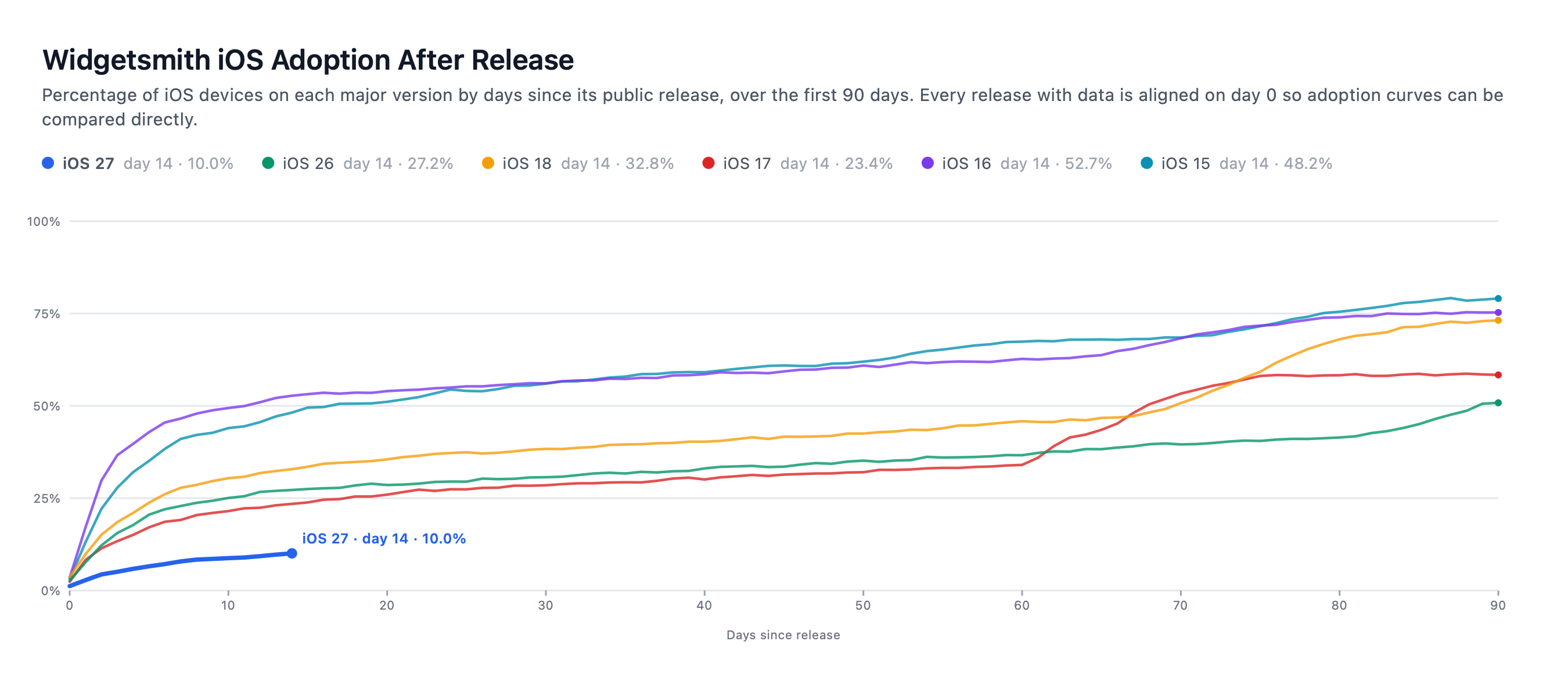
Been really interesting to watch the iOS 27 adoption curve over the first two weeks. Clearly on a different path than previous years. Still steadily growing, at a similar rate to the ‘steady growth’ phase of most years, but without the big surge at the start.
Given that this rate is largely controlled by Apple’s automatic update logic, I suspect it’s a deliberate choice. Likely because it lets them manage the Siri AI waiting list and avoid a big queue on day one.
Smith’s numbers are from analytics from users of Widgetsmith and Pedometer++. If you look at his chart for Widgetsmith, there’s really no explanation other than Apple pushing automatic updates to users more slowly than in any previous year, and I think it makes sense that this is to gate admissions to Siri AI. You can also see from his chart that Apple has been slowing down updates to initial .0 versions in recent years — the adoption rates were much faster for iOS 15 and 16 back in 2021 and 2022. Note too that every year Apple makes it more and more likely that users will opt into automatic software updates. The overwhelming majority of iOS users get OS updates when their devices update themselves.
And remember the whole thing with slower-than-previous-years adoption of iOS 26 last year — that was all attributable to the auto-update pace set by Apple.
(It’s purely personal anecdata, but I feel like Siri AI has gotten worse since iOS 27.0 was officially released. It feels a bit slower and I seem to get worse answers, sometimes. I asked it for a word today, using it as an interactive thesaurus, and it simply told me it couldn’t. It never did that over the summer. I started using iOS 27 full-time on my iPhone the day after the WWDC keynote and I got into the Siri AI beta the next week. While it might be some sort of placebo effect, I feel like Siri AI was better — slightly faster and more useful — in July and August than it is now. I could be wrong, or maybe just unlucky of late. But I’m also quite certain that scaling up the Private Cloud Compute side of Siri AI is a massive challenge for a platform with over a billion Siri AI-eligible users.)
- Joz Announces ‘Welcome Home’ Keynote Coming Tuesday, 13 October ★
-
It’s almost like you can predict the timing of such things, if you pay attention to Apple’s consistent patterns.
Wednesday, 7 October 2026
- Jaguar Type 01 ★
-
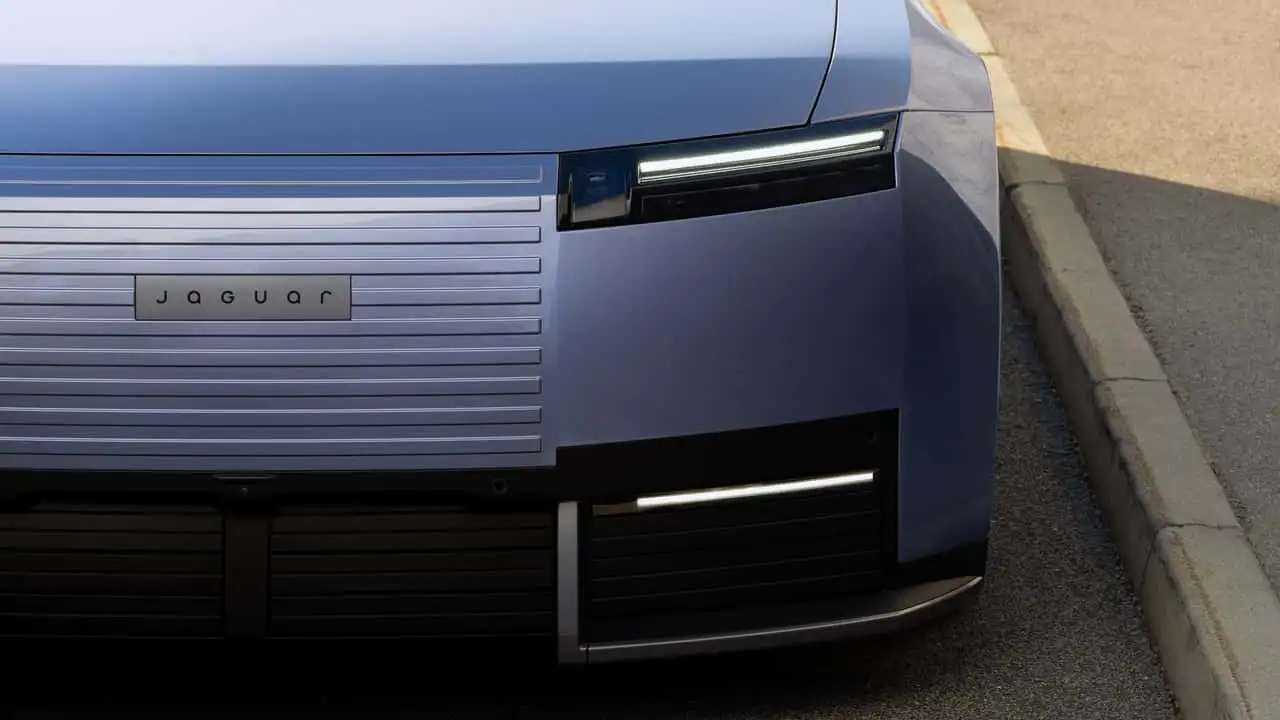
This is a cool car. It doesn’t look like anything else and it looks like it’s been pulled a few years from the future. I don’t know about this whole trend where cars don’t have rear windows though. I get it that you just use the camera but my old habits says I want to see out the back sometimes.
But the only reason I wouldn’t buy this thing is that turd of a new logo Jaguar went with. I could not abide driving around in something with this typographic calamity.
- Gurman Strikes Again: ‘Apple’s Smart Home Push Includes Doorbell, Lock, Thermostat Codeveloped With LG’ ★
-
The incomparable Mark Gurman, reporting for Bloomberg:
Apple Inc.’s upcoming push into smart home devices will include a doorbell, thermostat and other accessories developed through an unusual partnership with LG Electronics Inc.
The products will be part of an ecosystem of devices that work with Apple’s new smart home hub, as well as an upgraded HomePod mini and fresh TV set-top box, according to people with knowledge of the matter. The new Apple devices are set to be introduced on Oct. 13.
The products developed with South Korea’s LG will also include a smart deadbolt lock, indoor security camera, outdoor security camera and floodlight camera, said the people, who asked not to be identified because the undertaking is private.
Though the two companies worked together to develop the accessories, the products will carry the LG brand. The South Korean firm is handling manufacturing and product support.
Gurman has more than “people familiar with the matter” (or Matter, for that matter) — he cites FCC filings from LG that have product names and illustrations of some of the devices’ rear panels (with the connectors).
As Gurman himself notes, this is somewhat unusual for Apple, but it’s not altogether new territory either. In Venn diagram terms, the circle for “peripherals Apple very much wants on the market” is a superset of “peripherals Apple wants to make itself and put the Apple brand on”. For some of these products that Apple doesn’t want to make under its own brand, Apple makes them through Beats. But for others they partner with other companies. They’ve long partnered with Logitech for keyboards, keyboard iPad cases, and even the Logitech Crayon, the only third-party alternative to Apple’s own official iPad Pencils. Unlike Apple’s Pencils, the Crayon works without pairing to a specific iPad — surely a godsend in classrooms. There’s also the Logitech Muse — an air-pencil/magic-wand peripheral for Vision Pro. (Vision Pro is a $4000 mixed reality headset that weighs 2 pounds, which Apple released in early 2024.) Apple does this with Belkin too — that’s another trusted partner for Apple.
And, in addition to serving as a longtime display component supplier for Apple, back when Apple had temporarily and foolishly exited the market for Apple-branded external displays, they worked with LG to make the LG 5K Ultrafine display, which for a while was simultaneously the best external Mac display on the market yet also an unreliable flaky product. Even at its best it had an unstable sub-par stand.
The thing that makes this partnership awkward for Apple is that these products — doorbells, cameras, deadbolt locks — are products that require the utmost of trust. What products could possibly require more trust than a camera with footage of what’s going on in or at your home, or a lock that controls who can get in? I think that’s why Apple wants to get into this market with products that they can put their stamp of approval on. But LG, of all companies, was just exposed in a scandal for shipping “smart” TVs that literally listen to the ambient audio in the room — even in standby! — and invade your privacy by tracking what content appears on screen. (I own a 2019 LG TV but I haven’t allowed it Wi-Fi access since, literally, 2019.)
Tuesday, 6 October 2026
- Unofficial Command-Line Tool Removes Apple Intelligence From MacOS 27 ★
-
Scharon Harding, Ars Technica:
Unlike with previous versions of macOS, macOS 27 Golden Gate doesn’t have a toggle for turning off Apple Intelligence. That makes disabling AI features that you may not want more difficult. It also means that the AI models necessary for running Apple Intelligence will take up space on your disk, even if you don’t use them or if you go through your settings to individually find and disable AI capabilities.
In response, a developer known as Om Lahore on GitHub last week created RemoveMacAI, a command-line tool that allows macOS 27 users to “turn off Apple Intelligence on macOS 27” in a way that is “fully reversible,” per the GitHub page. They said that Apple’s Intelligence models take up “about 12GB,” but the models can actually take up over 30GB, The Verge noted.
RemoveMacAI “turns off Siri, Writing Tools, Genmoji, Image Playground, the ChatGPT extension, and all the summaries, then it deletes the models and stops macOS from downloading them again. Dictation still works because it’s a separate setting,” the developer said in a Reddit post first spotted by MacRumors.
Sounds crazy but it’s not
rming files in the /System/ folder — it uses techniques that work with System Integrity Protection remaining enabled. I mean, I wouldn’t do it on a production machine, but, I don’t want to disable Apple Intelligence.I can see the reasons why some people are frustrated that MacOS 27 Golden Gate doesn’t have built-in support for disabling this and removing the local models, though. If your Mac only has 256 or even 512 GB of storage, a dozen GB (or more) is meaningful. And there are institutional groups that have rules against AI — these places aren’t allowing Golden Gate at all until and unless Apple Intelligence can be removed. And that means not buying new Mac hardware that only runs Golden Gate.
Monday, 5 October 2026
- Steve Jobs, Walking Through a Mockup for Apple Park in 2010 ★
-
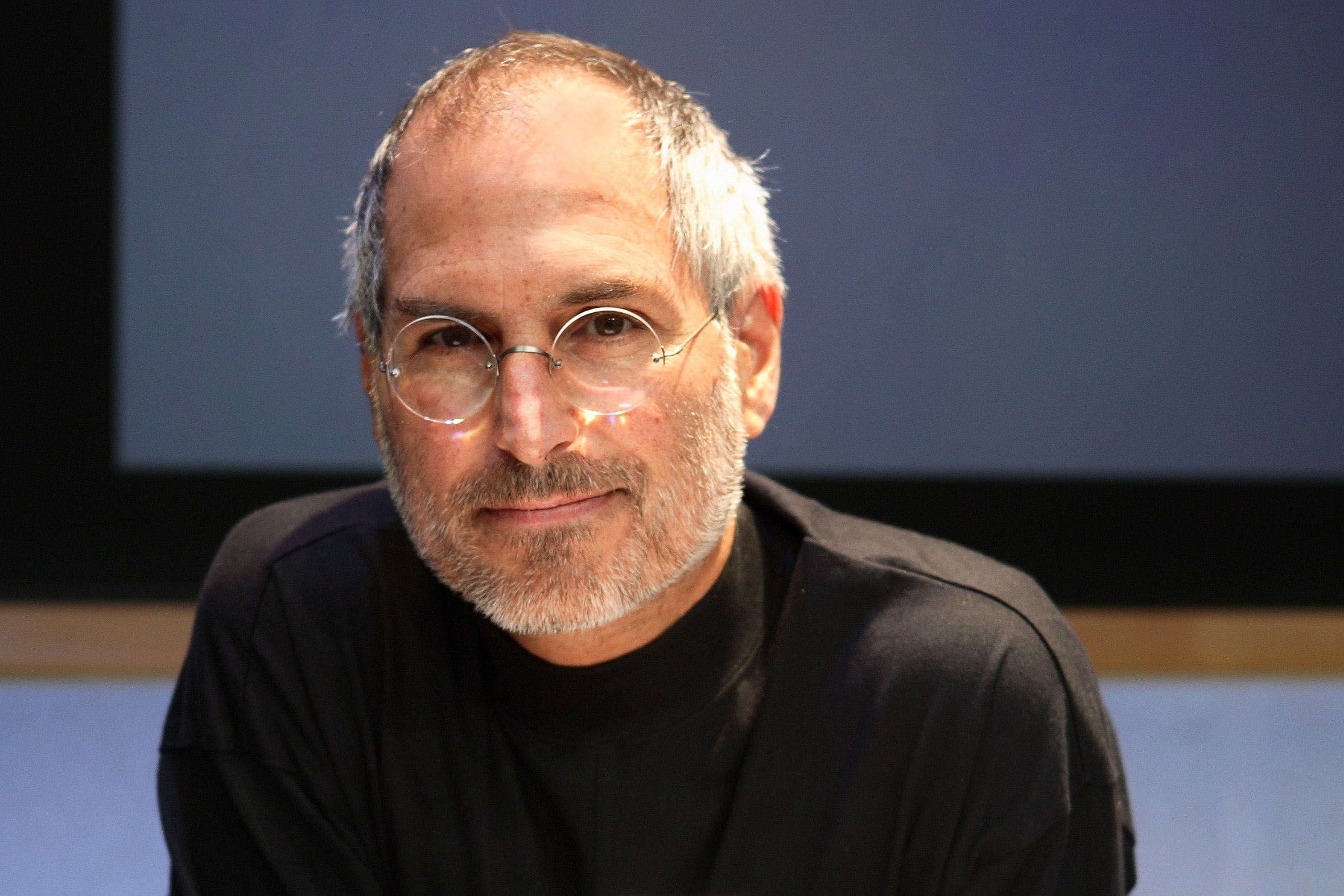
What an apt photo, today of all days. What a gift Make Something Wonderful is.

- OpenAI Announces Their Text Watermarking Plans ★
-
OpenAI, today:
The EU AI Act requires generative AI providers to make generated text identifiable in a machine-readable way. Text watermarking and detection remain early technologies with significant limitations, and views about their benefits and responsible uses are still developing. Our phased approach reflects both the EU AI Act requirements as well as the technology’s limitations, with an emphasis on transparency about what a text watermark can and cannot tell people:
- Starting today, API customers globally will be able to opt in to text watermarking for select models. Text watermarking will remain off by default in the API.
- Over the coming weeks, we will add an invisible watermark to eligible ChatGPT and Codex text output in the European Union.
- We’re opening applications to access our text watermark detector. Access will initially be limited to approved researchers and expert organizations that can help us evaluate and improve the technology.
First, unlike Anthropic, OpenAI is only forcing this upon users in the EU, where it’s mandated by their ill-considered 2024 regulation. Second, also unlike Anthropic, OpenAI has made this available via an API so developers should be able to actually see if this adulterates text output with real-world usage.
Third, none of these companies have yet made their watermark detectors publicly accessible. I remain highly skeptical that they will work as advertised in the real world. I think this is all somewhat of a sham to claim compliance with the EU AI Act without actually providing anything that anyone can actually use in a practical way.
Our text watermarking technology, textGrain, adds an invisible statistical signal to the model’s word choices. Our detector looks for that signal to assess whether a passage contains an OpenAI watermark. More details about how textGrain works can be found in our technical report, which will be updated with additional details in the coming weeks. We also plan to make the technology available in open source so that others can build on it.
In our evaluations, textGrain matched or exceeded the performance of other approaches we tested, including SynthID for text. Even so, strong performance under ideal conditions does not guarantee reliable detection in everyday use.
SynthID-Text is the Google algorithm that Anthropic says they’re using too.
Maybe I’m all wet, but I think what they mean in that last sentence quoted above is that it only performs usefully in ideal conditions, with simplistic prompts, and will prove to be unusable in practical everyday use, especially if the user’s prompt contains instructions designed to circumvent it.
- Ternus and Cook Tweet Brief Remembrances on the 15th Anniversary of Steve Jobs’s Death ★
-
John Ternus, posting on X:
The way Steve taught us to care about every detail, every experience, every person, still guides our work today. Forever grateful.
Tim Cook, also on X (with a photo I don’t recall seeing before):
There are people who leave a mark on the world, and then there are people who change it entirely. Steve changed the world and so many lives in the process. He certainly changed my life forever. His spirit lives on in everything he created and everyone he inspired.
Saturday, 3 October 2026
- WorkOS ★
-
My thanks to WorkOS for sponsoring this last week, once again, at DF.
SSO is table stakes for enterprise deals, but building it into your app yourself means writing SAML controllers, parsing XML assertions, and handling IdP-specific quirks for each provider. Learn how SAML flows work, the tradeoffs between building or buying, and best practices for security, routing, and UX.
Or, skip the hassle and add SSO with WorkOS. Read their developer’s guide to learn more — everything from how SSO works to why WorkOS is the fastest way to add it.
- Apple Confirms iPhone 18 Pro Max AT&T Cellular Issues, Affected Devices Require Hardware Replacement ★
-
Chance Miller, 9to5Mac:
In a statement to 9to5Mac, Apple said:
We have identified an issue affecting a small number of iPhone 18 Pro Max users on the AT&T network that may cause a device to lose service and be unable to make calls. We released iOS 27.0.1 earlier this week and strongly encourage all iPhone 18 Pro Max users to update now, and are also issuing a carrier settings update today. These updates together are meant to help prevent this issue from occurring.
The carrier settings update for the iPhone 18 Pro Max will download automatically over the next 14 days. However, users can manually trigger the download by going to Settings, choosing General, then About.
Apple explains that the software updates will help prevent future issues for iPhone 18 Pro Max users on AT&T. The software updates will not restore service on devices that have already lost it.
Apple says that iPhone 18 Pro Max users who have already lost service will need a hardware replacement. Those users should contact Apple Support or AT&T, or visit an Apple Store or AT&T location.
As we reported this morning, iPhone 18 Pro Max users affected by this problem can’t connect to AT&T’s network for calls, texts, and data. Instead, those users see “SOS” in their iPhone’s status bar. The connectivity issues aren’t impacting every iPhone 18 Pro Max user on AT&T.
I’ve heard from a handful of DF readers about this, and the readers experiencing the problem have all found each other in various forums over the last two weeks. The following all seem to be true:
It’s only a problem for AT&T customers. No such problems on Verizon or T-Mobile.
It’s only the 18 Pro Max, not the regular 18 Pro. The salient fact here is that the only iPhone 18 Pro models that use Qualcomm cellular modems, rather than Apple’s own C2 modem, are 18 Pro Max devices in the U.S.. So the problem seems to be something related to the Qualcomm modem and AT&T’s network.
It is not a problem for all 18 Pro Max devices on AT&T’s network. “A small number” is all Apple will say, but anecdotally it seems clear that it’s not most 18 Pro Max devices on AT&T. But it still seems like many. It’s not exceedingly rare.
Pretty unusual that once a device is affected and loses service, the device must be replaced. Yet, the 27.0.1 iOS update contains a fix (or fixes) that should help devices that haven’t yet lost service from losing service. I’d love to understand how a software update can prevent existing devices from being affected, but a software update cannot restore service to existing devices that have already been affected.
Something else I’m curious about is whether it’s related to AT&T customers, or AT&T’s network — are iPhone 18 Pro Maxes that are connected to MVNO carriers whose backend is provided by AT&T similarly affected? E.g. US Mobile customers on US Mobile’s “Dark Star” service? I’d love to hear from anyone who knows.
Thursday, 1 October 2026
- Yankees Sweep Boston in Two Games, by Combined Score of 18-2 ★
-
In the 6th inning last night the Yankees were only ahead 2-0, and Red Sox first baseman and all-around jackass Willson Contreras hit a home run, closing it to 2-1. Contreras decided to walk around the bases. The baseball gods do not look kindly upon that sort of ostentatiously belligerent showboatery. (Especially when your team is still losing.) Contreras circled the bags after his dinger like a rooster letting you know he just banged a few hens — but at a slower pace.
In the next inning, Contreras wasn’t paying attention and his laziness allowed a Yankee to reach base after striking out on a wild pitch. That started the rally that resulted in the blowout final score.
Wednesday, 30 September 2026
- Gurman Reports Apple Is Launching New ‘Smart Home’ Products on October 13 ★
-
Mark Gurman, reporting for Bloomberg (gift link):
Apple Inc. plans to make its long-delayed push into the smart-home market on Oct. 13, marking a critical product expansion for the company under new Chief Executive Officer John Ternus. At the center of the strategy is a smart-home hub code-named J490, according to people familiar with the matter. Apple also plans to announce the first update to the HomePod mini since that device’s 2020 debut and its first new TV set-top box since 2022. [...]
The home hub will take the form of a roughly 6-inch square display, with versions that can be mounted on a wall or placed on a countertop, according to the people, who asked not to be identified because the products haven’t been announced. [...]
Because the device is intended to remain stationary, it has a single FaceTime camera on the front and no rear camera. The product has microphones and speakers in its connected base. The hub is about as thick as an iPhone, and its display is surrounded by a quarter-inch, black bezel reminiscent of older iPads. It has rounded corners and no sharp edges. The device lacks a battery, so it has to be plugged in at all times, and there are no volume or power buttons.
The product comes in Apple’s standard gray aluminum finish and includes a USB-C port for power. The screen sits above a metal, round base with multiple rings of perforated speaker holes and connects to it through a polished metal arm. Users can manually tilt the display forward or backward. And the base has a rubberized bottom to help it stay on a table.
If you think that sounds like the beloved but short-lived “sunflower” iMac G4 from 2002, that’s exactly what Gurman says it resembles. As is so often the case, Gurman seems to know many details about the device, but yet doesn’t know its name or price. Presumably the speakers are good enough to serve by themselves, but how good are they? Can they be paired with HomePods to create stereo pairs?
The hub’s defining feature will be its ability to serve multiple members of a household. It is designed to recognize who is speaking to it or approaching it, and then display personalized content and provide answers based on that person’s data and accounts. When a user walks up, for example, the device will show that person’s contacts, messages, calendar appointments, notes and preferred app layout. The interface can then change automatically when another recognized household member approaches. It will also have a mode for visitors that hides personal information.
The device identifies users by their voices or through a facial-recognition system, though the latter is less reliable than Face ID on the iPhone. Users can require secondary authentication through an iPhone if they don’t want to rely solely on voice or facial recognition. The iPhone also serves as a fallback when the hub cannot identify someone correctly.
Given that Apple Watch is used as an identifier to unlock your Mac (and, says Apple, iPhone Duo), it would make sense if that worked with this device too.
- Anthropic’s IPO Prospectus Is a Fucking Doozy ★
-
Echo Wang, reporting for Reuters yesterday:
Anthropic is making a massive bet that AI will transform the global economy more profoundly than industrialization, electricity and the internet, according to its IPO prospectus seen by Reuters.
This is a strong clear lede, but even so it falls short of expressing the true magnitude of what Anthropic represents. To wit, not that “AI” as a field will prove more profoundly transformational than industrialization, electricity, and the Internet, but that Anthropic alone will. This is not an IPO that makes sense if you consider Anthropic one among peers, even a short list placing them alongside just (say) OpenAI, Google, and Meta. It only makes sense if you believe Anthropic is on the cusp of winning a race to create a godlike super intelligence, and that first godlike super intelligence will take over the world.
You know, something exactly akin to the “rapture” events that religious cultists believe are coming.
But the cost to get there will be staggering. Anthropic reported a net loss of $42 billion in 2025, and plans to spend $518 billion on cloud, computing and infrastructure obligations in coming years, according to the prospectus.
If you believe that they’re profitable now you’re as crazy as they are. They’ll seed stories to the press that they’re now profitable, using accounting methods they won’t define (and wouldn’t pass muster for a public company) but won’t make such claims in writing.
The prospectus details how the company has grown sharply in the last year — while also posting wider losses. Revenue grew 12-fold in 2025 to nearly $4.6 billion, even as the company lost more than $8 billion on an operating basis, excluding writedowns of various liabilities mostly tied to previous fundraising, according to the documents, reported here for the first time. [...]
Anthropic said nearly a quarter of its revenue came from two customers last year, and as part of its risk factors, warned that many of its largest clients were not locked into long-term contracts and could cut or stop spending.
I don’t think this is complicated. Their revenue is accelerating rapidly because they’re selling compute at a loss. They spent $13 billion to make $5 billion last year. Their revenue is growing rapidly, yes, but their costs are growing even faster. They’re already on the hook for half a trillion dollars on cloud computing expansion but their revenue is precariously reliant on a few big-spending whales who aren’t under contract, and commodity open source models are rapidly closing the gap. If Anthropic is losing a fortune now with $13 billion in costs how are they going to break even spending $100+ billion per year? Don’t worry, their godlike AI will figure that out?
Anthropic’s proposed valuation is easily calculated, as -50 times 2025 losses.
The more they lose, the more they win!
Tuesday, 29 September 2026
- Follow-Up on my Spitballed Predictions for Apple’s October ★
-
Regarding my post yesterday speculating on how Apple’s October — seemingly set to be a big one — might play out, a friend asked if any or all of the new stuff might be released through Apple Newsroom announcements only. Good question. Let’s run through the rumored new hardware products:
- Apple TV hardware: I’d love to say no, but the answer is yes. I could see this coming out as a simple announcement with new specs. I really want to see Apple double-down in this space, reinvigorate it. I think watching TV on Apple TV hardware is by far the best experience out there. Yet its market share is very low. Apple TV is to the living room today what the Mac was to desktop computing in the late ’90s and early ’00s. Everyone sees it as too expensive and they have no idea why they’d actually be happier if they had one. So I hope Apple makes it a big part of a keynote/event, but I wouldn’t bet on it.
- iPad Mini: Yes, could be just a press release.
- HomePod Mini: Yes, could be just a press release.
- HomePod-type thing with a screen (maybe they will just call it “HomePad”?): No way — if this is coming, it has to be unveiled with a keynote video and some sort of media event with hands-on demos. And if they’re going to have some sort of event/show for this, they might as well unveil the above things there too.
- MacBooks with OLED touchscreens: No way could this be released only with a press release.
- M6 iMacs: Could be just a press release, but if they’re going to have some sort of event/show for the touchscreen MacBooks, why not include these at the start of that?
- Destroy Any Website ★
-
Desktop only, and you definitely want sound on. (Update: Now works great on mobile devices, too!)
With things like this I always start with Kottke.org. No idea why, because it’s quite possibly the last site on the entire web I’d want to see actually destroyed. (Well, second-to-last.)