
By John Gruber

OurCal: Shared calendar. Meet messenger.
Touch and Glow
Friday, 6 November 2026
I’m not cut out for Los Angeles.
It’s hard not to love the place, though. The weather is absurd. The people in LA, by and large, don’t believe in bad weather. It’s like a legend to them, like hearing about the Irish Potato Famine.
Angelenos are friendly and good looking. The food is good and varied. But you really do need to drive everywhere. Trips from any one part of the city to another invariably require time not just in a car but on a freeway. What is oft-described as LA’s sprawl, I would describe as a layout and geographic scale that is more like that of a small, densely populated nation than of a mere city. LA’s palpable vastness is incredible, in a wholly different sense than, say, Manhattan’s. I love to visit. I would never want to stay.
The greater San Francisco Bay Area, I don’t feel that way about. The weather there, too, is certainly nicer than back east, but it’s not implausibly nice. San Francisco is a walkable city and can punish you with its weather at certain times of the year. I’m not at all religious but I was raised in a Catholic family, and one way that’s stuck with me is that I innately believe we deserve some stretches of bad weather. That it’s good for us to suffer to some extent, like physical exercise and toiling at our jobs. That’s a stupid thing to believe, I know, but I believe it. We all believe some stupid things.
Los Angeles is an unusual place for Apple to hold a media event. They hold two big annual events on campus at Apple Park in Cupertino each year: WWDC in June, and the iPhone (and friends) event in September. Back in the old days, they held their major keynotes in San Francisco. I liked the old events in San Francisco better, if only because I enjoyed staying a few days in vibrant, gritty San Francisco better than the somnolent, sterile South Bay. But I think the events were more interesting too. Not better per se, but just more interesting. Less polished. More unique. Every inch of the Steve Jobs Theater was designed and crafted to host events like the annual iPhone introductions. It is an architectural marvel. But its perfection is off-putting. It somehow doesn’t quite feel realistic, even when you’re right there.
In its San Francisco events of yore, Apple experimented. The Macworld Expo and WWDC keynotes in Moscone North had an unavoidable sameness to them. But Apple held other events in other places in the 2010s, like the small Yerba Buena Theater across the street from Moscone, and the cavernous Bill Graham Civic Auditorium, which was built in 1915 and looks, feels, and smells like it. The room Apple used for its post-keynote hands-on area at Yerba Buena was always a little claustrophobic and very dark. This photo I took after the introduction of the original iPad in 2010 captures the feel of that room during those events.
A few years later, they held an event there in October 2013 and solved — or at least improved — the problem by knocking a hole in the wall to allow in some sunlight and fresh air. Here’s a picture from the hands-on area at that event, showing Tim Cook (Katie Cotton at his side, as ever) chatting with Ed Baig (then at USA Today, still on the beat today at AARP). You can see the open air over Cook’s shoulder.
After that event wound down, I grabbed lunch nearby, and then walked back through the plaza next to the theater. I don’t remember why. Best guess is that it was simply on the path back to my hotel. Apple already had a crew taking apart the entrance they’d added to the theater. Katie Cotton was outside, supervising. I stopped to chat. This was around 2:20pm, a little over four hours after the keynote and probably only 90 minutes after they’d politely escorted the last of us from the hands-on area inside. I didn’t write notes or record the chat, which would have been weird, but as best I recall, the conversation started with my saying something like “Man, you guys don’t waste any time, do you?” Cotton told me that while Apple loved the Yerba Buena venue, they were always bothered by the hands-on area being closed off and dark. I said that yes, it was previously a dank hellhole, and she laughed. She always seemed to genuinely enjoy my sarcasm. Apple, she explained, had inquired about options for opening that wall. Yerba Buena told them, sure, they could do whatever they wanted so long as they restored it after the event, but it would cost a small fortune. But to Apple the price was negligible, and they accepted the offer immediately and commenced with plans for how to do it.1 Cotton liked how it turned out, and I told her I agreed. It made for a noticeably nicer space.
My column about that October 2013 event began thus:
There is a certain sameness to almost every Apple event. A pattern, a formula, a structure, a rhythm and pacing. Does this make them boring? In some ways, certainly, insofar as the only thing we don’t know is what they’re going to say, as opposed to how they’re going to say it. (And even then, we often have a pretty good idea what they’re going to announce, too.)
And I went on to quote from — and then disagree with — then-NYT tech columnist Nick Bilton’s griping that Apple’s keynotes lacked “wow” and had grown stale. (Bilton is now leading failson David Ellison’s team of dipshit weasels who are sinking 60 Minutes, the crown jewel of CBS News.)
Somehow, here we are 13 years later (alas, not all of us), and there are still complaints about the repetitive sameness of Apple’s events. Yet Apple’s events these days don’t resemble that event from 2013 at all. Change comes slowly but it always comes.
I enjoyed last week’s “Pro and Tell” event more than any in recent memory. I enjoyed the venue — both the unique building and the city. I enjoyed the format. But most of all I loved the subject: the Mac.
The building is best known as CBS Columbia Square, opened in 1937 as the West Coast headquarters for CBS. The color of the event was blue — matching the default wallpaper for the new MacBook Pros with PROLED XDR displays. Blue carpet covered the sidewalk leading into the entrance. After walking up the carpet, checking in outside, and donning my press lanyard, the magnetometer dinged me, and I was pulled aside and politely but brusquely asked to put my briefcase on the (carpeted) ground, and wait for a busy police dog to take a smell at it. I presume the dog was sniffing for weapons, not drugs, but either way my bag passed muster. Inside, just past the lobby, Apple had created a rather spacious theater, with a large screen and stage. There were blue padded bench seats along the outside walls, but the primary center area of the space was for standing. From the floor to the room’s high ceiling, the walls were blue.
Behind the theater was a large area with coffee, water, and small breakfast treats. Invited guests — primarily tech journalists and social media creators — mingled and sipped. I checked my laptop bag, and carried only my notebook and phone for the morning. Apple PR reps were, as ever, present but never overpresent. Conversation touched upon the expected but as yet unknown touch-enabled MacBook Pros. Word spread that Steven Levy, the undisputed dean of the Apple press corps, had landed an exclusive first look for Wired. (Levy, ever the pro, and a delightful raconteur, confirmed only that, yes, he had the exclusive, but he offered not a word regarding its content before his agreed-upon embargo. His wry smile, though, betrayed that he was happy with what Apple was about to unveil.) Much of the pre-event chatter, however, was dominated by discussion about the iPhone Duo. A rather remarkable number of attendees had Duos in hand — many of them still in the midst of reviewing it, but others professed to having already gone all-in on it. To each their own; there’s no accounting for taste.
Shortly before 10am, word spread that it was time to pack into the theater. I squeezed in close to the stage. Why not? Steve Jobs, I noted, never took the stage quite on time. He was seldom more than two or three minutes late, but he was always at least two or three minutes late. Rock stars don’t take the stage on time. Tim Cook, on the other hand, was never late. A minute early, sometimes; a minute late, never. You could set your watch to 10:00 by listening for his “Good morning!”
John Ternus took the stage at 10:00.
He spoke briefly. Just a few minutes recapping Apple’s week of announcements. The new OLED iPad Mini, the new M6 MacBook Pro, the updates to Creator Studio. He spoke naturally and comfortably, and seemingly extemporaneously. He looks like he smells like Apple Park. He’s a cool guy. And he knows that Tim Cook handed him a killer lineup of new products to introduce over his first two months as CEO. Every one of Apple’s major platforms is in a good-to-great place. His on-stage remarks culminated with the introduction of the truly new MacBook Pros: “That’s why we’re here today — to mark another huge moment for MacBook Pro, and for the Mac itself.” When Ternus then announced, a moment later, “And yes, for the very first time, we are bringing touch to the Mac”, the audience erupted in gasps and cheers — a reminder that for as much as many of us know before Apple makes these announcements, a lot of the people in attendance do not even know who Mark Gurman is. A lot of the people in the room were genuinely shocked and surprised.
Apple paid a lot of money to put a fantastically bright screen behind Ternus, and they used that screen to show this two-minute “If you give a Mac an OLED” intro video. The first mention of touchscreen support, in that video, comes a full third of the way in.
Ternus teased the return of the glowing back-of-the-display Apple logo in a tweet that morning. On stage he made it official: “The logo is back.” I love the way he phrased that. Not “the glowing logo is back”. Just “the logo is back” — like it might as well not have been there in the unilluminated years since 2016. Fuck yeah.
The show in the theater was short and sweet. We shuttled off to the hands-on area by 10:15, if not sooner. The format of the event — or “experience”, as Apple calls these — mirrored that of the MacBook Neo experience in New York back in March. Brief welcoming remarks from Ternus, a crisp short video presented to a standing room of invited media guests, and then, boom, a scramble off to an expansive hands-on area. Apple didn’t stream Ternus’s live-on-stage remarks to the world back in March, and they chose not to again last week. They should. These aren’t live keynote events, but they are live events. I’m glad I’ve gotten to see them in person, but I wish everyone could see them online. They are good. Good things should be shown. Apple is run by people. Seeing the company’s CEO live on stage is a rare glimpse behind the aluminum and glass facade.
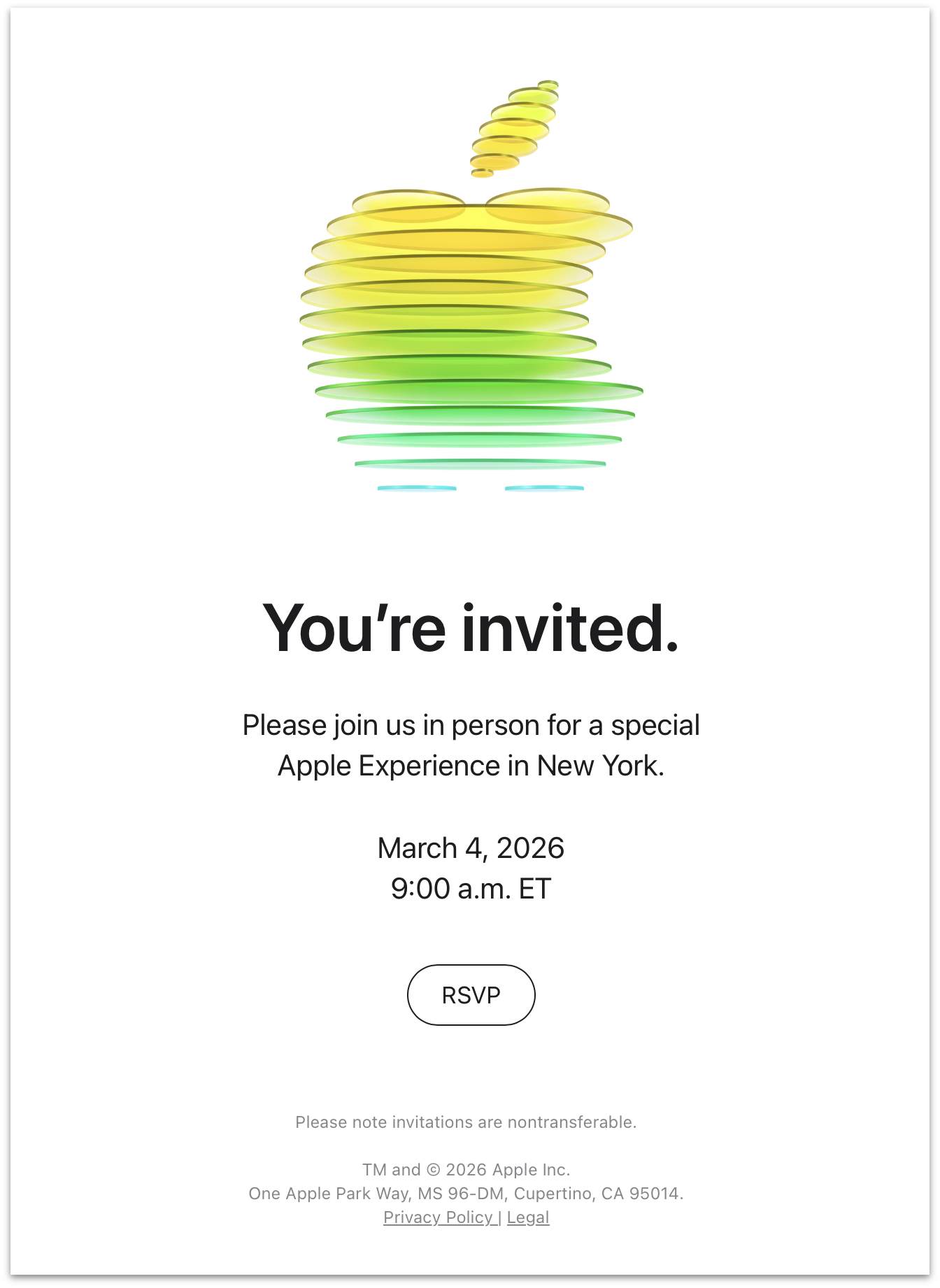
One is an anomaly. Two is a pattern. The Neo event (err, experience) back in March was like no other. This “Pro and Tell” MacBook Pro event was a lot like the Neo one. The Neo one didn’t get a punny title though — just a simple “You’re Invited” on the email invitation (although the decoration of the Apple logo hinted at the Neo’s signature citrus colorway). The Columbia Square building in Los Angeles is large, but it’s nowhere near as spacious as the empty warehouse in Chelsea where Apple held the Neo event. There seemingly were more invitees at last week’s event in LA too. In New York back in March, there was room to mingle. I snapped this fun photo of Jason Snell chatting with Phil Schiller, Greg Joswiak, and then-still-SVP-of-hardware John Ternus. Even setting aside Ternus’s subsequent promotion to CEO and levelling up in celebrity, that chat couldn’t have happened in the hands-on area of this event. There were too many people and too little space.
In the scramble after leaving the theater area, Apple reps were gladly informing attendees that there were two separate hands-on areas, and that “the one in the back” might be less crowded. It wasn’t. Both areas were tightly packed. They were tight tube-like hallways, with black walls, good lighting, and Apple Store-like tables upon which were arrayed the new MacBook Pros. Silver and space black; 14- and 16-inch; nano-texture and glossy. Some of the tables featured Apple’s speed-bumped M6 MacBook Pros, the enclosures for which are nearly indistinguishable from the machines everyone really wanted to see — the PROLED XDR M5 Pro and M5 Max models. I saw several attendees poking and sliding their fingers on the screens of those M6 models, to no avail, until someone gently told them “These are just the other new MacBook Pros.”
Packed shoulder-to-shoulder in a confined space with low ceilings, jostling for hands-on time with the PROLED XDR models, the temperatures — both atmospheric and emotional — got uncomfortably warm. It also became clear that some of the attendees chose not to shower that morning. The scene brought to mind the pungent imagery of the “coach” cars in Bong Joon-ho’s Snowpiercer.

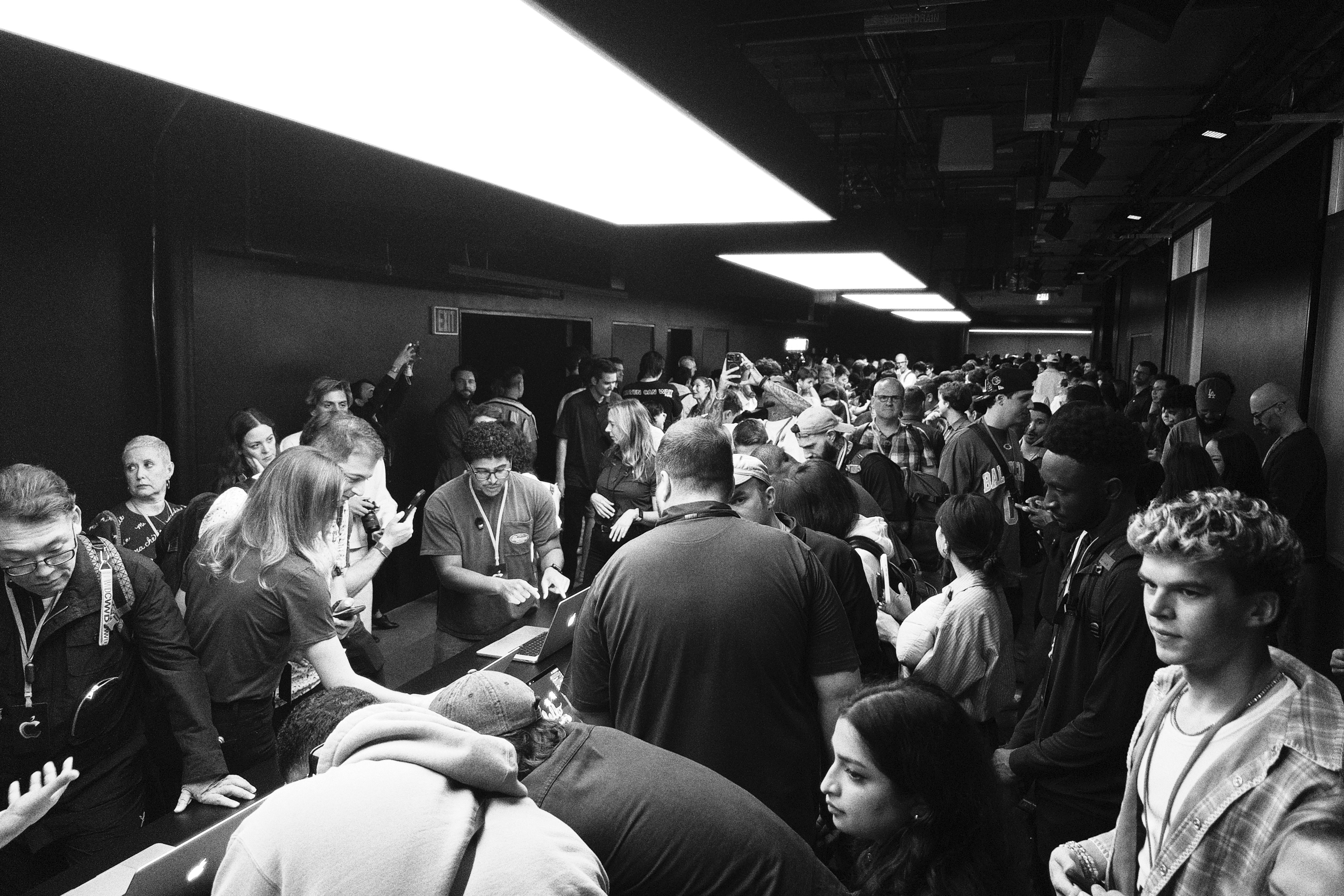
The Steve Jobs Theater, this was not.
But that’s not a complaint. This was different and different is good. It was a unique event in a unique venue. That’s good for Apple and good for those of us with the fortune to be invited to attend these things. Events at Steve Jobs Theater are held the SJT way. Apple adjusts and tweaks them, but the space defines them. An altogether new venue, whose ground floor Apple seemingly built out from scratch for this event, requires thinking about everything. And Apple’s thoughts are revealing. What I took away from the hands-on at this event is that Apple wanted us to get close to these MacBooks. To really look at them and appreciate them. No, they’re not radically different. They’re subtly different. But subtly different in very significant ways. That’s not exciting but it’s correct. The old MacBook Pros (including the new M6 model) were, by far, the best professional laptops ever made. The new ones are just better.
I like the hands-on scrums. There’s an energy to them you can use to gauge interest. When the products are genuinely exciting there’s a buzz that can’t be faked. People were fucking excited by these new MacBook Pros, and rightly so. These are the machines many of the people in attendance use themselves for their own work — our own work — all day, every day. The new tandem OLED displays are quite literally brilliant. You can see the difference even when they’re not side-by-side with the old mini-LEDs. When they are side-by-side, the old displays look washed. The new ones look wow.
And the “hands-on” aspect came into literal play two ways. First, yes, you can tap, swipe, and pinch the displays. Some people cared about that. A lot of others in the room, including yours truly, not so much. But even those of us who were ambivalent, at best, about touch coming to the Mac had reason to rejoice upon seeing Apple’s implementation: Apple added touchscreen support to MacOS the right way. Touch is decidedly secondary on MacOS. The density of the UI doesn’t change at all when you’re using a mouse pointer, and it only changes slightly to create larger tap targets when you touch the screen. This is the way. I would have bet that Apple would do it this way, but every bet is uncertain. And though the likelihood was low the stakes were high — a completely touch-first reimagining of the MacOS user interface would have been a devastating blow to an irreplaceable platform.
Second, the weight reduction Apple was able to achieve with these machines is astonishing. The 14-inch models weigh a full half pound less. The 16-inch models weigh 0.7 pounds less. Almost three-quarters of a pound! I saw numerous attendees picking up the hands-on demo machines to compare them to the personal MacBook Pros they were lugging around the event in their backpacks. Eureka after eureka. These are massive reductions in weight without — claims Apple — any decrease in sustained performance or battery life.
Next up, for some of us, were product briefings. I saw a disassembled PROLED XDR display panel. Five layers (I think?), each of them impossibly thin. A friend who was in another briefing group said the front panel cover glass shattered in the hands of one writer when it was passed around for examination. In my group — which might have been after that one — we didn’t get to touch anything.
Putting OLED into a laptop doesn’t magically make it good. Apple had a side-by-side comparison with a Lenovo Yoga 9 Whatever with an OLED display. The colors on that display were slightly greenish when viewed head-on, and garishly green when viewed off-angle. The colors on Apple’s PROLED XDR look remarkably good from any angle. Most surprising to me was Windows 11’s bizarrely clunky support for HDR images. When you open an HDR image, it displays as SDR, then you wait like 5–10 seconds for the display to “warm up” and only then does it show it in HDR — and when it does, the colors look bad. Getting a brief taste of “modern” Windows feels like visiting Cuba or something.
In the not-for-attribution Q&A after the briefing, I asked about the fact that the original glowing Apple logo in MacBooks — and PowerBooks — was a byproduct of the fact that the displays were backlit. There was a bright light sealed up inside the back of those display panels, and someone at Apple had the idea that if they just cut out the Apple logo on the back and fit it with translucent plastic, it would glow. Steve Jobs loved the idea and the rest is history. Every Mac laptop from 1999 through 2016 had a logo that glowed. Photos like this one from 2007 are iconic.
But OLED doesn’t use a backlight. Each pixel lights up on its own, which is how OLED’s blacks are so utterly black, and how light bleed is so drastically reduced. So if there’s no backlight, does that mean the new glowing logo has a light source of its own? Yes, was the answer. Apple engineered a custom light source just to enable the logo to glow once again, without adding any additional thickness to the lid. Someone else in my briefing group asked why Apple would bother doing that. “Because it’s awesome,” was the answer, which I’m quoting exactly and fully. That was the entire answer. Because it’s awesome.
If you work in a dark environment where the glowing logo might prove a distraction, or if you’ve had your sense of fun surgically removed, you can disable the light. The light-up logo was a particular source of joy for Apple executives and product managers, including the fact that they managed to keep it entirely secret. One difference between this new glowing logo and the old ones from 1999–2016 is that when the light is turned off on this one, it just looks like the highly polished Apple logos from MacBooks since 2016. It doesn’t look, at all, like a light that is turned off. Thus, Apple was able to keep it from leaking by not enabling the illumination in the builds of MacOS that were used by employees who were testing preproduction models inside the company.
Pure awesomeness. Fun for the sake of fun on the back. The best laptop display in the industry — by a longshot — on the front. How utterly Mac-like.
In the late afternoon came the “Pro Workflow Showcase”, on the third and fourth floors of the building. (The second floor held a cafe and an outdoor terrace with a separate coffee bar. There was an entire other cafe downstairs on the first floor. The coffee, as usual, was pretty good, and the small plates tasty and fresh.) This showcase featured half a dozen demonstrations from creative professionals using the Mac in innovative ways to pursue their various crafts. Impressive demos from obviously talented artists, one and all.
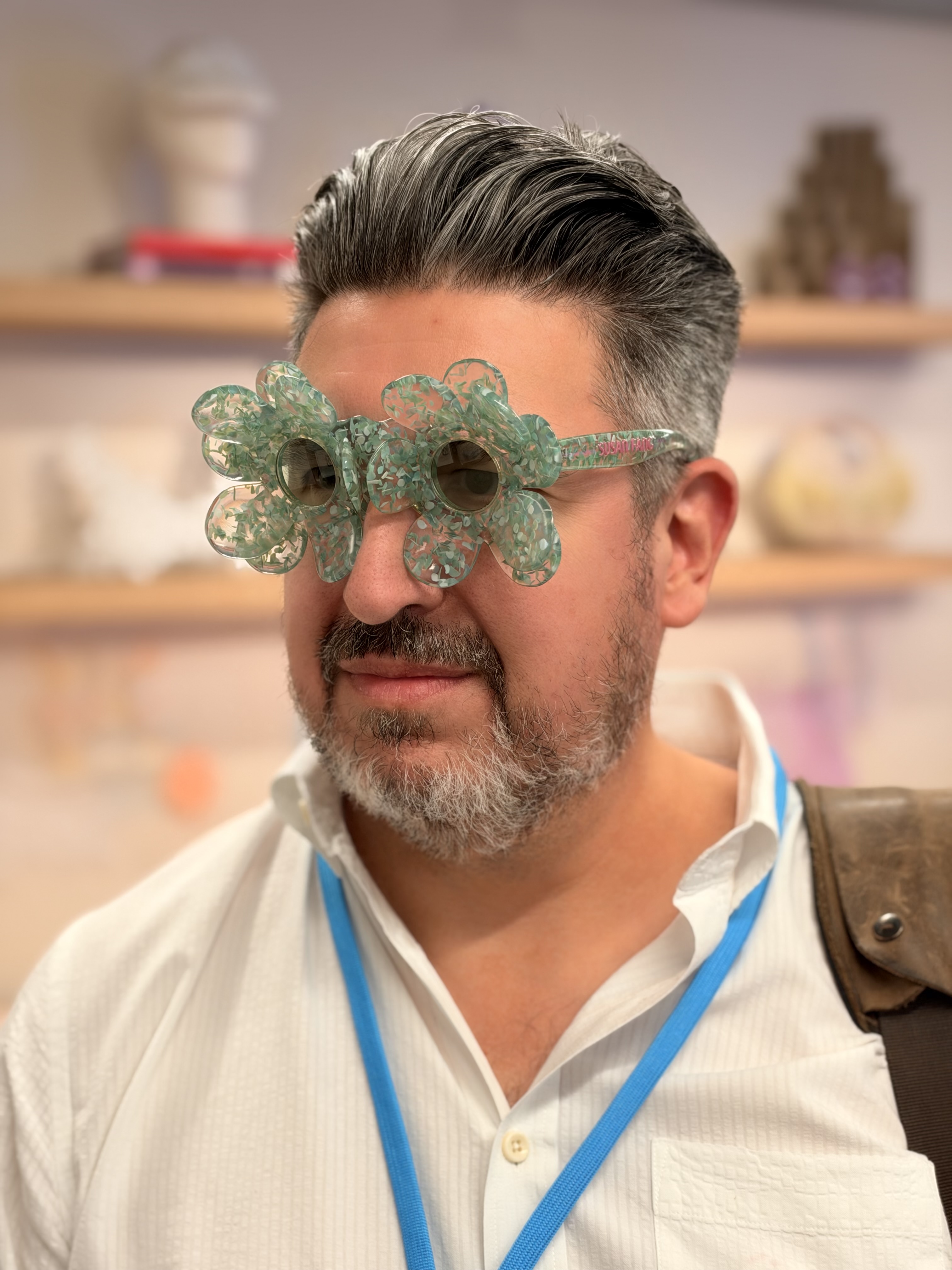
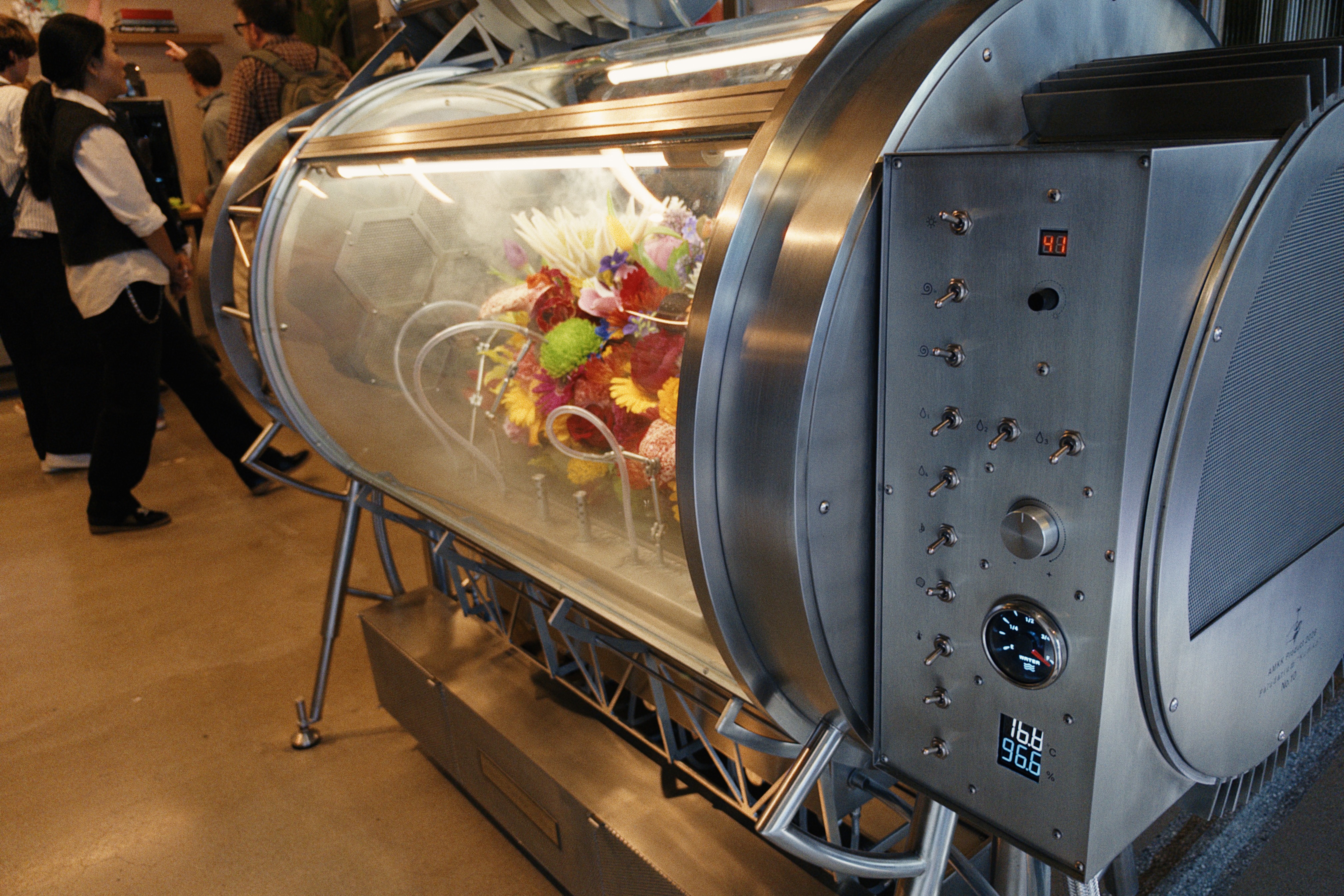
U.K. filmmaking brothers Will and Ed Reid (a.k.a. “The Reids”) showed off their “4D Gaussian splatting” workflow, which allows them to capture immersive 3D scenes using a synchronized array of nine iPhones used as cameras. Portrait photographer Jeremy Cowart, from Nashville, demonstrated his crazily customized studio workflow, which allows him to capture and process hundreds of still photos per minute, with the background behind the subject shifting with each frame. Record producer Fab Dupont, who has worked with musicians ranging from Bad Bunny to David Crosby, mixed music live in Logic Pro. (Dupont was particularly fond of the touchscreen on the new MacBook Pros, which he repeatedly stated he expected to ignore.) From the fashion world, the wife and husband duo of designers Susan Fang and Orelio de Jonghe showed off an array of intricate 3D-printed clothing, gowns, and accessories. I found a new pair of eyeglass frames that, I’m told, suit my face. (Photo credit: Austin Mann.) And then, most delightfully and surprisingly, there was a two-section demo area from Japanese experimental botanist and “haute couture” florist Azuma Makoto. Azuma was the subject of Flower Punk, a documentary short by Alison Klayman for The New Yorker back in 2020 — which, now that I’ve seen his work up close in person, is high atop my to-watch list. Azuma uses the Mac in multiple ways. First, to design elaborate, beautiful botanical sculptures. Second, to design and engineer intricate contraptions and machines — research equipment — that allow him and his team to optimize and control the blooming of picked flowers. Third, to control that equipment in operation. The machines are as beautiful as the flowers. I commented on the mechanical switches. They beg to be flipped just to feel them click. After hearing my brief question translated into Japanese, Azuma’s partner Shiinoki Shunsuke answered at length, with great enthusiasm. They’re often asked, he said, why they design their custom equipment with analog controls, rather than control them entirely through software. They feel that the physical nature of the plants inside the machines demands physical controls to manipulate their environment. It’s like touching the flowers without touching them. A beautiful description of hauntingly beautiful works at the intersection of technology, biology, and art. It’s like Doc Brown from Back to the Future meets Martha Stewart.
Oh, and there was one other demo station. It was from a small filmmaking outfit named Industrial Light and Magic, and the primary demo was helmed by John Knoll. Knoll co-created an image editor for the Mac in 1987 with his brother Thomas, and has pushed the cutting edge of VFX across five decades at ILM. Both the image editor and the movies he’s worked on have achieved a fair degree of renown and success. When I saw him, I was nearly dumbfounded. It was all I could do not to walk up to him and say what my mind was screaming: “You’re John Fucking Knoll.” John Fucking Knoll, doing demos on the third floor. Holy shit.
Knoll brought with him an elaborate rig from ILM. A spaceship model from Star Wars: Skeleton Crew. A real physical model. Behind the ship was a very large curved LED screen — a smaller version of the cavernous “Volume” 75-foot chamber that ILM first used for The Mandalorian in 2019. A miniature Volume for miniature models. In front of the ship was an iPhone camera with a large lens mounted on a track. In front of the track stood Knoll, controlling the whole apparatus from a MacBook Pro (with logo aglow, natch). Knoll built this motion-tracking camera control system in his garage and wrote the firmware himself. Of course. He’s John Fucking Knoll. And he showed us how they use this system to shoot a practical spaceship model flying through hyperspace that is being rendered, live, on the curved LED behind the model. It’s all just captured in camera. The secret is genlock, which syncs the video rendered on the LED in front of the camera with the video being captured on the camera — synchronized precisely not merely to the millisecond but to the microsecond.
There are two questions I can remember being obsessed with as a child, that started me on the path to what ultimately became my career. The first was, “How did they make Star Wars?”2 Now here I was, seeing, just a little at least, exactly how they make Star Wars today — in arm’s reach of an actual goddamn ILM spaceship miniature. And a big part of the answer of how they make it today is, “With the Mac.”
By my count Apple held four major events this year. Two of them were the inviolable tentpoles of the annual Apple calendar: WWDC in June, and the iPhone event in September — both held, as usual, at Apple Park. WWDC is the all-encompassing software event for all of Apple’s platforms. The iPhone event is the iPhone event, with Apple Watch as the opening act.
Apple’s other two major events in 2026 were the no-event-title Neo introduction in New York in March, and last week’s “Pro and Tell” introduction for the new MacBook Pros in Los Angeles — both of them big, expensive productions, both held in big, expensive cities far from Cupertino.
Now consider Jason Snell’s Six Colors chart of Apple’s quarterly revenue by product line for the last five years, up through last week’s results for Q4 2026:
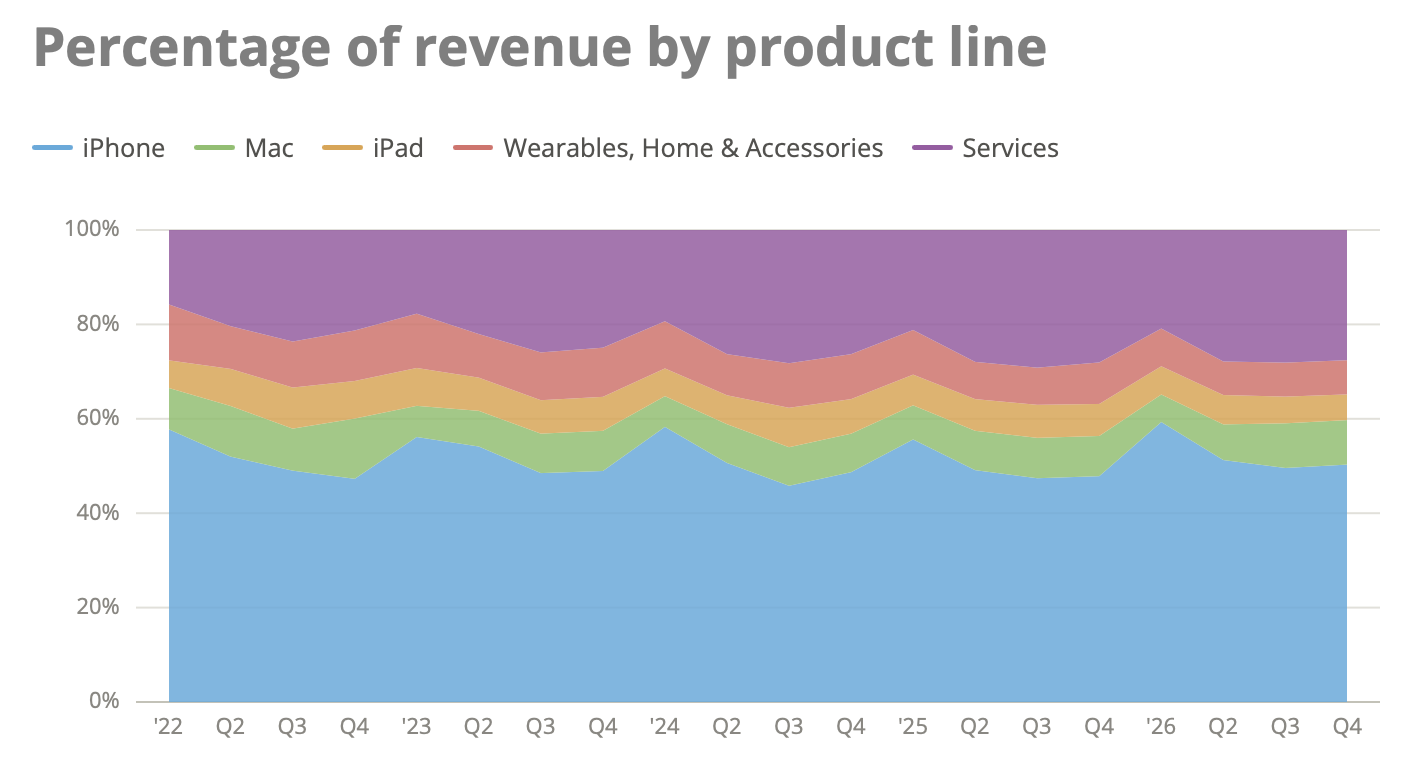
The green sliver represents the Mac’s share. Snell’s original chart is interactive — you can hover over it and get the specific breakdown for each quarter. The Mac’s share is consistently in the range of 7 to 9 percent for Q2, Q3, and Q4 each year. The iPhone is consistently around 50 percent in those quarters. In Q1 — the October/November/December holiday quarter — the iPhone jumps to around 60 percent, and the Mac drops to 5 or 6 percent. Year after year.
The Mac accounts for the high single digits of Apple’s revenue. High single digits, yes, but single digits. Yet two out of Apple’s four major events this year were focused entirely on the Mac. If you’re a pissant grump, you could argue that both of those events were wasteful, self-indulgent preening on Apple’s part. That the first one, for the MacBook Neo, was simply to announce a MacBook that cost $500 less than the previous entry point model, the MacBook Air. And the second one, last week in Los Angeles, was simply to announce MacBook Pros that cost $400 more than the previous ones, just to add touchscreen support that PC laptops have offered at lower prices for over a decade. All of this for a platform that doesn’t even account for 10 percent of the company’s revenue, with an operating system that ought to be put out to pasture.
What a miserably wrongheaded, ignorant, joyless take that would be.
These new MacBook Pros are worth showing off. What Mac users do and create on the platform is worth celebrating.
When I began closely following Apple, the Macintosh was Apple and Apple was the Macintosh. That hasn’t been true since the iPhone began its meteoric rise. Financially, Apple today is the iPhone, Services, and “everything else”.
But at the true center of Steve Jobs’s metaphorical intersection of Technology and the Liberal Arts, the Mac remains the heart and soul of everything Apple does, and responsible for so much of what users create with Apple’s products. We speak of people — both inside and outside the company — bleeding six colors. But the iPhone never had a six-color logo.
Apple has continuously adapted the Mac for changing times, changing technology, and a changing world, yet — for four decades — has kept it true to its original core. The Mac today is very recognizably the Mac to any user from any time in its illustrious history. Even touchscreen support, now, has been added the Macintosh way.
In 2010 I wrote “The Future of the Mac in an iOS World”. That piece has held up pretty well:
Here’s the short version of the “Mac is doomed” scenario: iOS is the future, Mac OS X is the past, and Apple, unlike most major tech companies, is strongly inclined to abandon the past in the name of the future.
You can’t really argue with that, can you? But the premise that the end is near for the Mac presupposes quite a bit about the near-term future of iOS. [...]
It’s the heaviness of the Mac that allows iOS to remain light.
When I say that iOS has no baggage, that’s not because there is no baggage. It’s because the Mac is there to carry it. Long term — say, ten years out — well, all good things must come to an end. But in the short term, Mac OS X has an essential role in an iOS world: serving as the platform for complex, resource-intensive tasks. The funny thing is, the best slogan to describe the Mac’s role is the same one it started with 25 years ago:
The computer for the rest of us.
I was only wrong then in fretting that the Mac might — perhaps — only have a decade or so yet ahead of it. Here we are now 16 years later and the Macintosh is more popular, more essential, more successful, and further ahead of its ostensible competition than ever in its 42-year history. Change comes slowly but it always comes.
The logo not only glows again. It might glow forever. ★
-
I am reminded of the delightful story of how Microsoft wound up with the rights to “Start Me Up” for the Windows 95 launch. The Rolling Stones had theretofore never licensed a song for use in a commercial. Mick Jagger had always handled such inquiries not by saying “no”, but instead by quoting astronomically high prices. Microsoft asked about “Start Me Up”, Jagger gave them a no-way-they’ll-say-yes price (supposedly $12 million) and Microsoft simply said, “Great, that’s a deal.” ↩︎
Friday, 6 November 2026
- Apple Support: ‘About the Illuminated Apple Logo on MacBook Pro With PROLED XDR Display’ ★
-
Apple Support:
To make the Apple logo dark in all lighting conditions, you can turn off its illumination using Terminal, which is in the Utilities folder of your Applications folder. You can also use Spotlight to find and open it.
Type or paste this command in Terminal, then press Return:
sudo defaults write com.apple.CoreBrightness LEBacklightMode -int 0[...]
To turn logo illumination on again, enter this command in Terminal:
sudo defaults delete com.apple.CoreBrightness LEBacklightModeApple might make this a GUI setting, but if I were them, I’d keep it this way. Make the people without fun in their souls use the Terminal command.
(Keeping it as a
defaultssetting also helps emphasize that you save no meaningful battery life by turning it off. If this gets exposed as a GUI preference, I could see it spreading as a dumb-ass “pro tip” to turn it off to save battery life, like the unshakeable utterly wrongheaded belief millions hold that they should religiously force-quit apps on iOS, when in fact doing so chews up more energy when the apps get relaunched from a cold start.) - The President is Coping Well ★
-
The WSJ, “Trump Signs Proclamation He Says Will Protect Oval Office From Major Changes”:
President Trump signed a proclamation Thursday that he said would designate the White House’s Oval Office and Cabinet Room as landmarks to prevent future presidents from making major changes to them.
“They won’t be able to be taken down, destroyed, touched or anything else,” Trump told reporters. “It’s called, actually, a national monument. It’s a federal landmark, and when completed and when we get the documentation fully done, legally binding, it’ll make it impossible for anybody ever to destroy this incredible space.”
Oh, buddy, every last bit of that pyrite cack will be pried off the walls and in a dumpster by mid-morning on 20 January 2029.
You know that scene in Pulp Fiction where John Travolta’s Vincent Vega tells his drug dealer (Eric Stoltz) about his vintage Chevy Malibu getting keyed? “Boy I wish I could’ve caught him doing it. I’d have given anything to catch that asshole doing it. It would have been worth him doing it, just so I could’ve caught him. What’s more chickenshit than fucking with a man’s automobile?”
I sort of feel that way about Trump and the next two years.
Thursday, 5 November 2026
- Salon Ceases Publication ★
-
Salon, in an unsigned goodbye post:
Thirty-one years is a remarkable run, but what matters most is what happened during those years: the journalism, the ideas, the voices, the conversations and the community that grew around them. Salon helped demonstrate what digital journalism could be and could become. We hope that legacy will continue to matter long after today.
I hope the archives stay online, but considering the care taken for this announcement, I doubt it.
Salon felt old and established when I started Daring Fireball in 2002. They were pioneers of treating the web as a first-class medium. A quick search indicates that I’ve linked to Salon in 27 posts here, starting with this one in 2003 (which was primarily a retort to a Paul Boutin column for Slate), and most recently with this April 2025 post that linked to a 2013 Salon article.
- Meta Releases Mac Version of Edits ★
-
From Instagram’s Edits blog:
I’m Brett Westervelt, and I lead the Edits app.
In just over a year, 50 million people have made Edits part of how they bring ideas to life, and we’re excited to expand what Edits can do for creators. Today we’re bringing Edits to the big screen. The first version of our desktop editor is now available for macOS. We’ve designed it to support more involved projects, where a larger screen and the precision of a mouse and keyboard really matter. Just like Edits on mobile, we’ll be updating our desktop app every week, so let us know what you think and what you’d like to see next.
Edits isn’t an app I need but I’m glad to see the resurgence in native Mac app development continue. I mean Instagram waited 15 years before they supported the iPad with their main app. Now they’ve got a native Mac video editor. That’s cool, and the app seems good. Looks like it’s SwiftUI? Someone on the team needs to go through the entire menu bar and properly title-case all the menu item commands, but overall it passes the sniff test. (It supports MacOS 15 Sequoia, but the icon looks lame — a sharp-cornered square.)
But I can’t help but think this just shows how Apple has ceded this market. Final Cut Pro is overkill for quick video editing, but iMovie ought to be optimized for this use case. It’s not. Who is iMovie for today?
And a decade ago Apple launched Clips, the entire point of which was to create social media-style videos. Clips was a really good app that never found an audience because it never had a clear use case. When it was new in 2017, I described it as “the single best example of a productivity app designed for iOS”. Apple officially end-of-life’d Clips in October last year, but before that, in January 2025, I wrote:
A mobile-first video editor isn’t a “money pit”. It’s an app. Apple makes a lot of apps, and they could easily afford to assign a team to make Clips truly great. It’s no different than 20–25 years ago, when Apple dedicated itself to making iMovie and Final Cut both great apps. It’s no different than the motivation to create GarageBand. The monetization wouldn’t be direct; it would be downstream of the general idea that if you’re editing videos for social media on your phone, the best app to do it with is from Apple and it’s exclusively available on iPhone. The idea is that Apple doesn’t just make the best computing devices for artists, writers, and creators, but they also make some of the best apps for those fields too. [...]
I don’t know if Edits is a rip-off of CapCut or not, but it’s definitely not a rip-off of Clips. It’s a good rule of thumb that when Apple succeeds at something, it gets ripped off. The better the Apple product, the more shamelessly it gets copied. Apple should make Clips into an iOS video editing app that everyone rips off shamelessly.
The other problem with Clips that comes to mind is that Apple never made a Mac version. I don’t know if the Mac version of Edits is actually a good Mac app, but it’s certainly a better Mac app than the no-app-at-all support for the Mac that Clips had. Maybe that was a byproduct of Clips being developed in 2016 and debuting in 2017, which coincided with the nadir of Mac hardware and the height of the-iPad-is-the-future within Apple. But a decade later, the Mac is back — and I’d say is in the strongest position as a platform that it has ever been. It seems rather embarrassing in hindsight that Apple itself never made a Mac version of Clips.
Now that Clips is dead (and largely forgotten), iMovie is the brand that Apple should reinvigorate. Apple ought to make a rethought-from-the-ground-up iMovie that is a great app on iPhone, iPad, and the Mac. The point of it should be to show CapCut and Edits how it’s done.
Wednesday, 4 November 2026
- This Election Will Not Look Surprising in History ★
-
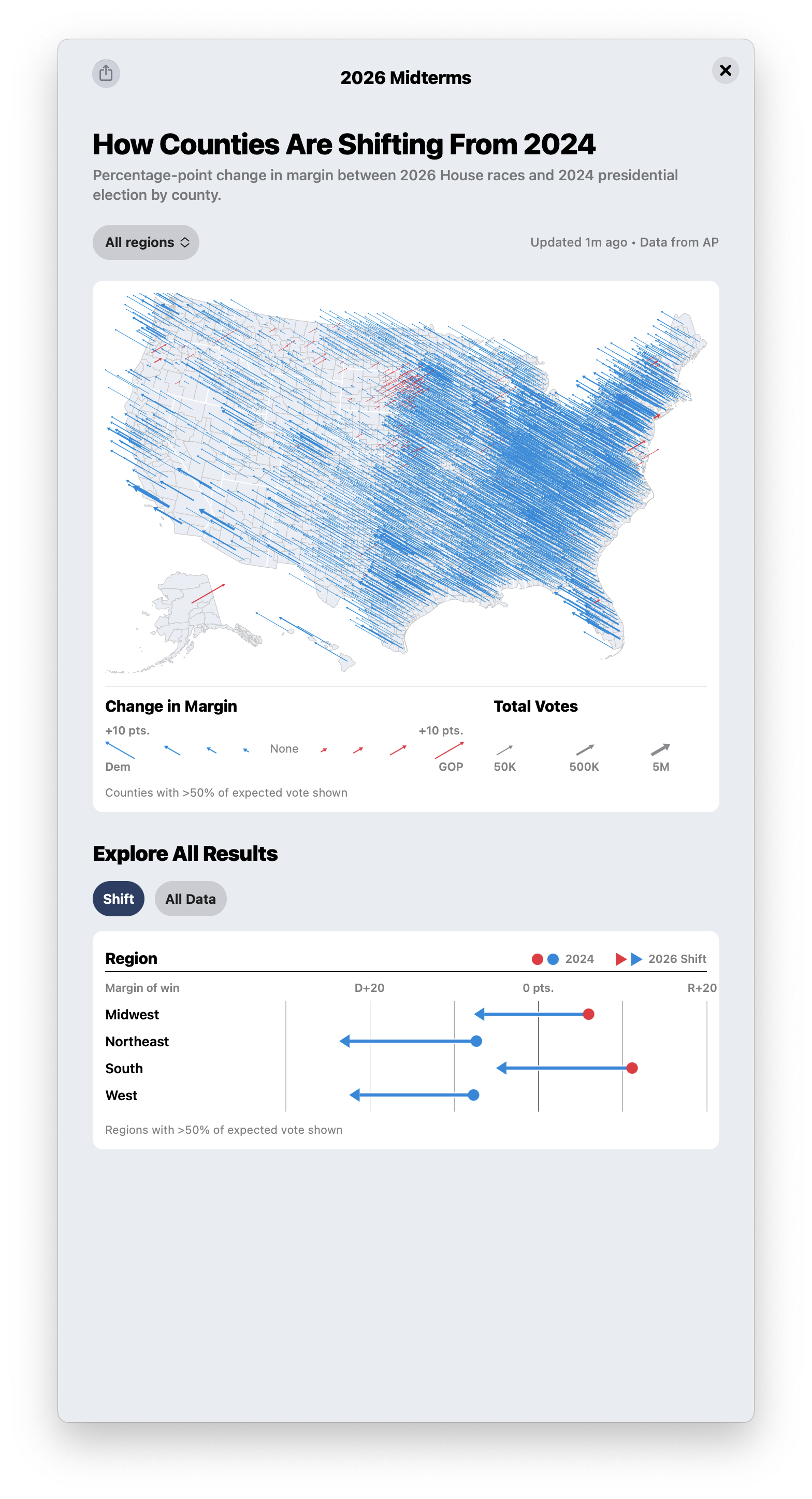
This striking map from Apple News tells the story of the magnitude of the shift since 2024.
The late Lindsey Graham, on Twitter back in May 2016 (punctuation sic):
If we nominate Trump, we will get destroyed.......and we will deserve it.
The wheels of history grind slowly, but they do grind. By the time of his death, Graham was amongst the lickspittlest of Trump’s GOP toadies. Graham’s idiot sister ran for his vacant Senate seat in South Carolina and lost.
Former representative Liz Cheney, at the January 6 hearings in 2021:
I say this to my Republican colleagues who are defending the indefensible. There will come a day when Donald Trump is gone, but your dishonor will remain.
Winston Churchill, perhaps apocryphally:
Americans can always be trusted to do the right thing, once all other possibilities have been exhausted.
You can fool some of the people all of the time, and all of the people some of the time, but you can not fool all of the people all of the time.
- ‘Political Reckoning Shatters Trump’s Grip on Washington’ ★
-
Aaron Zitner, reporting for the Rupert Murdoch-owned Wall Street Journal:
Rarely in American politics has a president traded away so much political support so quickly.
The losses that Republicans suffered on Tuesday marked one of the most decisive repudiations of a president in modern history. President Trump had re-entered the White House with advantages he lacked in his first term: a victory in the popular vote, a cadre of aides eager to expand his authority and cultural currency that had NFL players doing the “Trump dance” in the end zone.
Only two years later, his political standing has collapsed, all because of a dramatic miscalculation of his power to shape events. A war of choice with Iran and tariffs imposed on U.S. trading partners betrayed his promise to avoid foreign entanglements and tame inflation. His extraordinary interventions in his party’s primaries left Republicans with a set of unusually weak candidates.
The Democrats went from out of power in Washington to a massive majority in the House and an apparent 55-45 or even 56-44 majority in the Senate. Keisha Lance Bottoms was elected the first black woman governor in history — in Georgia. By a 9-point margin. Texas elected Democrats to the Senate and governor’s mansion. Kansas elected a Democratic senator for the first time in 94 years.
The fever, finally, well and truly broke.
Tuesday, 3 November 2026
- Apple Begins Opening Siri AI to Developers ★
-
Apple Developer:
Starting today with the iOS 27.3, iPadOS 27.3, macOS 27.3, and visionOS 27.3 betas, a new Developer Preview enables any developer to integrate their app with Siri AI, giving businesses and developers new ways to reach and serve their customers. [...]
This developer beta offers a sneak peek at Siri AI app intents for developers. With this early Developer Preview, your app can work directly with Siri AI, giving you a first look at new ways to reach and serve your customers. This preview provides early access before first shipping to customers in a few months; and with submission to the App Store opening up in the spring, developers have time to explore, build, and help shape their experiences before launch. Try it out and share your feedback.
As you explore early, we will follow up with more details about the terms and usage policies for experiences enabled through Siri AI. More to share soon.
Greg Pierce (developer of Drafts and other fine apps):
This sounds amazing, and I didn’t think we’d see App Intents integration into Siri AI until next WWDC.
Siri AI is getting to the point of underpromising and overdelivering, which is where you want products to be. In 2025 things were so bad, Apple had overpromised and not just underdelivered, but delivered nothing.
- iPad Mini (A20 Pro) Review Roundup ★
-
David Pierce at The Verge, on the Acoustic Display:
It means the sound fires out of the front panel rather than from speaker holes. (Some TVs currently work the same way.) It doesn’t sound any better than before, maybe a tiny bit bassier, but it also doesn’t sound worse, and if anything it’s slightly better to have the sound actually pointed at you instead of out the sides of the tablet. Mostly it’s a wash in service of the ruggedization, which is good enough for me.
Stephen Robles, on YouTube, thinks it sounds muffled at high volumes and doesn’t seem to like how you can feel the whole tablet vibrate at high volumes.
Tony Polanco at Tom’s Guide liked the Acoustic Display sound quality and praised the battery life (but only had time to run the battery test once):
In the Tom’s Guide battery test, which involves continuous web-surfing over Wi-Fi with the display set to 150 nits of brightness, the iPad mini 8 lasted for an astonishing 14 hours and 24 minutes! That’s nearly four hours longer than the previous model and Apple’s claims.
John Voorhees at MacStories was impressed by the Mini’s local AI performance:
The mini’s local AI capabilities extend beyond software optimized for the Neural Engine. To explore those, I ran Qwen 3.5 4B (4-bit) locally using a benchmark built into Russet, a local AI and developer tool. The 512GB iPad mini averaged a pace of 40 tokens per second across four sessions on both tests that output 128 or 256 tokens with a time to first token of 0.32 seconds for the 128 output token tests and 0.36 for the 256 output token tests.
I couldn’t compare the new mini’s local AI performance to my 6th generation iPad mini because it only has 4GB of memory, which is too little for the models Russet offers for download. Instead, I downloaded the same model on my 11-inch M4 iPad Pro and ran the same Russet benchmark. The A20 Pro came out on top in my tests. The Russet tests I ran use MLX, which runs on the CPU and GPU, so they don’t measure the benefit of the Dual 16-core Neural Engine. However, they do demonstrate the A20 Pro’s serious local AI capabilities.
- MKBHD on the New A20 Pro iPad Mini ★
-
Marques Brownlee describes the two color choices as “annoyingly, slightly not black and slightly not white,” which is apt. He digs the acoustic display enough that he can imagine Apple bringing it to a future high-end iPhone (like if they do a big redesign next year for the 20th anniversary), but he says you can feel the whole iPad shake if you turn the volume up high enough.
And, of course, he dings it for not having a 120 Hz display, and wonders where Apple even sourced a high quality OLED that doesn’t support 120 Hz. I think that’s the wrong question to ask. It’s not about the display panel. It’s the display controller, and ProMotion requires a display driver that’s enough more expensive that adding it to the iPad Mini would either raise the price even further or cut into Apple’s profit margins. It’s the display controller, though, not the panel, in my understanding.
- Safari 27.3 Beta Adds Vertical Tabs and Adaptive Dark Mode ★
-
Juli Clover, MacRumors:
With iOS 27.3, iPadOS 27.3, and macOS Golden Gate 27.3, Apple is making major updates to Safari. The browser is getting a Vertical Tabs layout, which can be used instead of the standard horizontal tab bar. It’s a change that pairs well with the iPhone Duo’s larger display, but it is available across iPhone, iPad, and Mac.
Vertical Tabs are located on the left side of the display and use icons by default to save space, but there is an option to make the tab bar wider to show website titles as well. Vertical Tabs work with both Topics and Tab Groups to keep things organized. Topics are created when automatic Apple Intelligence tab sorting is turned on in iOS 27. Pinning tabs by dragging, quickly swapping between Tab Groups, and other features also continue to work.
I got an advance demo of this last week and I’m really looking forward to trying it. I’ve gotten very used to horizontal tabs over the years, but a long time ago I was a devoted user of the Omni Group’s OmniWeb browser, of which one of my favorite features was its vertical tabs. That was so long ago, the tabs went in a drawer.
Apple is adding Adaptive Dark Mode for websites that don’t have a dark mode design option by default. If you use Dark Mode and then browse to a website with a bright background color, Safari will offer an option to “Try” Adaptive Dark Mode.
There are some popular Safari extensions that offer this (e.g. Noir), but Safari 27.3 has the feature built-in, and the demo I saw looked great. It kicks in for light-background websites that don’t offer a dark mode alternative presentation, and it allows for web developers to explicitly opt out.
- The New York Times (et al.) Sues Brave for Copyright Infringement, Selling Scraped Content to AI Companies for Model Training ★
-
Jay Peters, The Verge:
The New York Times and a group of other publications have filed lawsuits against the company that makes the Brave web browser over alleged unlawful scraping to train AI and also letting users bypass their paywalls, as reported by Reuters.
According to a complaint filed by the New York Daily News, the Chicago Tribune, and the Orlando Sentinel, Brave Software has monetized its index of scraped websites by, in part, providing AI companies with paid access to “real-time online content from the Brave Index.” The AI companies then use that index to train their models, access content to “respond to specific user queries,” or both. Brave has allegedly provided “stolen copyrighted content” to “many” AI companies including Anthropic, Perplexity, Mistral, xAI, and Cohere.
Brave also promotes “hundreds of top publishers” as being accessible through its “Paywall blocker” feature in its browser.
- Steve Jobs on His Final Quarterly Analyst Call: ‘We Think the Open Versus Closed Argument Is Just a Smokescreen’ ★
-
After linking to it earlier today, I re-read Steve Jobs’s remarks from his last appearance on a quarterly analyst call. It’s a banger of a good read:
You know, even if Google were right, and the real issue is “closed” versus “open,” it is worthwhile to remember that open systems don’t always win. Take Microsoft’s “Plays For Sure” music strategy, which used the PC model — which Android uses as well — of separating the software components from the hardware components. Even Microsoft finally abandoned this “open” strategy in favor of copying Apple’s integrated approach with their Zune player, unfortunately leaving their OEMs empty-handed in the process. Google flirted with this integrated approach with their Nexus One phone.
In reality, we think the open versus closed argument is just a smokescreen to try and hide the real issue, which is, “What’s best for the customer — fragmented versus integrated?” We think Android is very, very fragmented, and becoming more fragmented by the day. And as you know, Apple strives for the integrated model so that the user isn’t forced to be the systems integrator. We see tremendous value at having Apple, rather than our users, be the systems integrator. We think this a huge strength of our approach compared to Google’s: when selling the users who want their devices to just work, we believe that integrated will trump fragmented every time.
Prescient.
- Chance Miller Reviews the New A20 Pro iPad Mini ★
-
Chance Miller, writing at 9to5Mac:
Unfortunately, the new iPad mini’s screen has one limitation: it doesn’t support ProMotion, or a 120Hz refresh rate of any kind. Instead, it’s still locked to 60Hz. This is an incredibly frustrating decision that I can’t quite wrap my head around.
Apple touts the iPad mini’s OLED screen as offering significantly faster pixel response time than the previous generation’s LCD panel, leading to improvements like smoother scrolling and reduced motion blur.
I’ve noticed that things like swiping between Home Screen pages, scrolling social media, and system animations are noticeably smoother. They aren’t, however, as smooth as an Apple device with a ProMotion display, and they’re not a substitute for a higher refresh-rate display.
Apple is very stingy with ProMotion. Until last year it was exclusively available in iPhones, iPads, and MacBooks that had “Pro” in their name. Last year they added ProMotion to two products without “Pro” in their names: the iPhone 17 and iPhone Air. This year’s $2,000 iPhone Duo of course offers it now too. Apple refreshed the $1,600 Studio Display last year but it still only supports 60 Hz; only the $3,300 Studio Display XDR supports 120 Hz. (Apple does not call this “ProMotion”.)
What makes this frustrating with the iPad Mini is that Apple doesn’t sell an iPad Pro smaller than 11 inches. With MacBooks and larger iPads, if you really care about ProMotion, you can spend money to get it. With a small iPad, however, you can’t.
My big question re: the new iPad Mini is the new “acoustic display”. Miller gives it a thumbs-up:
Essentially, Apple has designed special woofers that vibrate the display to produce low and midrange frequencies. For higher frequencies, custom tweeters are hidden between the glass and aluminum enclosure. Apple says this new system delivers louder audio, “punchier” bass, and clearer highs, despite the iPad mini’s significantly thinner design.
In practice, I think the new iPad mini sounds great. I’d choose headphones or an external speaker for serious music or video consumption, but day-to-day the iPad mini’s built-in speakers are perfectly adequate. (I’d bet that this Acoustic Display technology shows up in future iPhones too, and the iPad mini is serving as a test bed of sorts.)
- Apple’s Analyst Calls Have Been Scripted for Decades ★
-
Bloomberg opinion columnist Dave Lee:
Apple investors and fans hoping to get an insight into the philosophy of new Chief Executive Officer John Ternus on Monday were left sorely disappointed. The 51-year-old’s first earnings call was a timid affair, with Ternus taking cover behind a carefully written script as analysts peppered him with questions.
This is stupid. I mean, it would have been fun if Ternus’s style on the analyst conference call had been loose and freewheeling. Just like it would have been fun if the questions from analysts hadn’t been mostly insipid and pointless. But nothing has changed here other than who the CEO is. Tim Cook’s quarter calls were snoozefests. Save those recordings and use them to help you sleep. And that’s exactly how Cook wanted them.
What Ternus should do is follow Steve Jobs’s lead, and skip these calls except when there’s something exceptional to address. Let CFO Kevan Parekh and COO Sabih Khan handle them, the way Jobs used to let Tim Cook and Apple’s then CFOs handle them. At one point in 2008, Jobs had only appeared on three of the calls in 11 years. He then appeared on the call in October 2008 to address the global financial crisis, and again in October 2010 (one year before he died) to celebrate Apple’s first $20 billion quarter and to throw shade at Android, BlackBerry, and competing tablets. In the 14 years of Jobs’s 2.0 stint as CEO, he only appeared on five quarterly calls. That’s the way to do it. Show up only when you have something worth saying. Otherwise the message remains clear: steady as she goes.
- Apple’s New iPhone Release Schedule Seems to Pay Off ★
-
Horace Dediu, tweeting yesterday on Apple’s results:
iPhone grew at 17% sales which is amazing considering they did not launch the 18 or the Duo or the new Air in the quarter.
The Duo didn’t launch until October, which is Q1 (in Apple’s financial calendar). And the Air, last year, was not a big seller (putting it lightly). The big bet Apple made this year was postponing the regular iPhone 18 until the end of winter early next year. The pro models — Pro and Pro Max — combined sell more than the regular non-pro no-adjective iPhone each year, but the regular non-pro iPhone is Apple’s single best-selling iPhone model. The bet that Apple made is that those mainstream buyers don’t care if the regular iPhone 18 ships five or six months after the 18 Pros — and won’t care next year, or the year after that, or the year after that about this same schedule being followed by the iPhones 19, 20, 21, etc.
The other factor at play is that the just-reported quarter started in July, just after Apple raised prices on just about every major product it sells other than the iPhone. So it’s theoretically possible that this quarter’s sales were boosted by people buying year-old iPhone 17-generation models in anticipation of Apple raising prices with the new models in September (which is exactly what happened). But I don’t see how that can explain 17 percent growth in sales year-over-year. Some savvy enthusiasts definitely did this. I have heard from a few people who bought iPhone 17 Pros in August, concluding that they’d be better off saving money than spending more for an only incrementally better 18 Pro (which would no longer come in the all-time-great cosmic orange colorway). But general consumers don’t follow Apple that closely. There are around 1.6 billion iPhone users worldwide, and I bet at least an entire billion of them have no idea that Apple always holds an iPhone introduction event in early September.
We can’t call this new launch schedule a win until we see what happens in late February or early March when Apple launches the iPhone 18, 18e, and Air 2, but so far it sure looks like a win.
Monday, 2 November 2026
- Apple Announces Record $114.5B Fourth-Quarter Results ★
-
Jason Snell, Six Colors:
On Monday, Apple announced record fourth-quarter earnings, with total revenue of $114.5B, up 12 percent from the year-ago quarter. iPhone revenue was up 17.5%, Mac revenue was up 23.7%, and Services revenue was up 9.8%. Wearables revenue was down 7.9% and iPad revenue was down 10.4%. [...]
And now, to help you visualize what Apple just announced, here is our traditional barrage of charts and graphs.
As usual, Snell also has a transcript of the analyst call — Ternus’s first as CEO. My favorite tidbit was his line at the end of this answer:
Richard Kramer, Arete Research: Your latest MacBook Pros included more iOS features like Touch and Dynamic Island as well as, obviously, Siri AI. Should we anticipate further close linking of macOS and iOS features, maybe even pointing at some point to a single unified OS, either for simplicity or to reduce costs?
John Ternus: Look, we are very proud of both the Mac and the iPad, and I think what you’ve seen over the years is we’ve really enjoyed the ability to bring features and capabilities across the ecosystem and create really compelling features that span things between handoff between iPhone and Mac and iPad, and so when we design the product, we’re looking at how can we make the best version of each and every product, and if you look at what we just did last week with the MacBook Pro, we took a huge leap forward. These MacBook Pros are better in every way than the ones that came before them, and we’re really proud of that, and so we don’t have any fundamentally different changes that we’re planning right now, nor would we talk about it anyway.
Sunday, 1 November 2026
- WorkOS: Let Agents Sign Up for Your App Without a Browser ★
-
My thanks to WorkOS for sponsoring last week at DF. An agent can’t click through a signup page built for humans, so give it something it can read instead. Publish an auth.md file and agents register themselves without ever touching a browser login, and the user never gets pulled out of what they were doing.
With WorkOS auth.md, enroll in the dashboard and AuthKit publishes the file. Agents read it, register, and get scoped, short-lived credentials you control.
Friday, 30 October 2026
- Sponsorship Openings for Daring Fireball (Including The Talk Show) ★
-
Sponsorships have continued selling briskly, of late. Knock on wood. As of yesterday, the next opening on the schedule wasn’t until the last week of December, and the Q1 2027 schedule is already filling up.
However, due to some schedule rejiggering, next week is now open.Update: OK, next week has been sold, but Christmas week remains open. That’s a good week at DF. I keep posting and readers are often more bored than usual. Also a good week to promote games.If you’ve got a product or service you think would be of interest to DF’s audience of people obsessed with high quality and good design, just email me — especially if you can act quick for next week’s opening. I’m also booking sponsorships for Q1 and Q2 2027, and over half of those weeks are already sold. The rate for the two remaining weeks in 2026 is $11,000, and the rate for open weeks in 2027 is $12,500.
The sponsorship schedule for The Talk Show also has openings, including for the next few episodes in November and December. The general rule of thumb is that sponsorship spots on The Talk Show cost one-third the rate for the weekly spots on DF. I’m happy to work out deals a little lower than that for first-time sponsors. If you’ve got a product or service you’d like to hear pitched on America’s favorite three-star podcast, get in touch.
MacBook Pro Pricing and Configurations for M6, M5 Pro, and M5 Max
Friday, 30 October 2026
Apple’s dynamic configuration UI in their online store doesn’t hide or disguise the pricing or configuration options, but it doesn’t present all of the options at a glance. I find it useful to organize all of the configuration options into tables on a single page, and I figured it might be useful to share this now, before I finish writing my full thoughts on the redesigned hardware and displays for the PROLED XDR models.
Notes:
The old-style (mini-LED, no touchscreens, heavier) M5 Pro and M5 Max MacBook Pros were announced and began shipping in March 2026, alongside the new Studio Display and Studio Display XDR, the MacBook Neo, and M5 MacBook Airs.
The new but old-style plain 14-inch M6 MacBook Pro was announced in October 2026 and is set to begin shipping in early November.
The all-new PROLED XDR (touchscreens, lighter weight) M5 Pro and M5 Max MacBook Pros were announced in October 2026 and are set to begin shipping in early November.
As in previous generations, there are no 16-inch models for the plain M6 or the chip-binned fewer-core M5 Pro configurations. The 16-inch MacBook Pro starts with the full 18-core CPU / 20-core GPU M5 Pro chip.
16-inch models, when available, cost $300 more than the same-specced 14-inch configuration.
Nano-texture displays are an option for all MacBook Pro models, and always cost $150.
The new PROLED XDR models cost $400 more than the equivalent old-style ones. This $400 difference is true for both 14- and 16-inch models.
The new 16 TB SSD upgrade is exclusively available for M5 Max models with the new PROLED XDR displays. It costs a smooth $7,000 more than the base 2 TB storage.
M6
12-core CPU / 12-core GPU:
    14-inch:        $2000
    16-inch:          N/A

    PROLED XDR:       N/A
    Nano-texture:    +150

    RAM:    16 GB      +0
            24 GB    +200
            32 GB    +400

    SSD:    1 TB       +0
            2 TB     +500
            4 TB    +1500
M5 Pro
15-core CPU / 16-core GPU:
    14-inch:        $2500
    16-inch:          N/A

    PROLED XDR:      +400
    Nano-texture:    +150

    RAM:    24 GB      +0
            48 GB    +600

    SSD:    1 TB       +0
            2 TB     +500
            4 TB    +1500


18-core CPU / 20-core GPU:
    14-inch:        $2700
    16-inch:        $3000

    PROLED XDR:      +400
    Nano-texture:    +150

    RAM:    24 GB      +0
            48 GB    +600
            64 GB   +1000

    SSD:    1 TB       +0
            2 TB     +500
            4 TB    +1500
M5 Max
18-core CPU / 32-core GPU:
    14-inch:        $4100
    16-inch:        $4400

    PROLED XDR:      +400
    Nano-texture:    +150

    RAM:    36 GB      +0

    SSD:    2 TB       +0
            4 TB    +1000
            8 TB    +3000
           16 TB    +7000  (PROLED XDR only)


18-core CPU / 40-core GPU:
    14-inch:        $4700
    16-inch:        $5000

    RAM:    48 GB      +0
            64 GB    +400
           128 GB   +2000

    SSD:    2 TB       +0
            4 TB    +1000
            8 TB    +3000
           16 TB    +7000  (PROLED XDR only)
To me, the most curious detail in these tables is that if you select the chip-binned M5 Max with only 32 GPU cores, the one and only RAM configuration is 36 GB. The “full” M5 Max with 40 GPU cores starts with 48 GB of RAM in the base configuration.
For size, weight, battery life, and display brightness differences, consult Apple’s ever-excellent Compare tool, preconfigured with that link to show the 14-inch models with M6, M5 Max (mini-LED), and M5 Max with PROLED XDR. (PDF archive of that Compare page, archived today for posterity.) ★
Friday, 30 October 2026
- The Only Good Easter Eggs Are Whole-Assed Easter Eggs ★
-
Marcin Wichary on the original iPod easter egg on Apple Music’s website 404 page:
I am usually not a fan of easter eggs — most of them are poorly made — but this might be the best iPod recreation I’ve seen, and it’s an interesting thing to study:
- I think it generally covers all the modes etc.
- (with small exceptions) the typography looks accurate,
- it has the little “haptic” beeps,
- it has proper acceleration and the scrollbar,
- it has a little music library with various playlists,
- I have only noticed a few small bugs.
It looks real, sounds real, feels real. Don’t bother with your easter egg idea if you’re going to half-ass it.
Update: The original iPod itself had a great easter egg: a hidden version of the classic game Breakout. Apple’s new easter egg web-page iPod includes the hardware iPod easter egg. Just go to Settings → About and hold down the center button for 5 seconds. An easter egg in the easter egg. That’s how you do it.
- GM to Pay $220 Million After Betraying Their Own Drivers’ Privacy ★
-
Jonathan Stempel, reporting for Reuters:
General Motors will pay $220 million to settle allegations that it illegally sold drivers’ private behavior and location data to brokers, who then sold the information to insurers that used it to set and sometimes increase rates.
The settlement, announced on Thursday, resolves claims by the attorneys general of 35 US states and the District of Columbia over the automaker’s Smart Driver program, which enrolled millions of drivers between 2016 and its discontinuation in 2024. Other regulators have also reviewed GM’s handling of driver data.
GM was accused of pitching Smart Driver to help people improve their personal driving safety, only to violate drivers’ privacy by reneging on its promise not to sell their data without permission. Many people who signed up were also enrolled in GM’s OnStar safety, navigation and diagnostic service.
Reuters’s milquetoast headline was “GM to Pay $220 Million to Settle Allegations It Violated Drivers’ Privacy”. They’re not mere allegations. They did it. They just betrayed their customers’ privacy to make a few quick bucks.
I’ve driven a few GM rentals in recent years, and I’d almost certainly never buy one of their cars just because they’re poorly-designed pieces of crap. But even if they made a decent car I wouldn’t buy it. They’re still seemingly digging in on the CarPlay thing, and they ratted out their own customers to insurance companies.
- Patrick Stewart Dies at 86 ★
-
Aaron Couch, The Hollywood Reporter:
Patrick Stewart, the sophisticated actor who brought a Shakespearean touch to Star Trek and X-Men as he made an otherworldly transformation from British stage veteran to sci-fi icon, has died. He was 86.
Stewart died Wednesday at his home in Los Angeles following “a brief and poignant journey with Alzheimer’s disease and Lewy body dementia,” longtime spokesperson Kelly Bush Novak announced.
There’s an old adage that everyone’s favorite SNL cast is the one from their teenage years. It’s probably true for Star Trek too. My favorite is The Next Generation and it’s not even close. Stewart’s Jean-Luc Picard was just so fucking cool. Smart, wise, firm, curious, empathetic, and just fucking cool. Those same adjectives seemingly all apply to Stewart himself.
See Kottke for a bunch more links.
Thursday, 29 October 2026
- Apple Drops App Store Commission by a Whopping 4 Percentage Points in Taiwan ★
-
Apple Developer News:
Apple is making changes to the Taiwan storefront of the App Store, following discussions with the Taiwan Fair Trade Commission.
As of October 31, 2026, the commission rate for standard Apple In-App Purchase and paid app transactions will be 26% on the Taiwan storefront of the App Store on iOS and iPadOS. Currently, that rate is 30%.
Well there we go. The App Store in Taiwan — just like in Japan — is fixed.
- A Health Update From Craig Hockenberry ★
-
Craig Hockenberry:
If you noticed that the Iconfactory sites were kinda broken last week, now you know why. It’s because I was kinda broken last week.
Now I’m finishing this post from a comfy chair on our deck. Typing into the latest version of WordPress and PHP. And I couldn’t be happier.
No, you teared up a little reading this.
Very good news from a very good friend.
- Rolfe Winkler at The WSJ: ‘The Beleaguered Chip Sellers Getting Their Revenge on Apple’ ★
-
Rolfe Winkler, in a crackerjack story for The Wall Street Journal (gift link):
Blevins, who left Apple in 2022, sometimes set up back-to-back meetings with suppliers so that rival sales teams might run into each other, stoking competitive tension. Sales representatives learned to pack nutrition bars to sustain them through negotiating sessions that Apple executives sometimes pushed past midnight without a dinner break. Blevins’s bad-cop reputation gave his staff leverage: They threatened to call him in if contract terms weren’t to their liking.
One significant contract term allowed Apple to audit its suppliers’ books. Flash makers typically had to designate Apple as a “most favored customer,” which guaranteed that no other buyer got a lower price, according to people familiar with the agreements. Apple’s audits allowed it to verify that no one paid less.
Apple caught Micron selling flash at cheaper prices to another customer and won an arbitration settlement worth tens of millions of dollars more than a decade ago, said people familiar with the dispute. Apple audited its suppliers so often that Blevins negotiated a volume discount with the auditor, Deloitte.
The whole story is a fascinating and entertaining read. But I don’t get the “revenge” angle in the headline. The biggest buyers can negotiate the best deals. Apple used to be the biggest buyer, by far, for flash memory chips. They negotiated, with hardball but above-the-board tactics, the best deals. Now, Apple isn’t the biggest buyer — the AI datacenter hyperscalers are. Apple no longer gets the best deals. But they’re still getting fair deals. Apple is still negotiating the best deals it can for itself. So where is the “revenge”? The pinch mostly isn’t being felt by Apple — it’s being felt by Apple’s customers, who now face significantly higher product prices.
I included “mostly” in the preceding sentence because Winkler, in collaboration with the research firm TechInsights, makes the case in the piece that the rising costs of flash memory have eaten into the remarkably juicy profit margins Apple has historically earned from higher-storage upgrades.
What I also don’t get, at all, is the participation in the story by Scott Nelson, the chief marketing officer at Kioxia (which I learned in this story is the new name for the company formerly known as Toshiba Memory Corporation), a major flash supplier. Nelson told Winkler he so loathes Apple that he shot his old iPod with a rifle and keeps the pieces on his desk. The article ends thus:
The industry’s low point came in 2023. The Covid-era, work-from-home device boom cooled, and flash prices bottomed out at 5 cents a gigabyte. Bernstein Research estimated the flash industry generated operating losses of $19 billion that year, while Apple earned $14 billion in gross profit selling extra flash storage.
Those were tough times that “I hope we don’t ever see again,” said Nelson, the Kioxia sales executive.
Yes, I’m sure the current AI datacenter mania will last forever, the bubble will never burst, and that even if it does, no one at Apple will remember Nelson’s participation in this story.
- The Space Shuttle Discovery’s Starboard Side ‘s’ Is Upside Down ★
-
How Jason Snell beat me to linking to this, I don’t know. But like I said back in February, when it comes to signage, “Mind your P’s and Q’s” ought to be “Mind your H’s and S’s”.
- Steven Levy on the New MacBook Pro, With, Yes, a Touchscreen ★
-
Steven Levy, writing at Wired with the scoop on the new MacBook Pros (News+ link):
This turnaround is a big deal to Apple fans. Ternus shrugs off the drama. “The Mac is first and foremost an indirect input device, built around the trackpad and keyboard. But I think there’s times when it’s comfortable and handy to have touch.”
Ternus and Apple want to make sure that the Mac faithful don’t panic that the 42-year-old franchise is losing its identity to Apple’s gangbusters mobile products. “We needed to get to a point where adding touch didn’t make the product lesser in any way. It didn’t make it heavier. It didn’t make it thicker. That came together with the OLED screen, the best display we’ve ever put into a Mac,” Ternus told me. “All of these things, and, oh yeah, it has touch as well.”
After a long fun day of hands-on exploration, briefings, and a slew of demos, not just most, but all of my concerns about touchscreen support adversely affecting the Mac UI have been allayed. I love it. These seem like exquisite machines even if you never want to touch the screen. I think what Ternus told Levy captures the truth of touch’s role: “All of these things, and, oh yeah, it has touch as well.”
Wednesday, 28 October 2026
- Guessing the Name: MacBook Studio? ★
-
Joe Rossignol, MacRumors:
A teaser video shared by Apple CEO John Ternus today hints at a potential name for the rumored MacBook models with touch-enabled OLED displays: MacBook Studio. [...]
Apple is expected to show off the new MacBooks to selected tech reporters and content creators at an experience in Los Angeles at 10 a.m. Pacific Time today, and that is the home of Hollywood movie studios after all.
I went to bed last night thinking “MacBook Studio” was the best guess. I woke up this morning feeling like it was a name worth betting on. It just fits. There’s a Mac Studio desktop, Studio Display monitor, and Apple’s suite of pro software tools is named Creator Studio — and they just announced big updates to that yesterday. As I suggested yesterday, these should be a new MacBook line, not the new MacBook Pros.
If this is the name, Rossignol gets the Being Right Point for calling it.
(A bunch of readers chimed in to suggest “MacBook Touch”. That wouldn’t work for the same reasons that Apple didn’t even consider calling the Duo the “iPhone Fold”. Yes, they used “Touch” for the iPod Touch of yore, but (a) that was a different era, and (b) that was such a mediocre product name that most consumers referred to it by the wrong name, “iTouch”. Apple likes names that evoke a feeling, not that describe a specific feature of the product.)
Update: Welp, never mind.
Tuesday, 27 October 2026
- Siri AI Expands to More Languages in OS 27.2 ★
-
Apple Newsroom yesterday:
With the 27.2 software updates released today, Siri AI — an entirely new version of Siri that is profoundly more capable, conversational, and personal — is expanding to more people around the world, with availability now in the French, Japanese, Korean, Portuguese, and Spanish languages. [...]
Siri AI is currently unavailable in the EU in iOS, iPadOS, and watchOS. Apple is working constructively with the EU in an attempt to find a path forward.
Don’t hold your breath. (Or if you prefer, N’y comptez pas trop.)
- Apple Creator Studio Updated With a Slew of AI Features, Along With a New Open JSON File Format for Keynote ★
-
Apple Newsroom, with software news for Apple’s “Pro and Tell” week:
Apple today introduced transformative updates to Apple Creator Studio, the powerful collection of creative apps designed to put studio-grade tools into the hands of modern creators across Mac, iPad, and iPhone. Final Cut Pro for Mac now includes built-in MotionVFX — an expansive collection of visual effects, plug-ins, transitions, templates, and motion graphics tools — as well as seamless editing in Pixelmator Pro. Apple’s curated Content Hub now includes video assets and is available in Final Cut Pro. Music creators using Logic Pro for Mac gain a new intelligent assistant in beta, an enhanced Stem Splitter that now separates drums, and a redesigned Browser that incorporates all sounds, with music understanding and even a Splice library. Pixelmator Pro introduces Generate Fill, which lets creators transform selected areas of an image using natural language. Keynote, Pages, and Numbers introduce new AI features in beta, including assistants that understand document context and new Model Context Protocol (MCP) support for workflow automation. They also add stock video in the Content Hub and new premium themes and templates.
Apple Creator Studio updates will be available on the App Store this November as a free update for existing subscribers.
That’s a lot. But this part at the end caught my eye:
Across Keynote, Pages, and Numbers, the Content Hub expands to include Apple-curated stock video footage, giving creators dynamic visuals to enhance presentations, reports, and spreadsheets. Subscribers also gain access to a fresh collection of professionally designed templates and themes. Keynote introduces support for Keynote Interchange Format (.keyx), an open JSON-based bundle file format designed to be readable and accessible to external tools, developer workflows, and AI agents.
Jesse Bunch, engineering manager for productivity apps at Apple, on X and LinkedIn:
Our new in-app assistants can help you get things done in record time. MCP allows you to bring your own agent if you want. And an open source format for Keynote (and Python library!) so you can create Keynote documents programmatically on any platform. Huge day for Creator Studio today.
I don’t think the Python library for the new Keynote Interchange Format is out yet, but neither are the updates to the Creator Studio apps. Very cool news, along the same lines as the new JSON-based format for Xcode projects that Apple announced last month.
Prestructured WYSIWYG
Tuesday, 27 October 2026
One of the many small pleasures of my job is when someone else writes a good take on a subject that I have been meaning to write myself. Occasionally this stings, because it was something I really wanted to write myself. But usually it’s just awesome, because it’s an article I wanted to exist, didn’t really want to do the work of writing myself, and now it exists and I can just link to it, perhaps with commentary. It’s like finding money on the ground or in the pocket of a jacket you haven’t worn in months.
That’s what happened yesterday with Glenn Fleishman’s “Why Notes Will Never Let Us Edit Markdown”, and my link to it. Found money!
But one of the reasons I’d been procrastinating on writing about Apple Notes and its growing support for Markdown import/export and copy/paste is that Notes is built around a text formatting idea that, to my knowledge, doesn’t really have a name. And without a name, it’s hard to write about. I’m going to suggest calling it prestructured WYSIWYG.
Apps like Apple’s Messages and especially Notes exemplify prestructured WYSIWYG, and I’m a huge fan of the idea. It’s low-key one of the best ideas and trends in software design of the last 15 years or so. Messages lets you apply WYSIWYG spans of character styles like bold and italics, but you can’t choose typefaces or define your own styles. Notes takes this further, adding inline hyperlinks and predefined block styles like title / heading / subheading, monostyled (e.g. for code), and ordered and unordered lists. But there is no Font menu or preference setting in Notes or Messages to change the default typeface. The “Aᴀ” formatting popover in Notes doesn’t have a control to change the typeface, only its preset styles, all of which are rendered in your notes using Apple’s San Francisco system font family.1 That would have seemed not just weird but downright wrong back in the early decades of the Mac (the era Fleishman calls the “Mac Is Not a Typewriter” era, referencing Robin Williams’s groundbreaking book). In those days, text was either plain text (a string of characters, no style at all, like a typewriter) or rich text, and if it was rich text, you expected to choose any font (and size) you wanted.
That era of anything-goes WYSIWYG presented unavoidable problems. On the technical side, the list of fonts installed on my computer isn’t the same as the list of fonts on your computer. Each operating system comes with its own set of included fonts. And the sort of people most interested in selecting their own typefaces are exactly the same people who are most likely to install third-party fonts. That’s a technical problem that can’t really be solved. There’s also an aesthetic problem. Most people, given the ability to choose their own fonts, make terrible typographic choices.
Prestructured WYSIWYG solves both problems. You get the expressiveness of abstract semantic styles like bold, italics, and monospace, and you get larger sizes for headings. But you avoid both the “missing font” technical problems and the “terrible font” design choices. If you use Apple Notes or Messages, you better like Apple’s San Francisco system font family, because that’s what you’re going to get. It’s great for accessibility, because all the type sizes are relative, not absolute. And these preset styles largely map well to Markdown, which itself has no concern with font choices or specific text sizes.
Even if you’re a decent designer (or believe yourself to be), it’s liberating not to have a say in the matter in certain contexts. Note-taking is exactly such a context. Email ought to be another, but alas, full-fledged WYSIWYG gained a foothold there long ago, and now it’s entrenched. Constraints are sometimes freeing. ★
-
There is a huge but here. Notes, on the Mac and only on the Mac, does allow you to pick arbitrary fonts. Format → Font → Show Fonts (⌘T) shows the standard AppKit Fonts palette, and you can use that to change the font in a note to anything you want. I think this is historical baggage from earlier versions of the Notes app for Mac. Or maybe there are some Mac Notes users inside Apple who really do use this. Font choices made in Notes on the Mac are rendered on iOS and iPadOS, if the selected font is available. It even works for third-party fonts (which are quite complicated to install on iOS). Here’s a screenshot of a note with custom fonts that I made on my Mac, and the same note as it appears on iOS, where only some of those fonts are installed. But you cannot change custom fonts in Notes on iOS.
I can’t say Apple discourages you from dicking around with fonts in Notes on the Mac. It’s right there in the standard AppKit Fonts panel. But most casual Mac users don’t know about the standard AppKit Fonts panel. When they pick fonts in apps like Mail, TextEdit, and Pages, they do it from toolbars in the window. So Apple doesn’t encourage you to dick around with fonts in Notes on the Mac either. If they wanted to encourage it, there’d be a toolbar with a Font menu on the Mac, and it would be possible to change fonts on iOS too.
So I say it’s best to pretend that Apple Notes doesn’t support custom font choices. Let it go — even if, like me, it drives you crazy that Notes and only Notes uses that childish-looking alternative single-story “a” glyph in San Francisco. ↩︎
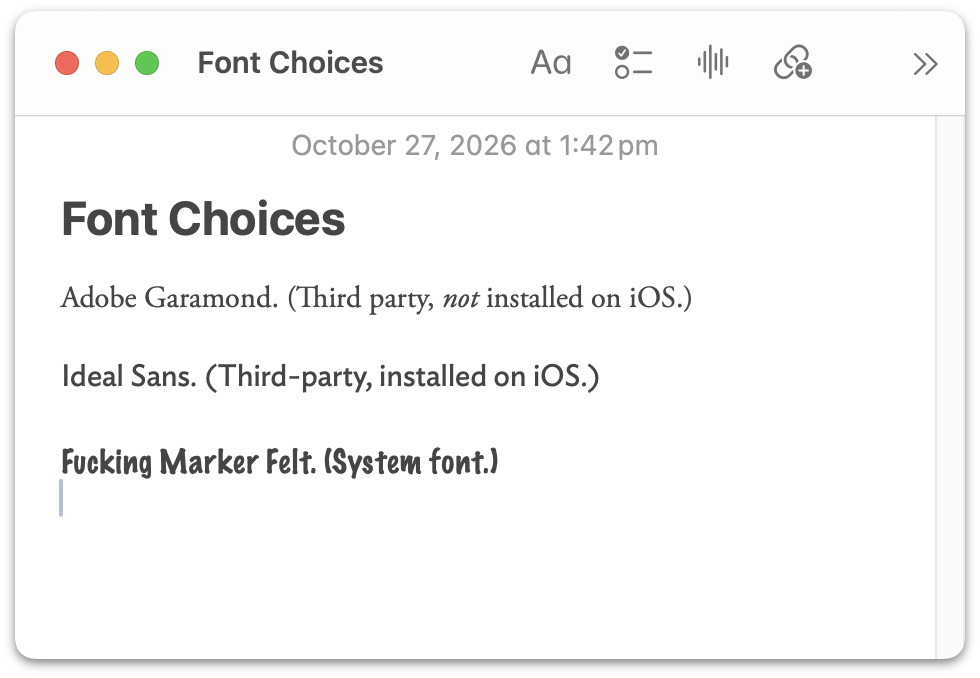
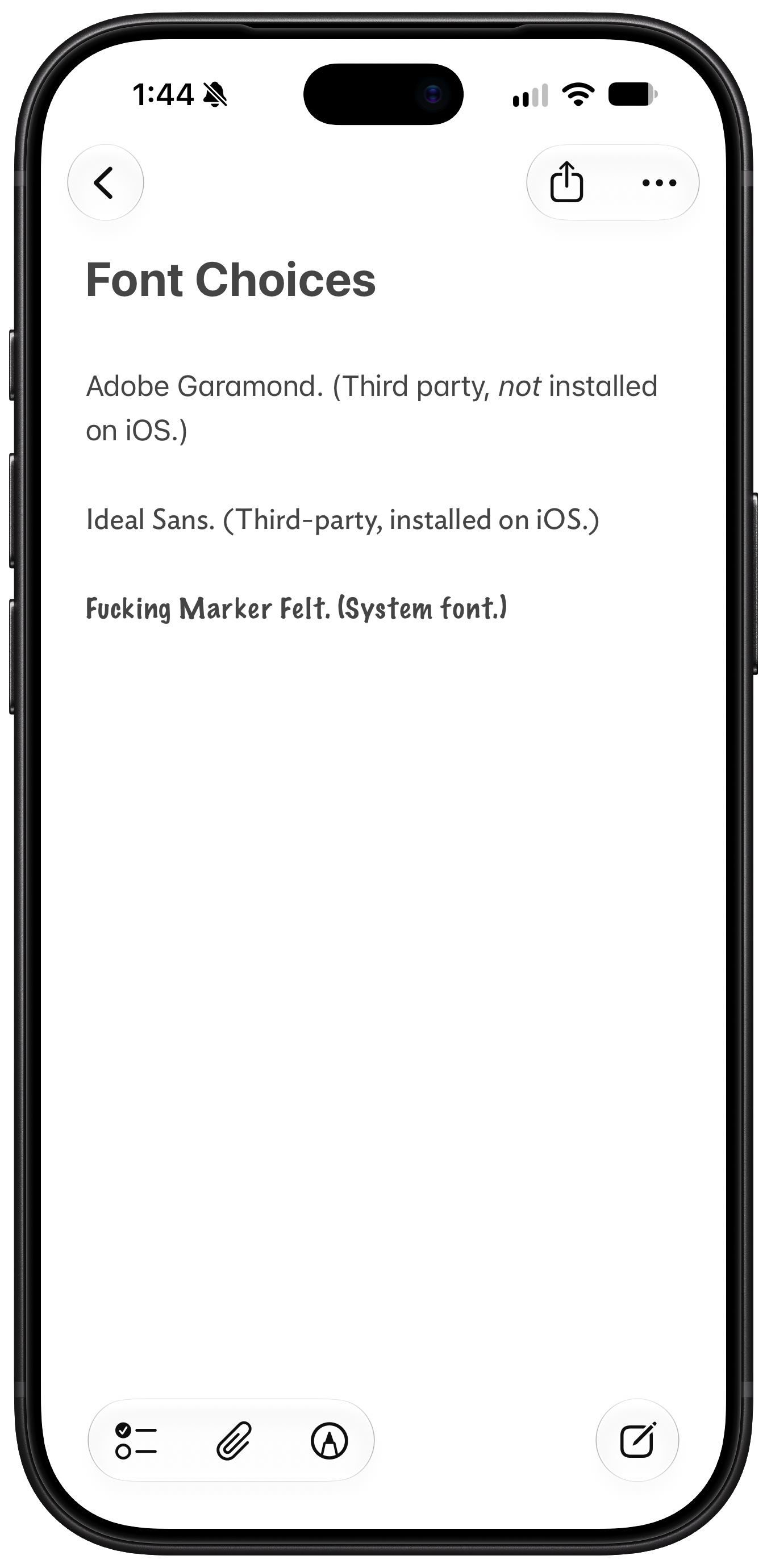
Tuesday, 27 October 2026
- What’s Left for ‘Pro and Tell’ Week: Touch-Enabled OLED MacBooks ★
-
Joe Rossignol, MacRumors:
Apple on Wednesday will announce 14-inch and 16-inch MacBook Pro models featuring touch-enabled OLED displays with thinner bezels, a Dynamic Island instead of a notch, M5 Pro and M5 Max chips, and a lighter and slightly thinner design, Bloomberg’s Mark Gurman reports. Apple is hosting a private “Pro and tell” experience in Los Angeles starting at 10 a.m. Pacific Time tomorrow.
I’m here in LA for the press shindig tomorrow. One thing I’ve been thinking about regarding these reported touch-enabled OLED MacBooks is that Gurman has reported for months that these new MacBooks will sport M5 Pro and M5 Max chips. Here’s Gurman back on June 26:
The MacBook models, positioned at the top of Apple’s lineup, will arrive between late this year and early next year, according to people with knowledge of the matter. They’re planned to be powered by the existing M5 Pro and M5 Max chips, said the people, who asked not to be identified because the plans are private. [...]
The first touch-screen 14-inch and 16-inch models, code-named K114 and K116, will represent the biggest overhaul of Apple’s high-end laptops since the company began moving away from Intel Corp. chips in 2020. An Apple spokesperson declined to comment on the company’s plans.
Apple’s decision to use the M5 line before jumping to a future M7 is part of a broader shift in its chip strategy. The company is skipping M6-generation Pro and Max chips altogether, breaking from its usual approach. Bloomberg News reported on this strategy earlier this week.
If that’s all true, it’s certainly unusual for Apple to skip the Pro and Max variants for the M6 chip generation. But there have been oddities with the higher-end Apple Silicon chips before. (There was no M4 Ultra chip, for example, and the M3 Ultra didn’t appear until the March 2025 Mac Studio update, 18 months after the M3 generation debuted.) But what I would find downright weird is the possibility of shipping a second generation of MacBook Pro models based on the exact same M5 Pro and M5 Max chips that the current generation offers. They only came out in March. So what’s the idea here? That Apple replaces the current higher-end MacBook Pros with versions whose only upgrades are to the chassis and display, but the performance remains the same? That’s certainly possible, I guess, but it would be weird.
So I’m just wondering if tomorrow’s new touchscreen OLED MacBooks aren’t replacements for the current MacBook Pros, but instead are the start of a new MacBook family with another name. I don’t think they’d call them MacBook “Duos”, because they’re not two-in-one devices. MacBook “Ultras”, maybe — with the same specs as the MacBook Pros but more expensive displays? But “Ultra” seems like a wrong name for a MacBook because Apple’s M-series Ultra chips are (to date at least) desktop only. It’d be weird if the M5 Ultra is exclusive to the Mac Studio while the MacBook “Ultra” maxes out with the M5 Max. So maybe they just are the new MacBook Pros and this first OLED/touch generation uses the same chips as the ones from March?
That’s what I’m most curious about heading into tomorrow.
- Apple Also Announces iMac With M6 ★
-
Just a speed bump, but speed bumps are good.
Pricing and configurations:
M6 with 2 Thunderbolt ports:
    Base price:    $1500

    RAM:   16 GB      +0
           24 GB    +200

    SSD:  256 GB      +0
          512 GB    +200
            1 TB    +500


M6 with 4 Thunderbolt ports:
    Base price:    $1700

    RAM:   16 GB      +0
           24 GB    +200

    SSD:  256 GB      +0
          512 GB    +200
            1 TB    +500
            2 TB   +1000


    Base price:    $2300

    RAM:   32 GB      +0

    SSD:  512 GB      +0
            1 TB    +300
            2 TB    +800
I list a separate base price for the 4-port, 32 GB RAM configuration in the table above because with 32 GB of RAM, the base storage goes from 256 to 512 GB. It’s effectively a $400 RAM upgrade and $200 SSD upgrade that are tied together, and that changes the upgrade prices to move up to 1 or 2 TB of SSD storage.
Nano-texture is a $200 upgrade, and the 2-Thunderbolt-port models have a $30 option for 2.5 gigabit Ethernet (by default it’s Wi-Fi only). The Ethernet port is on the power adapter. The 4-port models come with the Ethernet equipped power adapter.
- Apple Introduces New Base MacBook Pro With M6, 14-Inch-Only ★
-
Apple Newsroom’s “Pro and Tell” announcement week continues:
Apple today announced the new 14-inch MacBook Pro with M6, delivering even more performance, powerful on-device AI capabilities, and faster connectivity for college students, business users, creators, and more. M6 features an advanced 12-core CPU with the world’s fastest CPU core, so everything from productivity tasks to more demanding pro workflows feels incredibly fast and responsive. The 12-core GPU delivers up to 30 percent faster graphics and up to 25 percent faster AI workloads when compared to M5, making the 14-inch MacBook Pro with M6 a compelling value for users who need serious power. For those upgrading from M1, the performance gains are even more significant, with up to 11× faster graphics and up to 13× faster AI performance. With additional Neural Accelerators in the GPU and a Dual 16-core Neural Engine, M6 turns MacBook Pro into an even more powerful platform for AI — from taking advantage of Siri AI and Apple Intelligence features across apps and macOS to running LLMs locally, all while preserving user privacy. In addition, the 14-inch MacBook Pro features Wi-Fi 7 and Bluetooth 6, while superfast storage makes working with large files, exporting projects, and running demanding AI workflows fly.
I questioned Apple’s decision to close up “superfast” there, but I stand corrected — it is, in fact, a perfectly cromulent adjective. I learn something every day.
Anyway, this is just the base MacBook Pro, the one that’s more like a MacBook Air Plus than a true professional laptop with an M-series Pro or Max chip. This tier of MacBook Pro has only ever been offered in the smaller 14-inch size. Prices seem unchanged from the post-June-price-hike M5 models:
Base price:     $2000

  RAM:  16 GB      +0
        24 GB    +200
        32 GB    +400

  SSD:   1 TB      +0
         2 TB    +500
         4 TB   +1500
Space black and silver colors, and nano-texture is available for $150 extra.
Monday, 26 October 2026
- The NYT Seemingly Does Marissa Mayer Dirty ★
-
Alexandra Alter, in the lede for her profile of Marissa Mayer’s new AI startup Dazzle for The New York Times (gift link):
Late last year, Marissa Mayer was struggling with what felt like an impossible task.
Her daughter Marielle was turning 10, and Marielle’s teacher wanted three bullet points summarizing what made her special. Mayer — the former chief executive of Yahoo and a pioneer at Google, where she was the first female engineer — likes cracking a hard problem. But she felt overwhelmed by the range and complexity of potential answers.
So Mayer asked her personal A.I. assistant, Dazzle. Within a few seconds, Dazzle delivered an answer.
“It came back and was like, your daughter is empathetic, creative and an animal lover,” Mayer said. She thought it was perfect.
That anecdote is brutal. It makes it seem like Mayer has lost her mind. She’s getting roasted for it on social media. I suspected (and hoped) there was more to the story. There was. Here’s Mayer herself on X:
To be clear, I didn’t use Dazzle because I was overwhelmed by making a slide. I used it because summing up your child in a few bullets feels laughably limiting. And, since our team had just gotten an early prototype running, I wanted to see what deeper threads it might find.
She might just be hyping her startup. But she definitely didn’t tell The Times that she needed help from AI to remember that her own daughter is “empathetic, creative, and an animal lover”. She seemingly got done dirty by Alter and the Times on that use-case anecdote.
- Apple Issues Statement on iPhone Duo’s Crack Problem ★
-
Chance Miller, 9to5Mac:
Here is Apple’s full statement:
The response to iPhone Duo from early users has been incredibly positive, and we are seeing exciting things from developers who are rapidly updating their apps to take advantage of its unique form factor. We are aware of an issue impacting the inner display on a small number of iPhone Duo units. If users experience issues with their iPhone Duo display, they should contact AppleCare for a replacement.
The company says the problem affects a very small number of iPhone Duo units and appears to surface relatively quickly. Most iPhone Duo units are not affected. You do not need AppleCare+ to have your iPhone Duo replaced for this problem. If you bought from a carrier, you should contact AppleCare directly, not your carrier, to get your device replaced.
Did it cross Ternus’s mind to just say “You’re folding it wrong?”
(History doesn’t repeat, and in this case, it actually doesn’t even rhyme. Steve Jobs never told anyone they were “holding it wrong” with the iPhone 4 — he emailed a customer, “Just avoid holding it in that way.” But CNN went with the headline “Apple on iPhone Complaints: You’re Holding It Wrong” and that’s the line everyone wrongly remembers.)
- Glenn Fleishman on Apple Notes and Markdown ★
-
Glenn Fleishman, writing at Six Colors, “Why Notes Will Never Let Us Edit Markdown”:
The Notes app added Markdown import and export in the version 26 operating system releases, and the macOS 27 Golden Gate update lets us copy and paste as Markdown. Why can’t we just write natively in that hoary, simple format?
I use Markdown all day, every day. In fact, I’m writing these words in Markdown without you even knowing it. All content-management systems (CMSes) I’m aware of support native Markdown entries when posting, and many writing and note-taking apps integrate Markdown conventions without needing to trumpet them.
Fleishman not only ably describes why Apple Notes doesn’t support editing in Markdown syntax, but also why it shouldn’t. It is correct for Notes only to natively support WYSIWYG editing. Normal users should never ever be exposed to formatting codes. Also, Markdown, as a language, can be malformed. It should be impossible for users to create a malformed note in Notes. If you could edit in Markdown in Notes, you could create malformed notes. That’s just gross. I can say that. Markdown isn’t for everyone. And even for me — Markdown’s creator — I don’t want it in Notes, which is the notes app I use.
I think Apple has done a really good job in the last few years adding import/export and copy/paste support for Markdown to Notes. That’s the right way for Notes to support Markdown. My biggest complaint with Notes’s recent Markdown support — as noted by Fleishman — is that most of these features are only on the Mac, not iOS.
Apple Announces New A20 Pro iPad Mini
Monday, 26 October 2026
- Apple Newsroom announcement.
- iPad Mini (A20 Pro) product page.
- Tech specs page (PDF archive).
- iPad comparison page showing new A20 iPad Mini, previous A17 iPad Mini, and the 11-inch M4 iPad Air PDF archive].
- One-minute commercial.
Available in two colors, starlight and midnight (which does not seem very dark), and three storage capacities: 128, 256, and 512 GB. Pricing, with the previous-generation A17 Pro model for reference, both before and after Apple’s June 25 price hikes:
IPAD MINI                    128 GB   256 GB   512 GB
A20 Pro (new)                 $700     $800    $1000
A17 Pro (Q3 2026 price hike)  $600     $700     $900
A17 Pro (Q4 2024–Q2 2026)     $500     $600     $800
Notes:
Cellular adds $150 to any model.
The $100 nano-texture display option is new for the iPad Mini, and is only available with 256 or 512 GB storage.
Still stuck with Touch ID — a bummer in general, and a shit sandwich given how expensive these have gotten. Unless Apple decides to make a mini-sized iPad Pro (which I definitely do not expect), there’s no way to buy a mini-sized iPad with Face ID.
The display is now OLED, with inky-deep blacks and brighter brights. Max SDR brightness goes from 500 to 600 nits and HDR content goes to 1200 nits. This is the first iPad Mini with an XDR display. But: no ProMotion.
Support for Pencil Pro and Pencil USB-C. I still can’t believe the $2000 iPhone Duo doesn’t support the superior Pencil Pro.
The new Mini is thinner (5.4mm vs. 6.3mm) and lighter (255g vs. 293g for Wi-Fi models). The display is slightly larger (8.5″ vs. 8.3″) while the footprint shrank slightly, because the bezels have been reduced by 25 percent. The iPhone Duo weighs almost exactly the same (254g to be exact) but its inner display is only 7.6 inches diagonally.
The front-facing camera moves from the short side to the long side. All current iPads now have the camera on the long side.
The new iPad Mini introduces what Apple calls the Acoustic Display: “custom tweeters and woofers are now hidden beneath the glass and enclosure, delivering a rich, personal audio experience.” This change helped Apple achieve IP67 dust and water resistance, best-ever for any iPad model.
One last point. The previous iPad Mini launched two years ago, in October 2024, but had the now-three-year-old A17 Pro chip from the 2023 iPhone 15 Pro. Today’s new iPad Mini launches with the brand-new A20 Pro chip that debuted with last month’s iPhone 18 Pro and last week’s iPhone Duo. ★
Monday, 26 October 2026
- A Simple Two-Step Shortcuts Shortcut Lets You Lock the iPhone Duo When You Close It ★
-
Federico Viticci:
Don’t like that the iPhone Duo doesn’t auto-lock when you close it?
You can fix it with this simple Shortcuts automation.
Two steps:
- A conditional for when the iPhone is
Closed. - Lock the screen.
I mentioned in my review that I kept closing the Duo expecting it to lock, like when closing a book (or a laptop, for that matter). And it didn’t occur to me that I could simply add this feature via Shortcuts. That’s cool. But I also mentioned in my review that I wouldn’t want that to happen every time I closed it. Sometimes you do want to just switch from the wonderful inner display to the miserable little outer display, and the last thing you want when you do that is to need to re-authenticate for the hundredth time of the day with Touch ID. It was just a wrong instinct I had, and I broke myself of that instinct after about a week or so of full-time Duo use. I stopped expecting it to lock on close. So while I think this shortcut is worth pointing out — and I especially think it’s a good reminder to think about Shortcuts when you find yourself wishing for features that aren’t in Settings — I recommend trying to break yourself of this habit if you have a Duo and find yourself with the same wrong close-to-lock instinct I initially had.
Update: Stephen Robles posted a clever version that only locks the Duo on close if it’s on the home screen; if any app is open, it stays unlocked. That’s much more tempting to try. (He includes that one in a whole video full of Duo tips on YouTube.)
- A conditional for when the iPhone is
- Tiny Computers for iPhone Duo ★
-
If you’ve got or get a Duo and don’t try this out, you’re not hooked up right.
Update: But as Cabel Sasser notes, though incredibly fun, this was clearly made by a young Claude-aided developer who never used any of these actual old computers. Let’s just say there are a lot of ahistorical details.
Sunday, 25 October 2026
- Sunnny ★
-
My thanks to Sunnny for sponsoring last week at DF. Sunnny’s pitch to B2B companies is simple: you store valuable customer information across a myriad of systems, making it hard to get a simple overview. Sunnny consolidates your customer data, cleans it, resolves identities, identifies relationships, and presents it neatly for you, your team, and your AI model.
Early access is open now.
- Duo Users Are Registering the Base of Their Index Finger as a Touch ID Coping Strategy ★
-
Some guy on Reddit (with an illustration video):
Saw this online, tried it, and it works beautifully. Basically, I registered the lowest part of my right index finger. That part of the finger sits naturally when you go to swipe up at the phone.
This resolves a major issue I had where I couldn’t easily just look at my phone to glance through notifications on the lock screen. Now, it’s never been easier (shown at the end of the video).
This is arguably better than Face ID. The speed is up there, and the phone doesn’t need to be facing directly at you to unlock, this motion can be done as soon as you pick up the phone.
Tim Hardwick at MacRumors quotes the “arguably better than Face ID” line.
This idea is clever, and it does seem to work if you grip the Duo just right, but the idea that this is better than Face ID is a joke. Copium is a strong drug but it wears off quickly.
- The Talk Show: ‘Lubricate the Inside of the Hinge’ ★
-
Special guest: Joanna Stern.
Special topic: The iPhone Duo.Sponsored by: