
By John Gruber

Material Security:
Stop scaling headcount. Scale your workspace.
- Trump’s White House Ballroom Design Is Shit ★
-
The New York Times (gift link):
Critics warn it still has many issues — its portico is too big, its stairs lead nowhere, its columns will block views from inside the ballroom.
And that’s just the portico.
This is a really good piece, with animated-as-you-scroll illustrations pointing out specific problems with the design.
Such details affect how people passing by experience these iconic places, and how each structure fits into a capital city that has been planned around civic symbols and sightlines since the 1790s. The deliberation is also an expression of democracy, said Carol Quillen, the president and chief executive of the National Trust for Historic Preservation, which has sued the administration over the ballroom.
“Even if we are slow and we make mistakes and we fight, that process has meaning to us,” Ms. Quillen said. No project belonging to the public should be the vision of just one man, she said.
That is, however, how the ballroom has often been described.
“President Trump is the best builder and developer in the entire world, and the American people can rest well knowing that this project is in his hands,” Davis Ingle, a White House spokesman, said in a statement. Past administrations and presidents have wanted a ballroom for more than 150 years, he said, and Mr. Trump will accomplish it.
The way that these lickspittles talk about Trump exactly the way North Koreans speak of Little Kim, or that anyone in any other cult speaks of the cult leader, is just revolting. Even the Chinese don’t speak of Xi “The Pooh” Jinping like this. No one in China pretends Xi is a genius architect.
Wednesday, 1 April 2026
- Chris Espinosa, Employee #8, Profiled in The New York Times ★
-
Kalley Huang, writing for The New York Times (gift link):
As that happened, Apple laid off staff “again and again and again,” Mr. Espinosa said. His manager told him that he had been spared because he had worked for the company for so long that his severance package would be too expensive.
“I was wondering what I was going to do because I had no college degree and I had only worked at one company,” Mr. Espinosa said. Then he figured: “I was here when we turned the lights on. I might as well stick around until we turn the lights off.”
Lovely read.
- The Talk Show: ‘Apple at 50’ ★
-
Who better to join the show to commemorate Apple’s 50th anniversary than John Siracusa?
Sponsored by:
- More on Apple’s Fun ‘Rewind’ Video ★
-
Lex Friedman (with an embedded video to prove it):
If you reverse the new Apple video that plays in “rewind,” it’s the Think Different ad music, pitched up.
Of course it is.
And, regarding that “◀︎◀︎ REW” button where the “REW” was set in bitmapped Chicago 12” but the “◀︎◀︎” was modern, Craig Hockenberry fixed it:
I pretended to be Susan Kare and fixed it, bottom is the original, top is my interpretation.

- Ben Cohen of the WSJ Tours Apple’s Archive of Prototype Hardware ★
-
Lots of fun things I’ve never seen before in this 7-minute video. Best not to spoil them.
- New Jersey, the Jackass State ★
-
By far the dumbest Internet Jackass Day “joke” I’ve seen so far is this one from the official New Jersey state account on Twitter/X, claiming that effective immediately, they’re lifting the statewide ban on self-service gasoline. For those of you who’ve never been there, I swear, you cannot pump your own gas anywhere in the state. It’s so ridiculous that people have a hard time believing it. You have to wait for an attendant, who is generally rude and almost always slow. Back in the day, they were extra slow returning with change when you paid in cash, hoping you’d just give up and leave. I’d rather run out of gas and just abandon my car on the side of the road than buy a single gallon of gas in New Jersey. And yet here’s the official state Twitter account yucking it up like the joke isn’t on them.
- Ryan D’Agostino Profiles Tim Cook for Esquire on Apple’s 50th ★
-
Ryan D’Agostino, writing at Esquire (News+ link, in case Esquire stiffs you with their paywall):
Cook was at Jobs’s house the day he died. As he drove back to the office to announce it to the employees and, in so doing, to the world, he felt a strange kind of shock — strange because Jobs had been sick for so long, had even refused medicine when he was first diagnosed, instead trying to cure the disease with fruit juices, and so there should have been no shock at all.
“By that time, unfortunately, there was an inevitability to it,” Cook says. “But I was in denial for so long about the disease and where it would go, because I had watched him bounce back so many times, I assumed he always would. When I took the CEO role, I thought he was going to be executive chairman forever — that’s what I thought literally six weeks earlier. Looking back, I know somebody could say, How could you think that, given the circumstances? But that’s not the way I was wired in that moment.”
D’Agostino, fondly recalling the Apple IIe his family got for Christmas in 1983, wrongly remembers that, “When we turned it on, there was a little trash can in the corner of the screen.” Don’t let that conflation of the IIe and the Macintosh (yet to come in 1983) turn you off. It’s a good profile. Cook’s thoughts on Steve Jobs are touching, and D’Agostino gets Cook to expound upon his strategy of “engagement” with the Trump administration to a degree that I don’t think any other interviewer has. Cook’s answer is over 400 words, and Esquire, to their credit, ran the whole thing.
- Inside Apple’s AirPods Max 2 and the H2 Chip Upgrade ★
-
Jacob Krol, writing at TechRadar:
To understand exactly what that means five years on, TechRadar sat down with Apple VP of Platform Architecture Tim Millet and Director of Audio Product Marketing Eric Treski to unpack how AirPods Max 2 is finally catching up to its own ambitions. [...]
One of the boldest claims Apple makes for AirPods Max 2 is a 1.5× improvement in active noise cancellation — achieved without changing a single physical component. “Getting those improvements to ANC and especially that 1.5 times more powerful ANC, which of course is a feat in itself, considering we didn’t change the actual design of the headphone at all from a form factor or material standpoint,” says Treski.
That improvement isn’t limited to a specific frequency band either. “We take that average at 1.5 times across an average of all frequencies. We’re not cherry-picking individual frequencies or a certain range,” he adds. That means AirPods Max 2 should perform better whether it’s blocking louder, booming sounds or higher-pitched ones — and that’s a high bar, given that the original AirPods Max were no slouches when it came to blocking out sound.
- Hershey Says It Will Shift Back to Classic Recipe for All Reese’s Products After Criticism ★
-
The AP:
Hershey said Wednesday it will use classic recipes for all Reese’s products starting next year, a change that comes after the grandson of Reese’s founder criticized the company for shifting to cheaper ingredients.
Running to the press never works.
(Stick to Trader Joe’s, I say.)
- Apple Marks 50th Anniversary ★
-
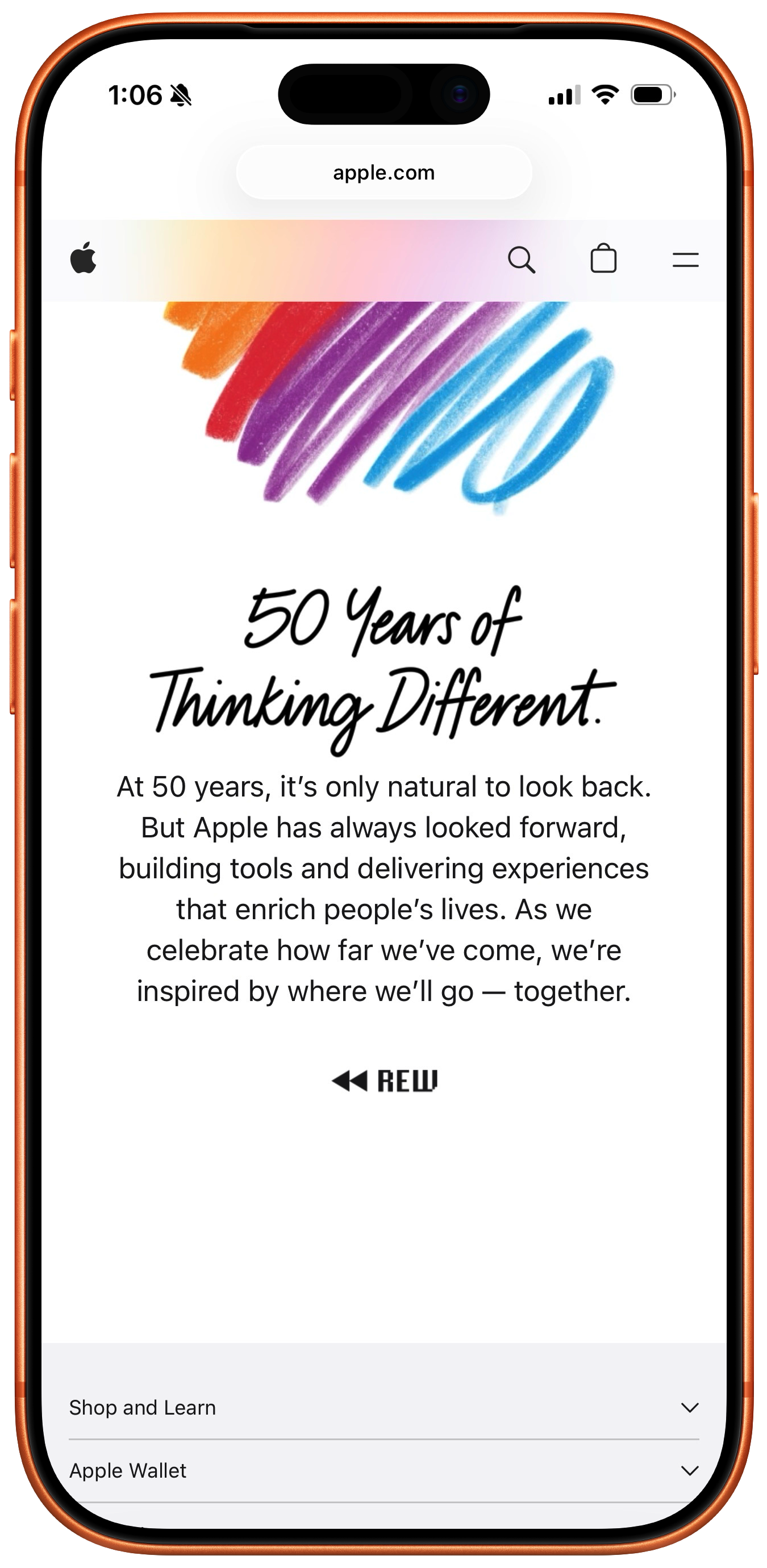
The Apple.com homepage has a nice little animation showing sketches of the company’s most iconic products. The video file itself is hosted here, but I’m not sure how permanent that link is.
Tim Cook posted a different video on Twitter/X, a VHS-style “rewind” through Apple product history. This one’s more fun. There’s an absolutely exquisite audio glitch at a certain moment — chef’s kiss. Bit of a shame that it’s only on X as far I know. Update: Ah, Apple posted the same video to their homepage, linked to a “◀︎◀︎ REW” button set in bitmapped Chicago 12, but it’s seemingly only shown when you visit on an iPhone. I don’t see the button from my Mac or iPad. But you should be able to watch the video from any device at this link. (I would have awarded bonus points for making the “◀︎◀︎” triangles pixel art too. I mean, come on!)
And, last night, Paul McCartney played a full concert at Apple Park for Apple employees. Good to see the two Apples burying the hatchet.

Tuesday, 31 March 2026
- Business Insider Profiles Fidji Simo, OpenAI’s ‘CEO of Applications’ ★
-
Grace Kay, Ashley Stewart, and Pranav Dixit, writing for Business Insider (News+):
“Part of bringing me on, and giving me the responsibilities of a CEO, was to make sure that I could really run that part of the company with autonomy,” Simo, whose title is CEO of applications, told Business Insider.
Altman defers to Simo when he doesn’t feel strongly, she said, and they “debate it out” when he does.
I am deeply suspicious of any company with two CEOs. It occasionally works, like at Netflix, when they’re not just co-CEOs but co-equals. Simo does not seem Sam Altman’s equal at OpenAI.
As OpenAI races toward a possible IPO later this year, Simo, who oversees nearly two-thirds of the company, has a delicate balancing act. She must craft a strategy to make products profitable, while convincing staffers who joined a research-driven organization that commercialization won’t change the mission.
The stakes are high. Deutsche Bank estimated that OpenAI is expected to amass the “largest startup losses in history,” totaling a projected $143 billion between 2024 and 2029. (An OpenAI spokesperson said that figure is incorrect, and one person familiar with the numbers said OpenAI’s internal projections are in line with other reports of $111 billion cash burn by 2030.)
It’s really something when the number in the company’s favor is a loss of $111 billion.
One former Meta employee recalled a moment when, after a contentious meeting, Simo sent a one-line follow-up saying she was unlikely to change her mind, so the team shouldn’t waste time trying to persuade her. She has little patience for internal debates that lose sight of the product, the former employee said, and she’s skilled at “being super clear in her directive so teams don’t scramble and waste time.”
Debates that lose sight of the product quality, or lose sight of the product revenue? Given that Simo rose to prominence at Facebook, eventually running the Facebook blue app, and considering the product quality vs. product revenue balance of that app, I think we know the answer.
This whole dumb “superapp” idea that leaked last week sounds exactly like the sort of thing someone who ran the Facebook app would think is a good idea. The difference, I expect, is that Facebook is free to let product quality (and experience quality) fall by the wayside because their social platforms have such powerful network effects. People stay on Facebook and Instagram even as the experiences worsen because everyone they know is also still on those apps. There’s no network effect like that for ChatGPT. Claude is already rising to near-equal status in popularity, and Gemini isn’t far behind, and Simo hasn’t even started enshittifying ChatGPT yet. People will just switch.
- RAM Is the New Bearer Bond ★
-
Hana Kiros, writing for The Atlantic:
Recently, a Costco in Florida instituted a new store policy. An employee told me that he was asked to open up every desktop computer displayed in the electronics section and remove the memory chips. Otherwise, the RAM harvesters would get them. Elsewhere, criminal groups are misdirecting trucks carrying RAM in order to loot them. All of this is happening because of a generational shortage of a part used in practically every electronic gadget on Earth.
Two of the best movies ever made, John McTiernan’s Die Hard in 1988, and Michael Mann’s Heat in 1995, revolved around plots to steal bearer bonds. (Also: Beverly Hills Cop — not quite one of the best films ever made, but a classic, for sure.) But bearer bonds have fallen out of favor as the world of legitimate finance has become almost entirely digital. A good heist film targeting a big shipment of RAM chips would be very 2026.
- Jensen Huang Doesn’t Smell Anything ★
-
Nvidia CEO Jensen Huang, during an on-stage interview at The Hill & Valley Forum last week, was asked “What do you see as America’s unique advantages that other countries don’t have?”
His answer, after taking a moment to think, “America’s unique advantage that no country could possibly have is President Trump.”
Huang, newly appointed to the aforelinked President’s Council of Advisors on Science and Technology, seemingly doesn’t smell the growing stink.
- Appointees to Trump’s Council of Advisors on Science and Technology ★
-
The White House:
The Council will be co-chaired by David Sacks and Michael Kratsios. The following individuals have been appointed:
Marc Andreessen
Sergey Brin
Safra Catz
Michael Dell
Jacob DeWitte
Fred Ehrsam
Larry Ellison
David Friedberg
Jensen Huang
John Martinis
Bob Mumgaard
Lisa Su
Mark ZuckerbergUnder President Trump, PCAST will focus on topics related to the opportunities and challenges that emerging technologies present to the American workforce, and ensuring all Americans thrive in the Golden Age of Innovation.
Scientific American observes that 12/13 are executives, and only one, Martinis, is an academic researcher. But I mean, of course a council like this, from this administration, is going to be made up of big-cap corporate executives and founders. I’d say it’s more surprising there is even one academic researcher than that there aren’t more.
I’m more intrigued by the companies who aren’t represented: no one from Apple, no one from Microsoft, no one from Amazon. (That left room for two from Oracle, that well known bastion of corporate virtue.) Read into that what you will. Me, I can’t help but suspect that this administration is taking on a profound stink, and something like appointments to this council are akin to a game of music chairs where Tim Cook, Satya Nadella, Andy Jassy, and Jeff Bezos are happy not to have gotten seats.
- Technical Analysis of the Android Version of the White House’s New App ★
-
Thereallo, after spelunking inside the APK bundle for the Android version:
Has a full GPS tracking pipeline compiled in that polls every 4.5 minutes in the foreground and 9.5 minutes in the background, syncing lat/lng/accuracy/timestamp to OneSignal’s servers.
Loads JavaScript from a random person’s GitHub Pages site (
lonelycpp.github.io) for YouTube embeds. If that account is compromised, arbitrary code runs in the app’s WebView. [...]
Is any of this illegal? Probably not. Is it what you’d expect from an official government app? Probably not either.
Hanlon’s razor: “Never attribute to malice that which is adequately explained by stupidity.”
The app is, at least temporarily, popular. As I type this it’s #3 in the iOS App Store top free apps list, sandwiched between Claude and Gemini. I don’t know how similar the iOS app is to the Android one, but I took one for the team and installed it, and after poking around for a few minutes, it hasn’t even prompted me to ask for location access. It’s a crappy app, to be sure. A lot of flashing between screen transitions. When you open an article, there’s a “< Back” button top left, and an “X” button top right. Both buttons seem to do the same thing. There’s no share sheet for “news” articles, which seems particularly stupid. You can’t even copy a link to an article and share it manually.
But the iOS version has a clean privacy report card in the App Store, and I don’t see anything in the app that makes me doubt that. It seems like the Android version is quite different.
Update 1: Someone on Reddit claims to have analyzed the iOS app bundle and discovered similar code as in the Android app, but I still don’t see any way to actually get the iOS app to even ask for location permission. I think there might be code in the app that never gets called. Like I wrote above, it’s clearly not a well-crafted app. If anyone knows how to get the iOS app to actually ask for location access, let me know how. Here’s another analysis of the iOS app.
Update 2: I installed the Android version of the app too, and just like on iOS, the only permission it asks for is to send notifications. Maybe they will in a future software update, but as far as I can see, the app never even tries to check the device’s location, on either platform.

Monday, 30 March 2026
- ‘The Brand Age’ ★
-
Paul Graham:
So when you have a world defined only by brand, it’s going to be a weird, bad world.
Graham’s thoughtful essay focuses on the mechanical watch industry. But I disagree with his conclusion. I think the market for mechanical watches has never been more fun or vibrant than it is today. The action, for me at least, isn’t with the high-end luxury Swiss brands. It’s with the indies, from companies like Baltic and Halios.
It’s also interesting to ponder Graham’s essay in the context of other industries. I think it’s self evident that the entire market for phones — the most popular and lucrative consumer devices in the world — is defined by a single brand, and every competitor just copies that one brand with varying degrees of shamelessness. That’s bad and weird.
- Macs of Unusual Size ★
-
Scott Knaster:
The Big Mac is about 22 times the size of the little Mac.
Sunday, 29 March 2026
- WorkOS ★
-
My thanks to WorkOS for once again sponsoring the week at DF. Their latest is a CLI that launches an AI agent, powered by Claude, that reads your project, detects your framework, and writes a complete auth integration into your codebase. No signup required. It creates an environment, populates your keys, and you claim your account later when you’re ready.
But the CLI goes way beyond installation. WorkOS Skills make your coding agent a WorkOS expert.
workos seeddefines your environment as code.workos doctorfinds and fixes misconfigurations. And once you’re authenticated, your agent can manage users, orgs, and environments directly from the terminal. See how it works at WorkOS’s website.See also: WorkOS just completed another Launch Week. This one, for Spring 2026, does not disappoint with its custom UI and theme. Even if you don’t have a need for WorkOS you should check out their Launch Week site just for fun.
- The Talk Show: ‘You’re Going to Have the Niggles’ ★
-
For your weekend listening enjoyment: Christina Warren returns to the show to discuss Apple big month of product announcements — in particular, the iPhone 17e and MacBook Neo. And we pour one out for the Mac Pro.
Sponsored by:
- Squarespace: Save 10% off your first purchase of a website or domain using code TALKSHOW.
- Sentry: A real-time error monitoring and tracing platform. Use code TALKSHOW for $80 in free credits.
- Version History: ‘The Macintosh’ ★
-
For your weekend viewing enjoyment:
But in almost every way that mattered, the Macintosh was right. Right about how we’d use computers going forward. Right about the idea that computers needed to be less complicated. Right about the fact that caring this deeply about both hardware and software design would make a difference. Though Apple didn’t sell many of those original Macintoshes, there’s no question it changed computers forever.
On this episode of Version History, we tell the story of the original Macintosh. David Pierce, Nilay Patel, and Daring Fireball’s John Gruber explain the strange corporate infighting that led to the project in the first place, the ways in which the Macintosh changed over time, and how Jobs and his team drove such massive hype for the device some people didn’t even want to ship. Then they debate the device’s true legacy, and whether the computer or the commercial is the true icon.
- The Verge: ‘Rank the Best Apple Products From the Last 50 Years’ ★
-
Look, I’m all for democracy, but a poll whose results currently have the Extended Keyboard II down at #47 is a poll that makes me angry.
Saturday, 28 March 2026
- The 2019 Intel Mac Pro’s Unfortunate Timing ★
-
Stephen Hackett, at 512 Pixels:
I’ve thought a lot about the bad timing Jones mentions. Had Apple stuck to the original timeline, and killed off the 2013 Mac Pro in favor of an iMac “specifically targeted at large segments of the pro market,” back in 2017, Apple could have avoided putting out the best Intel Mac ever, less than a year before the transition to Apple silicon.
Did Apple know in 2017 that 2020 was the year the M1 would make it out of the lab? Probably not, but it doesn’t make the timing any less painful.
Apple might not have had 2020 set in stone for the Apple Silicon transition, but in 2017, they definitely knew that Apple Silicon was the future. I think they knew that years before 2017, and in broad strokes, that’s why 2015–2020 was such a bad period for Mac hardware. They didn’t ship a retina MacBook Air until 2018. The 12-inch MacBook was beautiful but expensive and seriously underpowered. And nothing suffered more than the Mac Pro in that stretch. I think Apple knew that the future was on their own silicon, but in the meantime, they just couldn’t get it up for the last five years of the Intel era.
- Apple Should Set and Enforce Some Basic Standards for Custom Video Players on tvOS ★
-
While I’m bitching about Netflix’s craptacular new video player on Apple TV, let me quote from a piece I wrote two years ago (also complaining about Netflix’s tvOS app):
Turns out there are two better ways:
If you use the Control Center Apple TV remote control on your iPhone, there’s a dedicated “CC” button.
In tvOS, go to Settings → Accessibility → Accessibility Shortcut, and set it to “Closed Captions”. Now you can just triple-click the Menu/Back button on the remote to toggle captions. (On older Apple TV remotes, the button is labelled “Menu”; on the new remote, it’s labelled with a “<”.)
But here’s the hitch: Netflix’s tvOS app doesn’t support either of these ways to toggle captions. Netflix only supports the on-screen caption toggle in their custom video player. I get why Netflix and other streaming apps want to use their own custom video players, but it ought to be mandated by App Store review that they support accessibility features like this one.
What Apple should have done right from the start with the tvOS-based Apple TV a decade ago is require all apps to use the system video player. No custom video players. It’s too late for that, alas. But the tvOS App Store review process ought to insist on compliance with these accessibility and platform compliance features.
You want to use your own custom video player? Fine. But apps with custom video players must support the “CC” button in the iOS Control Center remote control, must support the triple-click accessibility shortcut, must support the platform conventions for fast-forwarding and rewinding using the Apple TV remote control, etc. If your video player doesn’t comply, your app update doesn’t get approved.
Apple should use the App Store approval process for the benefit of users. Isn’t that supposed to be the point?
- ‘How Apple Became Apple: The Definitive Oral History of the Company’s Earliest Days’ ★
-
This feature from Harry McCracken is just spectacularly good. (And it’s a gift link that’ll get you past Fast Company’s paywall.) 50 years is a long time and there are some key players in Apple’s origin story who are gone — but because everyone was so young at the time, it’s amazing how many of them are still alive. And, of course, in Chris Espinosa’s case, still working at Apple:
I was sitting there in the Byte Shop in Palo Alto on an Apple-1 writing BASIC programs, and this guy with a scraggly beard and no shoes came in and looked at me and conducted what I later understood to be the standard interview, which was “Who are you?” I said, “I’m Chris.” And he said, “What are you doing?” I said, “I’m writing BASIC programs on this Apple-1 for the owner.” And he said, “Are you any good?” I showed him my BASIC programs on the Apple-1.
He told me, “I’ve seen you around Homebrew. Woz is working on this second-generation computer, and instead of loading BASIC from cassette tape, we want to put it in ROM. And so it has to be perfect. I want you to come and test Woz’s BASIC, and I’ll give you 4K of RAM for that when you build your own computer.” That sounded like a good deal. Steve Jobs’s idea back then of recruiting was to grab a random-ass 14-year-old off the streets.
Apple is at its best when it’s infused with a bit of the spirit of the two Steves whose first joint venture were blue boxes that let you make long distance phone calls for free. The first public phone call Steve Jobs ever made on an iPhone was a prank call to the Starbucks next to Moscone West. I feel like that renegade spirit has been repressed in the Tim Cook era.
- Netflix Wrecked Their tvOS Video Player ★
-
Amanda Kondolojy, writing for Pocket-lint:
Though the Netflix app is largely the same on most platforms, over the weekend several Apple TV users on the unofficial Apple TV Reddit noticed some small changes to the tvOS version of the app that are making the app harder to use in subtle but very frustrating ways.
According to user iamonreddit, the most recent Netflix app update has made it slightly more difficult to use the fast-forward and rewind functions. Instead of clicking the back or forward button on the remote wheel to advance or return ten seconds, this button press now pauses the screen and brings up a frame selector. In order to actually go forward or go back, users then have to click the same button again. So essentially, what once required a single button press, now needs two.
These changes aren’t small, aren’t subtle, and don’t make fast-forwarding and rewinding merely “slightly” more difficult. (And what once required a single button press now requires three, not two.) The video playback interface in a streaming app is the most essential thing a streaming app does, and now Netflix’s tvOS player looks terrible and works wrong. The original report Kondolojy cites, from Reddit user “iamonreddit” (yes, you are), describes it as it is:
Did Netflix mess up the app? There are two extra clicks for a simple 10s rewind or fast forward. Instead of it going back 10s in one click, now it pauses and brings up the frame selector, and then you have to click again. Did they not do any research or usability testing before releasing this?
It’s also not smooth at all, it keeps spinning for a while and I have 1gig fiber optic internet. What a big downgrade!
They have some of the top paid employees in the world and this is what they come up with. Unless this was the result of some restrictions introduced by Apple.
Looks like they messed it up big time. Netflix used to set benchmarks for others. And here we are now. I’ve never had a single problem with their app so for, for over a decade of use.
Netflix’s gratuitously ugly new custom video player commits various crimes against accessibility. Two years ago I wrote about tvOS’s system accessibility shortcut that lets you assign triple-clicking the Back (“<”) button to toggle captions, and the fact that Netflix didn’t support it. This cursed new player, you will be unsurprised to learn, doesn’t support it either. It also does not support the wonderful standard platform convention of temporarily turning on captions when you rewind 10 or 20 seconds, for a “What did they just say?” moment.
Update: Switching to their own custom video player also broke Netflix’s integration with the iPhone. Until last week, playing video in the Netflix app on Apple TV would put a live activity widget on your iPhone lock screen with the name of the current program, scrub location, and player controls. Now that’s gone.
This regression dropping the same week that Netflix announced price hikes makes me so angry that I’m giving even more thought to downgrading my family’s Netflix account from the $27/month Premium plan to the $20/month Standard plan. Sending Netflix only $240 per year instead of $324 will show them.
- Trump Is Putting His Signature on U.S. Currency ★
-
Alan Rappeport, reporting for The New York Times:
President Trump’s signature will appear on U.S. dollars later this year, the Treasury Department said on Thursday. The decision to have Mr. Trump’s John Hancock on America’s paper currency represented an unprecedented change, one that the department said was being made in honor of the United States’ 250th anniversary.
Mr. Trump is set to become the first sitting U.S. president to have his signature on the greenback. His name will appear alongside that of Treasury Secretary Scott Bessent. As a result, the U.S. treasurer, whose name has been on the currency for more than a century, will not appear on the currency.
Raquel Coronell Uribe, reporting for NBC News:
Trump’s signature will go on the bills in honor of the country’s 250th anniversary, the Treasury said. Historically, paper currency carries the signatures of the treasury secretary and the treasurer.
“The President’s mark on history as the architect of America’s Golden Age economic revival is undeniable,” Treasury Secretary Scott Bessent said in a statement. “Printing his signature on the American currency is not only appropriate, but also well deserved.”
It’s certainly news that the sitting president — a man whom psychologists have publicly described as showing clear “symptoms of severe, untreatable personality disorder — malignant narcissism” — is putting his signature on U.S. currency. But why parrot the administration’s obviously false line that this gross, embarrassing change in longstanding tradition has anything whatsoever to do with “honoring” the United States’s 250th anniversary?
It makes no more sense that putting Trump’s signature on greenbacks “honors the nation” or its history than it would to claim that doing so will cure the common cold, reverse male pattern baldness, or keep us safe from Bigfoot. Call it what it is: sycophantic ego fellatio for a deeply unpopular narcissist who is losing his already tenuous grip on reality.
- New York Post: ‘Trump Considers Renaming Strait of Hormuz’ ★
-
The New York Post (I’m not sure if I should tell you to take this with a grain of salt, because it’s the Post and their journalistic standards are low, or, to assign this extra credibility because it’s the Post, a right-wing Murdoch rag that Trump lackeys actually talk to):
President Trump is prioritizing taking control of the Strait of Hormuz as he grows frustrated with the lack of help from allies to force open the crucial waterway. And once Trump ends Iran’s reign of terror over the shipping route, he’s considering rechristening it the “Strait of America” or even naming it after himself, sources told The Post. [...]
Trump told a Saudi investor forum Friday evening in Miami that he might decide to call the Strait after himself, rather than America.
“They have to open up the Strait of Trump — I mean Hormuz,” Trump said. “Excuse me, I’m so sorry. Such a terrible mistake. The Fake News will say, ‘He accidentally said.’ No, there’s no accidents with me, not too many.”
I suspect there are going to be accidents soon, as he descends further into dementia and needs adult diapers.
Friday, 27 March 2026
- Business Insider’s Subscriber Spiral ★
-
Oliver Darcy, reporting for Status (paywalled, alas):
According to the data obtained by Status, BI ended 2023 with roughly 160,000 paid subscribers, a drop of about 14 percent from the prior year when it boasted about 185,000 subscribers. The slide did not stop there, however. In 2024, it closed the year with roughly 150,000 subscribers, a further six percent decline. And in 2025, the number fell again, to about 135,000 paid subscribers — another 10 percent drop.
All told, over roughly three years, BI saw its subscription base plummet by about 50,000, or a jarring 27 percent.
Not the sort of momentum you want.
- Apple Says It’s Not Aware of Lockdown Mode Ever Having Been Exploited ★
-
Lorenzo Franceschi-Bicchierai, reporting for TechCrunch:
Almost four years after launching a security feature called Lockdown Mode, Apple says it has yet to see a case where someone’s device was hacked with these additional security protections switched on.
“We are not aware of any successful mercenary spyware attacks against a Lockdown Mode-enabled Apple device,” Apple spokesperson Sarah O’Rourke told TechCrunch on Friday.
- Apple Announces Ads Are Coming to Apple Maps ★
-
Apple Newsroom:
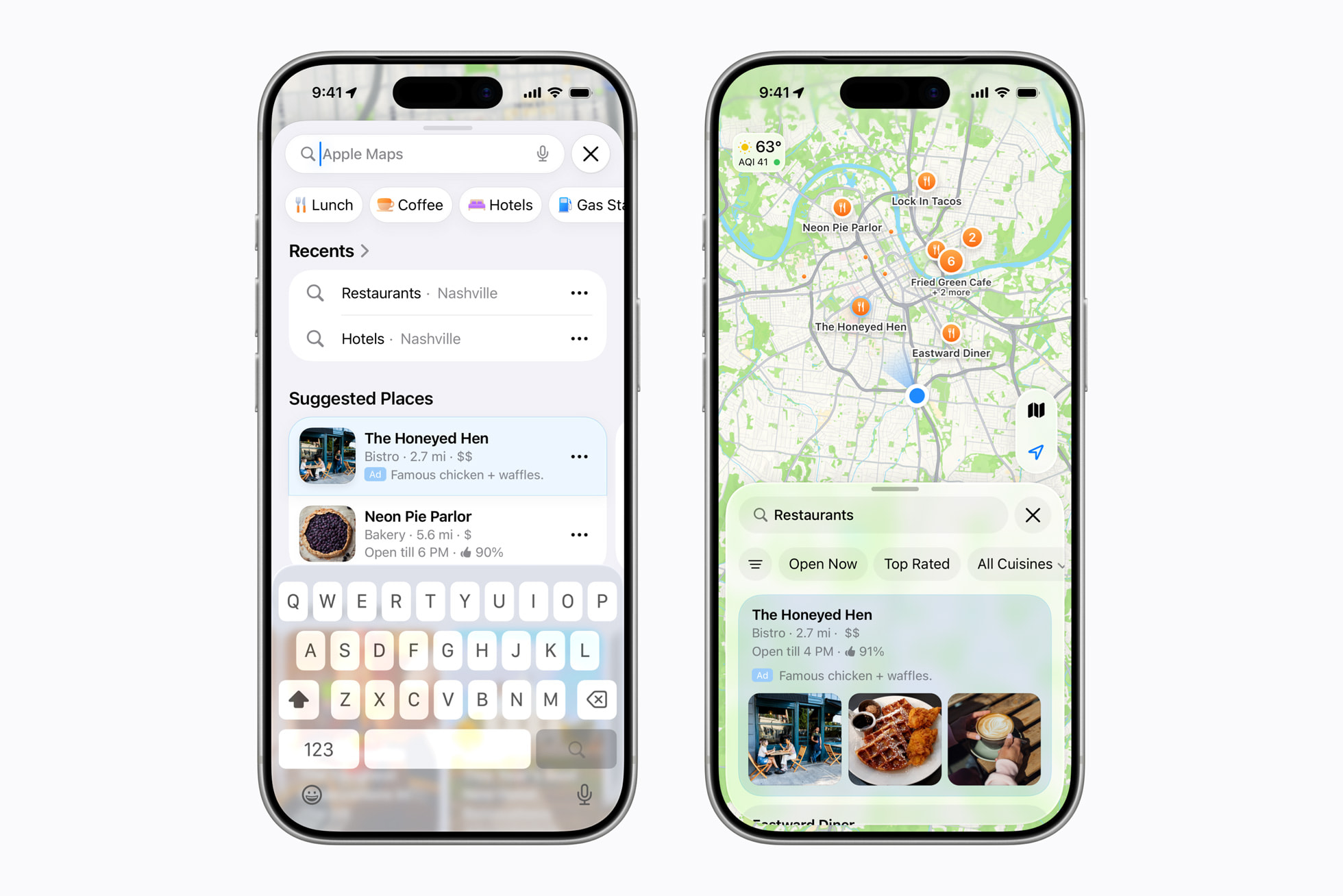
Beginning this summer in the U.S. and Canada, businesses will have a new way to be discovered by using Apple Business to create ads on Maps. Ads on Maps will appear when users search in Maps, and can appear at the top of a user’s search results based on relevance, as well as at the top of a new Suggested Places experience in Maps, which will display recommendations based on what’s trending nearby, the user’s recent searches, and more. Ads will be clearly marked to ensure transparency for Maps users.
Ads on Maps builds on Apple’s broader privacy-first approach to advertising, and maintains the same privacy protections Maps users enjoy today. A user’s location and the ads they see and interact with in Maps are not associated with a user’s Apple Account. Personal data stays on a user’s device, is not collected or stored by Apple, and is not shared with third parties.
The privacy angle is good. I don’t want to take that for granted, because few, if any, of Apple’s $1-trillion-plus market cap peers have such devotion to user privacy.
But more and more it’s becoming clear that while Apple’s devotion to protecting user privacy remains as high as ever, their devotion to delivering the best possible user experience does not. Here’s Apple’s own screenshot showing what these ads are supposedly going to look like. It looks fine. But these ads seem highly unlikely to make the overall experience of using Apple Maps better. Perhaps, in practice, they will not make the experience worse, and it’ll be a wash. But I can’t help but suspect that they’re going to make the experience worse, and the question is really just how much worse. The addition of ads to the App Store has made the experience worse.
We shall see. I’m not going to prejudge the actual experience, and you shouldn’t either. I also do not begrudge Apple for wanting to monetize Maps. But if the addition of ads does make the Apple Maps experience worse, why won’t Apple let us buy our way out of seeing them? Netflix doesn’t force us to watch their ads. YouTube Premium is arguably the best bang-for-the-buck in the entire world of content subscriptions. Why should Apple One subscribers still see these ads in Apple Maps?
- Netflix Raises Prices Again ★
-
Todd Spangler, Variety:
Under the new pricing, effective March 26 for new users and rolling out to current customers depending on their billing cycle, Netflix’s Standard plan (which has no ads and provides streaming on two devices simultaneously) is rising by $2, from $17.99 to $19.99/month. The ad-supported plan is going up a buck, from $7.99 to $8.99/month, and the top-tier Premium plan (no ads, streaming on up to four devices at once, Ultra HD and HDR) is increasing from $24.99 to $26.99/month.
I pay the full $27/month because I’d rather cancel Netflix than watch ads, and I suspect I’d notice the difference between 4K and 1080p. But also because money runs through my fingers like water.
Apple Giveth, Apple Taketh Away
Friday, 27 March 2026
The Good News First
Just this week I wrote about a hidden defaults preference you can set to turn off most of the insipid menu item icons in most of Apple’s first-party apps in MacOS 26 Tahoe. I bemoaned the fact that Safari — generally an exemplar of what makes a great Mac app a great Mac app — generally ignored this setting, leaving most of its menu item icons in place. I am delighted to report that that’s fixed in MacOS 26.4. With the preference set to hide these icons, Safari now only shows a handful.
Here’s a link to the screenshot of the old before/after, taken on MacOS 26.3.2. Boo hiss. Here’s the new before/after, taken on MacOS 26.4:
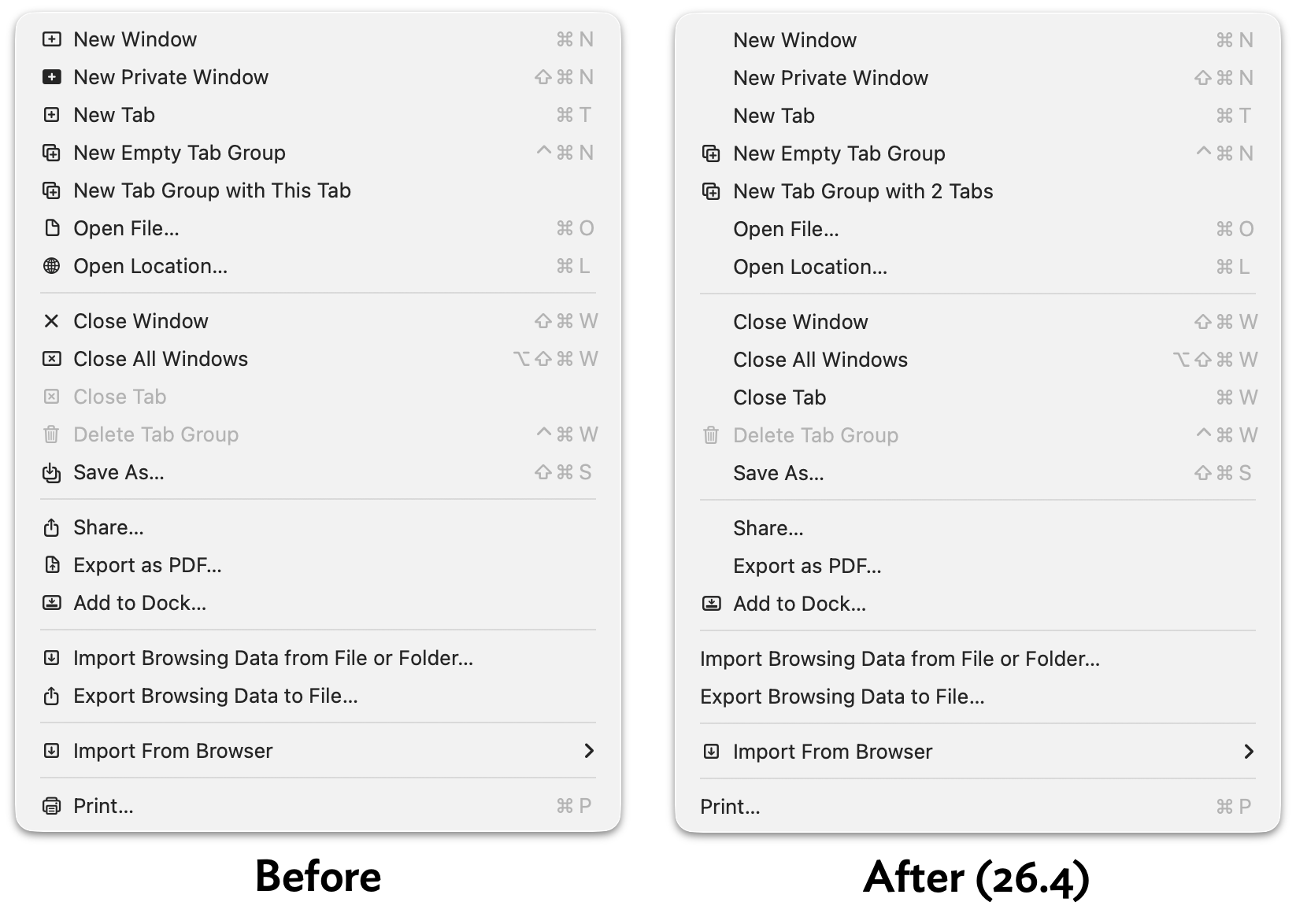
In Tahoe 26.3 (and presumably, earlier versions of Tahoe), 16 of 19 menu items in Safari’s File menu still showed an icon with this setting enabled. In 26.4, only 5 of 19 do.1 The rest of Safari’s other menus have been updated similarly, and look so much better for it.
It’s interesting to me that Safari was updated to support this hidden preference in 26.4. I take it as a sign that there’s a contingent within Apple (or at least within the Safari team) that dislikes these menu item icons enough to notice that Safari wasn’t previously recognizing this preference setting. (And I further take it as a sign that within Apple’s engineering ranks, the existence of this defaults setting is widely known.) Keep hope alive.
Now the Bad News
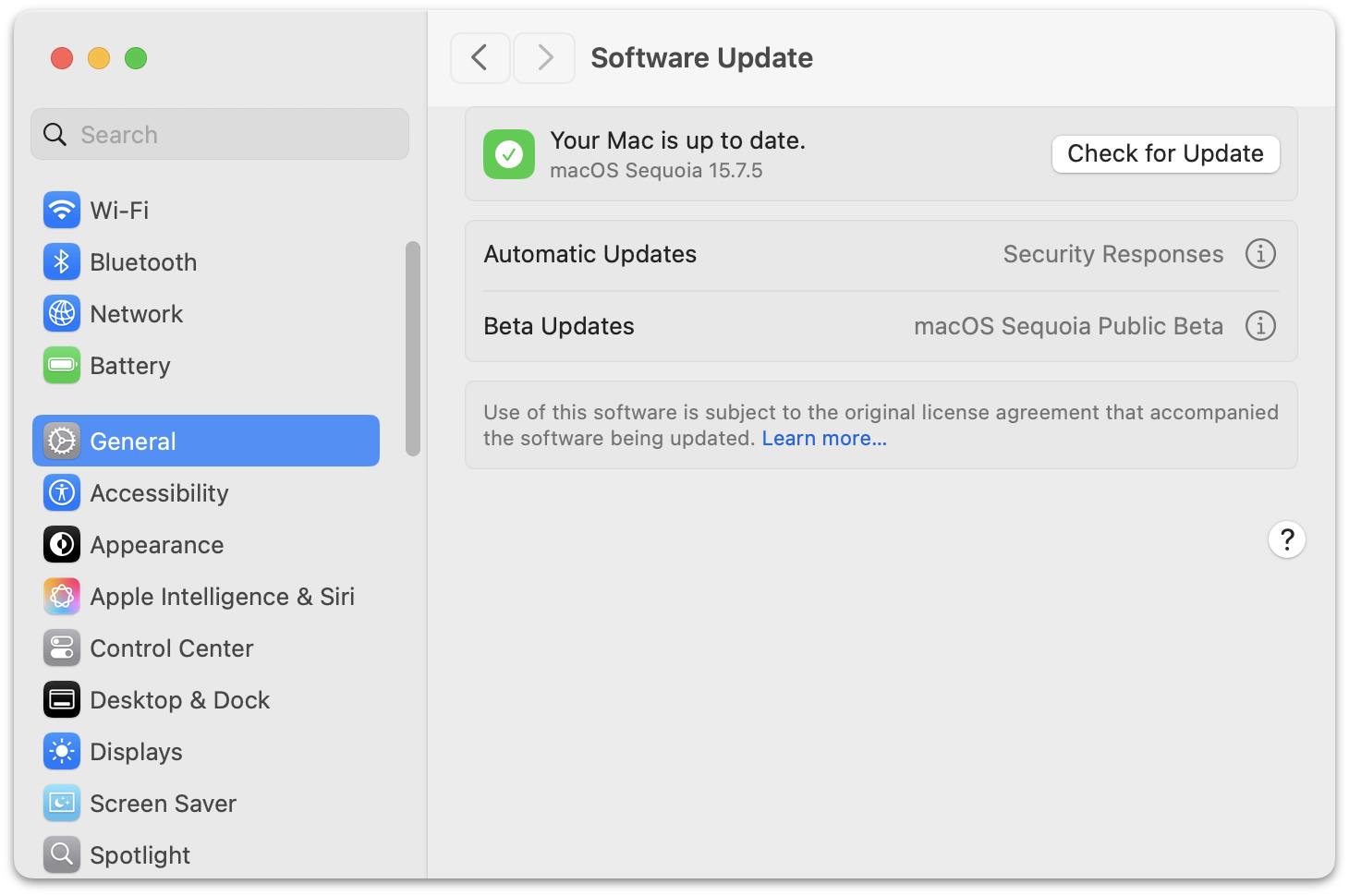
Another recent Tahoe-related tip I’ve been writing about was using a device management profile to block the prompts in System Settings → General → Software Update to “upgrade” from MacOS 15 Sequoia to 26 Tahoe. I first wrote about it a month ago, linking to a post from Rob Griffiths. I then wrote about it again, just this week, linking to a YouTube video from Mr. Macintosh.
Ever since this technique started making the rounds, there was widespread commentary that it was taking advantage of a bug, not a feature, in MacOS 15 Sequoia. The 90-day “deferral” period to block the Tahoe update prompts was supposed to be from the date of the Tahoe major release (26.0), not from the most recent minor release. Welp, with this week’s release of MacOS 15.7.5, this bug is fixed, and Tahoe shows up in the Software Update panel in System Settings even if you have one of these device management profiles installed. Alas.
All is not lost, however. The same video from Mr. Macintosh shows a second, slightly less elegant way to banish all signs of Tahoe in Software Update (just after the 9:00 mark). The trick is to register your Mac for the MacOS Sequoia Public Beta updates (or the developer betas). This blocks all signs of Tahoe. You don’t actually have to install any future betas of Sequoia (at the moment, there are none available). Just make sure you have Automatic Updates disabled too. I’d rather risk inadvertently installing a public beta of 15.8 Sequoia than inadvertently “upgrading” to Tahoe. ★
-
In my article earlier this week, my screenshots showed only 18 menu items in Safari’s File menu, not 19. That’s because I took those screenshots on my review unit MacBook Neo, which I’m running in near-default state. Safari’s File → Import From Browser submenu appears in the File menu if and only if you have certain third-party web browsers installed on your system. On my MacBook Neo review unit, I don’t have any third-party browsers installed, so Safari omits this menu item. I snapped today’s screenshots from a different Tahoe machine that has Firefox installed. ↩︎
Thursday, 26 March 2026
- Apple Discontinues the Mac Pro With No Plans to Bring It Back ★
-
Chance Miller with a big scoop at 9to5Mac:
It’s the end of an era: Apple has confirmed to 9to5Mac that the Mac Pro is being discontinued. It has been removed from Apple’s website as of Thursday afternoon. The “buy” page on Apple’s website for the Mac Pro now redirects to the Mac’s homepage, where all references have been removed.
Apple has also confirmed to 9to5Mac that it has no plans to offer future Mac Pro hardware.
The Mac Pro has lived many lives over the years. Apple released the current Mac Pro industrial design in 2019 alongside the Pro Display XDR (which was also discontinued earlier this month). That version of the Mac Pro was powered by Intel, and Apple refreshed it with the M2 Ultra chip in June 2023. It has gone without an update since then, languishing at its $6,999 price point even as Apple debuted the M3 Ultra chip in the Mac Studio last year.
In the PowerPC era, the high-end Mac desktops were called Power Macs and the pro laptops were PowerBooks. With the transition to Intel CPUs in 2006, Apple changed the names to Mac Pro and MacBook Pro. But unlike the MacBook Pro — which has seen major revisions every few years and satisfying speed bumps on a regular basis, and which has thrived in the Apple Silicon era — the Mac Pro petered out after a few years.
After its 2006 introduction, there were speed bumps in 2008, 2009, 2010, and lastly — sort of — in 2012. So far so good. (The “sort of” two sentences back refers to the fact that the 2012 “update” was very minor, arguably closer to a price cut than a speed bump.) But then came the cylindrical “trash can” Mac Pro in 2013. Perhaps the fact that Apple pre-announced it at WWDC in June before releasing it in October put a curse on the name. The cylindrical Mac Pro was never updated, and Apple being Apple, where the price is part of the product’s brand, they never dropped the price either. This culminated in a small “roundtable” discussion I was invited to in 2017, where Phil Schiller and Craig Federighi laid out Apple’s plans for the future of pro Mac desktops. Step one was the iMac Pro, a remarkable machine but a one-off, that arrived in December 2017. Then came the rejuvenated Mac Pro in 2019, the last Intel-based model and the first with the fancy drilled-hole aluminum tower enclosure. After that, there was only one revision: the M2 Ultra model in June 2023.
So after 2012 — and arguably after 2010 — there was one trash can Mac Pro in 2013, one Intel “new tower” Mac Pro in 2019, and one Apple Silicon Mac Pro in 2023. No speed bumps in between any of them. Three revisions in the last 14 years. So, yeah, not a big shock that they’re just pulling the plug officially.
- The Apple Charging Situation ★
-
Speaking of power adapters, this information guide from Rands in Repose is both useful and enlightening.
- You Can Jump Right to the Updates Screen in the App Store App on iOS 26.4 ★
-
I mentioned the other day that I was mildly irked by a change in iOS 26.4 that moved the list of available updates in the App Store app one additional screen further into its hierarchy. Good news (via Nate Barham on Mastodon): you can long-press on the App Store app on your Home Screen and jump right to the Updates screen from the contextual menu. Nice! (This feature has been around for a few years, apparently, but it’s extra useful in 26.4).
Alternatively, you can create a Shortcuts shortcut that jumps you to the Updates screen. Just one action: open the URL
itms-apps://apps.apple.com/updates. Save it as an “app” on your Home Screen or an action in Control Center. Me, I’m just going to use the tap-and-hold contextual menu item on the App Store app. - Disney Drops Vaporware $1B Investment in OpenAI After Sora Got Axed ★
-
Todd Spangler, reporting for Variety:
Disney has now ended its partnership with OpenAI, which included plans for the media conglomerate to take a $1 billion stake in the artificial-intelligence company led by CEO Sam Altman.
A Disney rep said in a statement to Variety: “As the nascent AI field advances rapidly, we respect OpenAI’s decision to exit the video generation business and to shift its priorities elsewhere. We appreciate the constructive collaboration between our teams and what we learned from it, and we will continue to engage with AI platforms to find new ways to meet fans where they are while responsibly embracing new technologies that respect IP and the rights of creators.”
Allow me to translate from PR-speak into plain English:
We love children, and children will always be the primary audience for Disney’s theme parks, movies, and other entertainment. But we don’t do business with children.
Most PR statements would be more effective in plain English.
- Google Brags About Android Web Browser Benchmark Scores on Unnamed Devices; Gullible Reporters Fall for It ★
-
Chrome engineer Eric Seckler, on Google’s Chromium Blog, under the bold headline “Android Sets New Record for Mobile Web Performance”:
Today, we are proud to celebrate a major milestone: Android is now the fastest mobile platform for web browsing.
Through deep vertical integration across hardware, the Android OS, and the Chrome engine, the latest flagship Android devices are setting new performance records, outperforming all other mobile competitors in the key web performance benchmarks Speedometer and LoadLine and providing a level of responsiveness previously unseen on mobile.
Three unnamed Android “flagship phones” scored higher than an unnamed “competing mobile phone platform” (presumably an iPhone 17 Pro) in two benchmarks, Speedometer 3.1 and LoadLine. Speedometer is a longstanding open source benchmark whose development is governed by representatives from WebKit (Apple), Blink (Google), and Gecko (Mozilla). LoadLine is a benchmark from Google and Android OEMs. Speedometer is a benchmark anyone can run just by visiting the benchmark’s website. Running LoadLine, especially on an iOS device, is an enormous hassle that involves two USB-C-to-Ethernet adapters, enabling Remote Automation and the Web Inspector in Safari, installing custom certificates on the iOS device, and installing custom software on an attached Mac.
You will be shocked to learn that the three unnamed Android phones outscored the “competing mobile phone” by significantly larger margins on LoadLine than Speedometer.
Claiming that these results make Android “the fastest mobile platform for web browsing” is ridiculous. It boggles the mind how many publications parroted Google’s braggadocio — MacRumors, 9to5Google, Android Authority, PhoneArena — without even mentioning that the results can’t possibly be verified because none of the devices (and none of the software versions) are named. This guy at Notebookcheck even had the audacity to put in his headline that Google “shows the receipts” for its claims. What kind of receipt doesn’t say what you bought? I would love to wager real money with the authors of any of those stories on what the Speedometer 3.1 results show for 100 random real-world Android users vs. 100 random real-world iPhone users. Or how about the average scores from the three best-selling models on each platform from the last year.
Name the devices or shut up.
- NYT: ‘Melania Trump Appears With a Robot, Saying More Children Should Be Educated by Them’ ★
-
Well, at least we know who taught her to talk like that.
- The Information: ‘Apple Can “Distill” Google’s Big Gemini Model’ ★
-
Jessica E. Lessin, Amir Efrati, and Erin Woo, reporting for the paywalled-without-gift-links The Information:
While we have reported that Apple can tweak, or fine-tune, a version of Google’s Gemini AI so that it responds to queries the way Apple wants, the agreement gives Apple a lot more freedom with Google’s tech.
In fact, Apple has complete access to the Gemini model in its own data center facilities. Apple can use that access to produce smaller models that power specific tasks or are small enough to run directly on Apple devices so they can run the tasks faster, said a person who has direct knowledge of the arrangement.
The process of producing such models is called distillation, which essentially transfers knowledge from one large language model, which acts like a teacher, to another model that acts as a student.
That Apple negotiated this level of access is interesting, but not surprising. The biggest tell that this deal runs much deeper than simple white-labelling is that Apple will — or at least has the right to — run these Gemini-based models in Apple’s own Private Cloud Compute datacenters.
- Katie Notopoulos Bids Farewell to Sora: ‘You Were Too Beautiful and Stupid for This World’ ★
-
Katie Notopoulos, my favorite Sora user, at Business Insider (paywalled, alas, but available via News+):
Eventually, my friends all seemed to get bored with the app. As I do at most parties, I stuck around longer than everyone else, but eventually I, too, found that the novelty had worn off. I rarely opened the app after the second week.
This was, I imagine, a problem: making videos of yourself is fun, but watching videos that strangers make of themselves is not fun. The idea of a social feed of AI-generated videos is simply not something that people are interested in. Around the same time, Meta also tried this with an app of AI videos, and it was even more boring.
It’s hard to see how anyone thought Sora would have staying power, or could ever justify the apparently exorbitant cost of running it. OpenAI burned a ton of money on what was effectively a stunt.
OpenAI doesn’t appear to be a well-oiled machine at the moment.
- MacOS 26.4 Adds ‘Slow Charger’ Indicator for MacBooks ★
-
Tim Hardwick at MacRumors:
macOS Tahoe 26.4 includes a new slow charger indicator that tells MacBook users when their charging setup isn’t delivering full power. As described in an updated Apple support document, a “Slow Charger” label now appears in orange text in the battery status menu and above the Battery Level graph in Battery settings. The indicator is accompanied by an info button for more details.
Apple says that to charge more quickly, users should use a power adapter and cable that deliver at least the minimum wattage recommended for their MacBook model.
This might be especially useful in Europe, where MacBooks no longer come with power adapters. Regular people often have no idea how power adapters work, and presume one charger is as good as another, if it works at all. After I posted this item back in October about the new MacBook Pros not shipping with chargers anywhere in Europe (not just the EU, even though it’s an EU law that requires products to be available without included chargers), a bunch of readers regaled me with tales of a family member complaining about their MacBook losing battery life even while plugged in, only to discover that they were using wimpy 5- or 10-watt USB-C adapters.
What to Do About Those Menu Item Icons in MacOS 26 Tahoe
Tuesday, 24 March 2026
Steven Troughton-Smith, over the weekend:
Here’s one for the icons-in-menus haters on macOS Tahoe:
defaults write -g NSMenuEnableActionImages -bool NOIt even preserves the couple of instances you do want icons, like for window zoom/resize.
You do not need to restart or log out after applying this setting, but you will need to quit and relaunch any apps that are currently running for it to take effect.
If this worked to hide all of these cursed little turds smeared across the menu bar items of Apple’s system apps in Tahoe, this hidden preference would be a proverbial pitcher of ice water in hell. As it stands, alas, it’s more like half a glass of tepid water. Still quite welcome when you’re thirsty in hell, though.
The problem is that while some of Apple’s system apps obey this setting across the board, others obey it only scattershot, and others still ignore it completely. Apple’s AppKit apps — real Mac apps — are the most likely to obey it. In the Finder, Notes, Photos, Preview, and TextEdit, it pretty much kills all menu item icons, leaving behind only a few mostly useful ones. (Among the random inconsistencies: Preview still shows an icon for the File → Print command — a stupid printer icon, natch — but none of the other apps listed above show an icon for the Print command.)
Mail and Calendar are more scattershot. Calendar hides most menu item icons, but keeps a few in the File menu. Mail is more like half-and-half, with no apparent rhyme or reason to which menu items still show icons. In the Mailbox menu, nearly all items have their icons removed; in the Messages menu, most keep their icons even with this setting set to hide them.
Safari is a heartbreak. It’s one of my favorite, most-used apps, and generally, one of Apple’s best exemplars of what makes a great Mac app a great Mac app. But with this setting enabled, only a handful of seemingly random menu items have their icons hidden. For example, here is the File menu in Safari v26.3.1, before and after applying this setting:
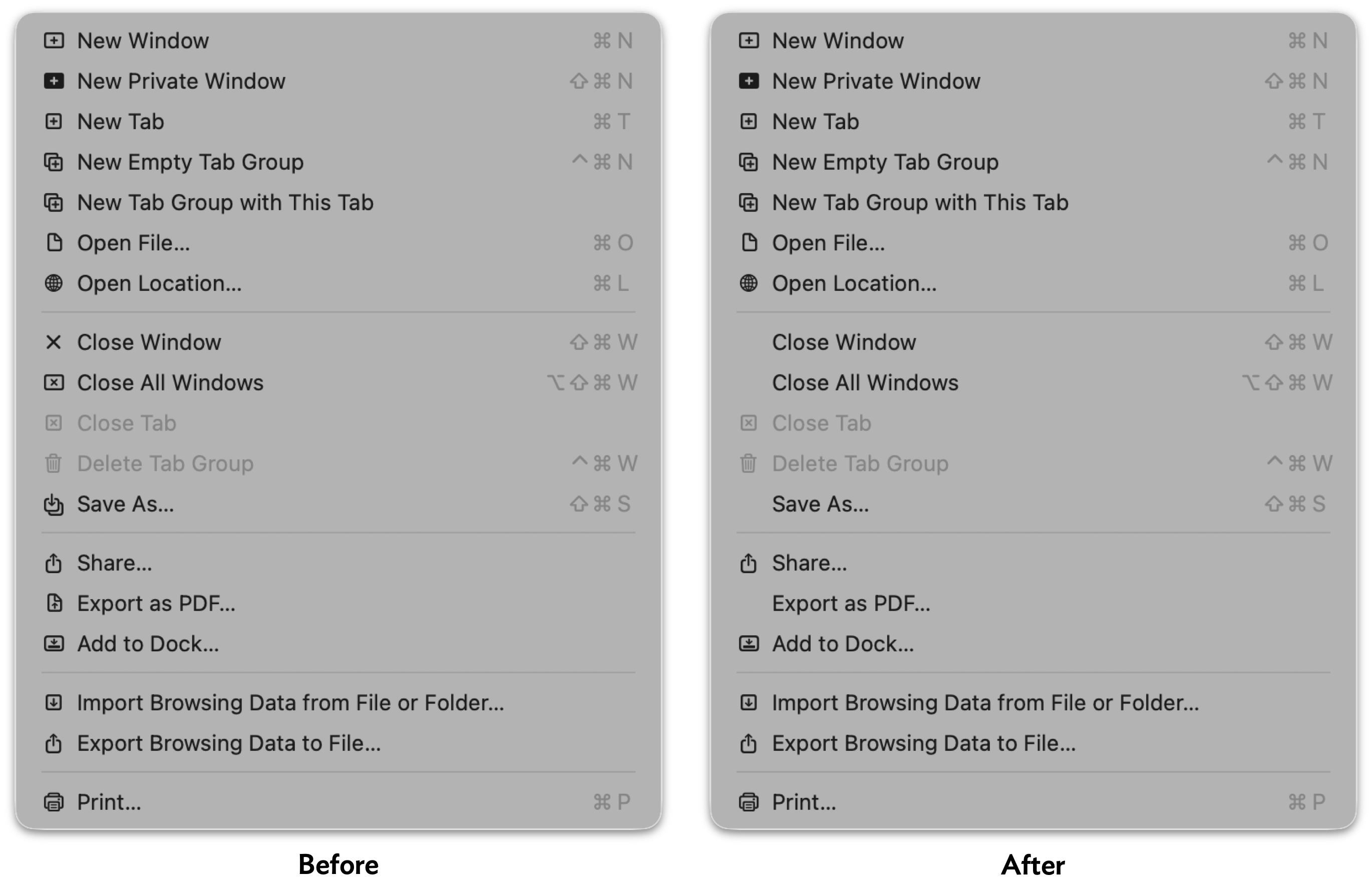
So, after applying a setting that should hide almost all menu item icons, 15 out of 18 menu items still have icons in Safari’s File menu — with no rhyme or reason to the 3 that are omitted. Safari’s other menus are similarly noncompliant. Like I said, heartbreaking.
(All is not lost in Safari, however — the setting does remove the icons from Safari’s contextual menu.)
Apple’s non-AppKit (Catalyst/UIKit/SwiftUI) Mac apps are mostly lost causes on this front. Messages, Maps, and Journal keep all their icons, except for the Window menu. The iPhone Mirroring app hides the icons from its Edit and Window menus, but keeps all of them in the View menu.
So it’s a mixed bag. But even a mixed bag is better than seeing all of these insipid ugly distracting icons. Apple should fix these apps so they all fully support this global preference (that’s what the -g switch in Troughton-Smith’s command-line incantation means), and should expose this setting as a proper, visible toggle in the System Settings app. And of course, in MacOS 27, Apple should remove most of these icons from these apps, leaving behind only the handful that add actual clarity to their menu items. There’s an outcome just waiting to be had where the MacOS menu bar is better than it used to be, not worse, by carefully adding icons only next to commands where the icons add clarity.
My favorite example: commands to rotate images, like the Tools → Rotate Left and Rotate Right commands in Preview, and Image → Rotate Clockwise and Rotate Counterclockwise in Photos.1 The rule of thumb should be that menu items should have icons if the icon alone could provide enough of a clue to replace the command name. That’s very much true for these Rotate commands, and the icons help reduce the cognitive load of thinking about which way is clockwise.
And but so what about third-party Mac apps? I think the best solution is for third-party apps to ignore Apple’s lead, and omit menu item icons on apps that have been updated for the new appearance on MacOS 26 Tahoe. That’s what Brent Simmons has done with NetNewsWire 7, using code he published as open source. Rogue Amoeba Software has adopted the same technique to improve their suite of apps when running on Tahoe, and published this blog post, illustrated with before and after screenshots, to explain their thinking.
No one is arguing that icons never improve the clarity of menu items. But for the most part, menu commands should be read. If a few special menu items are improved by including icons, include just those. They’ll stand out, further improving clarity. Part of the problem with Apple’s “almost every menu item has an icon” approach with their own apps on Mac OS 26 Tahoe is that — as copiously documented by Nikita Prokopov and Jim Nielsen — the overall effect is to add visual clutter, reducing clarity. But a side effect of that clutter is that it reduces the effectiveness of the menu items for which icons are actually useful (again, like Rotate commands, or the items in the Window → Move & Resize submenu). If every menu item has an icon, the presence of an icon is never special. If only special menu items have icons, the presence of an icon is always special.2 ★
-
It should go without saying that these commands in Preview and Photos should use the same terms. Either both should use Rotate Left/Right, or both should use Rotate Clockwise/Counterclockwise. I personally prefer Clockwise/Counterclockwise, but the inconsistency is what grates. In the heyday of consistency in Apple’s first-party Mac software, Apple’s apps were, effectively, a living HIG. If you were adding a Rotate command to your own application, and you were unsure whether to call it “Rotate Right” or “Rotate Clockwise”, you could just check what Apple did, in its own apps, and feel certain that you were doing the right thing, using the correct terms. ↩︎
-
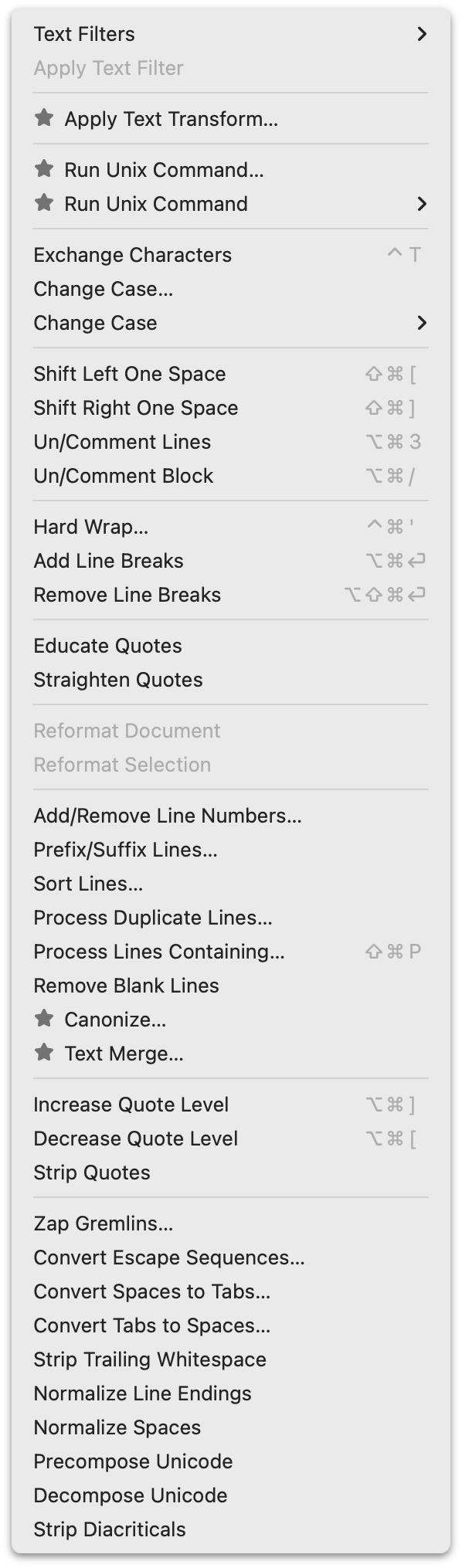
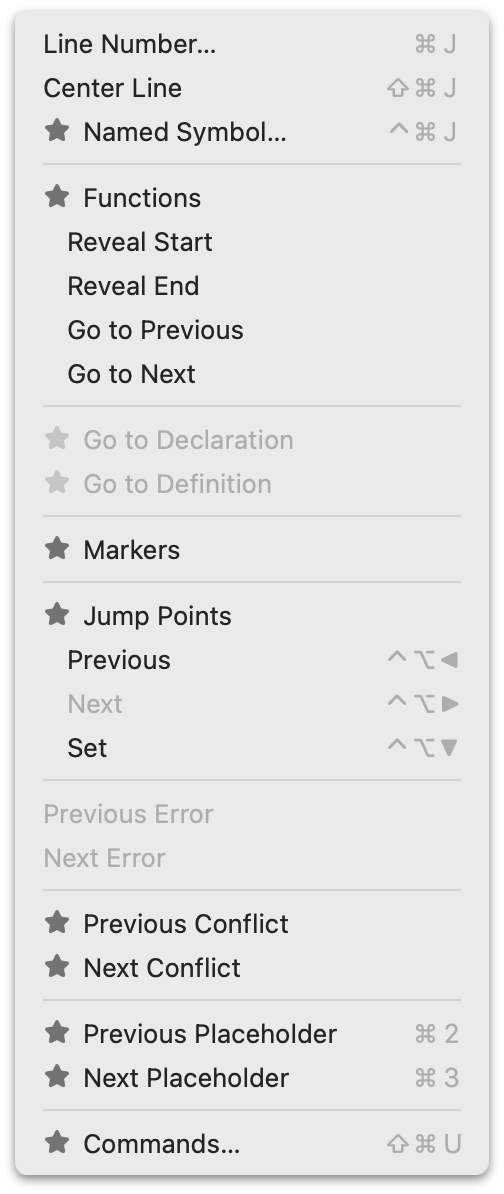
BBEdit offers a great example. BBEdit can be used, free of charge, in perpetuity with a limited (but robust!) subset of its full feature set. Its full feature set is unlocked with a one-time purchase for each major release version. But the full feature set is available as a 30-day trial — which trial period is reset each time a major new version is released. During that trial period, menu commands that are paid features are available to use, but marked with a “★” icon. (A very fine choice of icon, if you ask me.) Here, for example, are screenshots of BBEdit’s Text and Go menus while in trial mode. When the trial period ends, those commands are disabled, but remain visible in the menus, still marked with those star icons. Thus, during the free trial period, users can see which commands they’re using that they’ll need to pay for when the trial ends, and after the trial ends, they can see which features are locked. (After you purchase a license, those star icons just go away.) ↩︎︎
AppleScript: ‘Save MarsEdit Document to Text File’
Thursday, 19 March 2026
Here’s a simple AppleScript I wrote this week — one that solves a minor itch I’ve had for, jeez, 20 years. Almost every item I post to Daring Fireball goes through MarsEdit, the excellent Mac blogging client from Red Sweater Software (my friend Daniel Jalkut). MarsEdit has a built-in “local drafts” feature, where you can save unpublished drafts within a library in MarsEdit itself. It doesn’t happen often but I occasionally wind up with partially written posts that I don’t publish, but don’t want to throw away. But I don’t really want to keep them in MarsEdit. I want them saved as text files. For me, those text files go in a folder in Dropbox. For someone else, maybe they go in iCloud Drive.
I write my longer posts in BBEdit, and then copy them into a MarsEdit document when they’re ready to publish. My shorter posts — which is most of them — are usually entirely composed in MarsEdit. Any abandoned drafts that I might return to, I probably want to compose in BBEdit, because the reason they’re abandoned is that they need to be longer. Or they need to be shorter. But either way they need more thought, and BBEdit is where I go to do my most concentrated thinking.
MarsEdit doesn’t have a built-in way to save a document window as a text file. Just its built-in “Save as Local Draft” feature. I didn’t merely suspect but knew that it’d be relatively easy to write an AppleScript to add a “Save as Text File…” feature to MarsEdit, which I could invoke within MarsEdit from FastScripts, the system-wide scripts menu utility that is also from Red Sweater/Jalkut, and, using FastScripts, I could even give the script the standard keyboard shortcut Option-Command-S. (Or is it Command-Option-S?)
It’ll take a window like this:
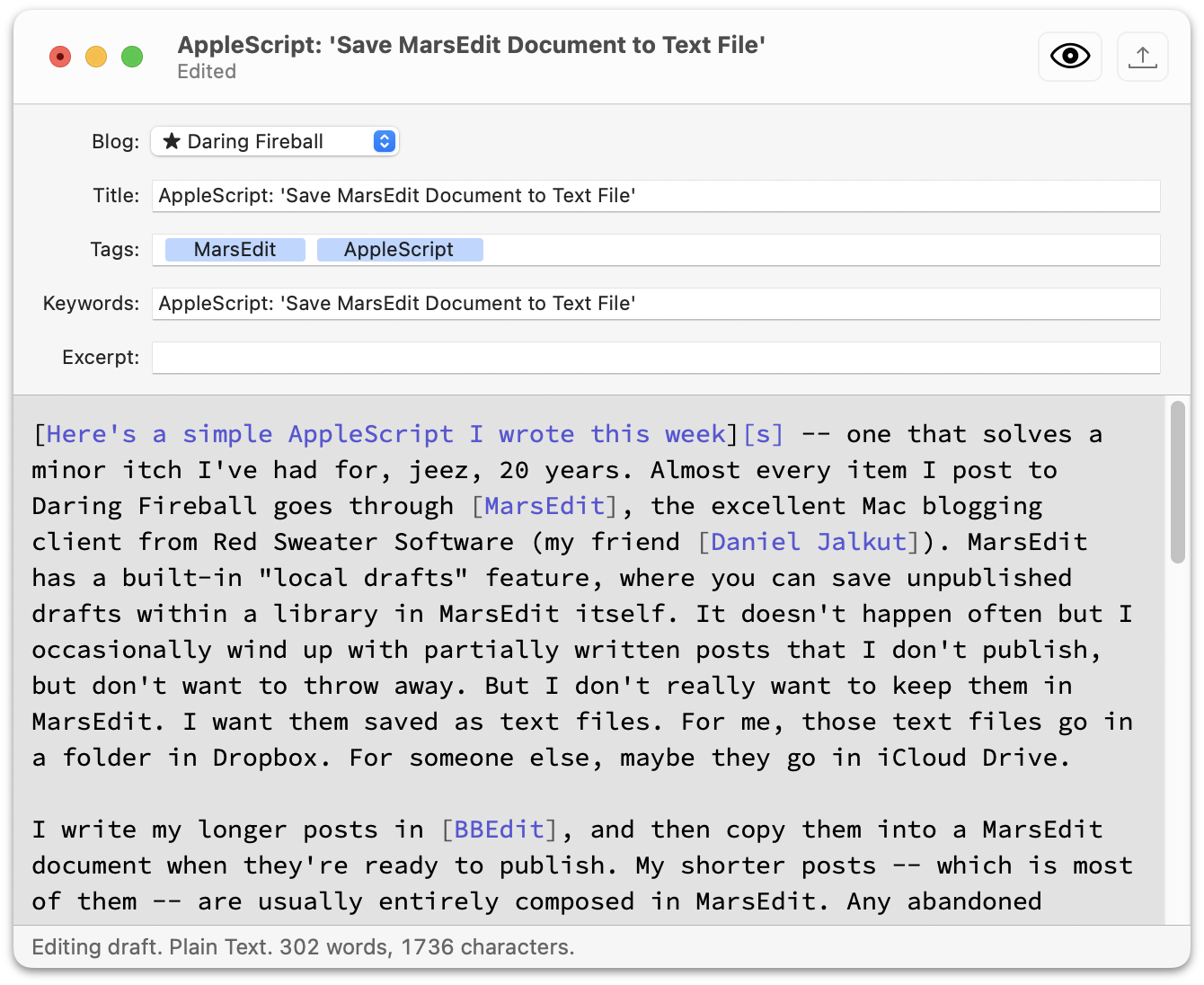
and then prompt you with a system Save dialog to enter a filename (defaulting to the Title field contents, if any, in the MarsEdit document) and location to save the text file. AppleScript even conveniently remembers the last place you saved a file, so it defaults to the same folder the next time you invoke it, without the script doing any work to remember that. The text file looks like this:
Title:  AppleScript: 'Save MarsEdit Document to Text File'
Blog:   ★ Daring Fireball
Edited: Thursday 19 March 2026 at 12:16:29 pm
Tags:   AppleScript, MarsEdit
Slug:   AppleScript: 'Save MarsEdit Document to Text File'
Excerpt:
---

[Here's a simple AppleScript I wrote this week][s] -- one that
solves a minor itch I've had for, jeez, 20 years. Almost every
item I post to Daring Fireball goes through [MarsEdit], the
excellent Mac blogging client from Red Sweater Software (my
friend [Daniel Jalkut]). ...
That’s it. If you use MarsEdit, maybe it’ll help you. I picked the document fields in MarsEdit that I use (Title, Tags, Excerpt, etc.). One potential point of confusion is that while MarsEdit has an optional document field named “Slug”, I don’t use it. For historical reasons, I use Movable Type’s “Keyword” field for the words I want to use for the URL slug for each post. So in my text files, where it says “Slug:”, the text after that label comes from MarsEdit’s Keywords field. And I keep MarsEdit’s actual Slug field hidden, because I don’t use a field with that name in Movable Type. Your mileage, as ever, may vary. But this makes total sense to me.
Anyway, this script helped me clean up 29 drafts, some of them years old, that had been sitting around in MarsEdit, bugging me. Now my “Local Drafts” library in MarsEdit is empty, and those drafts are safe and sound in text files in Dropbox. When something in your workflow is bugging you, you should figure out a way to address it. Why I didn’t write (and share) this script years ago is a mystery for the ages. ★