
By John Gruber

WorkOS: How SSO works and the fastest way to add it.
Linked List: March 2026
Tuesday, 31 March 2026
- Business Insider Profiles Fidji Simo, OpenAI’s ‘CEO of Applications’ ★
-
Grace Kay, Ashley Stewart, and Pranav Dixit, writing for Business Insider (News+):
“Part of bringing me on, and giving me the responsibilities of a CEO, was to make sure that I could really run that part of the company with autonomy,” Simo, whose title is CEO of applications, told Business Insider.
Altman defers to Simo when he doesn’t feel strongly, she said, and they “debate it out” when he does.
I am deeply suspicious of any company with two CEOs. It occasionally works, like at Netflix, when they’re not just co-CEOs but co-equals. Simo does not seem Sam Altman’s equal at OpenAI.
As OpenAI races toward a possible IPO later this year, Simo, who oversees nearly two-thirds of the company, has a delicate balancing act. She must craft a strategy to make products profitable, while convincing staffers who joined a research-driven organization that commercialization won’t change the mission.
The stakes are high. Deutsche Bank estimated that OpenAI is expected to amass the “largest startup losses in history,” totaling a projected $143 billion between 2024 and 2029. (An OpenAI spokesperson said that figure is incorrect, and one person familiar with the numbers said OpenAI’s internal projections are in line with other reports of $111 billion cash burn by 2030.)
It’s really something when the number in the company’s favor is a loss of $111 billion.
One former Meta employee recalled a moment when, after a contentious meeting, Simo sent a one-line follow-up saying she was unlikely to change her mind, so the team shouldn’t waste time trying to persuade her. She has little patience for internal debates that lose sight of the product, the former employee said, and she’s skilled at “being super clear in her directive so teams don’t scramble and waste time.”
Debates that lose sight of the product quality, or lose sight of the product revenue? Given that Simo rose to prominence at Facebook, eventually running the Facebook blue app, and considering the product quality vs. product revenue balance of that app, I think we know the answer.
This whole dumb “superapp” idea that leaked last week sounds exactly like the sort of thing someone who ran the Facebook app would think is a good idea. The difference, I expect, is that Facebook is free to let product quality (and experience quality) fall by the wayside because their social platforms have such powerful network effects. People stay on Facebook and Instagram even as the experiences worsen because everyone they know is also still on those apps. There’s no network effect like that for ChatGPT. Claude is already rising to near-equal status in popularity, and Gemini isn’t far behind, and Simo hasn’t even started enshittifying ChatGPT yet. People will just switch.
- RAM Is the New Bearer Bond ★
-
Hana Kiros, writing for The Atlantic:
Recently, a Costco in Florida instituted a new store policy. An employee told me that he was asked to open up every desktop computer displayed in the electronics section and remove the memory chips. Otherwise, the RAM harvesters would get them. Elsewhere, criminal groups are misdirecting trucks carrying RAM in order to loot them. All of this is happening because of a generational shortage of a part used in practically every electronic gadget on Earth.
Two of the best movies ever made, John McTiernan’s Die Hard in 1988, and Michael Mann’s Heat in 1995, revolved around plots to steal bearer bonds. (Also: Beverly Hills Cop — not quite one of the best films ever made, but a classic, for sure.) But bearer bonds have fallen out of favor as the world of legitimate finance has become almost entirely digital. A good heist film targeting a big shipment of RAM chips would be very 2026.
- Jensen Huang Doesn’t Smell Anything ★
-
Nvidia CEO Jensen Huang, during an on-stage interview at The Hill & Valley Forum last week, was asked “What do you see as America’s unique advantages that other countries don’t have?”
His answer, after taking a moment to think, “America’s unique advantage that no country could possibly have is President Trump.”
Huang, newly appointed to the aforelinked President’s Council of Advisors on Science and Technology, seemingly doesn’t smell the growing stink.
- Appointees to Trump’s Council of Advisors on Science and Technology ★
-
The White House:
The Council will be co-chaired by David Sacks and Michael Kratsios. The following individuals have been appointed:
Marc Andreessen
Sergey Brin
Safra Catz
Michael Dell
Jacob DeWitte
Fred Ehrsam
Larry Ellison
David Friedberg
Jensen Huang
John Martinis
Bob Mumgaard
Lisa Su
Mark ZuckerbergUnder President Trump, PCAST will focus on topics related to the opportunities and challenges that emerging technologies present to the American workforce, and ensuring all Americans thrive in the Golden Age of Innovation.
Scientific American observes that 12/13 are executives, and only one, Martinis, is an academic researcher. But I mean, of course a council like this, from this administration, is going to be made up of big-cap corporate executives and founders. I’d say it’s more surprising there is even one academic researcher than that there aren’t more.
I’m more intrigued by the companies who aren’t represented: no one from Apple, no one from Microsoft, no one from Amazon. (That left room for two from Oracle, that well known bastion of corporate virtue.) Read into that what you will. Me, I can’t help but suspect that this administration is taking on a profound stink, and something like appointments to this council are akin to a game of music chairs where Tim Cook, Satya Nadella, Andy Jassy, and Jeff Bezos are happy not to have gotten seats.
- Technical Analysis of the Android Version of the White House’s New App ★
-
Thereallo, after spelunking inside the APK bundle for the Android version:
Has a full GPS tracking pipeline compiled in that polls every 4.5 minutes in the foreground and 9.5 minutes in the background, syncing lat/lng/accuracy/timestamp to OneSignal’s servers.
Loads JavaScript from a random person’s GitHub Pages site (
lonelycpp.github.io) for YouTube embeds. If that account is compromised, arbitrary code runs in the app’s WebView. [...]
Is any of this illegal? Probably not. Is it what you’d expect from an official government app? Probably not either.
Hanlon’s razor: “Never attribute to malice that which is adequately explained by stupidity.”
The app is, at least temporarily, popular. As I type this it’s #3 in the iOS App Store top free apps list, sandwiched between Claude and Gemini. I don’t know how similar the iOS app is to the Android one, but I took one for the team and installed it, and after poking around for a few minutes, it hasn’t even prompted me to ask for location access. It’s a crappy app, to be sure. A lot of flashing between screen transitions. When you open an article, there’s a “< Back” button top left, and an “X” button top right. Both buttons seem to do the same thing. There’s no share sheet for “news” articles, which seems particularly stupid. You can’t even copy a link to an article and share it manually.
But the iOS version has a clean privacy report card in the App Store, and I don’t see anything in the app that makes me doubt that. It seems like the Android version is quite different.
Update 1: Someone on Reddit claims to have analyzed the iOS app bundle and discovered similar code as in the Android app, but I still don’t see any way to actually get the iOS app to even ask for location permission. I think there might be code in the app that never gets called. Like I wrote above, it’s clearly not a well-crafted app. If anyone knows how to get the iOS app to actually ask for location access, let me know how. Here’s another analysis of the iOS app.
Update 2: I installed the Android version of the app too, and just like on iOS, the only permission it asks for is to send notifications. Maybe they will in a future software update, but as far as I can see, the app never even tries to check the device’s location, on either platform.

Monday, 30 March 2026
- ‘The Brand Age’ ★
-
Paul Graham:
So when you have a world defined only by brand, it’s going to be a weird, bad world.
Graham’s thoughtful essay focuses on the mechanical watch industry. But I disagree with his conclusion. I think the market for mechanical watches has never been more fun or vibrant than it is today. The action, for me at least, isn’t with the high-end luxury Swiss brands. It’s with the indies, from companies like Baltic and Halios.
It’s also interesting to ponder Graham’s essay in the context of other industries. I think it’s self evident that the entire market for phones — the most popular and lucrative consumer devices in the world — is defined by a single brand, and every competitor just copies that one brand with varying degrees of shamelessness. That’s bad and weird.
- Macs of Unusual Size ★
-
Scott Knaster:
The Big Mac is about 22 times the size of the little Mac.
Sunday, 29 March 2026
- WorkOS ★
-
My thanks to WorkOS for once again sponsoring the week at DF. Their latest is a CLI that launches an AI agent, powered by Claude, that reads your project, detects your framework, and writes a complete auth integration into your codebase. No signup required. It creates an environment, populates your keys, and you claim your account later when you’re ready.
But the CLI goes way beyond installation. WorkOS Skills make your coding agent a WorkOS expert.
workos seeddefines your environment as code.workos doctorfinds and fixes misconfigurations. And once you’re authenticated, your agent can manage users, orgs, and environments directly from the terminal. See how it works at WorkOS’s website.See also: WorkOS just completed another Launch Week. This one, for Spring 2026, does not disappoint with its custom UI and theme. Even if you don’t have a need for WorkOS you should check out their Launch Week site just for fun.
- The Talk Show: ‘You’re Going to Have the Niggles’ ★
-
For your weekend listening enjoyment: Christina Warren returns to the show to discuss Apple big month of product announcements — in particular, the iPhone 17e and MacBook Neo. And we pour one out for the Mac Pro.
Sponsored by:
- Squarespace: Save 10% off your first purchase of a website or domain using code TALKSHOW.
- Sentry: A real-time error monitoring and tracing platform. Use code TALKSHOW for $80 in free credits.
- Version History: ‘The Macintosh’ ★
-
For your weekend viewing enjoyment:
But in almost every way that mattered, the Macintosh was right. Right about how we’d use computers going forward. Right about the idea that computers needed to be less complicated. Right about the fact that caring this deeply about both hardware and software design would make a difference. Though Apple didn’t sell many of those original Macintoshes, there’s no question it changed computers forever.
On this episode of Version History, we tell the story of the original Macintosh. David Pierce, Nilay Patel, and Daring Fireball’s John Gruber explain the strange corporate infighting that led to the project in the first place, the ways in which the Macintosh changed over time, and how Jobs and his team drove such massive hype for the device some people didn’t even want to ship. Then they debate the device’s true legacy, and whether the computer or the commercial is the true icon.
- The Verge: ‘Rank the Best Apple Products From the Last 50 Years’ ★
-
Look, I’m all for democracy, but a poll whose results currently have the Extended Keyboard II down at #47 is a poll that makes me angry.
Saturday, 28 March 2026
- The 2019 Intel Mac Pro’s Unfortunate Timing ★
-
Stephen Hackett, at 512 Pixels:
I’ve thought a lot about the bad timing Jones mentions. Had Apple stuck to the original timeline, and killed off the 2013 Mac Pro in favor of an iMac “specifically targeted at large segments of the pro market,” back in 2017, Apple could have avoided putting out the best Intel Mac ever, less than a year before the transition to Apple silicon.
Did Apple know in 2017 that 2020 was the year the M1 would make it out of the lab? Probably not, but it doesn’t make the timing any less painful.
Apple might not have had 2020 set in stone for the Apple Silicon transition, but in 2017, they definitely knew that Apple Silicon was the future. I think they knew that years before 2017, and in broad strokes, that’s why 2015–2020 was such a bad period for Mac hardware. They didn’t ship a retina MacBook Air until 2018. The 12-inch MacBook was beautiful but expensive and seriously underpowered. And nothing suffered more than the Mac Pro in that stretch. I think Apple knew that the future was on their own silicon, but in the meantime, they just couldn’t get it up for the last five years of the Intel era.
- Apple Should Set and Enforce Some Basic Standards for Custom Video Players on tvOS ★
-
While I’m bitching about Netflix’s craptacular new video player on Apple TV, let me quote from a piece I wrote two years ago (also complaining about Netflix’s tvOS app):
Turns out there are two better ways:
If you use the Control Center Apple TV remote control on your iPhone, there’s a dedicated “CC” button.
In tvOS, go to Settings → Accessibility → Accessibility Shortcut, and set it to “Closed Captions”. Now you can just triple-click the Menu/Back button on the remote to toggle captions. (On older Apple TV remotes, the button is labelled “Menu”; on the new remote, it’s labelled with a “<”.)
But here’s the hitch: Netflix’s tvOS app doesn’t support either of these ways to toggle captions. Netflix only supports the on-screen caption toggle in their custom video player. I get why Netflix and other streaming apps want to use their own custom video players, but it ought to be mandated by App Store review that they support accessibility features like this one.
What Apple should have done right from the start with the tvOS-based Apple TV a decade ago is require all apps to use the system video player. No custom video players. It’s too late for that, alas. But the tvOS App Store review process ought to insist on compliance with these accessibility and platform compliance features.
You want to use your own custom video player? Fine. But apps with custom video players must support the “CC” button in the iOS Control Center remote control, must support the triple-click accessibility shortcut, must support the platform conventions for fast-forwarding and rewinding using the Apple TV remote control, etc. If your video player doesn’t comply, your app update doesn’t get approved.
Apple should use the App Store approval process for the benefit of users. Isn’t that supposed to be the point?
- ‘How Apple Became Apple: The Definitive Oral History of the Company’s Earliest Days’ ★
-
This feature from Harry McCracken is just spectacularly good. (And it’s a gift link that’ll get you past Fast Company’s paywall.) 50 years is a long time and there are some key players in Apple’s origin story who are gone — but because everyone was so young at the time, it’s amazing how many of them are still alive. And, of course, in Chris Espinosa’s case, still working at Apple:
I was sitting there in the Byte Shop in Palo Alto on an Apple-1 writing BASIC programs, and this guy with a scraggly beard and no shoes came in and looked at me and conducted what I later understood to be the standard interview, which was “Who are you?” I said, “I’m Chris.” And he said, “What are you doing?” I said, “I’m writing BASIC programs on this Apple-1 for the owner.” And he said, “Are you any good?” I showed him my BASIC programs on the Apple-1.
He told me, “I’ve seen you around Homebrew. Woz is working on this second-generation computer, and instead of loading BASIC from cassette tape, we want to put it in ROM. And so it has to be perfect. I want you to come and test Woz’s BASIC, and I’ll give you 4K of RAM for that when you build your own computer.” That sounded like a good deal. Steve Jobs’s idea back then of recruiting was to grab a random-ass 14-year-old off the streets.
Apple is at its best when it’s infused with a bit of the spirit of the two Steves whose first joint venture were blue boxes that let you make long distance phone calls for free. The first public phone call Steve Jobs ever made on an iPhone was a prank call to the Starbucks next to Moscone West. I feel like that renegade spirit has been repressed in the Tim Cook era.
- Netflix Wrecked Their tvOS Video Player ★
-
Amanda Kondolojy, writing for Pocket-lint:
Though the Netflix app is largely the same on most platforms, over the weekend several Apple TV users on the unofficial Apple TV Reddit noticed some small changes to the tvOS version of the app that are making the app harder to use in subtle but very frustrating ways.
According to user iamonreddit, the most recent Netflix app update has made it slightly more difficult to use the fast-forward and rewind functions. Instead of clicking the back or forward button on the remote wheel to advance or return ten seconds, this button press now pauses the screen and brings up a frame selector. In order to actually go forward or go back, users then have to click the same button again. So essentially, what once required a single button press, now needs two.
These changes aren’t small, aren’t subtle, and don’t make fast-forwarding and rewinding merely “slightly” more difficult. (And what once required a single button press now requires three, not two.) The video playback interface in a streaming app is the most essential thing a streaming app does, and now Netflix’s tvOS player looks terrible and works wrong. The original report Kondolojy cites, from Reddit user “iamonreddit” (yes, you are), describes it as it is:
Did Netflix mess up the app? There are two extra clicks for a simple 10s rewind or fast forward. Instead of it going back 10s in one click, now it pauses and brings up the frame selector, and then you have to click again. Did they not do any research or usability testing before releasing this?
It’s also not smooth at all, it keeps spinning for a while and I have 1gig fiber optic internet. What a big downgrade!
They have some of the top paid employees in the world and this is what they come up with. Unless this was the result of some restrictions introduced by Apple.
Looks like they messed it up big time. Netflix used to set benchmarks for others. And here we are now. I’ve never had a single problem with their app so for, for over a decade of use.
Netflix’s gratuitously ugly new custom video player commits various crimes against accessibility. Two years ago I wrote about tvOS’s system accessibility shortcut that lets you assign triple-clicking the Back (“<”) button to toggle captions, and the fact that Netflix didn’t support it. This cursed new player, you will be unsurprised to learn, doesn’t support it either. It also does not support the wonderful standard platform convention of temporarily turning on captions when you rewind 10 or 20 seconds, for a “What did they just say?” moment.
Update: Switching to their own custom video player also broke Netflix’s integration with the iPhone. Until last week, playing video in the Netflix app on Apple TV would put a live activity widget on your iPhone lock screen with the name of the current program, scrub location, and player controls. Now that’s gone.
This regression dropping the same week that Netflix announced price hikes makes me so angry that I’m giving even more thought to downgrading my family’s Netflix account from the $27/month Premium plan to the $20/month Standard plan. Sending Netflix only $240 per year instead of $324 will show them.
- Trump Is Putting His Signature on U.S. Currency ★
-
Alan Rappeport, reporting for The New York Times:
President Trump’s signature will appear on U.S. dollars later this year, the Treasury Department said on Thursday. The decision to have Mr. Trump’s John Hancock on America’s paper currency represented an unprecedented change, one that the department said was being made in honor of the United States’ 250th anniversary.
Mr. Trump is set to become the first sitting U.S. president to have his signature on the greenback. His name will appear alongside that of Treasury Secretary Scott Bessent. As a result, the U.S. treasurer, whose name has been on the currency for more than a century, will not appear on the currency.
Raquel Coronell Uribe, reporting for NBC News:
Trump’s signature will go on the bills in honor of the country’s 250th anniversary, the Treasury said. Historically, paper currency carries the signatures of the treasury secretary and the treasurer.
“The President’s mark on history as the architect of America’s Golden Age economic revival is undeniable,” Treasury Secretary Scott Bessent said in a statement. “Printing his signature on the American currency is not only appropriate, but also well deserved.”
It’s certainly news that the sitting president — a man whom psychologists have publicly described as showing clear “symptoms of severe, untreatable personality disorder — malignant narcissism” — is putting his signature on U.S. currency. But why parrot the administration’s obviously false line that this gross, embarrassing change in longstanding tradition has anything whatsoever to do with “honoring” the United States’s 250th anniversary?
It makes no more sense that putting Trump’s signature on greenbacks “honors the nation” or its history than it would to claim that doing so will cure the common cold, reverse male pattern baldness, or keep us safe from Bigfoot. Call it what it is: sycophantic ego fellatio for a deeply unpopular narcissist who is losing his already tenuous grip on reality.
- New York Post: ‘Trump Considers Renaming Strait of Hormuz’ ★
-
The New York Post (I’m not sure if I should tell you to take this with a grain of salt, because it’s the Post and their journalistic standards are low, or, to assign this extra credibility because it’s the Post, a right-wing Murdoch rag that Trump lackeys actually talk to):
President Trump is prioritizing taking control of the Strait of Hormuz as he grows frustrated with the lack of help from allies to force open the crucial waterway. And once Trump ends Iran’s reign of terror over the shipping route, he’s considering rechristening it the “Strait of America” or even naming it after himself, sources told The Post. [...]
Trump told a Saudi investor forum Friday evening in Miami that he might decide to call the Strait after himself, rather than America.
“They have to open up the Strait of Trump — I mean Hormuz,” Trump said. “Excuse me, I’m so sorry. Such a terrible mistake. The Fake News will say, ‘He accidentally said.’ No, there’s no accidents with me, not too many.”
I suspect there are going to be accidents soon, as he descends further into dementia and needs adult diapers.
Friday, 27 March 2026
- Business Insider’s Subscriber Spiral ★
-
Oliver Darcy, reporting for Status (paywalled, alas):
According to the data obtained by Status, BI ended 2023 with roughly 160,000 paid subscribers, a drop of about 14 percent from the prior year when it boasted about 185,000 subscribers. The slide did not stop there, however. In 2024, it closed the year with roughly 150,000 subscribers, a further six percent decline. And in 2025, the number fell again, to about 135,000 paid subscribers — another 10 percent drop.
All told, over roughly three years, BI saw its subscription base plummet by about 50,000, or a jarring 27 percent.
Not the sort of momentum you want.
- Apple Says It’s Not Aware of Lockdown Mode Ever Having Been Exploited ★
-
Lorenzo Franceschi-Bicchierai, reporting for TechCrunch:
Almost four years after launching a security feature called Lockdown Mode, Apple says it has yet to see a case where someone’s device was hacked with these additional security protections switched on.
“We are not aware of any successful mercenary spyware attacks against a Lockdown Mode-enabled Apple device,” Apple spokesperson Sarah O’Rourke told TechCrunch on Friday.
- Apple Announces Ads Are Coming to Apple Maps ★
-
Apple Newsroom:
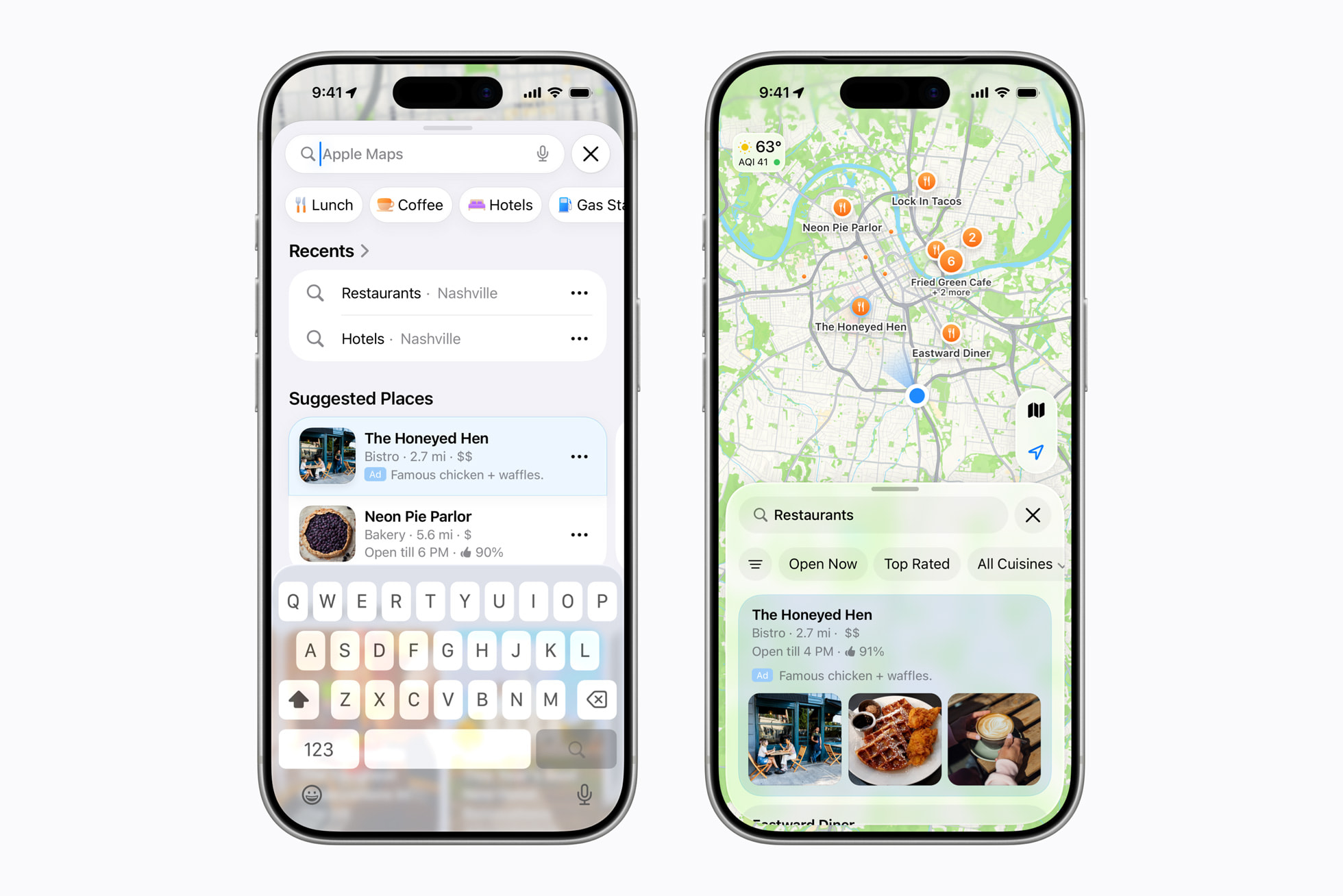
Beginning this summer in the U.S. and Canada, businesses will have a new way to be discovered by using Apple Business to create ads on Maps. Ads on Maps will appear when users search in Maps, and can appear at the top of a user’s search results based on relevance, as well as at the top of a new Suggested Places experience in Maps, which will display recommendations based on what’s trending nearby, the user’s recent searches, and more. Ads will be clearly marked to ensure transparency for Maps users.
Ads on Maps builds on Apple’s broader privacy-first approach to advertising, and maintains the same privacy protections Maps users enjoy today. A user’s location and the ads they see and interact with in Maps are not associated with a user’s Apple Account. Personal data stays on a user’s device, is not collected or stored by Apple, and is not shared with third parties.
The privacy angle is good. I don’t want to take that for granted, because few, if any, of Apple’s $1-trillion-plus market cap peers have such devotion to user privacy.
But more and more it’s becoming clear that while Apple’s devotion to protecting user privacy remains as high as ever, their devotion to delivering the best possible user experience does not. Here’s Apple’s own screenshot showing what these ads are supposedly going to look like. It looks fine. But these ads seem highly unlikely to make the overall experience of using Apple Maps better. Perhaps, in practice, they will not make the experience worse, and it’ll be a wash. But I can’t help but suspect that they’re going to make the experience worse, and the question is really just how much worse. The addition of ads to the App Store has made the experience worse.
We shall see. I’m not going to prejudge the actual experience, and you shouldn’t either. I also do not begrudge Apple for wanting to monetize Maps. But if the addition of ads does make the Apple Maps experience worse, why won’t Apple let us buy our way out of seeing them? Netflix doesn’t force us to watch their ads. YouTube Premium is arguably the best bang-for-the-buck in the entire world of content subscriptions. Why should Apple One subscribers still see these ads in Apple Maps?
- Netflix Raises Prices Again ★
-
Todd Spangler, Variety:
Under the new pricing, effective March 26 for new users and rolling out to current customers depending on their billing cycle, Netflix’s Standard plan (which has no ads and provides streaming on two devices simultaneously) is rising by $2, from $17.99 to $19.99/month. The ad-supported plan is going up a buck, from $7.99 to $8.99/month, and the top-tier Premium plan (no ads, streaming on up to four devices at once, Ultra HD and HDR) is increasing from $24.99 to $26.99/month.
I pay the full $27/month because I’d rather cancel Netflix than watch ads, and I suspect I’d notice the difference between 4K and 1080p. But also because money runs through my fingers like water.
Thursday, 26 March 2026
- Apple Discontinues the Mac Pro With No Plans to Bring It Back ★
-
Chance Miller with a big scoop at 9to5Mac:
It’s the end of an era: Apple has confirmed to 9to5Mac that the Mac Pro is being discontinued. It has been removed from Apple’s website as of Thursday afternoon. The “buy” page on Apple’s website for the Mac Pro now redirects to the Mac’s homepage, where all references have been removed.
Apple has also confirmed to 9to5Mac that it has no plans to offer future Mac Pro hardware.
The Mac Pro has lived many lives over the years. Apple released the current Mac Pro industrial design in 2019 alongside the Pro Display XDR (which was also discontinued earlier this month). That version of the Mac Pro was powered by Intel, and Apple refreshed it with the M2 Ultra chip in June 2023. It has gone without an update since then, languishing at its $6,999 price point even as Apple debuted the M3 Ultra chip in the Mac Studio last year.
In the PowerPC era, the high-end Mac desktops were called Power Macs and the pro laptops were PowerBooks. With the transition to Intel CPUs in 2006, Apple changed the names to Mac Pro and MacBook Pro. But unlike the MacBook Pro — which has seen major revisions every few years and satisfying speed bumps on a regular basis, and which has thrived in the Apple Silicon era — the Mac Pro petered out after a few years.
After its 2006 introduction, there were speed bumps in 2008, 2009, 2010, and lastly — sort of — in 2012. So far so good. (The “sort of” two sentences back refers to the fact that the 2012 “update” was very minor, arguably closer to a price cut than a speed bump.) But then came the cylindrical “trash can” Mac Pro in 2013. Perhaps the fact that Apple pre-announced it at WWDC in June before releasing it in October put a curse on the name. The cylindrical Mac Pro was never updated, and Apple being Apple, where the price is part of the product’s brand, they never dropped the price either. This culminated in a small “roundtable” discussion I was invited to in 2017, where Phil Schiller and Craig Federighi laid out Apple’s plans for the future of pro Mac desktops. Step one was the iMac Pro, a remarkable machine but a one-off, that arrived in December 2017. Then came the rejuvenated Mac Pro in 2019, the last Intel-based model and the first with the fancy drilled-hole aluminum tower enclosure. After that, there was only one revision: the M2 Ultra model in June 2023.
So after 2012 — and arguably after 2010 — there was one trash can Mac Pro in 2013, one Intel “new tower” Mac Pro in 2019, and one Apple Silicon Mac Pro in 2023. No speed bumps in between any of them. Three revisions in the last 14 years. So, yeah, not a big shock that they’re just pulling the plug officially.
- The Apple Charging Situation ★
-
Speaking of power adapters, this information guide from Rands in Repose is both useful and enlightening.
- You Can Jump Right to the Updates Screen in the App Store App on iOS 26.4 ★
-
I mentioned the other day that I was mildly irked by a change in iOS 26.4 that moved the list of available updates in the App Store app one additional screen further into its hierarchy. Good news (via Nate Barham on Mastodon): you can long-press on the App Store app on your Home Screen and jump right to the Updates screen from the contextual menu. Nice! (This feature has been around for a few years, apparently, but it’s extra useful in 26.4).
Alternatively, you can create a Shortcuts shortcut that jumps you to the Updates screen. Just one action: open the URL
itms-apps://apps.apple.com/updates. Save it as an “app” on your Home Screen or an action in Control Center. Me, I’m just going to use the tap-and-hold contextual menu item on the App Store app. - Disney Drops Vaporware $1B Investment in OpenAI After Sora Got Axed ★
-
Todd Spangler, reporting for Variety:
Disney has now ended its partnership with OpenAI, which included plans for the media conglomerate to take a $1 billion stake in the artificial-intelligence company led by CEO Sam Altman.
A Disney rep said in a statement to Variety: “As the nascent AI field advances rapidly, we respect OpenAI’s decision to exit the video generation business and to shift its priorities elsewhere. We appreciate the constructive collaboration between our teams and what we learned from it, and we will continue to engage with AI platforms to find new ways to meet fans where they are while responsibly embracing new technologies that respect IP and the rights of creators.”
Allow me to translate from PR-speak into plain English:
We love children, and children will always be the primary audience for Disney’s theme parks, movies, and other entertainment. But we don’t do business with children.
Most PR statements would be more effective in plain English.
- Google Brags About Android Web Browser Benchmark Scores on Unnamed Devices; Gullible Reporters Fall for It ★
-
Chrome engineer Eric Seckler, on Google’s Chromium Blog, under the bold headline “Android Sets New Record for Mobile Web Performance”:
Today, we are proud to celebrate a major milestone: Android is now the fastest mobile platform for web browsing.
Through deep vertical integration across hardware, the Android OS, and the Chrome engine, the latest flagship Android devices are setting new performance records, outperforming all other mobile competitors in the key web performance benchmarks Speedometer and LoadLine and providing a level of responsiveness previously unseen on mobile.
Three unnamed Android “flagship phones” scored higher than an unnamed “competing mobile phone platform” (presumably an iPhone 17 Pro) in two benchmarks, Speedometer 3.1 and LoadLine. Speedometer is a longstanding open source benchmark whose development is governed by representatives from WebKit (Apple), Blink (Google), and Gecko (Mozilla). LoadLine is a benchmark from Google and Android OEMs. Speedometer is a benchmark anyone can run just by visiting the benchmark’s website. Running LoadLine, especially on an iOS device, is an enormous hassle that involves two USB-C-to-Ethernet adapters, enabling Remote Automation and the Web Inspector in Safari, installing custom certificates on the iOS device, and installing custom software on an attached Mac.
You will be shocked to learn that the three unnamed Android phones outscored the “competing mobile phone” by significantly larger margins on LoadLine than Speedometer.
Claiming that these results make Android “the fastest mobile platform for web browsing” is ridiculous. It boggles the mind how many publications parroted Google’s braggadocio — MacRumors, 9to5Google, Android Authority, PhoneArena — without even mentioning that the results can’t possibly be verified because none of the devices (and none of the software versions) are named. This guy at Notebookcheck even had the audacity to put in his headline that Google “shows the receipts” for its claims. What kind of receipt doesn’t say what you bought? I would love to wager real money with the authors of any of those stories on what the Speedometer 3.1 results show for 100 random real-world Android users vs. 100 random real-world iPhone users. Or how about the average scores from the three best-selling models on each platform from the last year.
Name the devices or shut up.
- NYT: ‘Melania Trump Appears With a Robot, Saying More Children Should Be Educated by Them’ ★
-
Well, at least we know who taught her to talk like that.
- The Information: ‘Apple Can “Distill” Google’s Big Gemini Model’ ★
-
Jessica E. Lessin, Amir Efrati, and Erin Woo, reporting for the paywalled-without-gift-links The Information:
While we have reported that Apple can tweak, or fine-tune, a version of Google’s Gemini AI so that it responds to queries the way Apple wants, the agreement gives Apple a lot more freedom with Google’s tech.
In fact, Apple has complete access to the Gemini model in its own data center facilities. Apple can use that access to produce smaller models that power specific tasks or are small enough to run directly on Apple devices so they can run the tasks faster, said a person who has direct knowledge of the arrangement.
The process of producing such models is called distillation, which essentially transfers knowledge from one large language model, which acts like a teacher, to another model that acts as a student.
That Apple negotiated this level of access is interesting, but not surprising. The biggest tell that this deal runs much deeper than simple white-labelling is that Apple will — or at least has the right to — run these Gemini-based models in Apple’s own Private Cloud Compute datacenters.
- Katie Notopoulos Bids Farewell to Sora: ‘You Were Too Beautiful and Stupid for This World’ ★
-
Katie Notopoulos, my favorite Sora user, at Business Insider (paywalled, alas, but available via News+):
Eventually, my friends all seemed to get bored with the app. As I do at most parties, I stuck around longer than everyone else, but eventually I, too, found that the novelty had worn off. I rarely opened the app after the second week.
This was, I imagine, a problem: making videos of yourself is fun, but watching videos that strangers make of themselves is not fun. The idea of a social feed of AI-generated videos is simply not something that people are interested in. Around the same time, Meta also tried this with an app of AI videos, and it was even more boring.
It’s hard to see how anyone thought Sora would have staying power, or could ever justify the apparently exorbitant cost of running it. OpenAI burned a ton of money on what was effectively a stunt.
OpenAI doesn’t appear to be a well-oiled machine at the moment.
- MacOS 26.4 Adds ‘Slow Charger’ Indicator for MacBooks ★
-
Tim Hardwick at MacRumors:
macOS Tahoe 26.4 includes a new slow charger indicator that tells MacBook users when their charging setup isn’t delivering full power. As described in an updated Apple support document, a “Slow Charger” label now appears in orange text in the battery status menu and above the Battery Level graph in Battery settings. The indicator is accompanied by an info button for more details.
Apple says that to charge more quickly, users should use a power adapter and cable that deliver at least the minimum wattage recommended for their MacBook model.
This might be especially useful in Europe, where MacBooks no longer come with power adapters. Regular people often have no idea how power adapters work, and presume one charger is as good as another, if it works at all. After I posted this item back in October about the new MacBook Pros not shipping with chargers anywhere in Europe (not just the EU, even though it’s an EU law that requires products to be available without included chargers), a bunch of readers regaled me with tales of a family member complaining about their MacBook losing battery life even while plugged in, only to discover that they were using wimpy 5- or 10-watt USB-C adapters.
- Jennifer Daniel on the New ‘Distorted Face’ Emoji ★
-
Jennifer Daniel, on her “Did Someone Say Emoji?” blog:
First came Melting Face 🫠, our collective surrender to the liquid state.
Then Dotted Line Face 🫥, the visual representation of sublimation: turning from a solid into a gas just to escape a conversation.
Now, we have Distorted Face (U+1FAEA), a moment defined by tension: where you aren’t just feeling an emotion — you are being physically altered by it.
I’ll live, but it feels a tad spiteful that Apple only adds new emoji to the current-year OS updates. So this year’s 8 new emoji are in MacOS 26.4, but not MacOS 15.7.5, despite both being released this week.
- The Yankees Almost Signed Another P.E.D. Cheater ★
-
One more nugget from last night’s 7-0 Yankees win over the Giants:
During the sixth inning of Wednesday’s Opening Night matchup between two historic franchises, the Giants and Yankees, all-time home run leader Barry Bonds joined the Netflix broadcast booth at Oracle Park and told an incredible story about just how close he came to signing with the Yankees in 1992. [...]
“Well, I would’ve been a Yankees [player],” Bonds said, “but Steinbrenner got on the phone and they called us and they told me, ‘Barry, we’re gonna give you the money — [make you] the highest-paid player … but you have to sign the contract by 2:00 this afternoon.’”
One thing you don’t do is give Bonds an ultimatum.
“And I said, ‘Excuse me?’” Bonds said. “And I just hung the phone up.”
The Yankees went on to play in six World Series from that moment until the end of Bonds’s playing career, winning four championships. Bonds played in one World Series with the Giants, losing a seven-game series to the Angels in 2002.
- The New York Yankees Have the Best Record in Baseball ★
-
Nice 7-0 win last night over the San Francisco Giants.
The game was on Netflix, and it was the worst baseball broadcast I can recall watching in the HD era. The picture quality was just awful, with embarrassing dynamic ad injection. Yes, there was haze, but it’s not like crappy weather in San Francisco is a surprise. The game had the first Automated Ball-Strike (ABS) challenge in MLB history, but the broadcast missed it while it happened. And Netflix’s scorebug is without question the worst I’ve ever seen — as one guy on Reddit quipped, it was somehow “too big and too small at the same time”. I’d have to stand within arm’s reach of my TV to read those player names.
If this is the level of attention Netflix is going to pay to sports broadcasts, they should stick to bumfights.
- Mr. Macintosh Explains Another Way to Block the Software Update Prompts for MacOS 26 Tahoe ★
-
Last month I posted an item (linking to a post from Rob Griffiths) explaining how to hide the prompts in System Settings to upgrade to MacOS 26 Tahoe. The technique I posted involved hand-editing a device management profile.
This video from Mr. Macintosh shows how to do the same thing, but using the free iMazing Profile Editor to create the device profile instead of hand-editing the XML Property List. If you were spooked or put off by the original technique, but want to stay on MacOS 15 Sequoia and hide all the prompts related to Tahoe, watch this video.
MacOS 15.7.5 Sequoia came out this week alongside Tahoe 26.4, and it was delightful only to see the update notice for 15.7.5 in System Settings.
Wednesday, 25 March 2026
- ‘A List of Chain Restaurants Whose Names Contain Unusual Structures’ ★
-
When I first read this post from my friend Paul Kafasis last week — a One Foot Tsunami instant classic — I was hoping that I could think of an example that he missed. I can’t say I did.
The closest, though, is ShowBiz Pizza Place, a 1980s archrival to Chuck E. Cheese. (Instead of a pizza-cooking rat, ShowBiz had Billy Bob, a pizza-cooking hillbilly bear.) Place is an unusual noun to put in a restaurant name, but it isn’t a structure, so it doesn’t belong on Kafasis’s list. But what brings it to mind is that growing up, we had a ShowBiz Pizza Place near our mall, and I loved going there because it was a damn good arcade (and the pizza, I thought at the time, was pretty good — cut into small squares, not slices). They had the sit-down version of Star Wars, the best way to play the best coin-op game in history. (Two tokens to play that one, of course.) They had the sit-down version of Spy Hunter, too. Anyway, generally we all just referred to the joint as “ShowBiz”, but one thing that drove me nuts is that a few of my friends, when referring to it by its full name, called it ShowBiz Pizza Palace. It was like hearing someone call an iPod Touch an “iTouch”. And while I loved the place, trust me, it was not palatial — unless you’re familiar with palaces that are really dark and seedy, and had ball pits where bad things happened.
- Improved Analytics in App Store Connect ★
-
Apple Developer:
Analytics in App Store Connect receives its biggest update since its launch, including a refreshed user experience that makes it easier to measure the performance of your apps and games.
There’s a lot that’s new, but all the data is still collected with an emphasis on user privacy. There’s an all-new support guide that documents everything.
John Voorhees, writing at MacStories:
Since the changes rolled out, a couple of concerns I’ve seen expressed online are that there will no longer be a single place to view the aggregate performance of multiple apps and that the new default reporting period is three months. Those concerns are well founded. The changes are organized on an app-by-app basis, and as Apple says in a banner on App Store Connect, the Dashboards in the Trends section of Connect and related reports where that data was available are being deprecated later this year and next. So, while the data Apple offers is deep for each app, the aggregate data falls short by not providing a birds-eye view of a developer’s entire app catalog.
For what it’s worth, Apple is aware of the feedback regarding cross-app reporting. Also, the shorter sales reporting periods, such as the past 24 hours and seven days, are still available, but they’re less visible because three months is the new default.
Tuesday, 24 March 2026
- Claude Can Now Take Control of Your Mac ★
-
Claude:
In Claude Cowork and Claude Code, you can now enable Claude to use your computer to complete tasks. When Claude doesn’t have access to the tools it needs, it will point, click, and navigate what’s on your screen to perform the task itself. It can open files, use the browser, and run dev tools automatically — with no setup required.
This feature is now available in research preview for Claude Pro and Max subscribers. It works especially well with Dispatch, which lets you assign Claude tasks from your phone.
I think you’re nuts if you try this on your actual Mac, with all your actual data and files. But I thought people were nuts for using a lot of bleeding edge AI features before I tried them myself. It’s certainly notable that Anthropic has shipped agentic AI on the Mac before Apple has, after Apple originally promised it to arrive a year ago.
The Claude Mac client itself remains a lazy Electron clunker. If Claude Code is so good I don’t get why they don’t prove it by using it to make an even halfway decent native Mac app.
See also: Techmeme.
- WSJ: ‘OpenAI Plans Launch of Desktop “Superapp”’ ★
-
Berber Jin, reporting last week for The Wall Street Journal (gift link):
OpenAI is planning to unify its ChatGPT app, coding platform Codex and browser into a desktop “superapp,” a step to simplify the user experience and continue with efforts to focus on engineering and business customers.
Chief of Applications Fidji Simo will oversee the change and focus on helping the company’s sales team market the new product. OpenAI President Greg Brockman, who currently leads the company’s computing efforts, will help Simo oversee the product revamp and related organization changes, an OpenAI spokeswoman said.
The strategy change marks a major shift from last year, when OpenAI launched a series of stand-alone products that didn’t always resonate with users and sometimes created a lack of focus within the company. OpenAI executives are hoping that unifying its products under one app will allow it to streamline resources as it seeks to beat back the success of its rival Anthropic.
This sounds like an utter disaster in the making. Would it make any sense for Apple to merge Safari, Messages, and Xcode into one “superapp”? No, it would not. It makes no more sense for OpenAI to merge ChatGPT, Codex, and especially Atlas together. I use and very much enjoy ChatGPT because its Mac client is such a good Mac app.
Simo came to OpenAI by way of Shopify and Instacart — and before that, was Meta’s head of the Facebook app for a decade — so it doesn’t surprise me that she sees OpenAI’s existing product-first culture of creating well-crafted native apps as a problem, not a strength to build on. If this “superapp” plan is true, it’s going to tank everything that heretofore has been good about ChatGPT and Codex.
- OpenAI Is Closing Sora ★
-
Sora, on Twitter/X:
We’re saying goodbye to the Sora app. To everyone who created with Sora, shared it, and built community around it: thank you. What you made with Sora mattered, and we know this news is disappointing.
We’ll share more soon, including timelines for the app and API and details on preserving your work.
Sora was kind of fun for a week or two. But, contrary to the above, nothing anyone made with Sora mattered. It was just a very (very) expensive lark.
- iOS 26.4 ★
-
Good rundown of everything new and changed, as usual, from Juli Clover at MacRumors. This has been a noticeable change for me:
The App Store merges apps and purchase history, and has a dedicated section for app updates. It now takes two taps to get to app updates rather than having them available at the bottom of the profile page.
At first the extra tap irked me, but it really does make more sense for Updates to have its own section. I update apps manually, because I like reading release notes from developers who take the time to document changes, and I also like reading “Bug fixes and performance improvements” over and over and over again from developers who do not.
- Following Google’s Lead With Pixel Phones, Samsung Announces AirDrop Support With Galaxy S26 Phones ★
-
Samsung:
Samsung is introducing AirDrop support to the Galaxy S26 series, making it easier for users to share content between devices using Quick Share.
The feature will begin rolling out from March 23, starting in Korea and expanding to more regions including Europe, Hong Kong, Japan, Latin America, North America, Southeast Asia, and Taiwan. AirDrop support will initially be available on the Galaxy S26 series, with expansion to additional devices to be announced at a later date.
I presume, but don’t know for certain, that Samsung is using the same reverse-engineered implementation of AirDrop that Google announced for its Pixel 10 phones back in November, and for which Google offered a wee bit of technical details to vouch for the security of the implementation. A month ago, Google expanded support to the Pixel 9 generation.
Apple has, to date, not commented on any of this. I get the feeling there’s nothing they can do about this without breaking AirDrop compatibility between existing Apple devices. It would be kind of funny if AirDrop — never intended as a public protocol — becomes a de facto standard, but FaceTime — which Steve Jobs impulsively announced would become an official standard at its introduction in 2010 (to the complete surprise of both Apple’s legal and engineering teams) — never does.
Monday, 23 March 2026
- Gasoline Prices Around the World ★
-
I love a single-purpose website like this. (I had no idea gas was so expensive in Hong Kong.)
- WWDC 2026: June 8–12 ★
-
Apple Newsroom:
WWDC kicks off with the Keynote and Platforms State of the Union on Monday, June 8. The conference continues online all week with over 100 video sessions and interactive group labs and appointments, where developers can connect directly with Apple engineers and designers to explore the latest announcements. The conference will take place on the Apple Developer app, website, and YouTube channel; and on the Apple Developer bilibili channel in China.
I’ve never before heard of Bilibili, which seems to be a Chinese equivalent to YouTube.
As usual, there’s a lottery of sorts to attend the keynote in person.
- From the DF Archive, a Decade Ago: ‘The Industry Is Fucked Up’ ★
-
Here’s a post from 2015, linking to Rene Ritchie, then still at iMore, explaining how iMore found itself serving ever worse (and more reader hostile) ads. Not much has changed regarding the state of web advertising in a decade, and iMore — once a truly great site — is defunct.
- The HTML Review: Issue 05 ★
-
What a lovely thing to drop amidst my recent consternation over the state of web design.
To paraphrase Richard III: A horse, a horse! My kingdom for native app developers with the conviction of the artist-developers in The HTML Review.
Sunday, 22 March 2026
- Mux — Video API for Developers ★
-
My thanks to Mux for sponsoring last week at DF. Video isn’t just something to watch; it’s a boatload of context and data. Mux makes it easy to ship and scale video into anything from websites to platforms to AI workflows. Unlock what’s inside: transcripts, clips, and storyboards to build summarization, translation, content moderation, tagging, and more.
Mux stewards Video.js, the web’s most popular open source video player. Video.js v10 is a complete architectural rebuild, with the beta now available at videojs.org.
Mux is video infrastructure trusted by Patreon, Substack, and Synthesia. Get started free, no credit card required. Use code FIREBALL for an extra $50 credit.
- ‘Good, I’m Glad He’s Dead.’ ★
-
The sitting president of the United States, on his blog:
Robert Mueller just died. Good, I’m glad he’s dead. He can no longer hurt innocent people! President DONALD J. TRUMP
As the elderly descend further into dementia, they lose their sense of propriety and simply speak their mind. (They also get confused and think they need to “sign” their text messages and social media posts.) Say what you want about Trump’s truthfulness generally, but here, he’s just being brutally honest. Let’s keep his “Good, I’m glad he’s dead” post bookmarked for when Trump himself finally keels over — after he chokes on a hamburger or whatever it’ll be that finally does him in — and the good people of the world rejoice and celebrate.
- Half a Gigabyte of Ads ★
-
Stuart Breckenridge, examining a web page at PC Gamer:
Third, this is a whopping 37MB webpage on initial load. But that’s not the worst part. In the five minutes since I started writing this post the website has downloaded almost half a gigabyte of new ads.
This is so irresponsible and unprofessional it beggars belief. Web browsers ought to defend against this. Why not cap page loads by default at, I don’t know, 5 MB? And require explicit consent to download any additional content?
Saturday, 21 March 2026
- Reuters: ‘Amazon Plans Smartphone Comeback More Than a Decade After Fire Phone Flop’ ★
-
Greg Bensinger, reporting for Reuters:
The latest effort, known internally as “Transformer,” is being developed within its devices and services unit, according to four people familiar with the matter. The phone is seen as a potential mobile personalization device that can sync with home voice assistant Alexa and serve as a conduit to Amazon customers throughout the day, the people said. [...]
As envisioned, the new phone’s personalization features would make buying from Amazon.com, watching Prime Video, listening to Prime Music or ordering food from partners like Grubhub easier than ever, the people said. They asked for anonymity because they were not authorized to discuss internal matters.
The problem with this pitch is that it’s not hard at all to buy from Amazon.com, watch Prime Video, listen to Prime Music, or order food from Grubhub using the phones we already have. All of those things are ridiculously easy. I mean, I get it. On an Amazon phone, your Amazon ID would be your primary ID for the system. So those Amazon services would all just work right out of the box. But you can’t get people to switch from the thing they’re used to (and, in the case of phones, especially iPhones, already enjoy) unless you’re pitching them on solving problems. No one has a problem buying stuff or using Amazon services on the phone they already own.
A key focus of the Transformer project has been integrating artificial intelligence capabilities into the device, the people said. That could eliminate the need for traditional app stores, which require downloading and registering for applications before they can be used.
This is just nonsense. No matter how good Amazon’s AI integration might be, it isn’t going to replace the apps people already use. If you use WhatsApp, you need the WhatsApp app. If you want to watch video on Netflix, you need the Netflix app. If you surf Instagram and TikTok, you need those apps. If Amazon tries shipping a phone without any of those apps — let alone without all of them — this new “Transformer” phone will be a bigger laughingstock than the Fire phone was a decade ago. And we’re all still laughing at the dumb Fire phone. Which means they can’t eliminate “traditional app stores”.
People aren’t clamoring for the elimination of app stores. People like app stores. If Amazon, or anyone else, is going to introduce a new type of “AI-first” phone to disrupt the iPhone/Android duopoly, it has to offer something amazingly appealing. Nothing in Reuters’s description of Transformer fits that description. Also, it’s not like Amazon has market-leading AI. At the moment that feels like a three-way game between OpenAI, Anthropic, and Google.
Friday, 20 March 2026
- Google Search Is Now Using AI to Rewrite Headlines ★
-
Sean Hollister, The Verge (gift link):
After doing something similar in its Google Discover news feed, it’s starting to mess with headlines in the traditional “10 blue links,” too. We’ve found multiple examples where Google replaced headlines we wrote with ones we did not, sometimes changing their meaning in the process.
For example, Google reduced our headline “I used the ‘cheat on everything’ AI tool and it didn’t help me cheat on anything” to just five words: “‘Cheat on everything’ AI tool.” It almost sounds like we’re endorsing a product we do not recommend at all.
What we are seeing is a “small” and “narrow” experiment, one that’s not yet approved for a fuller launch, Google spokespeople Jennifer Kutz, Mallory De Leon, and Ned Adriance tell The Verge. They would not say how “small” that experiment actually is. Over the past few months, multiple Verge staffers have seen examples of headlines that we never wrote appear in Google Search results — headlines that do not follow our editorial style, and without any indication that Google replaced the words we chose. And Google says it’s tweaking how other websites show up in search, too, not just news.
This is way past “jumping the shark” territory. This is Jaws 3-D totally-lost-the-plot territory. Jesus H. Christ.
- Perhaps Bluesky’s Revelation of an 11-Month Ago $100 Million Investment Was, in Fact, an Act of Transparency ★
-
Regarding my earlier post expressing confusion/discomfort with Bluesky announcing a $100 million funding round almost an entire year after it closed, I had an interesting back-and-forth with Adam Vartanian on Bluesky (natch), where he wrote:
If you see press reports that says a company “has raised” some money but no date on when the round closed, it probably happened some time in the past. Bluesky is actually unusual in disclosing a date that’s so far in the past.
I kept thinking that I must be missing something in this story, and this feels like it must be exactly that something. If true, it’s not unusual these days for a company to announce a seeding round long after it actually closed. What’s unusual in this case with Bluesky is that when they finally did announce it, they revealed the long-ago date it closed, too. That it was, in fact, an act of transparency, at least in comparison to many other venture-backed companies today.
- Bluesky Raised $100M a Year Ago but for Some Reason Only Disclosed It Now ★
-
Bluesky:
In April 2025, Bluesky raised $100 million in Series B funding led by Bain Capital Crypto, with participation from Alumni Ventures, Anthos Capital, Bloomberg Beta, Knight Foundation and True Ventures. In the months since, we’ve focused on scaling our team to meet the rapid growth of both the AT Protocol (atproto) and Bluesky app. We’re excited to share more as we move into a new era of leadership and further growth.
This raise was led by Bluesky founder Jay Graber, who recently transitioned to Chief Innovation Officer to focus on building the future of open social infrastructure.
I didn’t post about Graber’s stepping aside as CEO earlier this month because I didn’t make much of it. I’ve been bullish on Bluesky since its inception, but I haven’t been thrilled by it of late. I don’t think it’s gotten any worse, but its growth has stalled, leaving it in the limbo between ghost town and boom town. For many products/services/businesses/publications, a sustained popularity that’s less than booming is fine. Niches can work, or thrive even. Daring Fireball is clearly a niche publication. But for social networks, two decades of evidence suggests that anything less than booming is a problem.
But what the hell are we to make of a $100 million funding round that wasn’t announced for 11 months? Is this commonplace, and I just somehow never before took note of a company keeping a large funding round secret for a year? Or is this as weird as I’m thinking it is? I always thought big funding rounds were things companies wanted to immediately promote, not hide. This roundup of links at Techmeme suggests I’m not alone.
Update, 2 hours later: The explanation I’ve now heard, from a source in a good position to have an informed take, is that it is unusual. But basically it’s a unique series of events, at a unique time (post–2024 election, when Bluesky experienced a nice surge), for a unique company. So: weird, yes. Cause for alarm, probably not.
See also: This follow-up post.
- Quiche Browser ★
-
Quiche Browser is a rather astonishing app from the one-man indie developer Greg de J./Quiche Industries. (What a killer domain name that is.) Quiche Browser is a very robust, exquisitely designed, stunningly handsome web browser exclusively for iPhone. Just iPhone — although an iPad version is currently in beta. I switched to it as my default iPhone web browser last summer, thinking I’d only stick with it for a day or two before going back to Safari, and I wound up sticking with it for a few weeks. I did go back to Safari, but it was a remarkably close call. So close that, today, I’m going to give it another try. (And I was so enamored during my month-long affair with Quiche that I gladly subscribed to Quiche Plus for $27/year to support such a remarkable app.)
Out of the box, every single aspect of Quiche Browser’s UI and feature set is designed with obvious thought and care. But it also supports a rich array of settings to tweak the design. You can customize the appearance style of the toolbar, the location of the toolbar, the buttons on the toolbar. Quiche brings to iOS something very much akin to AppKit’s Customize Toolbar from the Mac, but if anything, what Quiche implements is more customizable. The typography throughout the app is exquisite. It doesn’t support Safari extensions but it has its own built-in content blocker. And, of course, it has built-in support for Kagi, the world’s best search engine.
What got me thinking about Quiche Browser again today was this tweet on Mastodon from the developer:
One of the many reasons I made Quiche Browser was to get a per-website JavaScript kill switch in my toolbar.
But these days I’m even tempted to disable JavaScript everywhere and enable it only where needed.
A simple one-tap “JS” button you can toggle on any website. I missed this button when I was test-driving Quiche a few months ago. Every browser should have this button. It’s almost unbelievable how much it improves so many websites.
That “JS” button alone isn’t why you should check out Quiche. It’s the whole thing. It’s just so thoughtful. So utterly modern in its appearance and features, but old-school in its hyperfocus on serving you, the user, through craftsmanship.
Thursday, 19 March 2026
- StopTheMadness Pro and StopTheScript Extensions for Safari ★
-
Jeff Johnson, linking to my “Your Frustration Is the Product” piece:
My browser extension StopTheMadness Pro stops autoplaying videos and hides Sign in with Google on all sites. It also hides sticky videos and notification requests on many sites.
For more extreme measures, try my Safari extension StopTheScript. It kills JavaScript dead on websites you select. For example, from the blog post, it makes The Guardian readable.
These are both great extensions, and I have both installed for use in Safari on all my devices. StopTheScript is a bit peculiar, by nature of how it does what it does, but Johnson has a great illustrated tutorial for it and a good blog post explaining which sites he uses it on and why.
Over on the Chrome/Chromium side, there’s a very slick extension called Quick JavaScript Switcher. It’s free, but the developer (Maxime Le Breton) asks for a 5€ donation. QJS adds a simple JS on/off switch to the toolbar.
A lot of stuff doesn’t load when you just completely disable JavaScript for a site. You might be surprised just how much of that stuff is shit you don’t want or won’t miss.
Or, you can go the other way, give in, stop fighting the man, and install OnlyAds — an extension that hides everything on a website except the ads.
- Actual Headline in the Actual New York Times: ‘Trump Jokes About Pearl Harbor in Meeting With Japan’s Leader’ ★
-
Javier C. Hernández, reporting for The New York Times:
He was responding to a question about why Japan and other allies had received no advance notice of the U.S.-Israeli assault on Iran.
“We didn’t tell anybody about it because we wanted surprise,” he said. “Who knows better about surprise than Japan, OK? Why didn’t you tell me about Pearl Harbor, OK? Right?”
There was some laughter from the officials and journalists gathered in the room. “You believe in surprise, I think, much more so than us,” he added.
As Trump sinks further into dementia and his presidency slides further into disarray, his administration, in a sick way, gets funnier and funnier.
- ‘Everyone but Trump Understands What He’s Done’ ★
-
Anne Applebaum, writing for The Atlantic (gift link):
Specifically, they remember that for 14 months, the American president has tariffed them, mocked their security concerns, and repeatedly insulted them. As long ago as January 2020, Trump told several European officials that “if Europe is under attack, we will never come to help you and to support you.” In February 2025, he told Ukrainian President Volodymyr Zelensky that he had no right to expect support either, because “you don’t have any cards.” Trump ridiculed Canada as the “51st state” and referred to both the present and previous Canadian prime ministers as “governor.” He claimed, incorrectly, that allied troops in Afghanistan “stayed a little back, a little off the front lines,” causing huge offense to the families of soldiers who died fighting after NATO invoked Article 5 of the organization’s treaty, on behalf of the United States, the only time it has done so. He called the British “our once-great ally,” after they refused to participate in the initial assault on Iran; when they discussed sending some aircraft carriers to the Persian Gulf conflict earlier this month, he ridiculed the idea on social media: “We don’t need people that join Wars after we’ve already won!”
Meanwhile, Irina Slav at Oilprice.com writes that oil — which was trading around $60 per barrel before the war — might soon be headed to $150–200 per barrel. $200! Energy Common Sense reports “This is now a multi-month, likely rest-of-year story of elevated prices and elevated risk.” Axios reports that most Americans will soon be paying over $4/gallon for gasoline, but I walked by Center City Philly’s lone gas station at lunch, and regular gas remains under $4 and premium under $5 — both with an entire one-tenth of one cent to spare.
Although President Donald Trump says he has “destroyed 100% of Iran’s Military Capability”, the 0% that remains is playing havoc with the global economy by choking off 10-15% of its oil supply.
This whole dumb fiasco might go down as the canonical example for the phrase “hoist with his own petard”. You just hate to see it.
- The Day Mark Simonson Discovered Type Design ★
-
Mark Simonson:
Just by coincidence, I discovered a copy of U&lc magazine in the graphics classroom. U&lc was published by ITC, the International Typeface Corporation, a typeface publisher, and the designer and editor was the legendary Herb Lubalin. I’d never seen such beautiful typography and design. It was a motherlode for an aspiring typophile like me. [...]
I decided right then that someday, somehow, I wanted to design typefaces.
- Google’s New Sideloading Restrictions for Android Include a 24-Hour Waiting Period ★
-
Adamya Sharma, reporting for Android Authority:
When Google execs previously said sideloading would become a high-friction process on Android, they really weren’t kidding. The company is finally sharing what Android’s new sideloading flow will look like in practice, and if you’re someone who installs apps outside the Play Store, you’re going to feel it immediately, and you’re going to feel it deeply. [...]
When Android’s new sideloading rules come into force, installing apps from developers without Google verification (more on that later) will become extremely tedious by design and require a 24-hour lock before users can install them.
Here’s Google’s own explanation of the new restrictions. “Open always wins”, baby.
Would be interesting to hear Tim Sweeney’s thoughts on this, but he took a sack of cash in exchange for agreeing that whatever Google does with Android hence is “procompetitive” until 2032.
- Hacker News Discussion on Shubham Bose’s ‘The 49MB Web Page’ ★
-
One of the most controversial opinions I’ve long espoused, and believe today more than ever, is that it was a terrible mistake for web browsers to support JavaScript. Not that they should have picked a different language, but that they supported scripting at all. That decision turned web pages — which were originally intended as documents — into embedded computer programs.
There would be no 49 MB web pages without scripting. There would be no surveillance tracking industrial complex. The text on a page is visible. The images and video embedded on a page are visible. You see them. JavaScript is invisible. That makes it seem OK to do things that are not OK at all.
In my piece riffing on Bose’s “The 49MB Web Page” yesterday, I reiterated my also-longstanding argument that publications with print editions do things with their websites that they’d never in a million years do with their print editions. The way The New York Times uses JavaScript to present popovers that obstruct reading the actual article text would be the equivalent of them gluing pages together in the print edition, using tape labeled with an advertisement. They wouldn’t do that. But they do the equivalent, using JavaScript, on every page of their website.
Wednesday, 18 March 2026
- The Talk Show: ‘The Pogue Feature’ ★
-
Special guest David Pogue discusses his excellent and amazingly comprehensive new book, Apple: The First 50 Years.
Sponsored by:
- Notion: The AI workspace where teams and AI agents get more done together.
- Squarespace: Save 10% off your first purchase of a website or domain using code talkshow.
- Factor: Healthy eating, made easy. Get 50% off your first box, plus free breakfast for 1 year, with code talkshow50off.
- How to Identify Your Apple Keyboard Layout by Country or Region ★
-
This support page is a fascinating footnote regarding the recent changes Apple has made to their U.S. key cap labels.
- Jony Ive on Redesigning the Christie’s Rostrum ★
-
Who do you turn to when you’re Christie’s and you want to commission the finest rostrum the world has ever seen? Who else but Jony Ive and LoveFrom. I mean, I’d love to snark about this, but goddamnit, that’s a lovely piece of furniture.
- Meta Is Dropping VR Support From Horizon Worlds ★
-
David Heaney, writing for UploadVR:
Meta Horizon Worlds is dropping VR support in June, meaning it will only be available as a flatscreen experience for the web and smartphones.
By March 31, Meta says the Horizon Worlds app will be delisted from Quest’s store, and key first-party worlds such as Horizon Central, Events Arena, Kaiju, and Bobber Bay will no longer be accessible in VR. Then, from June 15, the Horizon Worlds app will be removed from Quest headsets, and all worlds will no longer be accessible in VR.
Yours truly, three months ago: “Meta Says Fuck That Metaverse Shit”.
- David Zaslav Set to Receive Up to $887 Million if Paramount Acquisition of Warner Bros Closes ★
-
Jake Conley, reporting for Yahoo Finance:
If the deal closes, Zaslav will receive $517.2 million in equity that would trigger if and when the sale goes through, along with roughly $34.2 million in cash and $44.2 million in benefits tied to the value of health coverage reimbursement. The Warner Bros. CEO will also get roughly $335.4 million in tax reimbursements. **
Just before the end of February, Warner Bros. agreed to a full acquisition by Paramount Skydance at $31 per share in a deal valued at about $110 billion.
The cash and equity are outrageous enough, but what in the everlasting fuck is “$44.2 million in benefits tied to the value of health coverage reimbursement”? They might as well pay Zaslav an extra $40 million for reticulating splines while they’re at it.
[Update: Variety reports that Zaslav is getting $44,195 in “continued health coverage reimbursement benefits”, which suggests that Conley at Yahoo incorrectly assumed a couple of extra zeroes on the health coverage number. Which would be a reasonable mistake to make — who but a total asshole would give a shit about $44,000 in insurance benefits as part of a $550 million heist? Assuming that was a mistake, Conley’s error wasn’t assuming the extra zeroes, it was forgetting that Zaslav is, quite obviously, a total asshole.]
The man redesigned the HBO logo five times, the company lost 50% of its value, and he made $887 million. We might be looking at the greatest businessman to ever exist.
The greatest something, for sure. I wouldn’t use the word “businessman”.
Tuesday, 17 March 2026
- Fox Sports to Broadcast U.S.-Venezuela World Baseball Classic Final in Immersive 3D – But Not on Vision Pro ★
-
Fox Sports, on Twitter/X:
Tonight, watch the WBC Final in a full immersive experience on the Fox Sports XR app for the Galaxy XR headset powered by Android XR!
The Fox Sports app in the App Store is native only on iOS (iPhone and iPad), Apple TV, and Apple Watch. So, unless I’m missing something, not only are they not streaming it immersively on VisionOS, they don’t even have a native VisionOS app.
- Samsung Discontinues Its Galaxy Z TriFold After Just Three Months ★
-
Jess Weatherbed, The Verge:
Samsung is preparing to axe its first three-panel foldable phone less than three months after launching the device in the US. Sales of the $2,899 Galaxy Z TriFold will first be wound down in Korea and then discontinued in the US once remaining inventory has been cleared, an unnamed Samsung spokesperson told Bloomberg.
Maybe five blades on a razor is too many?
- Lil Finder Guy Wallpapers ★
-
Stephen Hackett:
I was just going about my day then James Thomson of PCalc and other fine applications dropped these images on me and said I could share them.
Also, something fun for those of you with 3D printers.
Monday, 16 March 2026
- ‘The Last Quiet Thing’ ★
-
Another crackerjack essay on design and attention from Terry Godier. (Note that the Casio in the essay not only shows the actual time, but has functional buttons.)
- Apple Introduces AirPods Max 2 ★
-
Apple Newsroom today:
Apple today announced AirPods Max 2, bringing even better Active Noise Cancellation (ANC), elevated sound quality, and intelligent features to the iconic over-ear design. Powered by H2, features like Adaptive Audio, Conversation Awareness, Voice Isolation, and Live Translation come to AirPods Max for the first time. The new AirPods Max also unlock creative possibilities for podcasters, musicians, and content creators, with useful features like studio-quality audio recording and camera remote.
AirPods Max 2 will be available to order starting March 25 in midnight, starlight, orange, purple, and blue, with availability beginning early next month.
Seemingly no change to the Smart Case for the Max, which I know some people were hoping for. (I only use AirPods Pro, not Max, but when I tested the original AirPods Max I thought the case was fine.) Here’s a link to Apple’s Compare page showing all the differences between the Max 2 and original Max, with AirPods Pro 3 in the third slot. (Archived for posterity here.) One neat new feature: the Max 2 will support using the Digital Crown button as a remote camera shutter button for a paired iPhone or iPad.
Sunday, 15 March 2026
- CHM Live: Apple at 50 ★
-
David Pogue absolutely killed it hosting this live event last week. Glad I saved it to watch on my TV. Special guests include Chris Espinosa, John Sculley, and Avie Tevanian. A legit treat.
- Finalist 3.6 ★
-
My thanks to Finalist for sponsoring last week at Daring Fireball. Finalist is a remarkable, ambitious, and novel app for iPhone, iPad, and the Mac from indie developer Slaven Radic. It’s a planner — a digital take on traditional paper planners — that (with permission) pulls in your calendars, reminders, and health data. Its motto: “Most productivity apps help you organize tasks. Finalist helps you finish them.”
Finalist first sponsored DF back in December, and I wrote quite a bit about it then. You should read that post. I’ve continued using Finalist, day in, day out, since then. It’s open on my Mac and on my first iPhone home screen. I’m even on the TestFlight beta list, using new builds as Radic releases them. Finalist was good enough back in December that I started relying on it, and it’s gotten even better in the three months since. It’s a great app, period, but it’s really fun to use an app that is getting better so quickly. Radic is cooking with gas. It’s just so obvious, just using it, that Finalist is his own dream app for daily productivity. Here’s a fun one-minute video showing what’s new in version 3.6.
Recent features include subtasks, calendar bookmarks, HealthKit data in Finalist’s journal, and a spoken daily briefing you can trigger from your Lock Screen. You can (and I do) run Finalist alongside the apps you already use. E.g., Finalist hasn’t replaced Fantastical for me — they just work great together because they both show me the same calendar events. Same goes for Apple Reminders. If you took a look back in December, you should check out what’s new. If you haven’t tried Finalist yet, you definitely should. Free trial from the App Store, with both subscription pricing and a one-time lifetime purchase.
- ‘This Is Not the Computer for You’ ★
-
Sam Henri Gold:
Nobody starts in the right place. You don’t begin with the correct tool and work sensibly within its constraints until you organically graduate to a more capable one. That is not how obsession works. Obsession works by taking whatever is available and pressing on it until it either breaks or reveals something. The machine’s limits become a map of the territory. You learn what computing actually costs by paying too much of it on hardware that can barely afford it.
I know this because I was running Final Cut Pro X on a 2006 Core 2 Duo iMac with 3GB RAM and 120GB of spinning rust. I was nine. I had no business doing this. I did it every day after school until my parents made me go to bed.
What a lovely essay. The best piece anyone has written about the MacBook Neo — because it’s not really about the MacBook Neo.
- Blaming AI for Layoffs: ‘It Plays Better’ ★
-
Resume.org, summarizing their survey of 1,000 U.S. hiring managers:
59% admit they emphasize AI when explaining hiring freezes or layoffs because it plays better with stakeholders than citing financial constraints.
Reminds me of the “Not Me” ghost in Bil Keane’s The Family Circus comic strip.
- Horace Dediu on Apple Sitting Out the AI Spending Race ★
-
Horace Dediu, under the headline “The Most Brilliant Move in Corporate History?”:
Apple used to be the biggest capex spender, mainly because it paid for most of the property plant and equipment in the factories that made its phones and computers. [...]
But that all changed with AI. Amazon is spending $200 billion this year on AI data centers. Google, $185 billion. Microsoft, $114 billion. Meta, $135 billion. Combined: $650 billion. (Not including OpenAI, Anthropic and SpaceX/XAI.) That is like buying the US Navy every year. And yet Apple’s capital budget is still a modest $14 billion, oscillating with new hardware tooling cycles.
Apple is refusing to transfer its cash flow to Nvidia. Curiously, it believes that its cash flow belongs to its shareholders, not to Nvidia’s.
The hyperscalers are now spending 94% of their operating cash flows on AI infrastructure. Amazon is projected to go negative free cash flow this year with as much as $28 billion in the red. Alphabet’s free cash flow is expected to collapse 90% from $73 billion to $8 billion. These companies used to be the greatest cash machines ever built. Now they’re borrowing money to keep the data center lights on.
It has served Apple very well to guard its free cash flow preciously ever since the company sprung back to growth under Steve Jobs. Are they stuck in the past by sitting this out, or wisely passing on a mania?
If they can make Apple Intelligence a first-class agentic AI by relying on Gemini, paying only $1 billion per year, it sure looks like genius. But given their track record with Apple Intelligence to date, that is an enormous “if”.
- Reuters: ‘Meta Planning Sweeping Layoffs as AI Costs Mount’ ★
-
Katie Paul, Jeff Horwitz and Deepa Seetharaman, reporting for Reuters:
Meta is planning sweeping layoffs that could affect 20% or more of the company, three sources familiar with the matter told Reuters, as Meta seeks to offset costly artificial intelligence infrastructure bets and prepare for greater efficiency brought about by AI-assisted workers.
No date has been set for the cuts and the magnitude has not been finalized, the people said. Top executives have recently signaled the plans to other senior leaders at Meta and told them to begin planning how to pare back, two of the people said. The sources spoke anonymously because they were not authorized to disclose the cuts.
“This is speculative reporting about theoretical approaches,” Meta spokesperson Andy Stone said in response to questions about the plan.
This, hot on the heels of a New York Times report that Meta’s in-house AI models are lagging and they’re considering licensing Gemini from Google.

Saturday, 14 March 2026
- Matt Mullenweg Documents a Dastardly Clever Apple Account Phishing Scam ★
-
Matt Mullenweg:
One evening last month, my Apple Watch, iPhone, and Mac all lit up with a message prompting me to reset my password. This came out of nowhere; I hadn’t done anything to elicit it. I even had Lockdown Mode running on all my devices. It didn’t matter. Someone was spamming Apple’s legitimate password reset flow against my account — a technique Krebs documented back in 2024. I dismissed the prompts, but the stage was set.
What made the attack impressive was the next move: The scammers actually contacted Apple Support themselves, pretending to be me, and opened a real case claiming I’d lost my phone and needed to update my number. That generated a real case ID, and triggered real Apple emails to my inbox, properly signed, from Apple’s actual servers. These were legitimate; no filter on earth could have caught them.
Then “Alexander from Apple Support” called. He was calm, knowledgeable, and careful. His first moves were solid security advice: check your account, verify nothing’s changed, consider updating your password. He was so good that I actually thanked him for being excellent at his job.
That, of course, was when he moved into the next phase of the attack.
What makes this attack so dastardly is that parts of it are actual emails from Apple. And because the attackers are the ones who opened the support incident, when they called Mullenweg, they knew the case ID from the legitimate emails sent by Apple.
One of the tells that alerted Mullenweg that this was a scam was that he knew he hadn’t initiated any of it, so his guard was up from the start. Another is that the scammer texted him a link pointing to the domain “audit-apple.com” (which domain is now defunct). That domain name looks obviously fake to me. But to most people? Most people have no idea that
whatever-apple.comis totally different thanwhatever.apple.com. - iFixit’s MacBook Neo Teardown ★
-
iFixit:
Is Apple’s most affordable laptop ever also one of its most repairable? For years, opening a MacBook has usually meant fighting your way through glue and buried parts.
But the Neo stands out, with increasingly good day-one manuals, less-painful keyboard repairs, and a screwed-in battery tray that sent cheers across the iFixit office. This laptop proves that things can be made more affordable and more repairable at the same time.
That conclusion is backwards, I think. I suspect the MacBook Neo is more repairable not despite its lower price, but because of its lower price. It’s designed and engineered to be easier, and thus cheaper, to assemble. And the aspects that make it easier to assemble make it easier to disassemble.
Regarding the Neo’s 2.7-pound weight:
We were all a bit curious as to why the cheaper and less feature rich Neo weighed the same as a MacBook Air M3, each 13” laptop weighing in at about 1.24kg. It’s especially puzzling when considering the Neo supposedly uses a lighter chassis, and is, uh, smaller.
Here’s what we found: The Neo’s chassis is actually only barely lighter than the Air’s. Together, its chassis, keyboard, and bottom cover are just 8g lighter than the Air’s. But the Neo’s screen is 48g heavier, and the solid chunk of metal that supports its trackpad makes up 7% of the laptop’s overall weight! The Neo’s full trackpad assembly is almost exactly twice as heavy as the M3 MacBook Air’s, too.
- PC Makers Are Not Ready for the MacBook Neo ★
-
Antonio G. Di Benedetto, The Verge:
Somehow, the PC makers still don’t see it coming. Here’s how [Asus CFO Nick] Wu described the MacBook Neo, specifically its 8GB of RAM limitation:
“I think when Apple positioned the product, it’s probably focused more on content consumption. This differs somewhat from mainstream notebook usage scenarios, because in that case, the Neo feels more like a tablet — because tablets are mostly for content consumption.”
Hang on. Can we hold up for a second here? [...]
The proof of the MacBook Neo’s performance for the money is in the numbers. In single-core benchmarks tests — which most accurately measure the kinds of everyday tasks you do on a computer — the Neo’s A18 Pro chip beats out all manner of Windows laptops, including the new flagship Intel Panther Lake chip in Asus’ own $2,400 Zenbook Duo. Is a Zenbook Duo more capable than the MacBook Neo for heavier tasks, like photo and video editing or playing more graphically demanding games? Yes, and it’s part of why I loved that dual-screen laptop when I reviewed it. But the Zenbook Duo also costs four times as much. And, again, the Neo can hang with it for most common tasks, even with its 8GB of RAM.
This idea that because it’s “an iPhone chip” the Neo is not capable of, say, editing 4K video is utterly ignorant. You know what computers are fully capable of editing 4K video? iPhones. So of course the same chip that enables smooth 4K video editing in an iPhone can do the same in a Mac.
It’s folly to look at the MacBook Neo and presume that an Apple laptop with iPad-like specs must be iPad-like in its capabilities. Anyone who finds iPads limiting for work — and I’m one of them! — isn’t limited because of the hardware. It’s because iPadOS isn’t designed to suit the way we work. The MacBook Neo is a full-fledged kick-ass Macintosh. It really is. If PC makers think it’s something akin to an iPad in a laptop enclosure, they’re even dumber than I thought, and I’ve long thought most of them are pretty dumb.
- Ars Technica Fires Reporter Benj Edwards After He Published Story With AI-Fabricated Quotes ★
-
Maggie Harrison Dupré, writing for Futurism:
Earlier this month, Ars retracted the story after it was found to include fake quotes attributed to a real person. The article — a write-up of a viral incident in which an AI agent seemingly published a hit piece about a human engineer named Scott Shambaugh — was initially published on February 13. After Shambaugh pointed out that he’d never said the quotes attributed to him, Ars’ editor-in-chief Ken Fisher apologized in an editor’s note, in which he confirmed that the piece included “fabricated quotations generated by an AI tool and attributed to a source who did not say them” and characterized the error as a “serious failure of our standards.” He added that, upon further review, the error appeared to be an “isolated incident.”
Shortly after Fisher’s editor’s note was published, Edwards, one of the report’s two bylined authors, took to Bluesky to take “full responsibility” for the inclusion of the fabricated quotes.
I sincerely apologize to Scott Shambaugh for misrepresenting his words. I take full responsibility. The irony of an Al reporter being tripped up by Al hallucination is not lost on me. I take accuracy in my work very seriously and this is a painful failure on my part.
When I realized what had happened, I asked my boss to pull the piece because I was too sick to fix it on Friday. There was nothing nefarious at work, just a terrible judgement call which was no one’s fault but my own.
Ars fired him at the end of February.
- Lil Finder Guy ★
-
Basic Apple Guy:
Where I and the rest of the internet take this from here remains to be seen. All I know is that Apple should definitely keep this Lil Finder around.
But no, I do not think this is the last we’ve seen of Lil Finder Guy…
Apple’s MacBook Neo ad campaign on TikTok — and seemingly exclusive to TikTok — is the most fun they’ve had with a campaign in ages. I love it.
Friday, 13 March 2026
- Tim Cook: ‘50 Years of Thinking Different’ ★
-
Tim Cook:
At Apple, we’re more focused on building tomorrow than remembering yesterday. But we couldn’t let this milestone pass without thanking the millions of people who make Apple what it is today — our incredible teams around the world, our developer community, and every customer who has joined us on this journey. Your ideas inspire our work. Your trust drives us to do better. Your stories remind us of all we can accomplish when we think different.
If you’ve taught us anything, it’s that the people crazy enough to think they can change the world are the ones who do.
This is a perfectly cromulent letter to mark a big anniversary for Apple. And it is very Tim Cook. It’s short, earnest, honest, to the point, and uses plain simple language. But what also makes it so Cook-ian is that it’s so utterly anodyne. It’s inoffensive to the point of being unmemorable. The best part of Cook’s letter is when he harks back and explicitly quotes from an Apple ad campaign from 30 years ago.
Ten years from now, when Apple is celebrating its 60th anniversary, no one is going to quote from Tim Cook’s “banger of a letter” commemorating their 50th. 25 years from now, when Apple is celebrating its 75th, that future CEO won’t be quoting from any of the ad campaigns Apple ran while Cook was CEO, because there are no lines worth remembering from them.
- NYT: ‘Meta Delays Rollout of New AI Model After Performance Concerns’ ★
-
Eli Tan, reporting for The New York Times:
Meta’s new foundational A.I. model, which the company has been working on for months, has fallen short of the performance of leading A.I. models from rivals like Google, OpenAI and Anthropic on internal tests for reasoning, coding and writing, said the people, who were not authorized to speak publicly about confidential matters.
The model, code-named Avocado, outperformed Meta’s previous A.I. model and did better than Google’s Gemini 2.5 model from [last] March, two of the people said. But it has not performed as strongly as Gemini 3.0 from November, they said.
As a result, Meta has delayed Avocado’s release to at least May from this month, the people said. They added that the leaders of Meta’s A.I. division had instead discussed temporarily licensing Gemini to power the company’s A.I. products, though no decisions have been reached.
The two facts in the last paragraph don’t square with me. May is only two months away. If they might ship then, why license Gemini? To me, the “we may need to pay Google to license Gemini” scenario is a sign that Avocado might be a bust and they might be a year or longer away from their own competitive model.
Mr. Zuckerberg, 41, has staked the future of Meta, which owns Facebook, Instagram and Threads, on being at the cutting edge of A.I. His company has spent billions hiring top A.I. researchers and committed $600 billion to building data centers to power the technology. In January, Meta projected that it would spend as much as $135 billion this year, nearly twice the $72 billion it spent last year.
The difference between Meta and Apple might be that Meta is merely a few months away from rolling out its own best-of-breed AI model. But the difference could be that Meta has blown hundreds of billions of dollars pursuing their own frontier models, and Apple has not, and both just license Gemini from Google.
- Sports Programming Accounts for Almost 30 Percent of All Ad-Supported TV Viewing ★
-
Dade Hayes, reporting for Deadline:
While the rise of sports programming in recent years has been well-documented, new figures from Nielsen illustrate the extent of its dominance. The measurement firm said sports accounted for 29.2% of all advertising-supported TV viewing by people 25 to 54 years old during the fourth quarter. The stat, spanning broadcast, cable and streaming, was part of a report on viewership trends in the fourth quarter of 2025, released Thursday in the runup to upfronts.
Looking at the rest of the pie without sports, broadcast accounted for just 9.8%, with cable coming in at 18%. Streaming drew by far the largest tune-in, with 43% of all non-sports viewing, a reflection of the overall growth of advertising on streaming services like Netflix, Prime Video, Disney+, HBO Max and others.
- Claim Chowder: Anthropic CEO Dario Amodei on the Percentage of Code Being Generated by AI Today ★
-
Business Insider, one year ago:
Dario Amodei, the CEO of the AI startup Anthropic, said on Monday that AI, and not software developers, could be writing all of the code in our software in a year.
“I think we will be there in three to six months, where AI is writing 90% of the code. And then, in 12 months, we may be in a world where AI is writing essentially all of the code,” Amodei said at a Council of Foreign Relations event on Monday.
I’d marked this one on my claim chowder calendar a year ago, suspecting it would make for a laugh today. But while Amodei wasn’t exactly right, I think he was only wrong insofar as his remarks were too facile. It may well be true that 90 percent of the lines of programming code that are written today, Friday 13 March 2026, will have been generated by AI. If anything, it’s probably a higher percentage.
But where I think Amodei’s remarks, quoted above, are facile is that it hasn’t played out as simply that lines of code that would have been written by human programmers are now generated by AI models. That’s part of it, for sure. But what’s revolutionary — a topic I’ve been posting about twice already today — is that AI code generation tools are being used to create services and apps and libraries that simply would not have been written at all before. It may well be that the total number of lines of code that will be written by people today isn’t much different from the number of lines of code that were written by people a year ago. But there might be 10× more code generated by AI than is written by people today. Maybe more. Maybe a lot more? And a year or two or three from now, that might be 100× or 1,000× or 100,000×.
In that near future, human programmers are likely still to be writing — or at least line-by-line reviewing and approving — code. But as a percentage of all code being generated, that will only be a sliver.
Update, 4 May 2026: Judging by GitHub commits, that number is currently around 14×, but accelerating.
- ‘Software Bonkers’ ★
-
Craig Mod, on creating his own custom accounting software with Claude Code:
Simply put: It’s a big mess, and no off-the-shelf accounting software does what I need. So after years of pain, I finally sat down last week and started to build my own. It took me about five days. I am now using the best piece of accounting software I’ve ever used. It’s blazing fast. Entirely local. Handles multiple currencies and pulls daily (historical) conversion rates. It’s able to ingest any CSV I throw at it and represent it in my dashboard as needed. It knows US and Japan tax requirements, and formats my expenses and medical bills appropriately for my accountants. I feed it past returns to learn from. I dump 1099s and K1s and PDFs from hospitals into it, and it categorizes and organizes and packages them all as needed. It reconciles international wire transfers, taking into account small variations in FX rates and time for the transfers to complete. It learns as I categorize expenses and categorizes automatically going forward. It’s easy to do spot checks on data. If I find an anomaly, I can talk directly to Claude and have us brainstorm a batched solution, often saving me from having to manually modify hundreds of entries. And often resulting in a new, small, feature tweak. The software feels organic and pliable in a form perfectly shaped to my hand, able to conform to any hunk of data I throw at it. It feels like bushwhacking with a lightsaber.
Don’t get distracted by the mountains of steaming shit that hacks are using these tools to spew. There are amazing things being built by these tools that never would have, or in some cases could have, been built before.
- ‘Grief and the AI Split’ ★
-
Les Orchard:
I started programming in 1982. Every language I’ve learned since then has been a means to an end — a new way to make computers do things I wanted them to do. AI-assisted coding feels like the latest in that progression. Not a rupture, just another rung on the ladder.
But I’m trying to hold that lightly. Because the ladder itself is changing, the building it’s leaning against is changing, and I’d be lying if I said I knew exactly where it’s going.
What I do know is this: I still get the same hit of satisfaction when something I thought up and built actually works. The code got there differently than it used to, but the moment it runs and does the thing? That hasn’t changed in my over 40 years at it.
I’ve been thinking about a different divide than the one Orchard writes about here. (The obvious truth is that the AI code generation revolution is creating multiple divisions, along multiple axes.)
The divide I’m seeing is that the developers who are craftspeople are elated because their productivity is skyrocketing while their craftsmanship remains unchanged — or perhaps even improved. They’re achieving much more, much faster, than ever before. It’s a step change as great, or greater than, the transition from assembly code to higher-level programming languages. The developers who are hacks are elated because it’s like they’ve been provided an autopilot switch for a task they never enjoyed or really even understood properly in the first place. The industry is riddled with hack developers, because in the last 15-20 years, as the demand for software far outstripped the supply of programmers who wanted to write code because they love writing code and creating software, the jobs have been filled by people who got into the racket simply because they were high-paying jobs in high demand. Good programmers create software for fun, outside their jobs. Hack programmers are no more likely to write software for fun than a garbage man is to collect trash on his days off.
Orchard’s fine essay examines a philosophical divide within the ranks of talented, considerate craftsperson developers. The divide that I’m talking about has been present ever since the demand for programmers exploded, but AI code generation tooling is turning it into an expansive gulf. The best programmers are more clearly the best than ever before. The worst programmers have gone from laying a few turds a day to spewing veritable mountains of hot steaming stinky shit, while beaming with pride at their increased productivity.
Thursday, 12 March 2026
- Accents ★
-
Mahdi Bchatnia:
Accents is an app that lets you use the iMac/MacBook Neo accent colors on any Mac.
It’s a fun idea from Apple to have default accent colors that are, by default, exclusive to specific Mac hardware. But what exemplifies the Mac is that a clever developer like Bchatnia can make these accent colors available to any user on any Mac via a simple utility like Accents. (Via Michael Tsai.)
- Apple’s Platform Security Guide Adds a Brief Note on the MacBook Neo’s On-Screen Camera Indicator ★
-
Apple Platform Security Guide:
MacBook Neo combines system software and dedicated silicon elements within A18 Pro to provide additional security for the camera feed. The architecture is designed to prevent any untrusted software — even with root or kernel privileges in macOS — from engaging the camera without also visibly lighting the on-screen camera indicator light.
That’s the whole note, I believe. There aren’t any technical details regarding how exactly this is achieved. Until reading this new note in the Platform Security Guide, I thought the only visible indication of camera usage was the green camera icon in the menu bar. But on the Neo, there’s also a green dot in the upper right corner of the display. That green dot is the secure camera-use indicator, and it’s visible next to the time in the menu bar, and still visible when the menu bar is hidden, like in this screenshot I just took from Photo Booth in full-screen mode. What Apple is stating in this note in the Platform Security Guide is that if the Neo’s camera is being used, that corner of the display is guaranteed to light up with the green dot.
One of the reasons I failed to notice this green dot until today is that with Tahoe’s transparent menu bar and the default green-and-yellow desktop wallpaper for the citrus Neo I’m reviewing, a green dot doesn’t stand out. It’s much more prominent if you enable “Reduce transparency” in System Settings → Accessibility → Display, which gives the menu bar a traditional solid appearance.
- Eddy Cue Says F1 on Apple TV Opened to Increased Viewership ★
-
Alex Weprin, reporting for The Hollywood Reporter:
In a sign of strength for the streaming platform, Apple’s senior VP of services Eddy Cue tells The Hollywood Reporter that viewership for last week’s Australian Grand Prix was up year over year compared to the 2025 race, which aired on ESPN.
“The 2026 Formula 1 season on Apple TV is off to a strong start, with fans responding positively and viewership up year over year for the first weekend, exceeding both F1 and Apple expectations,” Cue says.
As is typical for Apple, the company declined to give any specific numbers, though last year’s Australian GP averaged 1.1 million viewers for ESPN.
So we don’t know the viewership number, but we know it’s higher than 1.1 million. That’s like a semi-Bezos number.
- Tech Re-Nu’s MacBook Neo Teardown ★
-
Tech Re-Nu, on YouTube:
That leaves us with a fully disassembled laptop. We’ve done this in less than 10 minutes, which is absolutely amazing for an Apple laptop. I can’t say we’ve ever had a Mac that looks as repairable and as modular as this one. No sticky tape, no tricky adhesives, modular parts, minimal parts as well, no hinge covers or anything like that. It’s just super straightforward, elegant design.
The aspects of the Neo that make it less expensive also make it simpler, and thus easier to service. Apple’s iPhones, iPads, and higher-end MacBooks that use a lot of glue and tape and pack components together in hard-to-disassemble ways aren’t designed that way out of spite or carelessness. They’re like that because that’s what it takes to make devices ever smaller, and ever more lightweight. By allowing the Neo to be a bit thicker and heavier, it’s also a lot simpler.
- Software Proprioception ★
-
Marcin Wichary:
There are fun things you can do in software when it is aware of the dimensions and features of its hardware. [...]
The rule here would be, perhaps, a version of “show, don’t tell.” We could call it “point to, don’t describe.” (Describing what to do means cognitive effort to read the words and understand them. An arrow pointing to something should be easier to process.)
I just learned the word proprioception a few weeks ago, in the context of how you can close your eyes and put your fingertip on the tip of your nose. Perfect word for this sort of hardware/software integration too.


Wednesday, 11 March 2026
- Jason Snell Is on Jeopardy Next Week ★
-
Jason Snell:
So here we are: Six Colors now has three Jeopardy! players as contributors.
Come on, Moltz, get your shit together.
- Another One From the Archive: ‘Web Kit’ vs. ‘WebKit’ ★
-
When I re-read my 2006 piece “And Oranges” today before linking to it, I paused when I read this:
And while it is easy to find ways to complain that Apple is not open enough — under-documented and undocumented security updates and system revisions, under-documented and undocumented file formats — it would be hard to argue with the premise that Apple today is more open than it has ever been before. (Exhibit A: the Web Kit project.)
It’s not often I get to fix 20-year-old typos, and to my 2026 self, “Web Kit” looks like an obvious typo. But after a moment, I remembered: in 2006, that wasn’t a typo.
- Apple Has Changed Several Key Cap Labels From Words to Glyphs on Its Latest U.S. MacBook Keyboards ★
-
“Mr. Macintosh”, on Twitter/X last week:
Small change:
Looks like Apple updated the keyboard on the new M5 16‑inch MacBook Pro. The Backspace, Return, Shift, and Tab labels are gone, replaced with symbols instead.
All the new MacBook keyboards sport this same change, including the M5 Air and A18 Pro MacBook Neo. I’m not a fan. I like the words on those keys. But I’m willing to admit it might just be that I’ve been using Apple keyboards with words on those keys since I was like 10 years old. iOS 26 switched from the word “return” to the “⏎” glyph on the software keyboard (and removed the word “space” from the spacebar — which, in hindsight, seemed needless to label).
The Escape key is still labelled “esc”, and the modifier keys (Fn, Control, Option, and Command) still show the names underneath or next to the glyphs. I suspect this is because documentation — including Apple’s own — often uses names for these keys (Option-Shift-Command-K), not the glyphs (⌥⇧⌘K). It’s only in the last few years that Apple began including the glyphs for Control (⌃) and Option (⌥) — until recently, those keys were labelled only by name. They added the ⌃ and ⌥ glyphs between 2017 and 2018. And until that change in 2018, Apple added the label “alt” to the Option key — a visual turd so longstanding that it dates back even to my own beloved keyboard.
Outside the U.S., Apple has been using glyphs for these key caps for a long time. The change from words to glyphs is new only here.
- Halide Cofounder Sebastiaan de With Joined Apple’s Design Team in January ★
-
Chance Miller, reporting for 9to5Mac back on January 28:
Halide and Lux co-founder and designer Sebastiaan de With announced today that he is joining Apple’s human interface design team. This marks a return to Apple for de With, who previously worked as a freelancer for the company on projects including Find My, MobileMe, and iCloud.
The last time I mentioned De With here on Daring Fireball was back in June, on the cusp of WWDC, when I linked to his resplendently illustrated essay, “Physicality: The New Age of UI”, wherein he speculated on where Apple might be going. It’s very much worth your time to revisit De With’s essay now, knowing that he’s joined Apple’s design team. My own comments on his essay hold up well too — especially my concern that a look-and-feel centered on transparency doesn’t seem a good fit for MacOS, where windows stack atop each other.
When De With published his essay, it was as an idea for where Apple might go. Now that we’ve seen and been living with Liquid Glass, his essay works even better as a roadmap for the direction Liquid Glass should head.
Also worth pointing out that despite De With’s departure for Apple, Lux is going strong. Developer Ben Sandofsky recently released a preview of the upcoming Mark III version of Halide.
- From the DF Archive: ‘And Oranges’ ★
-
Mark Pilgrim’s reappearance on Daring Fireball this week prompted me to revisit this essay I wrote 20 years ago. Holds up pretty well, I think.
This bit, in particular, seems particular apt w/r/t Tahoe:
I’m deeply suspicious of Mac users who claim to be perfectly happy with Mac OS X. Real Mac users, to me, are people with much higher standards, impossibly high standards, and who use Macs not because they’re great, but because they suck less than everything else.
Monday, 9 March 2026
- MacBook Neo Wallpapers Now Available for All Macs in MacOS Tahoe ★
-
Juli Clover, MacRumors:
Featuring bubble-style lines with colorful gradients, the wallpapers come in Mac Purple, Mac Blue, Mac Pink, and Mac Yellow. The design and the colors spell out the word “Mac.”
They got me. I’m upgrading to Tahoe now.
- Low-Wage Contractors in Kenya See What Users See While Using Meta’s AI Smart Glasses ★
-
Naipanoi Lepapa, Ahmed Abdigadir, and Julia Lindblom, reporting for the Swedish publications Svenska Dagbladet and Göteborgs-Posten:
It is stuffy at the top of the hotel in Nairobi, Kenya. The grey sky presses the heat against the windows. The man in front of us is nervous. If his employer finds out that he is here, he could lose everything. He is one of the people few even realise exist — a flesh-and-blood worker in the engine room of the data industry. What he has to say is explosive.
“In some videos you can see someone going to the toilet, or getting undressed. I don’t think they know, because if they knew they wouldn’t be recording.” [...]
The workers describe videos where people’s bank cards are visible by mistake, and people watching porn while wearing the glasses. Clips that could trigger “enormous scandals” if they were leaked.
“There are also sex scenes filmed with the smart glasses — someone is wearing them having sex. That is why this is so extremely sensitive. There are cameras everywhere in our office, and you are not allowed to bring your own phones or any device that can record”, an employee says.
Delightful. And what a brand move for Ray-Ban and Oakley.
Sunday, 8 March 2026
- Can Coding Agents Relicense Open Source Through a ‘Clean Room’ Implementation of Code? ★
-
Simon Willison:
There are a lot of open questions about this, both ethically and legally. These appear to be coming to a head in the venerable chardet Python library.
chardetwas created by Mark Pilgrim back in 2006 and released under the LGPL. Mark retired from public internet life in 2011 andchardet’s maintenance was taken over by others, most notably Dan Blanchard who has been responsible for every release since 1.1 in July 2012.Two days ago Dan released chardet 7.0.0 with the following note in the release notes:
Ground-up, MIT-licensed rewrite of chardet. Same package name, same public API — drop-in replacement for chardet 5.x/6.x. Just way faster and more accurate!
Yesterday Mark Pilgrim opened #327: No right to relicense this project.
A fascinating dispute, and the first public post from Pilgrim that I’ve seen in quite a while.
- Donald Knuth on Claude Opus Solving a Computer Science Problem ★
-
Donald Knuth, who, adorably, effectively blogs by posting TeX-typeset PDFs:
Shock! Shock! I learned yesterday that an open problem I’d been working on for several weeks had just been solved by Claude Opus 4.6 — Anthropic’s hybrid reasoning model that had been released three weeks earlier! It seems that I’ll have to revise my opinions about “generative AI” one of these days. What a joy it is to learn not only that my conjecture has a nice solution but also to celebrate this dramatic advance in automatic deduction and creative problem solving. I’ll try to tell the story briefly in this note.
- Steve Lemay Hits Apple’s Leadership Page ★
-
Help us Obi-Wan Lemay, you’re our only hope.
(Also, as noted by Joe Rossignol, Eddy Cue got an updated headshot.)
Saturday, 7 March 2026
- ‘npx workos’ ★
-
My thanks, once again, to WorkOS for sponsoring this week at DF.
npx workosis a CLI tool, replete with cool ASCII art, that launches an AI agent, powered by Claude, that reads your project, detects your framework, and writes a complete auth integration directly into your existing codebase. It’s not a template generator. It reads your code, understands your stack, and writes an integration that fits.The WorkOS agent then type-checks and builds, feeding any errors back to itself to fix. See how it works for yourself.
Friday, 6 March 2026
- Daring Fireball Weekly Sponsorship Openings ★
-
Weekly sponsorships have been the top source of revenue for Daring Fireball ever since I started selling them back in 2007. They’ve succeeded, I think, because they make everyone happy. They generate good money. There’s only one sponsor per week and the sponsors are always relevant to at least some sizable portion of the DF audience, so you, the reader, are never annoyed and hopefully often intrigued by them. And, from the sponsors’ perspective, they work. My favorite thing about them is how many sponsors return for subsequent weeks after seeing the results.
Sponsorships have been selling briskly, of late. There are only three weeks open between now and the end of June.
But one of those open weeks is next week, starting this coming Monday:- March 9–15 (Update: Sold)
- April 20–26 (Update: Sold)
- May 25–31
I’m also booking sponsorships for Q3 2026, and roughly half of those weeks are already sold.
If you’ve got a product or service you think would be of interest to DF’s audience of people obsessed with high quality and good design, get in touch — especially if you can act quick for next week’s opening.
- Google’s Threat Intelligence Group on Coruna, a Powerful iOS Exploit Kit of Mysterious Origin ★
-
Google Threat Intelligence Group, earlier this week:
Google Threat Intelligence Group (GTIG) has identified a new and powerful exploit kit targeting Apple iPhone models running iOS version 13.0 (released in September 2019) up to version 17.2.1 (released in December 2023). The exploit kit, named “Coruna” by its developers, contained five full iOS exploit chains and a total of 23 exploits. The core technical value of this exploit kit lies in its comprehensive collection of iOS exploits, with the most advanced ones using non-public exploitation techniques and mitigation bypasses.
The Coruna exploit kit provides another example of how sophisticated capabilities proliferate. Over the course of 2025, GTIG tracked its use in highly targeted operations initially conducted by a customer of a surveillance vendor, then observed its deployment in watering hole attacks targeting Ukrainian users by UNC6353, a suspected Russian espionage group. We then retrieved the complete exploit kit when it was later used in broad-scale campaigns by UNC6691, a financially motivated threat actor operating from China. How this proliferation occurred is unclear, but suggests an active market for “second hand” zero-day exploits. Beyond these identified exploits, multiple threat actors have now acquired advanced exploitation techniques that can be re-used and modified with newly identified vulnerabilities.
- ‘The Window Chrome of Our Discontent’ ★
-
Nick Heer, writing at Pixel Envy, uses Pages (from 2009 through today) to illustrate Apple’s march toward putting “greater focus on your content” by making window chrome, and toolbar icons, more and more invisible:
Perhaps Apple has some user studies that suggest otherwise, but I cannot see how dialling back the lines between interface and document is supposed to be beneficial for the user. It does not, in my use, result in less distraction while I am working in these apps. In fact, it often does the opposite. I do not think the prescription is rolling back to a decade-old design language. However, I think Apple should consider exploring the wealth of variables it can change to differentiate tools within toolbars, and to more clearly delineate window chrome from document.
This entire idea that application window chrome should disappear is madness. Some people — at Apple, quite obviously — think it looks better, in the abstract, but I can’t see how it makes actually using these apps more productive. Artists don’t want to use invisible tools. Artists crave tools that look and feel distinctive and cool.
Clean lines between content and application chrome are clarifying, not distracting. It’s also useful to be able to tell, at a glance, which application is which. I look at Heer’s screenshot of the new version of Pages running on MacOS 26 Tahoe and not only can I not tell at a glance that it’s Pages, I can’t even tell at a glance that it’s a document word processor, especially with the formatting sidebar hidden. One of the worst aspects of Liquid Glass, across all platforms, but exemplified by MacOS 26, is that all apps look exactly the same. Not just different apps that are in the same category, but different apps from entirely different categories. Safari looks like Mail looks like Pages looks like the Finder — even though web browsers, email clients, word processors, and file browsers aren’t anything alike.
- The Verge Interviews Tim Sweeney After Victory in ‘Epic v. Google’ ★
-
The Verge:
Sean Hollister: What would you say the differences are between the Apple and Google cases?
Tim Sweeney: I would say Apple was ice and Google was fire.
The thing with Apple is all of their antitrust trickery is internal to the company. They use their store, their payments, they force developers to all have the same terms, they force OEMs and carriers to all have the same terms.
Whereas Google, to achieve things with Android, they were going around and paying off game developers, dozens of game developers, to not compete. And they’re paying off dozens of carriers and OEMs to not compete — and when all of these different companies do deals together, lots of people put things in writing, and it’s right there for everybody to read and to see plainly.
I think the Apple case would be no less interesting if we could see all of their internal thoughts and deliberations, but Apple was not putting it in writing, whereas Google was. You know, I think Apple is... it’s a little bit unfortunate that in a lot of ways Apple’s restrictions on competition are absolute. Thou shalt not have a competing store on iOS and thou shalt not use a competing payment method. And I think Apple should be receiving at least as harsh antitrust scrutiny as Google.
Interesting interview, for sure — but it’s from December 2023, when Epic scored its first court victory against Google. And, notably, it came before Sweeney signed away his right to criticize Google or the Play Store.
But I don’t see Epic’s ultimate victory in the lawsuit as a win for Android users, and I don’t think it’s much of a win for Android developers either. These new terms from Google just seem confusing and complicated, with varying rates for “existing installs” vs. “new installs”.
- Tim Sweeney Signed Away His Right to Criticize Google’s Play Store Until 2032 ★
-
Sean Hollister, writing for The Verge:
But Google has finally muzzled Tim Sweeney. It’s right there in a binding term sheet for his settlement with Google.
On March 3rd, he not only signed away Epic’s rights to sue and disparage the company over anything covered in the term sheet — Google’s app distribution practices, its fees, how it treats games and apps — he signed away his right to advocate for any further changes to Google’s app store policies, too. He can’t criticize Google’s app store practices. In fact, he has to praise them.
The contract states that “Epic believes that the Google and Android platform, with the changes in this term sheet, are procompetitive and a model for app store / platform operations, and will make good faith efforts to advocate for the same.” [...]
And while Epic can still be part of the “Coalition for App Fairness,” the organization that Epic quietly and solely funded to be its attack dog against Google and Apple, he can only point that organization at Apple now.
Sounds like a highly credible coalition that truly stands for fairness to me.
- The MacBook Neo’s Price, Looking to the Past and Future ★
-
Ethan W. Anderson, on Twitter/X:
I’ve plotted the most expensive McDonald’s burger and the least expensive MacBook over time. This analysis projects that the most expensive burger will be more expensive than the cheapest laptop as soon as 2081.
Looking to the past, if you plug $599 in today’s money into an inflation calculator, that’s just ~$190 in 1984, the year the original Macintosh launched with a price of $2,495 (which works out to ~$7,800 today.)
- ‘Never the Same Game Twice’ ★
-
John McCoy:
From around 1970 to 1980, the Salem, Massachusetts-based Parker Brothers (now a brand of Hasbro) published games whose innovative and fanciful designs drew inspiration from Pop Art, Op Art, and Madison Avenue advertising. They had boxes, boards, and components that reflected the most current techniques of printing and plastics molding. They were witty, silly, and weird. The other main players in American games at the time were Milton-Bradley, whose art tended towards cartoony, corny, and flat designs, and Ideal, whose games (like Mousetrap) were mostly showcases for their novel plastic components.
Parker Brothers design stood out for its style and sophistication, and even as a young nerd I could see that it was special. In fact, I believe they were my introduction, at the age of seven, to the whole concept of graphic design. This isn’t to say that the games were good in the sense of being fun or engaging to play; a lot of them were re-skinned versions of the basic race-around-the-board type that had been popular since the Uncle Wiggly Game. But they looked amazing and they were different.
These games mostly sucked but they looked cool as shit. Lot of memories for me in this post.
- Another Steve Jobs Quote on Lower-Priced Macs ★
-
Steve Jobs, on Apple’s quarterly results call back in October 2008:
There are some customers which we choose not to serve. We don’t know how to make a $500 computer that’s not a piece of junk, and our DNA will not let us ship that.
Harry McCracken, writing at the time:
With that out of the way, the question that folks have been asking lately about whether Apple will or should release a netbook-like Mac is fascinating. Regardless of whether the company ever does unveil a small, cheap, simple Mac notebook, it’s fun to think about the prospect of one. And I’ve come to the conclusion that such a machine could be in the works, in a manner that’s consistent with the Apple way and the company’s product line as it stands today. I’m not calling this a prediction. But it is a scenario.
Apple made many $500 “computers” in the years between then and now. But they were iPads, not Macs. I think part of the impetus behind the MacBook Neo is an acknowledgement that as popular as iPads are, and for as many people who use them as their primary larger-than-a-phone computing device, there are a lot of other people, and a lot of use cases, that demand a PC. And from Apple, that means a Mac.
Thursday, 5 March 2026
- Steve Jobs in 2007, on Apple’s Pursuit of PC Market Share: ‘We Just Can’t Ship Junk’ ★
-
In August 2007, Apple held a Mac event in the Infinite Loop Town Hall auditorium. New iMacs, iLife ’08 (major updates to iPhoto and iMovie), and iWork ’08 (including the debut of Numbers 1.0). Back then, believe it or not, at the end of these Town Hall events, Apple executives would sit on stools and take questions from the media. For this one, Steve Jobs was flanked by Tim Cook and Phil Schiller. Molly Wood, then at CNet, asked, “And so, I guess once and for all, is it your goal to overtake the PC in market share?”
The audience — along with Cook, Jobs, and Schiller — chuckled. And then Jobs answered. You should watch the video — it’s just two minutes — but here’s what he said:
I can tell you what our goal is. Our goal is to make the best personal computers in the world and to make products we are proud to sell and would recommend to our family and friends. And we want to do that at the lowest prices we can. But I have to tell you, there’s some stuff in our industry that we wouldn’t be proud to ship, that we wouldn’t be proud to recommend to our family and friends. And we can’t do it. We just can’t ship junk.
So there are thresholds that we can’t cross because of who we are. But we want to make the best personal computers in the industry. And we think there’s a very significant slice of the industry that wants that too. And what you’ll find is our products are usually not premium priced. You go and price out our competitors’ products, and you add the features that you have to add to make them useful, and you’ll find in some cases they are more expensive than our products. The difference is we don’t offer stripped-down lousy products. We just don’t offer categories of products like that. But if you move those aside and compare us with our competitors, I think we compare pretty favorably. And a lot of people have been doing that, and saying that now, for the last 18 months.
Steve Jobs would have loved the MacBook Neo. Everything about it, right down to the fact that Apple is responsible for the silicon.
Wednesday, 4 March 2026
- Studio Display vs. Studio Display XDR ★
-
Not sure if this page was there yesterday, but the main “Displays” page at Apple’s website is a spec-by-spec comparison between the regular and XDR models. Nice.
- Compatibility Notes on the New Studio Displays ★
-
Juli Clover, at MacRumors, notes that neither the new Studio Display nor the Studio Display XDR are compatible with Intel-based Macs. (I’m curious why.) Also, in a separate report, she notes that Macs with any M1 chip, or the base M2 or M3, are only able to drive the Studio Display XDR at 60 Hz. You need a Pro or better M2/M3, or any M4 or M5 chip, to drive it at 120 Hz.
Update: My understanding is that if you connect one of these new Studio Displays to an Intel-based Mac, it’ll work, but it’ll work as a dumb monitor. You won’t get the full features. I’ll bet Apple sooner or later publishes a support document explaining it, but for now, they’re just saying they’re not “compatible” because you don’t get the full feature set. Like with the Studio Display XDR in particular, you won’t get HDR or 120 Hz refresh rates.
- ‘In Other Words, Batman Has Become Superman and Robin Has Become Batman’ ★
-
Jason Snell, Six Colors:
Here’s the backstory: With every new generation of Apple’s Mac-series processors, I’ve gotten the impression from Apple execs that they’ve been a little frustrated with the perception that their “lesser” efficiency cores were weak sauce. I’ve lost count of the number of briefings and conversations I’ve had where they’ve had to go out of their way to point out that, actually, the lesser cores on an M-series chip are quite fast on their own, in addition to being very good at saving power!
Clearly they’ve had enough of that, so they’re changing how those cores are marketed to emphasize their performance, rather than their efficiency.
Tuesday, 3 March 2026
- Apple Announces Updated Studio Display and All-New Studio Display XDR ★
-
Apple Newsroom:
Apple today announced a new family of displays engineered to pair beautifully with Mac and meet the needs of everyone, from everyday users to the world’s top pros. The new Studio Display features a 12MP Center Stage camera, now with improved image quality and support for Desk View; a studio-quality three-microphone array; and an immersive six-speaker sound system with Spatial Audio. It also now includes powerful Thunderbolt 5 connectivity, providing more downstream connectivity for high-speed accessories or daisy-chaining displays. The all-new Studio Display XDR takes the pro display experience to the next level. Its 27-inch 5K Retina XDR display features an advanced mini-LED backlight with over 2,000 local dimming zones, up to 1000 nits of SDR brightness, and 2000 nits of peak HDR brightness, in addition to a wider color gamut, so content jumps off the screen with breathtaking contrast, vibrancy, and accuracy. With its 120Hz refresh rate, Studio Display XDR is even more responsive to content in motion, and Adaptive Sync dynamically adjusts frame rates for content like video playback or graphically intense games. Studio Display XDR offers the same advanced camera and audio system as Studio Display, as well as Thunderbolt 5 connectivity to simplify pro workflow setups. The new Studio Display with a tilt-adjustable stand starts at $1,599, and Studio Display XDR with a tilt- and height-adjustable stand starts at $3,299. Both are available in standard or nano-texture glass options, and can be pre-ordered starting tomorrow, March 4, with availability beginning Wednesday, March 11.
Compared to the first-generation Studio Display (March 2022), the updated model really just has a better camera. (Wouldn’t take much to improve upon the old camera.) The Studio Display XDR is the interesting new one. Apple doesn’t seem to have a “Compare” page for its displays, so the Studio Display Tech Specs and Studio Display XDR Tech Specs pages will have to suffice. Update: The main “Displays” page at Apple’s website serves as a comparison page between the new Studio Display and Studio Display XDR.
The regular Studio Display maxes out at 600 nits, and only supports a refresh rate of 60 Hz. The Studio Display XDR maxes out at 1,000 nits for SDR content and 2,000 nits for HDR, with up to 120 Hz refresh rate. Nice, but not enough to tempt me to upgrade from my current Studio Display with nano-texture, which I never seem to run at maximum brightness. I guess it would be nice to see HDR content, but not nice enough to spend $3,600 to get one with nano-texture. And I don’t think I care about 120 Hz on my Mac?
Unresolved is what this means for the Pro Display XDR, which remains unchanged since its debut in 2019.Update 1: Whoops, apparently this has been resolved. A small-print note on the Newsroom announcement states:Studio Display XDR replaces Pro Display XDR and starts at $3,299 (U.S.) and $3,199 (U.S.) for education.
Update 2: I neglected to mention what might be the biggest upgrade: Thunderbolt 5 with support for daisy-chaining multiple displays. With the original Studio Display (and Pro Display XDR), each external display needed a cable connecting it to your Mac. Now, you can connect your Mac to one Studio Display, connect that one to a second, and connect the second to a third. Nice.
- New MacBook Air With M5 ★
-
Apple Newsroom:
MacBook Air now comes standard with double the starting storage at 512GB with faster SSD technology, and is configurable up to 4TB, so customers can keep their most important work on hand. Apple’s N1 wireless chip delivers Wi-Fi 7 and Bluetooth 6 for seamless connectivity on the go. MacBook Air features a beautifully thin, light, and durable aluminum design, stunning Liquid Retina display, 12MP Center Stage camera, up to 18 hours of battery life, an immersive sound system with Spatial Audio, and two Thunderbolt 4 ports with support for up to two external displays.
Base storage went from 256 to 512 GB, but the base price went from the magic $999 to $1,100 ($1,099, technically, which doesn’t make the 99 seem magic). Presumably, those in the market for a $999 MacBook will buy the new about-to-be-announced-tomorrow lower-priced MacBook “Neo”, which I’m guessing will start at $800 ($799), maybe as low as $700 ($699), but will surely have higher-priced configurations for additional storage. Today’s new M5 MacBook Airs have storage upgrades of:
- 1 TB (+ $200)
- 2 TB (+ $600)
- 4 TB (+ $1,200)
Colors remain unchanged (and in my opinion, boring): midnight, starlight, silver, sky blue (almost black, gold-ish gray, gray, blue-ish gray). RAM options remain unchanged too: 16, 24, or 32 GB.
A comparison page showing the new M5 Air, old M4 Air, and base M5 MacBook Pro suggests not much else is new year-over-year, other than the Wi-Fi 7 and Bluetooth 6 support from the N1 chip.
- Apple Might Have Prematurely Leaked the Name ‘MacBook Neo’ ★
-
Joe Rossignol, MacRumors:
A regulatory document for a “MacBook Neo” (Model A3404) has appeared on Apple’s website. Unfortunately, there are no further details or images available yet. While the PDF file does not contain the “MacBook Neo” name, it briefly appeared in a link on Apple’s regulatory website for EU compliance purposes.
My money was on just plain “MacBook”, but I like “MacBook Neo”.
- Apple Introduces MacBook Pro Models With M5 Pro and M5 Max Chips ★
-
Apple Newsroom:
Apple today announced the latest 14- and 16-inch MacBook Pro with the all-new M5 Pro and M5 Max, bringing game-changing performance and AI capabilities to the world’s best pro laptop. With M5 Pro and M5 Max, MacBook Pro features a new CPU with the world’s fastest CPU core, a next-generation GPU with a Neural Accelerator in each core, and higher unified memory bandwidth, altogether delivering up to 4× AI performance compared to the previous generation, and up to 8× AI performance compared to M1 models. This allows developers, researchers, business professionals, and creatives to unlock new AI-enabled workflows right on MacBook Pro. It now comes with up to 2× faster SSD performance and starts at 1TB of storage for M5 Pro and 2TB for M5 Max. The new MacBook Pro includes N1, an Apple-designed wireless networking chip that enables Wi-Fi 7 and Bluetooth 6, bringing improved performance and reliability to wireless connections. It also offers up to 24 hours of battery life; a gorgeous Liquid Retina XDR display with a nano-texture option; a wide array of connectivity, including Thunderbolt 5; a 12MP Center Stage camera; studio-quality mics; an immersive six-speaker sound system; Apple Intelligence features; and the power of macOS Tahoe. The new MacBook Pro comes in space black and silver, and is available to pre-order starting tomorrow, March 4, with availability beginning Wednesday, March 11.
The MacBook Pro Tech Specs page is a good place to start to compare the entire M5 MacBook Pro lineup. One noteworthy change is that last year’s M4 Pro models only supported 24 or 48 GB of RAM; the new M5 Pro models support 24, 48, and 64 GB. Memory configurations for the M5 Max are unchanged from the M4 Max: 36, 48, 64, and 128 GB. (You could get an M4 Pro chip with 64 GB, but only on the Mac Mini.)
Also worth noting — Apple’s RAM pricing remains unchanged, despite the spike in memory prices industry-wide. With the “full” M5 Max chip (18-core CPU, 40-core GPU — there’s a lesser configuration with “only” 32 GPU cores for -$300), base memory is 48 GB. Upgrading to 64 GB costs $200, and upgrading to 128 GB costs $1,000. Same prices as last year. This means the price for a MacBook Pro with 64 GB of RAM — if that’s your main concern — dropped by $800 year over year. Last year you needed to buy one with the high-end M4 Max chip to get 64 GB; now you can configure a MacBook Pro with the M5 Pro with 64 GB. Nice!
Ben Thompson and I wagered a steak dinner on this on Dithering. Ben bet on Apple’s memory prices going up; I bet on them staying the same. My thinking was that this industry-wide spike in RAM prices is exactly why Apple has always charged more for memory — “just in case”. I’m going to enjoy that steak.
- Apple Debuts M5 Pro and M5 Max, and Renames Its M-Series CPU Cores ★
-
Apple Newsroom:
Apple today announced M5 Pro and M5 Max, the world’s most advanced chips for pro laptops, powering the new MacBook Pro. The chips are built using a new Apple-designed Fusion Architecture. This innovative design combines two dies into a single system on a chip (SoC), which includes a powerful CPU, scalable GPU, Media Engine, unified memory controller, Neural Engine, and Thunderbolt 5 capabilities. M5 Pro and M5 Max feature a new 18-core CPU architecture. It includes six of the highest-performing core design, now called super cores, that are the world’s fastest CPU core. Alongside these cores are 12 all-new performance cores, optimized for power-efficient, multithreaded workloads. [...]
The industry-leading super core was first introduced as performance cores in M5, which also adopts the super core name for all M5-based products — MacBook Air, the 14-inch MacBook Pro, iPad Pro, and Apple Vision Pro. This core is the highest-performance core design with the world’s fastest single-threaded performance, driven in part by increased front-end bandwidth, a new cache hierarchy, and enhanced branch prediction.
M5 Pro and M5 Max also introduce an all-new performance core that is optimized to deliver greater power-efficient, multithreaded performance for pro workloads. Together with the super cores, the chips deliver up to 2.5× higher multithreaded performance than M1 Pro and M1 Max. The super cores and performance cores give MacBook Pro a huge performance boost to handle the most CPU-intensive pro workloads, like analyzing complex data or running demanding simulations with unparalleled ease.
This is a bit confusing, but I think — after a media briefing with Apple reps this morning — I’ve got it straight. From the M1 through M4, there were two CPU core types: efficiency and performance. When the regular M5 chip debuted in October, Apple continued using those same names, efficiency and performance, for its two core types. But as of today, they’re renaming them, and introducing a third core type that they’re calling “performance”. They’re reusing the old performance name for an altogether new CPU core type. So you can see what I mean about it being confusing.
There are now three core types in M5-series CPUs. Efficiency cores are still “efficiency”, but they’re only in the base M5. What used to be called “performance” cores are now called “super” cores, and they’re present in all M5 chips. The new core type — more power-efficient than super cores, more performant than efficiency cores — are taking the old name “performance”. Here are the core counts in table form, with separate rows for the 15- and 18-core M5 Pro variants:
Efficiency Performance Super M5 6 — 4 M5 Pro — 10 5 M5 Pro — 12 6 M5 Max — 12 6 Another way to think about it is that there are regular efficiency cores in the plain M5, and new higher-performing efficiency cores called “performance” in the M5 Pro and M5 Max. The problem is that the old M1–M4 names were clear — one CPU core type was fast but optimized for efficiency so they called it “efficiency”, and the other core type was efficient but optimized for performance so they called it “performance”. Now, the new “performance” core types are the optimized-for-efficiency CPU cores in the Pro and Max chips, and despite their name, they’re not the most performant cores.
Monday, 2 March 2026
- Unsung Heroes: Flickr’s URLs Scheme ★
-
Marcin Wichary, writing at Unsung (which is just an incredibly good and fun weblog):
Half of my education in URLs as user interface came from Flickr in the late 2000s. Its URLs looked like this:
flickr.com/photos/mwichary/favorites
flickr.com/photos/mwichary/sets
flickr.com/photos/mwichary/sets/72177720330077904
flickr.com/photos/mwichary/54896695834
flickr.com/photos/mwichary/54896695834/in/set-72177720330077904
This was incredible and a breath of fresh air. No redundant
www.in front or awkward.phpat the end. No parameters with their unpleasant?&=syntax. No%signs partying with hex codes. When you shared these URLs with others, you didn’t have to retouch or delete anything. When Chrome’s address bar started autocompleting them, you knew exactly where you were going.This might seem silly. The user interface of URLs? Who types in or edits URLs by hand? But keyboards are still the most efficient entry device. If a place you’re going is where you’ve already been, typing a few letters might get you there much faster than waiting for pages to load, clicking, and so on.
In general, URLs at Daring Fireball try to work like this.
- This post:
/linked/2026/03/02/wichary-flickr-urls - In Markdown:
/linked/2026/03/02/wichary-flickr-urls.text - This day’s posts:
/linked/2026/03/02/ - This month’s posts:
/linked/2026/03/
I say “in general” because the DF URLs could be better. There should be one unified URLs space for all posts on DF, not separate ones for feature articles and Linked List posts. Someday.
Wichary subsequently posted this fine follow-up, chock full of links regarding URL design.
- This post:
- ChangeTheHeaders ★
-
During the most recent episode of The Talk Show, Jason Snell brought up a weird issue that I started running into last year. On my Mac, sometimes I’d drag an image out of a web page in Safari, and I’d get an image in WebP format. Sometimes I wouldn’t care. But usually when I download an image like that, it’s because I want to publish (or merely host my own copy of) that image on Daring Fireball. And I don’t publish WebP images — I prefer PNG and JPEG for compatibility.
What made it weird is when I’d view source on the original webpage, the original image was usually in PNG or JPEG format. If I opened the image in a new tab — just the image — I’d get it in PNG or JPEG format. But when I’d download it by dragging out of the original webpage, I’d get a WebP. This was a total WTF for me.
I turned to my friend Jeff Johnson, author of, among other things, the excellent Safari extension StopTheMadness. Not only was Johnson able to explain what was going on, he actually made a new Safari extension called ChangeTheHeaders that fixed the problem for me. Johnson, announcing ChangeTheHeaders last year:
After some investigation, I discovered that the difference was the Accept HTTP request header, which specifies what types of response the web browser will accept. Safari’s default Accept header for images is this:
Accept:
image/webp,image/avif,image/jxl,image/heic,image/heic-sequence,video/*;q=0.8,image/png,image/svg+xml,image/*;q=0.8,*/*;q=0.5
Although
image/webpappears first in the list, the order actually doesn’t matter. The quality value, specified by the;q=suffix, determines the ranking of types. The range of values is 0 to 1, with 1 as the default value if none is specified. Thus,image/webpandimage/pnghave equal precedence, equal quality value 1, leaving it up to the web site to decide which image type to serve. In this case, the web site decided to serve a WebP image, despite the fact that the image URL has a.pngsuffix. In a URL, unlike in a file path, the “file extension”, if one exists, is largely meaningless. A very simple web server will directly match a URL with a local file path, but a more complex web server can do almost anything it wants with a URL.This was driving me nuts. Thanks to Johnson, I now understand why it was happening, and I had a simple set-it-and-forget-it tool to fix it. Johnson writes:
What can you do with ChangeTheHeaders? I suspect the biggest selling point will be to spoof the User-Agent. The extension allows you to customize your User-Agent by URL domain. For example, you can make Safari pretend that it’s Chrome on Google web apps that give special treatment to Chrome. You can also customize the Accept-Language header if you don’t like the default language handling of some website, such as YouTube.
Here’s the custom rule I applied a year ago, when I first installed ChangeTheHeaders (screenshot):
Header:
Accept
Value:image/avif,image/jxl,image/heic,image/heic-sequence,video/*;q=0.8,image/png,image/svg+xml,image/*;q=0.8,*/*;q=0.5
URL Domains: «leave blank for all domains»
URL Filter: «leave blank for all URLs»
Resource Types:imageI haven’t seen a single WebP since.
ChangeTheHeaders works everywhere Safari does — Mac, iPhone, iPad, Vision Pro — and you can get it for just $7 on the App Store.
- Welcome (Back) to Macintosh ★
-
Jesper, writing at Take:
My hope is that Macintosh is not just one of these empires that was at the height of its power and then disintegrated because of warring factions, satiated and uncurious rulers, and droughts for which no one was prepared, ruining crops no one realized were essential for survival.
My hope is that there remains a primordial spark, a glimpse of genius, to rediscover, to reconnect to — to serve not annual trends or constant phonification, but the needs of the user to use the computer as a tool to get something done.
- SerpApi Filed Motion to Dismiss Google’s Lawsuit ★
-
Julien Khaleghy, CEO of SerpApi:
Google thinks it owns the internet. That’s the subtext of its lawsuit against SerpApi, the quiet part that it’s suddenly decided to shout out loud. The problem is, no one owns the internet. And the law makes that clear.
In January, we promised that we would fight this lawsuit to protect our business model and the researchers and innovators who depend on our technology. Today, Friday, February 20, 2026, we’re following through with a motion to dismiss Google’s complaint. While this is just one step in what could be a long and costly legal process, I want to explain why we’re confident in our position.
Is Google hurting itself in its confusion? Google is the largest scraper in the world. Google’s entire business began with a web crawler that visited every publicly accessible page on the internet, copied the content, indexed it, and served it back to users. It did this without distinguishing between copyrighted and non-copyrighted material, and it did this without asking permission. Now Google is in federal court claiming that our scraping is illegal.
I’ve come around on SerpApi in the last few months. My initial take was that it surely must be illegal for a company to scrape Google’s search results and offer access to that data as an API. But I’ve come around to the argument that what SerpApi is doing to obtain Google search results is, well, exactly how Google scrapes the rest of the entire web to build its search index. It’s all just scraping publicly accessible web pages.
This December piece by Mike Masnick at Techdirt is what began to change my mind:
Look, SerpApi’s behavior is sketchy. Spoofing user agents, rotating IPs to look like legitimate users, solving CAPTCHAs programmatically — Google’s complaint paints a picture of a company actively working to evade detection. But the legal theory Google is deploying to stop them threatens something far bigger than one shady scraper.
Google’s entire business is built on scraping as much of the web as possible without first asking permission. The fact that they now want to invoke DMCA 1201 — one of the most consistently abused provisions in copyright law — to stop others from scraping them exposes the underlying problem with these licensing-era arguments: they’re attempts to pull up the ladder after you’ve climbed it.
Just from a straight up perception standpoint, it looks bad.
- ‘Anthropic and Alignment’ ★
-
Ben Thompson, writing at Stratechery:
In fact, Amodei already answered the question: if nuclear weapons were developed by a private company, and that private company sought to dictate terms to the U.S. military, the U.S. would absolutely be incentivized to destroy that company. The reason goes back to the question of international law, North Korea, and the rest:
- International law is ultimately a function of power; might makes right.
- There are some categories of capabilities — like nuclear weapons — that are sufficiently powerful to fundamentally affect the U.S.’s freedom of action; we can bomb Iran, but we can’t North Korea.
- To the extent that AI is on the level of nuclear weapons — or beyond — is the extent that Amodei and Anthropic are building a power base that potentially rivals the U.S. military.
Anthropic talks a lot about alignment; this insistence on controlling the U.S. military, however, is fundamentally misaligned with reality. Current AI models are obviously not yet so powerful that they rival the U.S. military; if that is the trajectory, however — and no one has been more vocal in arguing for that trajectory than Amodei — then it seems to me the choice facing the U.S. is actually quite binary:
- Option 1 is that Anthropic accepts a subservient position relative to the U.S. government, and does not seek to retain ultimate decision-making power about how its models are used, instead leaving that to Congress and the President.
- Option 2 is that the U.S. government either destroys Anthropic or removes Amodei.
It’s Congress that is absent in — looks around — all of this. Right down to the name of the Department of Defense. The whole Trump administration has taken to calling it the Department of War, but only Congress can change the legal name. (Anthropic, despite its very public spat with the administration, refers to it as the “Department of War” as well. But serious publications like the Journal and New York Times continue to call it the Department of Defense.)
Nilay Patel, quoting the same section of Thompson’s column I quoted above, sees it as “Ben Thompson making a full-throated case for fascism”. I see it as the case against corporatocracy. Who sets our defense policies? Our democratically elected leaders, or the CEOs of corporate defense contractors?
- WSJ: ‘Trump Administration Shuns Anthropic, Embraces OpenAI in Clash Over Guardrails’ ★
-
Amrith Ramkumar, reporting for The Wall Street Journal (gift link):
Trump’s announcement came shortly before the Pentagon’s Friday afternoon deadline for Anthropic to agree to let the military use its models in all lawful-use cases, a concession the company had refused to make. “We cannot in good conscience accede to their request,” Anthropic Chief Executive Dario Amodei said on Thursday.
The company’s red lines had been domestic mass surveillance and autonomous weapons, areas the Pentagon said Anthropic didn’t need to worry about because the military would never break the law with AI. Defense Department officials said Anthropic needed to fully trust the Pentagon to use the technology responsibly and relinquish control.
OpenAI Chief Executive Sam Altman said the company’s deal with the Defense Department includes those same prohibitions on mass surveillance and autonomous weapons, as well as technical safeguards to make sure the models behave as they should. “We have expressed our strong desire to see things de-escalate away from legal and governmental actions and towards reasonable agreements,” he said, adding that OpenAI asked that all companies be given the chance to accept the same deal. [...]
Shortly after the deadline, Defense Secretary Pete Hegseth said on X that he is designating the company a supply-chain risk, impairing its ability to work with other government contractors.
My short take is that both of these are true:
- It’s not the place of a corporation to dictate terms to the Department of Defense regarding how its product or services are used within the law.
- It’s a preposterous, childish (and almost certainly illegal) overreaction to designate Anthropic a “supply-chain risk to national security” in this way. Grow up.
See also: Anthropic’s official response.
- Seasonal Color Updates to Apple’s iPhone Cases and Apple Watch Bands ★
-
Joe Rossignol, MacRumors:
A seasonal color refresh arrived today for a variety of Apple accessories, including iPhone cases, Apple Watch bands, and the Crossbody Strap. All of the accessories in the latest colors are available to order on Apple.com starting today.
- Apple Introduces New iPad Air With M4 ★
-
Apple Newsroom:
Apple today announced the new iPad Air featuring M4 and more memory, giving users a big jump in performance at the same starting price. With a faster CPU and GPU, iPad Air boosts tasks like editing and gaming, and is a powerful device for AI with a faster Neural Engine, higher memory bandwidth, and 50 percent more unified system memory than the previous generation. With M4, iPad Air is up to 30 percent faster than iPad Air with M3, and up to 2.3× faster than iPad Air with M1. The new iPad Air also features the latest in Apple silicon connectivity chips, N1 and C1X, delivering fast wireless and cellular connections — and support for Wi-Fi 7 — that empower users to work and be creative anywhere. [...]
With the same starting price of just $599 for the 11-inch model and $799 for the 13-inch model, the new iPad Air is an incredible value. And for education, the 11-inch iPad Air starts at $549, and the 13-inch model starts at $749. Customers can pre-order iPad Air starting Wednesday, March 4, with availability beginning Wednesday, March 11.
So much for my theory that Apple would separate its announcements this week with separate days for each product family (e.g. iPhone 17e on Monday, iPads on Tuesday, MacBooks on Wednesday.) Maybe an update to the no-adjective iPad isn’t coming this week?
Aside from the M3 to M4 speed bump, there are very few differences between this generation iPad Air and the last. Same colors even (space gray, blue, purple, and starlight). Here’s a link to Apple’s iPad Compare page, preset to show the current M5 iPad Pro, new M4 iPad Air, and old M3 iPad Air side-by-side.
One interesting tech spec: the new M4 iPad Air models come with 12 GB of RAM, up from 8 GB in last year’s M3 models. With the M5 iPad Pro models, RAM is tied to storage: the 256/512 GB iPad Pros come with 12 GB RAM; the 1/2 TB models come with 16 GB RAM.
- Apple Introduces the iPhone 17e ★
-
Apple Newsroom:
Apple today announced iPhone 17e, a powerful and more affordable addition to the iPhone 17 lineup. At the heart of iPhone 17e is the latest-generation A19, which delivers exceptional performance for everything users do. iPhone 17e also features C1X, the latest-generation cellular modem designed by Apple, which is up to 2× faster than C1 in iPhone 16e. The 48MP Fusion camera captures stunning photos, including next-generation portraits, and 4K Dolby Vision video. It also enables an optical-quality 2× Telephoto — like having two cameras in one. The 6.1-inch Super Retina XDR display features Ceramic Shield 2, offering 3× better scratch resistance than the previous generation and reduced glare. With MagSafe, users can enjoy fast wireless charging and access to a vast ecosystem of accessories like chargers and cases. And when iPhone 17e users are outside of cellular and Wi-Fi coverage, Apple’s groundbreaking satellite features — including Emergency SOS, Roadside Assistance, Messages, and Find My via satellite — help them stay connected when it matters most.
Available in three elegant colors with a premium matte finish — black, white, and a beautiful new soft pink — iPhone 17e will be available for pre-order beginning Wednesday, March 4, with availability starting Wednesday, March 11. iPhone 17e will start at 256GB of storage for $599 — 2× the entry storage from the previous generation at the same starting price, and 4× more than iPhone 12 — giving users more space for high-resolution photos, 4K videos, apps, games, and more.
The main year-over-year changes from the 16e:
- MagSafe, the absence of which felt like the one bit of marketing spite in the 16e.
- An additional color other than black or white.
- SoC goes from A18 to A19, the same chip in the iPhone 17, except the iPhone 17 has 5 GPU cores and the 17e only 4 (same as the 16e). No big whoop.
- Improved camera with next-gen portraits. I found the 16e camera to be surprisingly good.
- Ceramic Shield 2 on the front glass.
- Base storage goes from 128 to 256 GB, while the price remains $600.
- The 512 GB version drops from $900 to $800.
That’s about it. Here’s a preset version of Apple’s iPhone Compare page with the iPhone 17, 17e, and 16e.
Sunday, 1 March 2026
- Sentry ★
-
My thanks to Sentry for sponsoring last week at DF. Sentry is running a hands-on workshop: “Crash Reporting, Tracing, and Logs for iOS in Sentry”. You can watch it on demand. You’ll learn how to connect the dots between slowdowns, crashes, and the user experience in your iOS app. It’ll show you how to:
- Set up Sentry to surface high-priority mobile issues without alert fatigue.
- Use Logs and Breadcrumbs to reconstruct what happened with a crash.
- Find what’s behind a performance bottleneck using Tracing.
- Monitor and reduce the size of your iOS app using Size Analysis.
I know so many developers using Sentry. It’s a terrific product. If you’re a developer and haven’t checked them out, you should.
- The Talk Show: ‘Bad Dates’ ★
-
Jason Snell returns to the show to discuss the 2025 Six Colors Apple Report Card, MacOS 26 Tahoe, Apple Creator Studio, along with what we expect/hope for in next week’s Apple product announcements.
Sponsored by:
- Notion: The AI workspace where teams and AI agents get more done together.
- Squarespace: Save 10% off your first purchase of a website or domain using code talkshow.
- Sentry: A real-time error monitoring and tracing platform. Use code TALKSHOW for $80 in free credits.